Buy anything from 5,000+ international stores. One checkout price. No surprise fees. Join 2M+ shoppers on Desertcart.
Desertcart purchases this item on your behalf and handles shipping, customs, and support to Indonesia.
๐พ Unlock your past with a sleek USB twist!
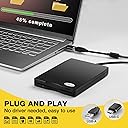
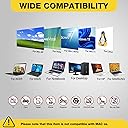
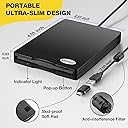
The RAAYOO USB Floppy Disk Reader is a compact, ultra-thin external drive that reads 3.5-inch 1.44 MB floppy disks via USB. Compatible with Windows 11 through XP, it requires no drivers and offers plug-and-play convenience, making it ideal for professionals seeking to recover or archive legacy data from vintage floppy disks.


| ASIN | B077HDT19H |
| Additional Features | Durable, Portable |
| Best Sellers Rank | #4 in Floppy & Tape Drives |
| Brand | RAAYOO |
| Color | Black |
| Compatible Devices | PC,Computer,Laptop,Desktop |
| Connectivity Technology | USB |
| Customer Reviews | 4.2 out of 5 stars 3,394 Reviews |
| Data Transfer Rate | 12 Megabits Per Second |
| Hardware Interface | USB 2.0 |
| Item Dimensions L x W x H | 5.51"L x 4.01"W x 0.63"H |
| Manufacturer | RAAYOO |
| Media Type | Floppy Disk |
| Mfr Part Number | 5829736952 |
| Model Number | RYD001-BK |
| Operating System | Windows 7 |
| Special Feature | Durable, Portable |
| UPC | 889269578365 |
| Warranty Description | 2 Year Warranty Period |
L**E
Floppy Disk Reader
This did exactly what I needed it to do. I found a very old floppy disk that I wanted to find out what was on it. Unfortunately, the error I ran into was the system on my computer I used was too new that it was not set up to read the file. The floppy disk reader was great otherwise. Easy to understand, felt like it was good quality, and was nice and compact so it did not take up too much space at all. It was an easy set up to plug into the computer and seems like it connected and set up just fine. Again, the computer I was using was the issue. For that reason, I unfortunately had to return the reader and I was not able to use it.
K**R
SUPERB! I can now use all of my old files!
As modern computers aren't set up to read 3.5 inch disks - it wasn't a surprise to soon find out that it took a couple of extra steps to get my Windows 11 computer to get this superb device to read one! So - the first time was slow. But it was well worth it! ~IF~ one reads the instructions thoroughly, and follows them, it works fine. And after using it a couple of times one soon gets to a point where it is faster and smoother to use! YES - as fully explained & expected - the files in the old file format on 3.5" disks WILL take quite a while to open. Be patient and you will be all set! I LOVE IT!!! I can now see & use the hundreds of files I saved years ago and really, really, didn't want to lose! Yippee ! ! !
M**K
It works well for the most part
It works pretty well but some of the pictures don't load? And if I take it out and put it back in, then some load that didn't load before and others don't load. I'm not sure if it's the age of the floppy disks or the unit itself, but it works fine on some of the pictures.
D**N
It holds a huge amount on each disk
Works great for holding more files so I can get it on my computer and not have to keep it in my files on board. One disk holds over 3 trillion byes per disk. Easier to have each subjects on its own disks. Worth it. I would buy. It again and from this buyer.
L**C
Replug to change diskettes!!
I got quick delivery of the RAAYOO USB 3.5-inch diskette drive, model D001-BK (they also list this as part number RY-D001). Everything seemed to work fine. I was able to fully copy a 1.4 Mb diskette about 20 years old!! Thank you!! I tried this on an older HP Win7 laptop. With large stacks of my older diskettes (and my older computers are mostly dead), it's a relief to read these diskettes even though I backed up most of them to CD-ROM's and large USB hard disks long ago. Here are some observations: > If you are experienced with diskette drives, there is one HUGE observation: REPLUG TO CHANGE DISKETTES Unplug and reconnect the USB cable if you change diskettes. The User Manual mentions this and someone else here made a similar comment. This is different than most of us remember diskettes where you just pop in a new diskette. WON'T WORK!! It's no biggie, just remember to replug the USB otherwise the folder listings will be wrong. > The driver software takes a while to fully load after you plug in the USB cable. Wait a minute or so until the spinning icon on the taskbar finishes twirling and it reports a successful load. You'll only need this delay ONCE per computer. When you plug in the drive again, it will come to life quickly since it should find the driver already installed. I did NOT try this on a Win 10 but I suspect no problems. Nor did I try this on older, low density 720 Kb 3.5-inch diskettes. They make a big point of NOT using a USB extension cable. The supplied USB cord is about 18 inches. > Make sure that your Explorer folder and file skills are good (copy, paste, sort, rename files, etc.). When everything was ready, there was a correct "Drive A:" indication in my Windows File Explorer. It was located on TOP of Drive C:, possibly because the File Explorer puts the drives in alphabetical order. If you already have an installed "drive A:", this USB drive will probably relocate to another drive letter but I could not try this. You use that Explorer "Drive A:" icon to do your copying instead of the taskbar icon. I suggest copying a whole diskette to a new folder on your computer. > I don't recommend running an executable program (.EXE, .MSI or .COM file extension) directly from the diskette drive. (Okay, you call them "apps"!!) Running a program would probably work but instead, copy the file(s) to your main disk first. Then run the program. As you probably know, some older EXE and COM programs will not run under new Windows. You can try them under the COMMAND prompt. Be aware that some programs WRITE files to the default drive as they run. > Similarly, some older format programs can be copied but may not work (such as WRI or ".WS" Wordstar files?). Or you may be able to load them and re-save to newer formats. You may have to play tricks in the file menu to emulate running under an older operating system. > I was able to copy (write) a file TO the diskette drive from my main disk. I did NOT attempt to FORMAT (initialize) a new blank diskette. Again, it would probably work but why do it?? I am guessing that this USB diskette drive does the correct things with the file layout (FAT, etc.). Remember to adjust the Write Protect gadget off if you wish to attempt writing. > As usual, make sure that your entire computer is always fully backed up. I didn't write the driver for this diskette drive so hopefully, it has no problems.
D**E
A bad product
This is a very bad product. Part of the problem is that it seems to work wonderfully when it comes right out of the box, then slowly becomes erratic and ultimately messes up one's system. We were were thrilled when our Raayoo first arrived. It allowed us to swap files back and forth between our upstairs and downstairs computers, which is what we'd been hoping for. Then, slowly, performance began to degrade. The first difficulty was that that when we tried to save a file we'd get "disk not formatted. Do you want to format disk now?" (If you say "yes," by the way, nothing happens.) We at first assumed that the problem was with our own disks, but this turned out to be wrong. We tried old-fashioned mini-disks, newer high density disks, newly-bought disks right out of the package, etc. No result. It gets worse. Thinking that this might just be a faulty unit that got past quality control, we ordered another from Amazon. The exact same thing happened: (1) terrific performance for about two weeks, then (2) "disk not formatted" messages, then (3) refusal to recognize the disk drive altogether. We didn't order a third, assuming that it, too, would be junk. In an attempt to figure out what was going on, we spent hours going to tech sites. What we found is that hundreds of people had our same experience: "disk needs to be formatted," "drive not recognized," etc etc. There were work-arounds, and we tried every one. For instance, one site mentioned that the Raayoo, plugged into a USB hub, might be getting too little power. The solution was to shift it from the hub to a direct USB port on the main computer unit. We did this, and it worked. Once. Then it was back to "disk needs to be formatted" and "drive not recognized," and the rest. So: back to where we started. The only good thing about all these dysfunctions was that we found that literally hundreds of people were having the same experience: "disk in drive needs formatting," etc etc. Also that most of them had tried the same workarounds -- unplug from hub, plug into direct port -- and had temporary success followed by permanent failure. We're writing this review solely to warn other customers not to be fooled because some reviews, based on initial experience, are positive. We too were thrilled when our portable drives came right out of the box. Then, as problems developed, we were relieved to find that there were workarounds that would let us keep on using the product. And finally, we were dismayed and disappointed to find that hundreds of people had had exactly our own experience. The takeaway: don't be fooled if your portable drive works wonderfully for a week or a month. Don't be fooled if going on the web lets you find some workarounds that temporarily seem to resolve the problem. Do be prepared to throw your portable drive on the junk pile after you've used it for a relatively short time. Until then, enjoy it: the idea is a good one. It's the technology that's flawed.
T**N
A blast from the past that works with modern PCs.
Worked like a champ from a powered external usb hub. Let's face it, floppy disk drives have not been included in computers for years. Usb thumb drives are much faster and easier to use. But if you have some old floppy discs that you were to lazy to convert to modern storage technology then this drive is perfect for you. I used this drive to reclaim a ton of clipart that I had stored on 1.44 mb floppy discs back in 1995 (Win 95 vintage). I thought that I had lost all that clipart to history. I decided to try to recover all that clipart but I no longer had any computer that could read a floppy disc. I have reclaimed almost all of that clipart for under $20 with this external floppy disc drive! It was plug and play on my new Windows 10 pro 64 bit computer. It had no problem reading all of my old floppy discs. The only problem I ran into was that some of the old files were incompatible with my modern version of drawing software. I saved hundreds of dollars worth of clipart. Granted, this will be a one off use. I don't expect floppy discs to make a comeback any time soon or ever again. If you have data on old floppy discs collecting dust in a closet somewhere then this is a solution for you to reclaim that old data.
E**O
Reasonable Reader of 3.5" Floppy Disks
Reasonable price for what it is - a READER. It does not save information onto floppy disks. It can recover some data if the disks are in reasonable shape and the file is readable.
J**N
A diskette player that works!
This diskette player/recorder really reads my old disks when other brand players (I had 2 before) didnโt work. I am so pleasantly surprised & so glad I paid a little bit more.
R**E
The drive works perfectly. Opening or running 30-40 year old files not so easy.
I used this drive to access 3.5 inch floppy disks that I'd archived from the 1980s and 1990s. The drive successfully connected to my Windows 10, 64bit desktop and and an old Win10/Win7 64bit dual-boot laptop. Driver installation and device configuration were plug'n play easy. The drive operated very well under Win10 and Win 7. While the instructions (which are very good) say not to use the drive with a USB hub, I found the drive worked well with my USB hubs. A few 3.5 inch disks that were corrupted due to age were unreadable. Most of my 3.5 in disks were readable. However, none of the executable files were able to run on 64bit Windows machines -- they need a 32 bit computer to open them. Data files were accessible if I had the software required to open them. Overall, the device works as expected. It's not the RAAYOO drives fault if you can't run or open files formated for operating systems or software that is no longer available.
S**R
Working good
Very useful and good working
P**S
Does what it says on the tin.....
Best thing ever! I recently discovered an old 3.5" disc that had my daughter's wedding photos on, but no device to play it on. Have now been able to copy them on to my desktop, then on to the Cloud. Thank you!
M**S
The USB Floppy Disk Reader Drive and older games don't always agree.
I'm pretty disappointed the three games didn't download onto it at all, that was my main reason for buying it. I really wanted to play the games and the floppy disks are there to play but unfortunately they don't always work. On the website it sounded really good so I thought it would work and I thought this is one of the last chances to play them.
Trustpilot
2 weeks ago
1 day ago