💾 Unlock your digital universe with WD’s powerhouse storage!
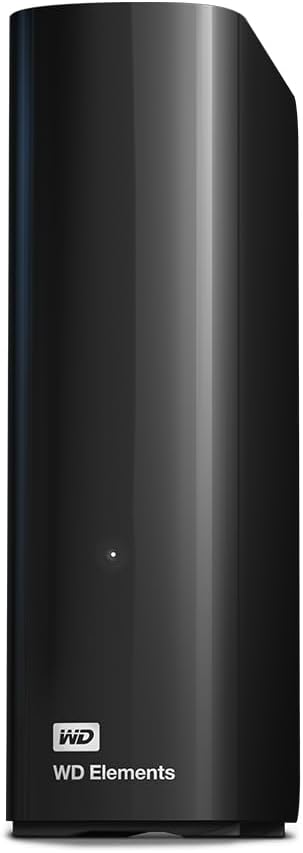
The WD 22TB Elements External Hard Drive offers massive desktop storage with a 3.5-inch mechanical HDD, USB 3.0 interface for fast data transfer, and a sleek black design. Ideal for professionals needing reliable, high-capacity backup and easy plug-and-play expansion.


| Brand | WD |
| Product Dimensions | 13.5 x 4.8 x 16.5 cm; 1 kg |
| Item model number | WDBWLG0220HBK-EESN |
| Manufacturer | Western Digital |
| Series | WDBWLG0220HBK-EESN |
| Colour | black |
| Form Factor | 3.5-inch |
| Hard Drive Size | 22 TB |
| Hard Disk Description | Mechanical Hard Disk |
| Hard Drive Interface | USB 3.0 |
| Hard Disk Rotational Speed | 5400 RPM |
| Hardware Platform | PC |
| Are Batteries Included | No |
| Item Weight | 1 kg |
| Guaranteed software updates until | unknown |
S**S
Big & Fast
It was less than 2 years ago that I purchased an 8Tb Seagate Backup hub Plus external drive - what I thought then was a "big" drive, but found I had filled that up all too soon. I use this drive to backup my NAS, which stores all my media, so as this slowly grew in size, I needed to get myself a higher capacity drive. Enter the Western Digital 14Tb Elements drive, which at £249 at the time of writing, represents pretty decent value considering I paid £179 for the aforementioned 8Tb Seagate model a couple of years back. Strangely, if I want to buy the equivalent drive as a bare unit i.e not housed in an external enclosure with all the additional electronics that entails, it would actually cost me over £300! Why a less expensive to produce version should cost more than one in an enclosure is beyond me. The WD unit is rather like a heavy book, in that one edge is curved, rather reminding me of the spine of a hard back. On this surface you will find the single power/activity LED, which is quite small. The drive has small rubber feet such that it stands in a vertical orientation - like a book in a book case. This is perhaps the best orientation for air flow given the vented top and rear edges. I personally don't really like drives standing up like this, it's too vulnerable to being knocked if its stood on a busy desk. Lying flat is OK, but I think my unit ran a little hotter like that. I don't know why WD do not provide an optional to fit stand with wider feet to provide better stability. Such a simple plastic stand would cost next to nothing to produce and would give customers the option to have a more secure base. That minor gripe aside, the drive itself is impressive in its performance. Unlike the Seagate which was an SMR type drive and thus termed an "archive" drive that suffered from slow write performance at just 38.7 Mb/sec sequential writes according to my Crystal Disk Mark test, the WD Elements 14Tb drive tested at an impressive 214Mb/sec read and write sequential transfer rate. For reference, the Seagate tested at around 118Mb/sec sequential read as I recall. As with these large capacity drives, the head seek action is quite heavy, far heavier than my internal 2Tb drives and will feel like the drive is suffering from a fit of the shakes when initializing after a power on. Not an issue, but worthy of note to those who may think they have received a faulty unit. The previously mentioned 8Tb Seagate had a heavy seek action too, but not as heavy as this monster from WD, I can only imagine it may have to do with the high platter count such high capacity hard drives have. These external drives actually appear to run warmer than internal drives, so it's advisable to situate the drive somewhere where it is not penned in by other items. The drive performed flawlessly when I backed up my entire NAS to it over my horribly slow USB 2 connection on the NAS (only one I have) and took some 81.5 hours to complete the transfer of some 7.3Tb of data. So, it is certainly able to operate continuously for that length of time without issue. Of course, had I backed up via a USB 3 connection, then the transfer would've been far faster. I suggest that purchasers of this drive, as with all Western Digital drives, register them on the WD website in order to ensure the full warranty cover. The drive comes complete with the required power and USB cables of generous lengths. The drive has no power switch as such, so once connected to power and an active USB port, will power up. This drive seems to be smart enough to power down/enter standby if the connected computer is shut down or goes to sleep. Connected to a Windows 10 PC, the drive reports 12.7Tb available. Of course, 12.7Tb is what I call "proper" Terra bytes despite hard drive manufacturers deeming a Tb to be an even 1,000Gb where as I, being old school, see a Tb as 1,024Gb hence the 12.7Tb shown in Windows. That's fine, not a WD thing as all manufacturers go with this system of measurement. The drive's default volume label is "Elements", but of course you can change this if you so wish. Nothing required to do if using with a Windows based computer, so you can immediately start copying files to it once connected as the drive is pre formatted using NTFS. Mac users will either need to reformat or use a utility to permit use of NTFS file systems. No backup software is supplied with this drive, unlike the My Book series from WD. however, this is a bonus as I generally prefer not to use the software provided by the manufacturer for this purpose anyway. A quick note to those less computer savvy; There are numerous free backup programs for Windows you can use if you need backup software. This Western Digital 14Tb Elements is an impressive drive at an impressive price.
K**N
Incredibly reliable hard drive and fantastic price
Western Digital make great quality external hard drives and I have never had any issues with any of them...so far! touch wood I would always recommend getting a smaller size hard drive (4tb max size) if possible as they can fail and losing so much data (6tb+) can be difficult to take. I've also read that larger size hard drives are more likely to fail but cannot confirm this. These devices are incredibly easy to setup and use. Just plug in the USB cable and you're away. Note: I would highly recommend using a 3.0 usb slot when transferring large files. USB 3.0 does downgrade to USB 2.0 slots but the speeds are so much slower. If you dont have a usb 3.0 lot then use the 2.0 slot but if your desktop pc has multiple drives then make sure you use the faster 3.0 slot. As mentioned before, I can't fault these drives so far. My only concern is the varying write speeds. A few of the hard drives I have purchased seem to have much faster write speeds than others despite being the same model. I do not know why this is but others have mentioned possible cost cutting and use of slower drives/materials. It can be frustrating but isn't too bad on the whole, it just means waiting a few minutes more. Lastly, PLEASE DO NOT leave your hard drive on all the time! The heat generated will impact the drive and can lead to problems. These drives shouldn't be left unused for a long time but should NOT be used constantly as a seperate drive. They are for storage/backup of larger files to decrease file space on your pc/laptop. If you feel like the hard drive is getting hot or been on for a long time, then please safely eject the device and allow it to cool down. Overall I'm very happy with my purchase. Delivery was very fast and Amazon were much cheaper than any where else. I will definitely be buying another one in the future and hope Western Digital continue making high quality but affordable products like this.
F**K
A little noisey, a tad slow but plenty of space and opportunity!
The 18TB drive is absolutely fantastically priced for its size! The drive is a little noisey as it awakens from its slumber, it’s also a relatively slow drive and doesn’t try to hide that. However it’s space and value far exceed the perceived downsides of the speed and noise of the drive as you won’t be using this daily of you are using it in its USB form factor. However when you crack it open, that’s when this drive really comes alive. Inside the slow plastic USB shell lies a 7200rpm WDC WD180EDGZ which when connected directly to an array or PC is silent and really rather impressive performance. If used as a USB drive Its sheer size alone will allow you and the entire family to back up all of your important data such as photos, videos documents safely in one east to access place. If you are cracking this open and putting inside a sinology, raid array or simply a PC the 7200rpm WDC WD180EDGZ really does hold its own against smaller drives, theoretically faster drives. Overall this is a reliable, great value drive that is designed for backup and storage (not for high speed gaming or searching) and If you understand that going in you won’t be disappointed! These are also the same drives that the extremely handsome “Richard” form Digital Foundry purchased and recommended during the Black Friday sales (2021) and we all know that recommendations don’t come much higher or more prestigious than that. A fantastic purchase!
D**N
A good quality and competitively priced external hard drive
A competitively priced external hard drive that's ideal for backing up one's data and photos.
G**Y
Excellent price for a reliable, quality product. Very happy customer here.
D**E
At this price how can you not get it. Wish I had had bought a couple of them because you do not see them at this price. HDD is fast (same as other USB 3.0 external HDD's). If you see it for the AU$274 price again, jump on it. Usually goes for over AU$400 elsewhere. Again, wish I'd bought a couple of them.
O**D
منتج ممتاز وجودة وسعر بطل
H**Z
Der WD Elements Desktop mit einer Kapazität von 20 TB ist eine ideale Lösung für alle, die große Mengen an Daten sicher und effizient speichern möchten. Als Ergänzung zu meiner bestehenden Speicherstrategie habe ich das Produkt für gelegentliche Datensicherungen speziell in Verbindung mit meiner Synology DS1621+ NAS gekauft. Funktionen und Vorteile Der Platte ist einfach in der Installation und Nutzung. Nach dem Anschließen mit dem mitgelieferten USB-Kabel kann sofort mit der Datensicherung begonnen werden – ohne zusätzliche Software oder komplizierte Einrichtungsschritte. Dank USB 3.0 ist die Übertragungsrate gut: Große Dateien werden mit bis zu 250 MB/s kopiert, wodurch Backups äußerst schnell erledigt werden können. Die Verarbeitung des Geräts ist insgesamt solide. Es wirkt robust und zuverlässig. Die Platte arbeitet relativ leise, was sie für den Büro- oder Heimgebrauch angenehm macht. Besonders praktisch finde ich die Kompatibilität mit meiner Synology DS1621+, wodurch die Platte bestens für gelegentliche Backups geeignet ist. + Einfache Installation und sofortige Nutzung. + Schnelle Datenübertragung dank USB 3.0. + Robuste Verarbeitung und relativ leiser Betrieb. + Kompatibilität mit Synology NAS für Backups. + Große Speicherkapazität für verschiedenste Anforderungen. Nachteile Trotz meiner positiven Erfahrungen gibt es eine kleinere Schwäche, die erwähnt werden sollte. Das Gerät erzeugt leichte Vibrationen, was dazu führt, dass ein leichtes Brummen hörbar ist – insbesondere bei empfindlichen Ohren könnte dies störend sein. Fazit Zusammenfassend ist der WD Elements Desktop 20 TB eine zuverlässige und schnelle externe Festplatte. Die Vorteile überwiegen für mich deutlich, hauptsächlich die einfache Handhabung, die Geschwindigkeit bei Übertragungen und die solide Verarbeitung. Sie eignet sich besonders für gelegentliche Datensicherungen und große Dateiübertragungen. Von mir gibt es daher eine klare Kaufempfehlung. Vor dem Kauf unbedingt der Preisverlauf beachten, da es verschiedene Angebote gibt, bei denen sich ein Kauf besonders lohnt.
D**R
El que me ha llegado en Mayo de 2022 lleva dentro un disco WD80EMZZ (CMR) de 128MB de caché de 5640 rpm. El disco funciona fresco y rápido. Parece ser una variante de los HGST por lo que he leído por ahí. No tengo queja, no sé como irá por USB porque yo lo he extraído (cuando comprobé que funcionaba bien) para usarlo directamente por SATA. No me gustan los cable micro usb 3.0, me parecen muy endebles. Imagino que en la carcasa de plástico y poco ventilado se calentará bastante si se le hace trabajar en serio, quiero decir copiar seguidos varios TB de datos. Donde lo tengo instalado lleva horas escribiendo datos y no pasa de 36ºC. Información SMART correcta. Todo bien. Buen shuck de 8TB por 159€. Actualizo: He comprado también el de 10TB (JUL-2022-199€). Lleva un WD101EDBZ, de 7200RPM, CMR, y se calienta bastante dentro de la caja de plástico, unos 30 grados por encima de la temperatura ambiente y en idle. Es una barbaridad pero también lo esperaba, estos discos es mejor ponerlos en una carcasa o un NAS con ventilación. He comprobado que el disco esta bien y va rápido, en cuanto se enfríe lo saco de su prisión para ponerlo en el NAS que estará mas fresquito. He comprado también uno de 14TB, y lleva dentro una unidad NAS de 7200rpm, relleno de Helio modelo HGST WD140EDGZ, bastante rápido y silencioso, una joya, tengo que decirlo, el disco más rápido y silencioso que he tenido nunca. Lo mismo se aplica al de 16TB que lleva un WD160EDGZ y que compré en los prime days de OCT-2022 por 272.99€, un chollazo. Tengo que añadir que la versión de 16TB es un poco ruidosa al arrancar, el sistema de autocalibración de los brazos hace un sonido grave bastante audible, no es desagradable ni estridente y solo lo hace al arrancar. Aún así es un poco más sonoro en funcionamiento que el de 14TB, acercándose a los de 8TB. Actualizo: Hay una característica de los discos de gran capacidad llamada PWL (Preventive wear leveling) que últimamente se implanta en todos los discos de calidad y por todos los fabricantes que ocasiona un movimiento de las cabezas de lectura cada 5 segundos aproximadamente cuando el disco está inactivo, para evitar que el desgaste de las pistas al mantener el cabezal en la misma posicion, y para mantener el lubricante de los ejes homogeneo. Al llevar los cabezales a una posición aleatoria lejana cada 5 segundos se produce una vibración mas o menos sonora según el anclaje del disco al chasis. Esto es una característica de los discos modernos y no debe ser equivocada con los clicks de la muerte chirriantes, largos y que se producen incluso durante momentos activos del disco. Este sonido es normal, periodico, grave, e indica el funcionamiento normal del disco evitando el desgaste no uniforme. No creais que comprando otra marca vais a estar a salvo de ese ruidito PWL, todos los fabricantes de discos lo implementan actualmente en discos gordos dado que incrementa la duración y fiabilidad del disco, aún a costa de hacer un pelín de ruido. Casi me vuelvo loco investigando esto hasta que encontré una explicación razonable. Quería ahorraros el trabajo si lo habéis observado y os preocupa, así que tranquilos, es así por diseño, y tiene su explicación. Añado (13-02-2023): Después de haber usado a conciencia 24/7 los discos de 8/10/14/16TB Me quedo sin duda con los de 14TB. Rápidos, silenciosos, espaciosos y con buena calidad/precio. Estos discos de helio de 14TB son los mejores que he tenido nunca. Seguiré comprando el modelo de 14TB para rellenar los NAS mientras los necesite y se puedan encontrar, que se va poniendo dificil...
Trustpilot
2 months ago
1 week ago