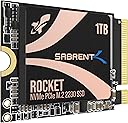
![SABRENT Rocket 2230 NVMe 4.0 1TB High Performance PCIe 4.0 M.2 2230 SSD [SB-2130-1TB]](https://m.media-amazon.com/images/I/71BVLQNOlmL._AC_SL3840_.jpg)
Buy anything from 5,000+ international stores. One checkout price. No surprise fees. Join 2M+ shoppers on Desertcart.
Desertcart purchases this item on your behalf and handles shipping, customs, and support to Indonesia.
🚀 Small Drive, Giant Leap in Speed & Storage
The SABRENT Rocket 2230 NVMe 4.0 1TB SSD delivers cutting-edge PCIe Gen4 performance in an ultra-compact M.2 2230 form factor. With blazing speeds up to 5GBps and 800K IOPS, it’s perfect for upgrading space-constrained devices like the Steam Deck or Microsoft Surface. Its efficient DRAM-less design with HMB support ensures cool operation, while the generous 1TB capacity lets you store large game libraries or media collections. Backed by a full retail warranty and free cloning software, this SSD combines reliability with next-gen speed for professionals and gamers alike.


| Customer reviews | 4.7 4.7 out of 5 stars (4,357) |
O**R
Thanks Amazon.
Its nice easy to install, easy to manage, really I love it. Thanks Amazon
A**H
What i received was used and wasn't 1 TB
👎
L**S
Buena pero usar con cuidado
Yo le cambiĂ© la memoria que tenĂa la Steam deck y puse esa, y admito que funciona excelente como se esperarĂa. Sin embargo aquellos que no son muy experimentados en armar y/o desarmar aparatos y no están muy familiarizados, usar con mucha precacucion. En mi caso desgarrĂ© la lámina de aluminio (o no se que sea) que cubre la memoria de la Steam deck y, aunque sĂ© perfectamente que fue culpa mĂa, no quita el hecho de que esta memoria no sea tan fácil como otras porque tiene un pequeño relieve que hace que estĂ© más ancha. Eso no quita que la memoria merezca sus 5 estrellas porque el error fue mĂo por no investigar o hacer las cosas mejor y por eso comparto mi exp para que tengan cuidado y no les pase lo mismo a ustedes
P**G
Works great with Zitay CFExpress adapter
Bought to use with the Zitay CFExpress adapter, for use in my Canon R5C. Works great and is super fast to offload. Get the 1TB if this is your application as the 2TB uses quad level memory which has lower sustained write speeds. Recommended!
M**0
Très correct
J’ai acheté ce SSD pour booster les performances de mon ordinateur portable, qui dispose d’un emplacement M.2 2230. Le SSD est compatible avec la norme PCIe 4.0, ce qui lui permet d’atteindre des vitesses de lecture et d’écriture impressionnantes. Le SSD a une capacité de 1 To, ce qui est rare pour un SSD de cette taille. Il me permet de stocker tous mes fichiers, mes jeux et mes applications sans problème. Le SSD est de qualité et facile à installer, il suffit de le glisser dans l’emplacement M.2 et de le visser. Le SSD a un design sobre et compact, il ne chauffe pas trop et ne fait pas de bruit. Je suis très satisfait de ce SSD, il a transformé mon ordinateur portable en une bête de course. Je le recommande à tous ceux qui cherchent un SSD M.2 2230 performant et abordable.
B**B
Great upgrade for the Surface Pro 8
I had read a lot of horror stories about upgrading the M.2 NVMe drive on the Surface Pro 8 (SP8). There were a lot of stories about overheating and BSOD when trying to re-install Windows. When I saw this Sabrent drive advertised on Amazon it specifically said Surface Pro compatible and that it ran cool, so I took a chance on it. I am very pleased with the result. I'll do the TL;DR part up front: I upgraded my 256GB M.2 Drive on my Surface Pro 8 with the 1 TB Sabrent Rocket 2230 NVMe M.2 drive, and the drive runs great at PCIe 4.0 Speeds according to CrystalMark 8. No BSOD and runs under 50 Celsius *EDIT*: Under maximum load, about 35 degrees celcius degrees idle/normal operations *END EDIT* according to CrystalDiskInfo 8. I was able to copy all of my files using Acronis partitioning software you get to use free from Sabrent when you purchase their drive. If you want to know exactly how I copied everything over without ever having to go into the BIOS, keep reading: UPFRONT DISCLAIMER: You will need to purchase three things to do this upgrade if you don't have them already. Two of them you would need anyway if you were to upgrade like Microsoft suggests: #4 Torx screwdriver/bit, thermal compound, and an external NVMe drive enclosure. 1) First I did purchase an external NVMe enclosure to copy the old drive to the new one. You can find them on Amazon for under $30 US. You need to make sure the enclosure can take 2230 size drives. I got one that had USB C to USB C cable and was thunderbolt compatible. Another consideration is that after you swap the NVMe drives you can use the enclosure with your old drive and have another high speed hard drive to back stuff up on, although I found you will need an NVMe thermal pad/heatsink for the old drive or it can overheat. 2) After reading about BSOD NVMe upgrade horror stories on the SP8 it lead me to articles talking about AHCI Link Power Management - HIPM/DIPM. HIPM/DIPM power management is not on by default and you actually have to do a Windows registry edit to make it available. There are some good guides on how to do this via a quick google search. I recommend you enable it and turn the feature on. 3) I had to disable drive encryption before copying files over (it is on by default). You can either disable encryption or get a USB encryption key. I chose to decrypt the drive which will take hours depending on how much data you have on the drive. You can re-encrypt once everything is over to the new drive. THIS NEXT PART IS WHERE MOVING FILES OVER AND GETTING WINDOWS SETEP ON THE NEW DRIVE DIFFERS FROM WHAT MICROSOFT WANTS YOU TO DO. 4) I cannot stress enough the kudos to Sabrent for having their own disk partition software. Acronis, which you can get from Sabrent's website, will copy all of your files over for you verbatim; no reinstalling necessary. Follow the disk cloning prompts, and the best part is it will automatically increase the size of your main windows drive to maximum while keeping your boot partition and recovery partition intact (just make sure you chose the correct cloning prompt). Acronis alone makes it worth it to go with Sabrent. 5) The SP8 comes with a front and back metal sleave for the NVMe drive. YOU WILL NEED a #4 Torx screwdriver bit (very tiny!) to unscrew the drive and screw it back in. The metal casing snaps off (do so gently so as not to bend the casing). I cleaned off the thermal compound the old drive had, put in the Sabrent drive, re-applied some CPU thermal compound I already had, and put the casing back together, then screwed it back into the SP8. A lot of videos show using a thermal pad instead of re-using the Microsoft drive enclosure. I think the drive enclosure helps distribute heat evenly back into the SP8 chassis. I turned the SP8 on and it recognized me with all of my files intact without ever having to go into the BIOS the first time. I have been running normally for almost two weeks and not a single issue. Drive runs cool and fast. Works great and couldn't be happier. I hope this helps you out if you are on the fence!
K**N
Leistungsstarker Turboantrieb fĂĽr das Steam Deck: SABRENT Rocket 2230 NVMe SSD M.2 im Review
Die SABRENT Rocket 2230 NVMe SSD M.2 hat sich als wahrer Game-Changer für mein Steam Deck erwiesen, und ich bin begeistert von ihrer herausragenden Performance und Zuverlässigkeit. Performance: Die Geschwindigkeit dieser SSD ist schlichtweg beeindruckend. Mit Lesegeschwindigkeiten von bis zu 3400 MB/s und Schreibgeschwindigkeiten von bis zu 3000 MB/s sorgt sie für blitzschnelle Ladezeiten und ein flüssiges Spielerlebnis. Spiele starten im Handumdrehen, und auch anspruchsvolle Anwendungen laufen äußerst reaktionsschnell. Die NVMe-Technologie zeigt hier ihr volles Potenzial und macht Gaming auf dem Steam Deck zu einem wahren Vergnügen. Kapazität und Speicherplatz: Mit verschiedenen Kapazitätsvarianten ist die SABRENT Rocket 2230 NVMe SSD M.2 flexibel und bietet ausreichend Speicherplatz für eine umfangreiche Spielebibliothek. Das Steam Deck verfügt ohnehin über begrenzten internen Speicher, und diese SSD schafft Abhilfe, indem sie genügend Platz für Spiele, Anwendungen und sogar Multimedia-Inhalte bietet. Installation im Steam Deck: Die Installation war denkbar einfach. Die kompakte Bauweise der SABRENT Rocket 2230 passt perfekt ins Steam Deck, und das PCIe M.2 Format gewährleistet eine problemlose Integration. Nach dem Einbau konnte ich sofort von den verbesserten Ladezeiten und der generell gesteigerten Leistung profitieren. Die SSD passt sich nahtlos in das Gesamtdesign des Steam Decks ein und macht es zu einem noch leistungsstärkeren Handheld-Gaming-System. Fazit: Die SABRENT Rocket 2230 NVMe SSD M.2 ist ein absoluter Gewinn für jeden, der das Maximum aus seinem Steam Deck herausholen möchte. Mit beeindruckender Performance und einer unkomplizierten Installation bietet sie einen erheblichen Mehrwert. Ob für schnelle Ladezeiten, flüssiges Gameplay oder einfach nur mehr Speicherplatz – diese SSD erfüllt alle Erwartungen. Ich kann sie uneingeschränkt empfehlen und bin dankbar, dass sie mein Gaming-Erlebnis auf dem Steam Deck auf ein neues Level gehoben hat.
Trustpilot
3 weeks ago
1 week ago