Buy anything from 5,000+ international stores. One checkout price. No surprise fees. Join 2M+ shoppers on Desertcart.
Desertcart purchases this item on your behalf and handles shipping, customs, and support to Indonesia.
โจ๏ธ Elevate your desk game with compact power and seamless connectivity!
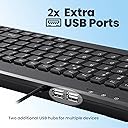
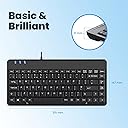
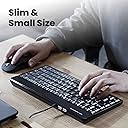
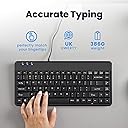
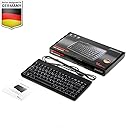
The Perixx PERIBOARD-409H is a sleek, compact UK QWERTY keyboard featuring a durable ABS build and tactile membrane keys rated for 10 million keystrokes. It includes 2 built-in USB 2.0 hubs for enhanced workspace flexibility and offers plug-and-play ease with Windows 7, 8, and 10 compatibility. Designed for professionals seeking a reliable, space-saving keyboard with extended connectivity, it comes with a 24-month limited warranty.


| ASIN | B008HE7V6M |
| Antenna Location | Business, Education, Everyday Use, Personal |
| Best Sellers Rank | 4,608 in Computers & Accessories ( See Top 100 in Computers & Accessories ) 61 in Keyboards (Computers & Accessories) |
| Box Contents | USB Cable |
| Brand | perixx |
| Brand Name | perixx |
| Button Quantity | 88 |
| Colour | USB with 2 Hubs |
| Compatible Devices | Laptop, PC |
| Compatible Operating System Family | Windows |
| Compatible devices | Laptop, PC |
| Connectivity Technology | USB |
| Connectivity technology | USB |
| Country of Origin | China |
| Customer Reviews | 4.4 out of 5 stars 437 Reviews |
| Enclosure Material | Acrylonitrile Butadiene Styrene |
| Global Trade Identification Number | 04049571140933 |
| Hand Orientation | Ambidextrous |
| Item Dimensions L x W x H | 31.5L x 14.7W x 2.1H centimetres |
| Item Weight | 0.41 Kilograms |
| Keyboard Description | Multi Functional |
| Keyboard Layout | QWERTY |
| Keyboard description | Multi Functional |
| Manufacturer | Perixx |
| Manufacturer Part Number | PB-409HUK-10839 |
| Model Name | PB-409HUK-10839 |
| Model Number | 10839 |
| Number of Keys | 88 |
| Number of Sections | 1 |
| Power Source | Corded Electric |
| Product Features | 2 USB Hubs |
| Product Warranty | 24-Month Seller Limited Warranty |
| Recommended uses for product | Business, Education, Everyday Use, Personal |
| Series Number | 10839 |
| Special feature | 2 USB Hubs |
| Style Name | Contemporary |
| Switch Type | Tactile |
| Theme | Office |
| Total USB 2.0 Ports | 2 |
| Unit Count | 1.0 count |
| Water Resistance Level | Not Water Resistant |
A**D
Exactly what you pay for
Iโm giving this 5 stars because it did exactly what I needed it to do, and the price was very reasonable. The compact size was perfect for my setup, and despite being small, itโs comfortable to type on. It didnt give me the WOW factor but I cant think of anything to mark it down. Itโs simple, effective, and worked straight out of the box without any issues. For the price, I couldnโt ask for moreโitโs a no-frills keyboard that gets the job done perfectly. If youโre looking for something reliable and budget-friendly, this is a great option!
D**E
Lovely keyboard
I am very happy with this compact wired keyboard. It works on my laptop and on my android 12 tablet as well. No need to instull a software, just plug and play. I had to purchase Type C to USB adaptor in order to use the keyboard with my android tablet. And it works perfectly, no issues with typing at all. Overall, I am happy with this product.
P**N
No-frills compact keyboard
This is a fairly solid keyboard for the price if it's what you're looking for. I got the wired USB model that has two female USB ports. The typing experience is nothing that'll blow you away, but the majority of keys are normal size. It sounds more rubbery than clickity clackity (in comparison to another non-mechanical keyboard) which is personal preference whether that's a good thing or not. The keys must be fully depressed before the keystroke is registered. They have travel typical of a desktop keyboard. The indicators for numlock, caps lock and scroll lock are unpleasant bright blue LEDs, though fortunately don't shine directly in your eyes unless you're hunched right over the keyboard. If it annoys you, it could be tamed with some electrical tape. Most of the time you can have the locks disabled anyway. There is a function key, but it doesn't do a lot and its features aren't documented anywhere. Fn+Insert toggles numlock. Fn+; right-clicks, just as your mouse would. When numlock is active, Fn+U/I/O/J/K/L produce the numbers 4/5/6/7/8/9. These don't register as numpad keys, so this isn't a solution if you want to use mouse keys or any software that treats the numpad separately from other numerical keys. The top portion and edges of the keyboard is glossy, which show finger oiliness very easily. The keyboard is slightly raised, but really only slightly. If you find it more comfortable, you may wish to prop the back up with CD cases or something - it doesn't have extended feet that can be flipped out. Despite the product photos suggesting otherwise, what I received is the proper UK layout with a full-size Enter key. You can see this for yourself in other reviwers' photos. All other elements look the same as the product photos. Like with every keyboard I've ever used, yes, it works on Linux, even if the booklet only lists it as compatible with Windows XP and newer. It doesn't come with any drivers or software. The two female USB ports are useful for plugging certain things into, though are unsuitable for very heavy loads at all, with a 150mA load being enough to drop the output to 4.75V, which is the lower end of the 5V ยฑ5% range devices are typically designed to cope with. It's possible the USB-C model's cable has less voltage drop, but I'm not going to buy one to find out. Being USB 2.0, you may not want to, say, plug a really fast flash drive in there either. I'm able to put the ports to use with a USB microphone and mouse - these sorts of low loads seem to be ideal. I'll continue using this keyboard when a numberpad isn't required, which is most of the time in my case. I enjoy requiring less space for the keyboard and mouse, with the right 15cm or so of the keyboard missing, and using its ports to replace my USB extension cables has helped tidy up. I've only just started using this keyboard today, and I'll update this review if it breaks or an unexpected amount of wear occurs.
A**Y
Nice small keyboard
Used for a few months now with no problems. Needed a small keyboard for servicing a piece of kit in the field, small enough to kit in my tool box, so doesnโt get damaged unlike a fullsize one. Usb ports on back are very handy as I donโt have carry an extra hub to use usb drives, good bit of kit.
F**S
Ideal Keyboard Fro Use With The A500 Mini...
Ideal keyboard for use with the A500 Mini and the two extra USB ports which it has give you more options for adding extras to the console. Highly Recommended... ๐
T**E
PERFECTION IN A SMALL PACKAGE
Perfect no frills neat keyboard. Everything most people would need including full size keys. The only comment I would make is that transitioning back from a massive ergonomic keyboard took a little while, but I have no regrets. To answer some questions : No mechanical keyboard is silent but this one very quiet and has a very nice touch. It doesn't tilt but I find that a couple of large pencil rubbers under the back coupled with the built in front feet give excellent stability.
J**G
Weird position of Enter and Back Space
Good keyboard overall but annoying layout of back space and enter keys. You can see it in the pictures and maybe just me but I don't need home and page up buttons there.
H**D
Not a bad keyboard, just no power functions and not recognised in BIOS
I've been trying to get a replacement for a USB mini keyboard for ages, since my original's right ctrl key packed up. Why is this relevant? Because this keyboard was all I could find that was similar: the 'Del/Home/PgUp/PgDn/End/-> column on the right side, small form factor, Fn key. It's got lots of sniny black bits and the keys are excellent, better than the old one. And the USB ports work fine. BUT No power button; not recognised on bootup; Fn+F1 (which did standby on the old KB) does nothing and can't be remapped; oh and the 'Num Lock' key is labelled 'Pause Break'. The lack of a Windows logo is a bit fishy too, not that I mind, it's just fishy. So altogether, it's not 100% satisfactory. If these things matter to you, be advised. The lack of a power function and non-BIOS is quite a biggie, actually. So once WinXP (yes, XP) had run through 5 or 6 install approval dialogs, presumably for the USB slots, I tried to enable Hibernate, to see if that made a difference to the power settings, because you see, there aren't any on this KB. This meant that (1) my triple-monitor display was messed up (2) Windows remapped all my USB drives and (3) I had to completely reinstall from a Macrium image. All for a keyboard. At least it was only ยฃ20. And the very next day, the one I'd been trying to replace for a year turned up on eebeeay. For ยฃ6. Ain't that the way?
M**M
Small , good typing. 2 usb ports.
Nice typing on it. 2 USB ports also on the keyboard. Very handy.
Trustpilot
5 days ago
3 weeks ago