We remain fully operational. Our teams are working around the clock to ensure your deliveries continue safely.

DOWNLOAD THE APP


Customer Services
Copyright © 2025 Desertcart Holdings Limited
DOWNLOAD THE APP


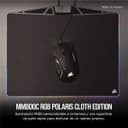
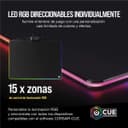
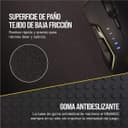
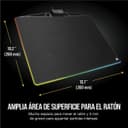

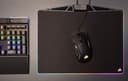
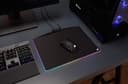

🌟 Light up your workflow with precision and style!
The Corsair MM800C RGB Polaris is a premium cloth surface mousepad featuring 15-zone customizable RGB lighting with true PWM technology for vivid color accuracy. Its low-friction textile-weave surface ensures smooth, precise mouse control, while the built-in USB 2.0 pass-through port adds convenience by reducing desk clutter. Sized at 400 x 340 x 35 mm, it offers ample space and a durable, warp-resistant design ideal for professional and gaming setups alike.


| ASIN | B0759L45CG |
| Are Batteries Included | No |
| Best Sellers Rank | 103,553 in Computers & Accessories ( See Top 100 in Computers & Accessories ) 2,343 in Mouse Pads 3,124 in PC Accessories |
| Brand | Corsair |
| Colour | Einfarbig |
| Customer Reviews | 4.7 4.7 out of 5 stars (2,412) |
| Date First Available | 9 Sept. 2017 |
| Guaranteed software updates until | unknown |
| Item Weight | 560 g |
| Item model number | CH-9440021-EU |
| Manufacturer | Corsair |
| Number of USB 2.0 Ports | 1 |
| Product Dimensions | 40 x 34 x 3.5 cm; 560 g |
| Voltage | 1.5 Volts |
G**E
Fast glide, bold lights—this Corsair mousepad delivers smooth control with premium desk presence.
Low-friction surface glides like butter—perfect for fast mouse movement without skipping. The RGB lighting’s sharp and customisable across 15 zones, so it syncs well with other Corsair gear. USB pass-through’s a proper bonus—keeps the desk tidy and saves a port. Build’s solid, doesn’t warp or slide, and the size gives plenty of room without crowding the setup. Been using it daily and it still looks fresh. If you want performance with a bit of flair, this pad nails it.
P**B
RGB everything - great looking mouse pad to complete your "battlestation"
A well built and great looking mousepad for all your RGB cravings. On a serious note, the mousepad looks great. It comes in the usual Black and Yellow corsair gaming brand box with most of the mousepad covered with plastic film. Pop it into a system using the 2m braided cable terminating in a USB connection into a PC with CUE / iCUE and away you go. There are plenty of lighting options as expected and with Corsair CUE you can set up plenty of varying options. This works even better in tandum with other corsair peripherals as the lighting can be harmonized with said peripherals. In addition to the lighting strip around the edge, you get the USB 2.0 port located near the top which also houses the cable for the pad. The port works fine for most items I have tried it with and have no issue using Corsair DARK CORE RGB with the receiver working fine. Frustratingly, a slight downside to this port / cable location is its right in the center, so for some it may be an issue as generally your mouse cable will be around that area. In terms of the surface itself, for me with the mouse's I have used it with (Corsair Dark Core, Corsair's Schimitar and Logitk's G602s) I had no real issues with tracking. The surface may take some time for some people to get used to who may have lived with a soft cloth mouse pad, but having come from the In win batmat which is made of an even harder surface, this feels smooth for me. Is it expensive, yes. Is it worth the money, not really, but lets be honest, your adding this to add some finishing touch's to your "battle station". My only quirk with it is as mentioned in regards to the central location of that hub, off to one side as Corsair's newer MM1000 does makes more sense.
P**E
Amazing mouse pad, perfect for gaming or just general use.
Amazing mouse pad, perfect for gaming or just general use as it's surface is not very slippery or very hard, it's the best combination of them two, it lets the mouse slide very easily allowing for very accurate gaming or for fast browsing or content creation and it has the best RGB lighting I have ever seen. The LED strip has 15 different zones which can be customised individually and can be synchronised with any other Corsair peripheral. The USB port at the back of the mouse pad is a nice addition and it does help not waste a USB port on your motherboard which would be used for the mouse pad's LEDs anyway. If plugged in a USB 3 heather on the back of the motherboard it will work with no problems with any device, but if used in a USB 2 heather than the lights may be affected a bit which will be seen in a how fluid the colors change and the whatever is plugged into the USB may be having delays or even not be recognised from time to time, therefore it is recommended if used with a USB 2.0 not 3.0 to connect devices like webcams or things that are not used regularly and do not need much accuracy, compared to a controller for example. Overall great product, definitely worth the money if interested in RGB lights, but the mouse pad it's self it is not worth the money if the RGB lights are not your interest as there are many other simple mouse pads at a much cheaper price.
A**R
Great, colourful hard mousepad
Is it slightly ridiculous and unnessecary? Yes. Does it look cool? Also yes. I've always used cloth mousepads, so a hard mousepad felt a little weird at first but I much prefer it. It's not too loud when you move your mouse across. The USB connection for your mouse on the mousepad is also useful, especially as I use wired mouse. I haven't run across any issues of the wire getting stuck on the little part of the mousepad that juts upwards at the top, but that could be because I use my mousepad at an angle, so the wire doesn't get close. The mousepad has a little bit of flex to it, but still feels sturdy. The iCUE software is very easy to use and there is grips on the bottom of the mousepad to stop it from leaving. I really like it, and if you'd like to pay a little extra for some fancy coloured lights around the mousepad, this is a pretty good option.
G**E
Read this if you use a corded mouse...
If you use a wired mouse with your computer (like many gamers do) then you might run into an issue with this mouse pad. The pad has a chunky black control box smack dab in the middle of its topmost edge. This acts as a direct obstacle for your mouse cable which might be annoying if, like me, you have a particularly sensitive grip on the mouse. Corsair should have either placed the control unit at one of the corners of the pad or, perhaps even better, should have built in a cable channel straight through the middle of the unit so the mouse cord could be cable-managed. Aside from that the hardware is good. Sturdy, well-made and nice looking LEDs. Corsair's software (iCUE) is unfortuntaely a different story. It's a travesty and very difficult to use compared to other gaming peripheral brands. This might improve with time but if you plan on creating custom effects you'll really need to dedicate some time to learning its ins and outs.
G**N
Dentro de las alfombrillas con LED no hay muchas opciones. Estuve viendo varios modelos, Razer, NewSkill, y otras marcas menos conocidas. Buscaba una para ratón, no de las grandes para ratón y teclado. Al final, tras ver varios análisis y comparativas, me decanté por la Corsair Polaris MM800. También porque pensaba comprar un teclado Corsair K95 RGB PLATINUM, y así se pueden sincronizar las luces de ambos dispositivos. El envío con amazon fue puntual. Como es costumbre en los productos de Corsair, el embalaje es de mucha calidad, y atractivo a la vista. La alfombrilla viene muy bien protegida. Mide 350 x 260 x 5 mm. Tiene un puerto USB secundario, ideal para, por ejemplo, conectar el ratón. A diferencia del teclado K95, la Polaris solo usa un USB de nuestro PC. Es elegante a la vista, y, en el caso de la versión "dura", ofrece muy buen control con el ratón, tanto óptico como láser. La he probado con un Ozone radon 5K, y con mi ratón actual, un Roccat Kone Aimo, y va perfecta, si bien es ligeramente rugosa al tacto. La iluminación RGB es excelente. La tira que se ilumina sobresale un poco hacia afuera respecto de la alfombrilla en si, haciendo que los efectos de luz destaquen aún más (una de las cosas en las que me gusta más ésta que la de razer). Tiene 15 zonas de iluminación que podemos programar de diferente manera. La luz es clara, y los colores intensos. El software de Corsair iCUE, si bien resulta algo espeso al principio, es extremadamente, y digo extremadamente potente, y estable y con un buen diseño desde hace ya un tiempo. Podemos configurar la iluminación de la alfombrilla de mil maneras diferentes, y lo mejor es que, si tenemos otros dispositivos Corsair, como un teclado, ratón o soporte para auriculares, por ejemplo, podremos sincronizar la iluminación entre todos los dispositivos, creando resultados espectaculares. Además, hay muchos perfiles en internet gratis, para importarlos al software iCUE. En definitiva, una alfombrilla de mucha calidad y espectaculares efectos de iluminación LED, si te gustan ese tipo de cosas. 100% recomendable.
M**Z
Yüzey dokusu, rgb ışıkları çok güzel. Parasını hakediyor.
S**R
Ein echt geiles Mauspad. Super verarbeitet, RGB einfach schön. Größe ist perfekt für mich und meine Maus fliegt förmlich über das Pad. Ich musste sogar meine Maus langsamer stellen weil der Unterschied zu meinem alten Hartplastik-Mauspad so extrem ist. Ich habe mich außerdem für die Hartplastik Variante entschieden weil auf lange sich dieses einfach wesentlich besser zu reinigen ist als die Variante mit Stoff und warscheinlich auch langlebiger. Standfüße am Pad können nicht abgehen da es keine hat. Die Unterseite ist vollflächig gummiert und liegt dadurch felsenfest auf dem Schreibtisch. Der USB-Anschluss am Pad ist vielleicht etwas ungünstig angebracht da man dort evtl mal mit dem Mauskabel hängen bleiben kann, weil es an der Oberseite mittig angebracht ist und auch relativ hoch ist. Der Preis ist relativ hoch mit ca. 50€-60€ aber das ist es auch wert. Ich gebe eine klare Kaufempfehlung und würde es mir jederzeit wieder bestellen.
A**I
شريته لني تعبت من الماوس بادات القماشية الخشنة . ولون rgb قوي
D**W
PREZZO AL MOMENTO DELL’ACQUISTO E TEMPI SPEDIZIONE €60,59 il 16/11/2020 In questo caso i tempi di consegna sono stati rispettati. Non sono previste spese di spedizione per i clienti PRIME. DESIGN E PRESTAZIONI Un grande appassionato di videogiochi che possiede un set da gaming firmato Corsair composto da una tastiera meccanica STRAFE RGB, un mouse IRON CLAW e un headset VIRTUOSO non può non avere la necessità di completarlo con questo bellissimo mouse pad Corsair MM800. Il prodotto arriverà nella sua elegante confezione nero/gialla nella quale sono presenti gli ormai classici adesivi e un libricino dedicato alla garanzia. Dal punto di vista del design il prodotto di Corsair si fa veramente apprezzare per la cura nei dettagli e il suo sgargiante gioco di colori (16 milioni di colori per 19 zone di illuminazione). Per quello che riguarda la parte pratica, che in fondo è quella che interessa di più, Corsair MM800 si fa amare in ogni ambito in cui viene usato, capace di offrire massime prestazioni "in-game" e, nello stesso tempo, un'ottima esperienza di uso standard. Unica pecca resta l'eccessiva scivolosità della superficie. Sul prodotto è altresì presente una porta USB 2.0 che può essere utilizzata per collegare varie periferiche, anche se sarebbe stata più apprezzata la versione 3.0 della stessa. PRO ✔️ Elevate prestazioni ✔️ Design accattivante ✔️ Qualità dei materiali ✔️ Piacevole al tatto ✔️ Porta USB 2.0 integrata... CONTRO ❗️ Molto rigido e scivoloso ❗️ Rapporto qualità/prezzo decisamente alto ❗️ ...si sente la mancanza della USB 3.0 GIUDIZIO FINALE I prodotti Corsair restano una garanzia e un riferimento per l'intero settore dell'hardware dedicato al gaming e, sotto molti aspetti, si rivelano essere anche superiori alla concorrenza.
Trustpilot
2 weeks ago
3 weeks ago