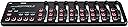
🎶 Master your mix anywhere with the ultimate slimline MIDI controller!
The Korg nanoKONTROL2 is a sleek, USB-powered MIDI controller featuring 8 mixer channels and transport controls, compatible with Windows, Mac, iOS, and Linux. Its slim profile and plug-and-play design make it ideal for professional musicians and producers seeking precise, portable control over their digital audio workstations.


| ASIN | B004M8UZS8 |
| Batteries | 1 AAA batteries required. |
| Colour | Black |
| Compatible Devices | Desktop, Laptop, Smartphone (Windows, Mac, iOS) |
| Connector | USB |
| Country Produced In | china |
| Customer Reviews | 4.3 4.3 out of 5 stars (2,566) |
| Date First Available | 12 May 2011 |
| Hardware Interface | USB |
| Hardware Platform | macintosh |
| Instrument Key | Any |
| Item Weight | 293 g |
| Item model number | NANOKON2BK |
| Material Type | Plastic |
| Mixer Channel Quantity | 8 |
| Musical Style | Electronic |
| Number of Keyboard Keys | 1 |
| Product Dimensions | 32.5 x 8.3 x 3 cm; 293 g |
| Size | Einheitsgröße |
| Supported Software | Avid Pro Tools |
F**E
Great for Linux
I bought this NanoKontrol2 to use with soft synths and mixing software on Linux - works great. It was recognized and in use straight away with Jack, AmSynth, Hydrogen drum machine and Ardour mixing software. I haven't been able to find a native Linux app to change the control codes that the device sends out, but the editor software for Windows from Korg's site worked fine under Wine 1.0.1 on Debian (current version - squeeze, both 32-bit and 64-bit versions). Editor, driver and firmware upgrade for Windows and Mac need to be downloaded from Korg's site. For Linux, you only need the Windows editor software. The driver is not required and, if you try to install it under Wine, the editor will not find the device (it will not install properly anyway). I didn't try the firmware upgrade as the device works perfectly. The editor can load and save settings as files so mappings can be sent to the controller in seconds. Versatile piece of kit, with accurate controls and a nice amount of friction to them. Recommended.
J**S
Running fine with Linux/Pipewire.
I've been using this on Linux with Pipewire and Jack Mixer, it's actually really nice, I've included a map I made which shows which Midi channels refer to which control.... Jack Mixer actually has a learn function which helps with mapping the controls, and you can save the profile once you set it up, but if you need to know for some reason I mapped them out. I imagine there would be no problem using it with Ardour also. Also, don't ignore the little card with the software bundle if you're on Linux, there are some "PC" things in there which are designed for Windows, but most will run fine using "Bottles"... using their default settings... Definitely recommended, although you'll want Ubutnu 22.10 or newer as if you aren't already familiar with Jack, then Pipewire will make everything easier... also install "qpwgraph" and "Jack Mixer".
A**E
Great little mixer for Reaper DAW
I bought this as a cheap conrol surface for my DAW (Cockos Reaper). it was as expected, if you use in Reaper though, select Mackie control surface in the preferences and you will be greeted with all kinds of slider movements on the screen!.. well, to overcome this, first select "Sonar template" in Korg Nanokontrol, then search cockos website for "clinke's mackie control surface" and install that in Reaper (see help files on how to do) and then hey presto, that will work on each slider independently along with pan, controls like mute, record, solo, play, rewind, forward, markers (you cant insert markers with nanokontrol, but you can by pressing M on keyboard, and then selecting with nanokontrol marker button. It works well, and does what it says, it's cheap, cheerful, and fairly well made for the price. Some people say they never got USB cables included, they are stuffed in a compartment at one end of the box and could be passed by if you dont open both ends!.. so check before throwing the box away :o)
T**C
Great Product Works on Reaper.
Great Product I bought to use with Reaper running on Windows 10. However it does need setting up and there's conflicting advice on the web of doing this for Reaper. After following these instructions it worked perfectly: All you have to do before connecting the nanoKONTROL 2 to your computer is hold down the SET MARKER button along with the main RECORD button, and then plug in your USB cable. This will load the template for Cakewalk Sonar. You’ll notice the record button blinks a few times after it’s connected, to let you know you’re in Sonar mode. Although that template is designed for Cakewalk Sonar, it works perfectly for Reaper, if you set Reaper correctly: 1. Start Reaper of course… and then go to Reaper’s PREFERENCES (CTRL-P), go into Control Surfaces (left menu, near the bottom). 2. Click ADD and Reaper will ask you what kind of Control Surface Mode…. choose “Mackie Control Universal.” 3. Then choose your MIDI input and output to be “nanoKONTROL2”. Done. Now, once you’ve exited Preferences, you’ll see that the nanoKONTROL2’s buttons respond perfectly in Reaper… all mute/solo/arm record buttons work for every track, the faders work for the track volumes, and the knobs work for the track panning. You’ll also notice the transport controls (RECORD, PLAY, STOP, REWIND, FF) all work in Reaper as well, and of course.. the SET MARKER and marker left/marker right buttons all work, too. If you have more than 8 tracks loaded (say, 16, or 24), you can use the TRACK < > buttons to navigate your track groups
S**R
Surprisingly solid.
The pits and sliders feel good for such an inexpensive controller. Setting it up for controlling a Metric Halo Mio Console software mixer was straight forward using the downloadable editor. I soon after bought a second one because they’re inexpensive, take little space on the desktop and they just work.
A**G
Fantastic Option for Those that want MIDI Control
I have owned the NanoKontrol2 for 3 months now and I absolutely love it. It's logical layout is made up of 8 columns each containing a fader, rotary encoder and 3 buttons. It also has supposed transport controls to the left. The quality of the components though isn't too great, the faders and encoders do feel light and plasticky. However for £44 I really don't care. The controller allows me to program lots of MIDI control. It's layout is optimised for programming in DAWs however I have only programmed it within Traktor. Using it in two modes - a sample deck player and an FX controller. It works absolutely great and its size means I can pick it up while using and get really creative! For those starting to want to own some hardware of their own, this is a great option. And for those who want to expand the boundaries of control it is also a great addition.
J**X
I recieved this in the mail 2 days ago, and i must say i am totally impressed with this unit. I programmed Reaper 3.76 using it's Midi CC message mode, and it took time using the action option in Reaper to manually program the NanoKontrol 2, to use it as the transport and mixer functions of the daw. Once i set it up (i got it programmed to 24 faders and pan knobs, plus all solo/mute/record arm buttons and the full transport as well using 3 out of 16 availiable midi channels! But if you like you can max it out at 8 tracks per midi channel, up to 16 midi channels giving you a max of 128 channels/tracks!) it worked smooth as butter. The pan knobs feel really good and not cheap, the faders have a nice feel of resistance to them like mixing boards do. The buttons light up when they are armed to toggle, i am very impressed with the quality of this unit. The pros to this unit is that it is definitely a step up in the construction and build quality of this unit compared to the version 1 of the NanoKontrol. The added transport functions are great , all the solo/mute/record arm buttons, as well as the transport buttons don't feel cheap at all, and feel solid which is a big surprise granted the cost of this unit (59.99 as of 7/3/2011). It has a decent weight to it, around 3/4 of a pound. It looks cool too during use in a session. The controls are very responsive with Reaper 3.76. I use this controller with it's Midi CC Message mode. The cons i have is that the scene button from version one was removed, and instead is now a part of the Korg Kontrol Editor, a program you get from the Korg website after you purchase the unit, and this program allows you to set the functions and switches, from monetary press to toggle mode, as well as set the seperate midi channels (midi channels 1-16) to switch between 8 sets of tracks(per one of the 16 midi channels you can select in the Korg Kontrol Editor) you program the NanoKontrol 2 to use. In order to switch between the midi channels, you must open the Korg Kontrol Editor and write the scene to the NanoKontrol 2 for every time you need to swtich between midi channels in your daw. The Korg Kontrol Editor doesn't take too long to load to make the changes to your NanoKontrol 2, so it isn't a big deal but some might have preferred the scene button on the device itself. But it doesn't bother me much so i like it as is. And if you have no idea how to program midi cc messages to your controller from your daw, it might frustrate a few folk who might see programming midi into a controller a bit frustrating at first. This was my first time ever programming any controller using midi cc messages from Reaper's built in Action Option window, and once i understood how it worked (took me from openeing the package and programming the actions for up to 24 tracks of faders/pan knobs/ solo,mute and record arm buttons, plus full transport controls took me about 2 hrs tops) it was so easy to program, and i got it after seeing how it worked! The second con is the version 1 of NanoKontrol had 9 faders instead of version 2's 8 faders. I wish they would have kept the 9th fader, due to the fact that the 9th fader could have been used as the master volume track and that would've been great. But for what i paid for it, and for what it is worth, i have to truly say the cons aren't so great to me, that it makes me regret my purchase. Matter of fact i will say that this is the best 60.00 i spent on a cheaper piece of gear and i would totally buy another one, that is how great this daw controller is. In short, it is worth your 60 dollars, it has a sturdier build than the first version, it has a nice feel and good resistance on the faders and pan knobs and all toggle switches feel durable and better quality than the cost of this unit. I would HIGHLY reccommend the NanoKontrol 2 usb/midi Daw controller for your home studio, and even pro studio use.
E**D
Work well with Logic Pro and probably other daws.
T**U
Super ! Je l'utilise en live pour gérer mes sequense son en salle de concert, comme en studio ! Pour le prix, c'est juste génial !
R**4
Vendedor envio super rápido , produto chegou muito bem embalado, original recomendo a todos!!!
A**R
J'ai eu beaucoup de difficulté à installer le NanoKontrol, à cause de la mise à jour du Korg Driver, au lieu du Driver midi générique, surtout si vous avez plus de 9 applications midi branchés. J'ai trouvé un article qui faisait référence au problème: Korg nanoKontrol 2 Driver on Windows 10 - not working - How to fix it. Steve Caldwell May 6 2021. C'est très bien expliqué et il suffit de modifier le Driver. Maintenant tout fonctionne et je suis très satisfait.
Trustpilot
2 weeks ago
1 month ago