
Desertcart purchases this item on your behalf and handles shipping, customs, and support to Indonesia.
📈 Elevate your maths game with Casio’s vibrant, exam-approved calculator!
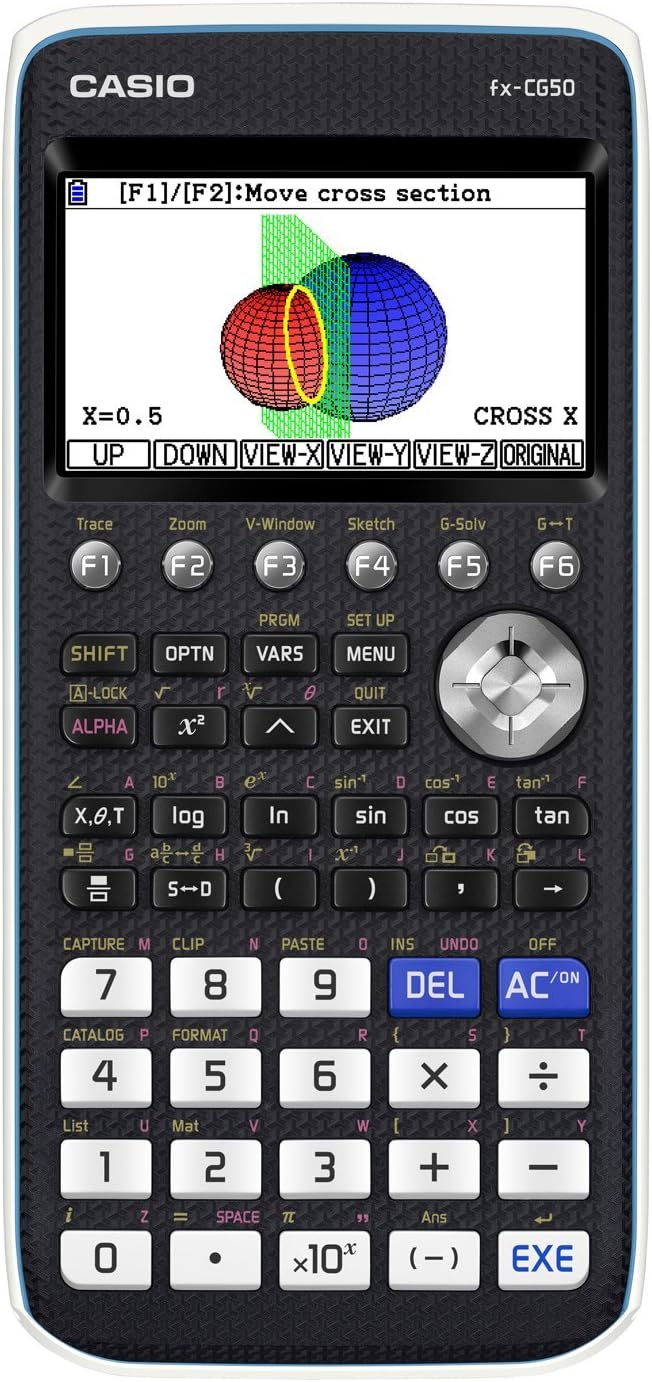
The Casio fx-CG50 is the UK’s top-selling colour graphic calculator, designed for GCSE, A-level, Further Maths, and IB students. Featuring a 3.7-inch high-resolution colour LCD, over 3,000 built-in functions, and an intuitive icon-based interface, it delivers exceptional clarity and ease of use. The package includes a protective slide cover and PC connection cable, powered by 4 AAA batteries with a 3-year warranty, making it a reliable and versatile tool for academic success.


| ASIN | B071S1HRM7 |
| Best Sellers Rank | 246 in Stationery & Office Supplies ( See Top 100 in Stationery & Office Supplies ) 1 in Graphing Calculators |
| Box Contents | CASIO FX-CG50 Graphic Calculator |
| Brand | Casio |
| Brand Name | Casio |
| Calculator Type | Graphing |
| Colour | Previous Model - Black |
| Country of Origin | China |
| Customer Reviews | 4.7 out of 5 stars 1,632 Reviews |
| Display Type | LCD |
| Enclosure Material | Plastic |
| Global Trade Identification Number | 04549526600814 |
| Item Dimensions L x W | 18.9L x 9.5W centimetres |
| Item Type Name | CASIO FX-CG50 GRAPHIC CALCULATOR |
| Item Weight | 0.25 Kilograms |
| Manufacturer | CASIO |
| Manufacturer Part Number | FX-CG50 |
| Model Name | Previous Model |
| Model Number | FX-CG50 |
| Number of Batteries | 4 AAA batteries required. (included) |
| Number of Items | 1 |
| Number of batteries | 4 AAA batteries required. (included) |
| Power Source | Battery Powered |
| Power source | Battery Powered |
| Product Warranty | 3 year gurantee |
| Screen Size | 3.7 Inches |
| Screen size | 3.7 Inches |
A**S
Fantastic! But flaws need correcting
This is my favourite calculator that is highly recommended for above GCSE, (or for super keen GCSE students) and all professionals like engineers and scientists. But I have a lot of recommendations for Casio for the next CG50: Show the derivative in X or Y solver, not just in trace in the graph mode. Provide dy/dx solver in graphing app so that x/y value can be found for a given gradient... and also for a given second derivative. Provide a gsolve option to identify points of inflections in the graph. And even identify concave and convex areas in different colour. Allow parametric equation solve features just like normal cartesian graph gsolve features as none of the g solve soft keys work at the moment when it comes to parametrically defined curves. Allow us to do everything including finding areas. Please move the radian degrees item to first on the list of settings as we have to frequently switch between degrees or radians and it requires too many key strokes. We can find the tangent/normal to a graph using sketch option but the equation of the tangent/normal cannot be pasted into the graphing app as a curve. If we could than it would be easier to find where the normal/tangent intersects other key points. Please allow us to adjust the font size. The bottom keys of the CG50 have been shaven off at an angle compared to the Classwiz 991EX. The height of the area we press is less. This makes key presses less comfortable than classwiz 991EX. Please could you restore full size. Allow recurring decimals option where we can enter and convert between recurring decimals and other formats. Allow us to find prime factors of a number, as other less advanced Casio's do. Allow calculations of volumes of revolution, and 3D depiction of volumes of revolutions. Conics app is isolated from graph app and is really not that useful... we need to be able to plot tangents or other curves with the circles to find intersections with the circle etc. Importantly, please could you allow us to define a cartesian graphs IMPLICITLY... the grapher becomes useless when an equation is implicitly defines. Other calculators are able to show implicit graphs. This allow circles to be plotted easily without a separate conics app. The new distribution app is almost useless in an exam conditions or computations setting. This is because it lacks all the features for calculating but visually shows the distribution (useful), which means you need to be in the stats app for calculations. So to make the ability to see the distribution accessible, I would like the option to visually see my distributions where I am doing my calculations (stats ap) and not have an isolated distribution app to go to. Please integrate the distribution ap features in the stats app. Infact, the z distribution shows in the stats ap. Please integrate the distributions app this way. When we get an answer for a probability in the stats ap, please allow us to copy / store in a variable like x/ANS so we can move to main and use that value for the probability in a calculation... often we have to remember a string of digits to copy. Transformation of 3D images in geometry app will be very useful. Please allow us to copy the ANSWERS from intermediate calculations in main rather then just the calculations line... this is a really annoying omission from the calculator. Also sometimes calculations line that used ANS in the calculation does not contain the answer from the part before if further calculations were executed...a software method to detect this would be nice where it takes the answer from the line before. Enable Spearman’s rank correlation coefficient calculations in the stats ap. Allow access to all Statistical Table of values (eg. Critical values) for all types of distribution such as for critical values for Hypothesis testing for zero correlation of bivariate data - PMCC values vs significance level and sample size. Allow us to access stats data as we still have to use a book to access these stats data, it should be in CG50, if it has a periodic table it should have this. Allow the stats app to perform Hypothesis testing for different distributions by taking all the required parameters (like numworks calculator does). Allow Negative binomial distribution function in the statistics aps. Recursion web graph does not start at the table start, please fix this. List commands have to be executed in main rather that in the stats app making it difficult for use. Again, please bring the ANS key to CG50 like the classwiz. Square root should also ideally be a direct key and not a shift operation. When we select a function operation using soft keys in main and it appears on the screen, knowing the syntax is often a problem, find a way to quickly view the syntax of the operation. Some of the vector operations and vector input are in different locations, bring them in a coherent place. Provide decametres and decimetres for length conversion. A dark mode option.
C**M
Great calculator!
This calculator is extremely good at its performed functions. It's an excellent choice for students studying at higher level education, and is well preferred over the other calculator choices. The calculator itself comes with many different options, and is still one of the most advanced calculators for its time. Its a very good quality and it's quite easy to use for simple calculations, however for more complex ones you will need to find out how to use it. Its quite a chunky calculator compared to most, and the weight of it is pretty heavy, but this means that it does the job quite fast and has a much longer battery life. For me, the battery life is around 14 months with moderate use, however if you use it more frequently then it may need to be changed much sooner.
M**R
Amazing Calculator. Well worth the expense!
My daughter has started A-Level maths and said this was the best calculator there was. Imagine my surprise and shock (I could have fainted) when she told me said calculator was £120....yes yes one hundred and twenty pounds. After a lot of umming and erring we decided to get it for her, wanting the best for her education. I am told it does basically everything but make you a cup of tea. It is large for a calculator but thats not surprising considering how much it does. It covers you for the whole of A-Level content and will help her through university as well. It has a colour screen and while I couldn't use it she was getting on wonderfully with it once she had got to grips with it. She has said you can upload python programs to it, draw graphs, do trigonometric functions and a whole host of other wonderful things (I couldn't quite believe it as I grew up with a calculator that had four functions....+, ×, ÷ and -)! This is beyond amazing for a calculator and is a real investment to your or your child's education. I am really pleased we bought it for her. I also read a review that said to get the protective case, incase you drop it and to keep dirt and dust out. This was an excellent idea and I ordered it with the calculator. I would advise anyone to do the same.
V**N
Very impressive graphing calculator
This is my first graphing calculator and it is a great piece of kit. The User interface is easy to navigate. There are so many functions in the sub menus that you sometimes stop and think ‘I have used that before – where is it?’ but, after a few goes, it becomes natural. If you write down the sequence of keys that you use for common activities (e.g. Run-Matrix/Optn/Calc/SolveN), then you remember it after you have done it a few times. I spend most of my time in the calculator math mode and can move around the options now without really thinking. One strong feature is that when you input integrals etc, they look like they do in a text book. The graphing option is brilliant and it is straightforward to find the area under a curve, intersections, etc on the excellent colour screen. You can solve definite integrals either by using maths mode or by using graph mode – and you even get the same answer either way! One thing to note is that this calculator does not provide algebraic answers. If you want to differentiate x squared, for example, you have to do it at a value of x so it gives you a number – it won’t give you 2x. The same applies to integrals - they have to be definite. If you want the facility to get algebraic answers, you have to buy a CAS calculator – there aren’t many of those around as they are more expensive and generally not allowed in exams so there is a smaller market. It’s quite a big calculator (4AAA batteries in the back) and is very solid. Having originally thought that I would use it for specific work and use my smaller FX83 calculator for daily use, I now find that I use the CG50 for everything. One plus is that it displays all the calculations that you have done until you delete them – even staying on screen after the calculator has been turned off and on, which is really handy. One odd thing to note is that there appears to be no simple percentage function or key – the inbuilt one is rather complex. I am not sure why it has lost that when the cheaper models have it. There are numerous apps to explore – 3D graphs, spreadsheets – and they all work in a similar way so, once you have mastered one app, it is relatively easy to use another. Also there are lots of videos on YouTube taking you through solving specific problems if you find the manual a bit daunting. Recommended to anybody who wants to explore what modern calculators are capable of.
M**Y
A strong product - but better and cheaper alternatives exist
For anyone thinking about buying this - first of all check out the Casio Graph 90+E , the French version. It has an identical hardware specification (except maybe for older 3.40 version firmware which can be flashed to the current 3.50) differing in colour only - though this may make some of the (yellow) key labels harder to read. However, at time of review, it was two-thirds the price of this CG50. Physically, this unit impresses with a solid build, high-quality colour screen that is transflective (so viewable even under bright sunlight) and large keys with a small amount of feedback (an improvement on past Casio models with keys reminiscent of a ZX Spectrum keyboard). Text is displayed clearly, but without sub-pixel rendering (aka ClearType) meaning that the tails of 6's and 9's look a little nibbled - a minor flaw. A hard plastic sleeve is supplied that can be slipped over the front of the calculator (protecting the screen and avoiding accidental presses of the AC/on key from draining batteries) or on the back, for safe keeping while the CG50 is in use. A mini-USB socket allows connection to a PC and a single-pin socket allows connection to other CG50s (cables for both purposes included). Four AAA batteries are used to power the calculator, and it is possible to select between Alkaline and NiMH in the System application for accurate display of battery level. While some may consider this a minus (more bulk and less capacity than a built-in Lithium battery), such batteries are easy to replace, spares are readily available (and likely to be even 20-30 years from now) and swapping in a fresh set can be done in less than a minute. Past Casio calculators have had keys with as many as 4 or 5 functions - this one reduces them to 2 or at most 3. This has been achieved in two ways - first the calculator has an "app based" design where you select a usage mode from the main menu (e.g. Run-Matrix for general calculation, Statistics for uni/multivariate analysis, Physium for a pretty table of elements). Within each app, many functions are accessed by calling up a menu and using the F1 to F6 keys to select an option (for long menus, F6 advances to the next 5 options). This simplifies the design but also means that more keypresses are required to access advanced features, such as hyperbolic functions. This is especially true for data transfer between apps, e.g. copying across a physical constant from the Physium app for use within Run-Matrix. 22 apps are included (with some duplication - notably four graph-related) with more downloadable from the Casio website. Both these and third-party apps can be loaded via USB, and there are some notable ones like the CAS application KhiCas plus a version of the 3D shooter Doom. On a related topic, two languages are supplied for programming - Casio BASIC and MicroPython. A third-party C.Basic is also available. Some features seem unfinished - this calculator can handle complex numbers (once the option is enabled) and will calculate e^Ï€i correctly, but try using a trigonometric or hyperbolic function with a complex value and a "Non Real" error results. There is no option to expand the (displayed) precision beyond 10 significant digits or to handle numbers exceeding the range 10^-100 - 10^100, something which even the humble Windows calculator can do nowadays. Now for the downside - other reviews have highlighted the comparatively small (and non-expandable) 16MB of flash storage - however Casio have also crippled this unit with a mere 64KB RAM (the Casio FX8500 graphic calculator from 1987 had 10K - a sixfold improvement over 25 years seems paltry) and this severely limits some apps like the spreadsheet - limited in size to 30KB or just 15KB if used within the eActivity app (the inability to transfer data to PC spreadsheets hamstrings this app further). Compare this to the slightly costlier HP Prime G2 which ships with 256MB RAM and 512MB flash. Or a cheaper Ad-free Fire 8 tablet with 2GB RAM and 32GB flash. The CG50 is astoundingly poor value in hardware terms. The final elephant in the room with the CG50, is why buy a graphics calculator at all when a mobile phone (or tablet) offers more memory, a faster processor and a better screen? Install a Computer Algebra System (CAS) app or one of the calculator emulators, and you'll have all the functionality - and better hardware - at a lower price. Some reasons to go the CG50 route could include: * you need something permitted in exams (the CG50 has 4 Exam Modes - UK, IB, NL and Texas); * you want the tactile feel of a keypad; * you want to use batteries you can get (almost) anywhere. If one or more of the above apply, the CG50 may be worthwhile - but check out the Graph 90+E first.
I**P
Graphic calculator
Bought for son for his GCSE & A level maths exams. Said it was ideal.
C**N
Perfect for A-Level Further Maths
Great graphing calculator, basically built-in, offline Desmos, although it is a bit expensive for students. If you love maths enough to spend this much on a calculator, the odds are you’re good enough to not even need this level of calculator, but it is cool. It surprised me that it doesn’t have some of the functions of the beloved scientific calculator, FX-991EX, which is now also a nightmare to find, but it is what it is. My son specified he wanted to stick to Casio over TI as it’s more UK curriculum friendly and he’s used to it, and he has no regrets.
A**R
Great for School with a large amount of features.
This calculator is very good and has a large amount of features that make it very good for everyday use. It is great that it is allowed in all UK examinations as this means it can be used a GCSE level which is very useful as many graphical calculators cannot be used at this stage. Some of the features such as normal calculations and 2D graphing are very simple and easy to use, however some of the features can be a bit confusing at first and I had to watch some videos in order to figure out how to use all the features. The calculator is quite bulky and not very portable when compared to other non-graphing calculators however the size is understandable due to the large amount of features. The battery lasts a long time, I have had mine for about 4 months and the battery is still pretty much full. I also love the fact that you can connect it to your computer to install additional apps and games, personally I love playing the Flappy Bird game when I am bored. Would highly recommend this calculator, especially for anyone studying maths at GCSE or higher.
D**O
Tout est d'accord.
Tout allait bien. Pas de problèmes ou de défauts.
A**R
Good calculator. Sender needs better packing for transit.
Calculator product delivered as expected. Feedback for sender - need better packing. The box arrived a bit damaged. For a calculator of this price it’s at risk of being damaged in transit.
A**D
Good Product
nice product. rcvd as expected.
J**O
Buen producto
Fácil uso , intuitiva
Y**O
cumple
humble con todo lo que pide el colegio y se puede usar el IB
Trustpilot
1 month ago
3 weeks ago