Buy anything from 5,000+ international stores. One checkout price. No surprise fees. Join 2M+ shoppers on Desertcart.
Desertcart purchases this item on your behalf and handles shipping, customs, and support to Indonesia.
🎮 Elevate your virtual cockpit — fly like a pro, feel the control!
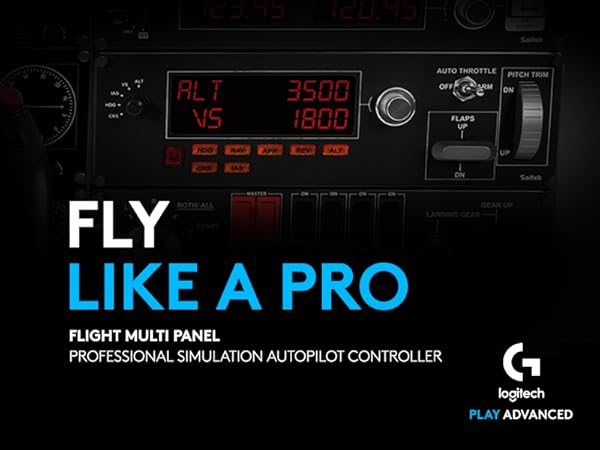
The Logitech G Saitek Pro Flight Multi Panel is a professional-grade flight simulator controller designed for PC users. Featuring a crisp LCD autopilot display, 14 dedicated control buttons, and a realistic trim wheel, it offers precise management of autopilot, throttle, and flaps across popular flight sim platforms like FSX, X-Plane, and Prepar3D. Its modular design allows stacking with other Logitech panels to customize your cockpit setup. USB-powered and built with durable materials, it ensures reliable, flicker-free operation for immersive flight simulation.


| Brand | Logitech G |
| Colour | Black |
| Compatible devices | PC, Microsoft Windows XP/Vista, USB 1.1/2.0 |
| Connectivity technology | USB |
| Controller type | Joystick |
| Model name | pro |
J**N
Very useful Flight sim add on - which works!
This brief review is in respect of the Logitech (formerly Saitek) Pro Flight Multi Panel. I only say that because the reviews in this area seemed to be bundled together in respect of products that are as different as chalk and cheese. The Multi Panel is one of a series of separate Flight Simulator add ons made by Logitech for use alongside a joystick, control column, and other flight simulator controls. To the un-initiated, perhaps considering buying as a gift, please speak to the recipient first. By itself, this item will be useless! Right, having got that over with. If you are in the market for an add-on Flight Sim controller that provides elevator trim, flap control and simple autopilot functions, then you'll be please with this. I have it working with Microsoft Flight Sim X, X Plane 11, and Aerofly FS2. By itself it's tricky to get working, but install FSUIPC software (free download, no catches and well respected in the FS Community, which will be sufficient, or payware if you want full facilities) and you'll be away in seconds. I'm no expert at the techie bits, but once I connected this, I love it!
J**H
Very useful and easy to use
Works well but it has to be plugged in from 'start up' of computer. Doesn't work 'plug and play' as I expected. Otherwise, very useful and easier than using on-screen flight deck controls in X-Plane 10 (Mac). If I have any criticism, the function selector is very stiff and it makes me wonder how long it will last.
A**C
Check EXE.xml file if Flight Simulator 2020 fails to start Logitech Plugin
I bought this to use with Flight Simulator 2020 for the auto pilot and trim wheel functionality. Installed the Logitech Plug-in software and it was working fine for a few weeks. When it suddenly stopped recognising the Multi Panel, I discovered I had to manually launch the Logitech Plug-in software. Reinstalling the Logitech software made no difference. Upon further investigation, the EXE.xml file contained in Flight Simulator 2020 was corrupt. I deleted the file and reinstalled the Logitech software. This created new entries in the EXE.xml file to locate and automatically start the Logitech Plugin software. It's been working ever since for past 18 months. I purchased the Multi panel direct from Amazon UK (not marketplace) when it was on special offer in spring 2024. I was surprised it was being shipped from Germany and it would take a week. When it arrived, the protective film covering the LED display was crumpled. The unit was in mint condition though. I suspected it was either 'open box' or 'refurbished'. The serial no. on the unit didn't match the one printed on the box. Upon Very close inspection of the box lid seals, the original seals had been professionally removed and replaced with new identical round seals. I complained to Amazon and they offered a discount which I accepted, and they backed it up with a written 2 year guarantee.
P**O
Plug and play
Excellent ‘plug & play’
P**T
Awful! *PLEASE READ BEFORE BUYING*
I purchased and intended on using this for Microsoft flight simulator use on the A320 and I'm appaled on the features of this 1. not simple at all, when I plugged it in the panel didn't work at all and I had to use the online forums to help me find out how to use it properly 2. awful software, the software provided is nothing like what's explained on the information sheet and once again I had to find a video online to help me set it up! 3. It does not even work, I used this on Microsoft Flight Simulator 2020 on the Airbus A320 and when using the screen never updated and caused me to plummet to the floor multiple times when using it! in conclusion, it is a rubish poorly made overpriced item DO NOT BUY!
H**S
Works straight out of the box....
Microsoft flight simulator 2020 and windows 11 compatible. I installed the logitec drivers, then tried it out. Every single function works, depending if the aircraft has that function to start with. Turns on and off automatically with flight simulator. No need for external usb power hub. Works straight from the blue usb port. More than happy with it.
M**S
Flight sim
Brought as a gift, and he loved it, stability good quality
A**R
Good but has a fixable issue.
I got this for flight sim 2020, you have to go to Logitech website and download the driver. Overall it's great to be able to set altitudes and more without fiddling with the annoying dials in game. However, there is one issue which I've since fixed. The issue was that the turning heading turning in 10 degree increments when turning the dial. The fix was to unmap some of the buttons on my honeycomb yoke, those were all the buttons on the front of the yoke panel, including the starter key. I'm not sure if they all need disabling, but will need to do more testing. Once disabled, the Logitech panel worked as intended, it now turns in 1 degree increments for heading, it can still be a little finicky where it might turn by 2 degrees but you can just turn back 1 degree. Obviously it's not ideal having to disable yoke buttons, but not a big deal as those buttons are in cockpit and usually just a 1 time press. I don't who's to blame for the issues, it could be a flight sim issue, could be a Logitech issue, but despite that id still highly recommend this panel because it sure beats trying to fiddle around with the annoying little dials in the cockpit
H**R
Good product
I like it
F**B
impeccable
Comme avec tout les produits de la gamme> aucun problèmes
W**T
Leuke toevoeging voor de Flightsimulator
Bijna onmisbaar als je veel in Flightsimulatie zit. Het enige minpuntje is dat de +/- draaiknop maar 1 knop is en niet een binnen/buiten werking heeft (zoals het Radiopanel) en erg jammer dat Logitech (Saitek) dit na al die jaren dat het al te koop is nooit aangepast is. Dit had de Multi Panel nog beter gemaakt. Gelukkig kan je met wat software Spad/Axis and Ohs deze werking iets beter maken
C**S
Muy útil y práctico
Sirve para cualquier tipo de avión y simulador, logitech siempre hace buenos productos y este no es para menos. Todos los botones funcionan a la perfección y con precisión. Lo recomiendo mucho.
T**S
Très bien
Très facile à installer. Fonctionne très bien, qualité très correcte. Certains problèmes (comme la perte des paramètres qui oblige a reprogrammer tout) sont dus à cette daube de Flight Simulator, pas au produit.
Trustpilot
2 weeks ago
1 month ago