Buy anything from 5,000+ international stores. One checkout price. No surprise fees. Join 2M+ shoppers on Desertcart.
Desertcart purchases this item on your behalf and handles shipping, customs, and support to Indonesia.
๐ Elevate your storage game with speed, versatility, and sleek portability!
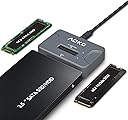
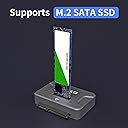
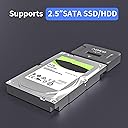
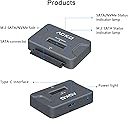
The AOKO NVMe to USB 3.2 SSD Reader Docking Station is a compact, portable adapter that supports ultra-fast 10Gbps data transfer. It uniquely accommodates M.2 PCIe NVMe, M.2 SATA SSDs (2242/2260/2280), and 2.5'' SATA SSD/HDD drives, making it the ultimate all-in-one solution for IT pros and tech-savvy millennials. Its plug-and-play design works seamlessly across Windows, macOS, and Linux, while smart thermal management and auxiliary power support ensure reliable, high-performance operation wherever you go.


| ASIN | B0BDLZQCJY |
| Best Sellers Rank | #7 in Hard Drive Docking Stations |
| Brand | AOKO |
| Built-In Media | NO |
| Color | black |
| Compatible Devices | 2.5 inch sata ssd/hdd, m.2 nvme ssd, m.2 sata ssd |
| Customer Reviews | 4.3 out of 5 stars 291 Reviews |
| Hardware Interface | USB 3.2 Gen 2 |
| Manufacturer | AOKO |
| Mfr Part Number | M2 SATA/NVMe or 2.5'' SATA Read |
| Model Number | M2 SATA/NVMe or 2.5'' SATA Read |
| Number of Ports | 2 |
| Total USB Ports | 1 |
| Total Usb Ports | 1 |
| UPC | 706409439914 |
| Warranty Description | 1 |
G**T
Compact, Reliable SSD Docking Station for IT Professionals
As someone who works in IT and frequently handles data recovery, this docking station has been a lifesaver. It supports both NVMe and SATA M.2 drives, eliminating the need to carry multiple adapters, a particularly convenient feature when youโre unsure of the drive type youโll encounter. Transfer speeds are excellent, taking full advantage of USB 3.2 for fast and reliable data movement. In practice, Iโve been able to copy large files and images quickly without any bottlenecks, which is critical when working in the field. The unit is completely plug-and-play, requiring no external power. Itโs compact, small enough to fit in a pocket, and includes a USB-C to USB-A adapter, making it compatible with both modern laptops and older systems. I originally purchased one for myself, but after seeing how useful it was, I had my company buy four more for our vehicles and offices. That way, everyone has access without needing to borrow mine. Between the speed, portability, and versatility, this dock has more than paid for itself. If mine ever breaks, I wouldnโt hesitate to buy another.
N**N
About time!
Iโve been looking for something like this for years that supports both SATA and M.2 and so happy this worked for me for both types of drives. My older adapters only worked for one or the other. I recently used this to come one drive to another, cloning an older SATA NVMe drive to a M.2 and it was so easy and painless. I had two of these used on the same computer to transfer between one directly to the other using Clonezilla in KDE Neon Linux. No special drivers were needed in either Linux or Windows either :) If I had to gripe about one thing, and itโs really very minor, it would be that these only included one USB cable which is a USB type C male to two USB type A male adapters, one for data and one for power. The secondary for power only seems to be needed when working with older SATA drives and likely only the 3.5โ drives that require additional power beyond SATA, unlike 2.5โ which typically can run off SATA alone. But thatโs really not even a problem because this cable does exactly whatโs needed. I just would have preferred another USB type C to USB type C like many others offer but itโs not a big deal because you typically have a few on hand.
E**K
Exposed as mass storage device and not NVME device
I was able to use this device to transfer data from an old NVME to a new NVME after doing a replacement. I have used this adapter successfully for both M.2 SSD and NVME drives. Although keep in mind that it shows up as a mass storage device and NVME tools won't work when connected to the adapter. One thing I would have liked to do would be format namespaces for securely erasing data. In fact you don't even see the namespaces so I assume it's only exposing namespace 1? This limitation might not be possible to overcome unless you have a USB-4/Thunderbolt adapter and it gets exposed as a PCI-e device. I had this connected to a USB-C 3.1 port, which offers 10Gbps (which is the link speed I was seeing on the port in Linux), but the transferred speed was around 300 MB/s, occasionally rising to 500MB/s. When the drive was previously directly attached being a PCI-e 4.0 NVME drive it was getting up to 4 GB/s.
W**R
It can be sensitive so make sure you stabilize the adapter and the NVMe. It can unseat.
I have a rather large NVMe that I couldn't fit anywhere. With the AOKO NVMe it works great and my large 990 Pro fits with USB connection. Glad I bought it.
S**R
real handy item for your computere.
works great for updating and running a separate removable hard drive.
R**D
Does not work with M1 MacBook Pro
I tried to use it with my M1 MacBook Pro. Because it doesn't have type A USB ports, I had to use a powered Anker USB hub. It would appear, then disappear on my laptop. I tried every which way and sometimes it would appear, let me click into the drive, but then hang up when attempting to read the main folder and then eject itself. So then I tried connecting it to my Samsung Galaxy, and had to format the drive (I'm using it on a Blackmagic camera only). After this, I attempted to connect it back on the MBP one last time, and it asked me to format the drive, which I did to EX FAT. After the format, it seemed it would work. I placed it back into the camera, recorded a quick video, connected the drive back into the MBP, and the whole ordeal started again. Sending this back for a refund.
D**Z
Worked good
Worked good. Cable that comes with it only works a certain direction. Instructions came with it and made it easy to understand.
R**E
Excelente ๐
Muy bueno
Trustpilot
3 weeks ago
3 days ago