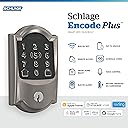
đ Elevate your home security with smart, stylish control at your fingertips.
The Schlage BE499WB CAM 619 Encode Plus is a premium smart deadbolt lock featuring built-in WiFi for remote access, support for up to 100 unique access codes, and seamless integration with Apple HomeKit and voice assistants. Designed for easy DIY installation, it combines industry-leading security with modern convenience and a sleek satin nickel finish.


| ASIN | B09RS1Z1ZN |
| Batteries Required? | Yes |
| Batteries included? | No |
| Best Sellers Rank | 924,826 in DIY & Tools ( See Top 100 in DIY & Tools ) 843 in Dead Bolts |
| Colour | Satin Nickel |
| Customer Reviews | 4.2 4.2 out of 5 stars (598) |
| Date First Available | 1 April 2022 |
| Finish | satin |
| Included Components | Installation Hardware, Installation Instructions |
| Item Package Quantity | 1 |
| Item Weight | 1.36 kg |
| Item model number | BE499WB CAM 619 |
| Manufacturer | Schlage |
| Material | Nickel |
| Number of Pieces | 1 |
| Part Number | BE499WB CAM 619 |
| Pattern | Camelot |
| Product Dimensions | 2.26 x 7.62 x 12.7 cm; 1.36 kg |
| Shape | Rectangular |
| Special Features | Wifi Compatibility,Hands-free,Smart Lock,Wifi |
| Style | Camelot |
S**D
The lock looks elegant and feels premium quality. It uses NFC to set up on the iPhone Home App, making the setup process easy and error-free. I thought the lock uses WiFi for connection but my router-connected device list doesn't list the lock, making me feel the lock is offline. However, everything still works well. So I searched it up online and realized that it uses Thread for HomeKit integration YAY! I have Eve products for home automation and the Eve app shows the lock under the Thread network. Additionally, the Home Key express mode works like a charm!
J**H
It worked for 6 months - bought it in Feb 2025. Now the touchscreen will randomly not work and i have to remove the battery pack and reinsert to get it working. No warning as to when it will fail. My previous Schalge touchscreen lasted more than 10 years. Total disappointment as the return period is over and no warranty from Amazon. I just saw other 1 star reviews who have the same problem. AMAZON should respond to this.
G**I
I received the Schlage smart lock and installed immediately. The installation went well and the pairing with the Schlage iPhone app with my phone went well as well. When I tried pairing the Schlage lock with Apple HomeKit is when my problems started. After several hours of troubling shooting as to why it would not pair with Apple HomeKit that I realised that the issue was that Amazon sent me the wrong Schlage dead bolt. As you can see on my video the box had to barcodes, one for the Schlage wifi (non HomeKit version) & one for the Schlage Encode Plus which is the one I ordered. If you are looking for a non HomeKit version then this smart lock is for you. My problem was with Amazon, they have placed 2 seperate barcodes on the box. I have contacted Amazon and they have agreed to send me a replacement unit. I'm just hopping the replacement unit is the real deal & I don't have the same issue. I will update this review once the replacement unit is installed. Update: After receiving the correct Schlage encode plus with HomeKit support that I paid for and tested the unit- works as advertised very happy.
D**N
I wanted a smart lock for my Mom who has lost some finger dexterity and has difficulty with keys. I was particularly interested in the Apple Home Key tap to unlock feature - which only the Enclode Plus from the Schlage smart lock family has. The mechanical install, as advertised, is very easy. All you need is a Philips screw driver and a ruler or tape measure though it goes more quickly with an electric screw driver Activating the lock with the Schlage Home app was straight forward as well. After the lock was connected to the home wifi via the Schlage home app we could easiily add access codes and connect it to Alexa, which allows you to check the status or lock the door by voice command. I like the fact that the lock has a "normal" Schlage deadbolt cylinder and key (can be rekeyed or copied just as with a non smart lock) The Home Key setup was another matter, this is rather buggy. You first need to setup the Apple Home app on your phone. Once that's done according to the Schlage instructions you can add the lock to the Apple home using the home app directly by pressing the pairing button and tapping the phone to the lock or scanning the QR code on the installation booklet. I tried this many times - but the phone would not detect the lock. Power on reset didn't help same result. The only way I was able to get the Home Key setup to work was removing the lock from the Schlage app (equivalent to a factory reset) and start the paring process over with one key difference: adding to Apple Home BEFORE adding the lock to the Schlage app. This worked! If this is a known issue Schlage aught to do a better job documenting this -- this lock has been out for many years time enough to get the kinks out. Tap to unlock is a very nice -- as you would expect you just need to tap the phone to the lock to unlock or lock it (without having to unlock your ohone) - but you give up a bit of security for that convenience, considering if your phone is stolen the thief could get into your home assuming they knew where it was. Home key works by adding a credential to your Apple wallet. I thought my Mom would be able to share Apply keys home key with a trusted guest or family, however this doesn't work unless you have an Apple Hub (that's an Apple limitation, not due to Schlage)
S**N
We bought 3 locks for our airbnbâs. One of the locks is a faulty lock. No customer service. You are on your own. I tried everywhere but no luck.
Trustpilot
1 month ago
4 days ago