⌨️ Elevate your iPad Pro game—work smarter, type brighter, and stay effortlessly connected.
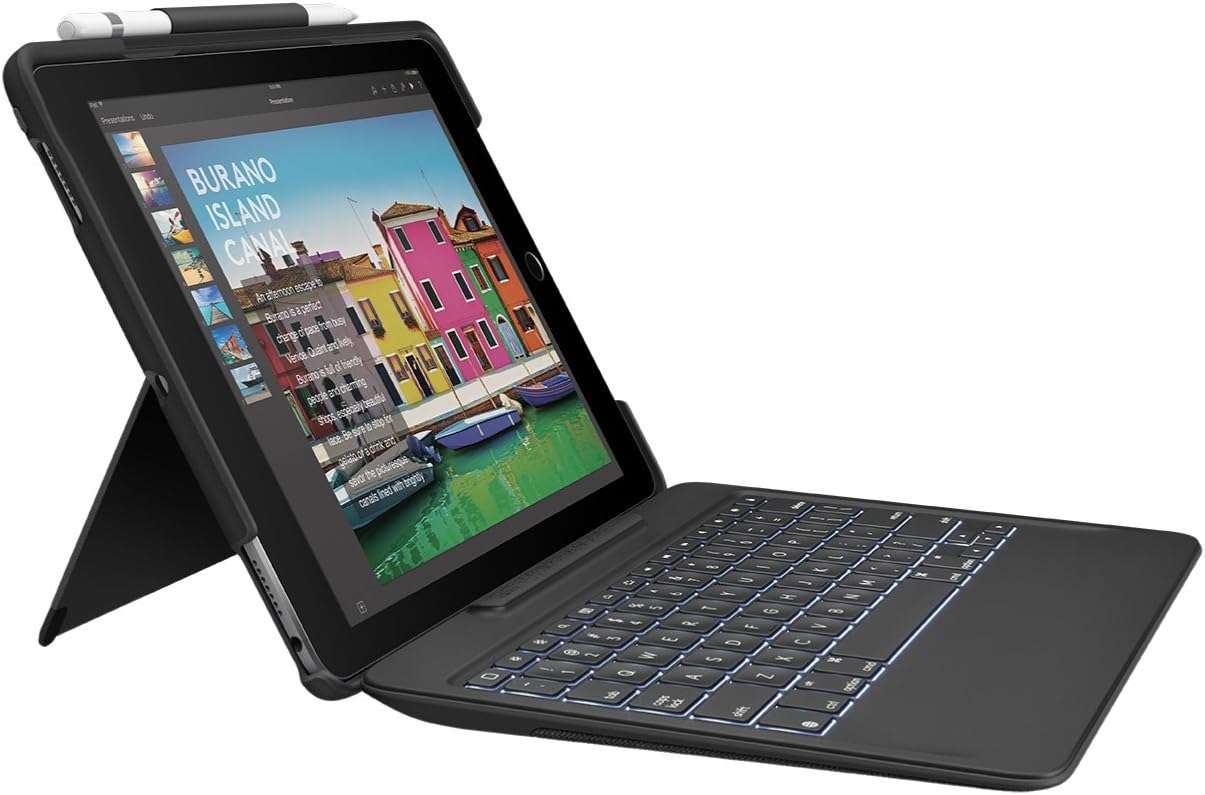
The Logitech Slim Combo for iPad Pro 10.5” is a premium keyboard case featuring a detachable, backlit keyboard powered by Apple’s Smart Connector for instant, battery-free connection. Designed for professionals on the go, it offers 4 versatile use modes with adjustable viewing angles, durable spill-resistant materials, and a dedicated Apple Pencil holder—combining protection, productivity, and style in one sleek package.
| ASIN | B0753223KN |
| Additional Features | Backlit |
| Antenna Location | Office |
| Best Sellers Rank | #2,283 in Tablet Keyboard Cases |
| Brand | Logitech |
| Built-In Media | Case with detachable keyboard, user guide |
| Button Quantity | 78 |
| Color | Black |
| Compatible Devices | iPad Pro 10.5-inch, A1701, A1709, A1852 |
| Connectivity Technology | Smart Connector |
| Customer Reviews | 4.2 out of 5 stars 1,614 Reviews |
| Enclosure Material | Plastic, Polyurethane (PU) |
| Generation | 2nd Generation |
| Global Trade Identification Number | 00097855128966 |
| Hand Orientation | Right |
| Item Dimensions L x W x H | 10.16"L x 7.24"W x 1.06"H |
| Item Type Name | Logitech 920-008420 iPad Pro Keyboard Case SLIM COMBO with Detachable, Backlit, Wireless Keyboard and Smart Connector, 10.5" (Black) |
| Item Weight | 1.2 Pounds |
| Keyboard Backlighting Color Support | Single Color |
| Keyboard Description | Multi Functional |
| Keyboard Layout | QWERTY |
| Manufacturer | Logitech |
| Mechanical Keyboard Switch Model | Cherry MX |
| Model Name | Ipad Prok 10.5 Slim Combo |
| Model Number | 920-008420 |
| Number of Keys | 78 |
| Number of Sections | 78 |
| Power Source | Smart Connector |
| Recommended Uses For Product | Office |
| Special Feature | Backlit |
| Style Name | iPad Pro 10.5 Keyboard + Case |
| Switch Type | Mechanical |
| Theme | Office |
| UPC | 097855128966 |
| Unit Count | 1.0 Count |
| Warranty Description | 1-year Limited hardware warranty |
| Water Resistance Level | Water Resistant |
L**A
Hard wired connection, NOT Blue Tooth.
I dont understand the poor reviews I see for this item on Amazon. True, there can be SOME bad ones out of the factory or, maybe the supplier got knock offs infiltrated into their supply. However, the one I just got works and functions very well. The complained about kick-out that holds the IPad up appears to be well made and is quite sturdy. The IPad itself snaps into the case and protects it very well. The keyboard connects to the IPad in the EXACT same way as the Apple version does. Its magnectic, so dont expect to hold the keyboard in your hand and then swing it violently around, its not designed for that, however, it “Sticks” very well while in use on your lap or on a table (as DESIGNED TO). FUNCTIONALITY: The Apple keyboard does NOT have the following keys, but this one DOES: Decicated keys: Arrow, brightness, speaker volume, reverse, forward, desktop reveal, lock and others which are not on the Apple version. I cant understand why anyone would want any other keyboard. This one connects to the IPad electronicaly, hard wired, not via Blue Tooth. How long will this unit last??? I’ll use it daily and after 6 months, I will come back and update this review. .
R**F
Best iPad case with an Apple Pen holder. One of Logitech's best designs
Best one on the market! I returned another design and got this one, and I'm completely happy with it. Logitech does it again! The 3-pin edge connector for the keyboard is completely solid, held by strong magnets and a very well designed self-aligning case. Note that you can easily take the keyboard off when it's not needed. The case protects the iPad well, but the tradeoff is added thickness. The adjustable foot that holds up the screen can be adjusted to any angle from about 40 to 80 degrees, which covers most use cases such as reading, typing, watching a video, etc. This is one of the very few cases with a holder for the Apple Pen. Just a simple loop of elastic, very easy to use. The keyboard is great. Good feel, good key travel, lighted. Better than the Logitech bluetooth keyboard I used to use. I've used lots of Logitech products, and I like their quality. I think this is one of their best designs. I expect years of trouble-free use. Well done, Logitech!
J**O
Pretty good quality 2 years later, just some disconnecting issues.
I bought this product June 21, 2018. I liked it because I love the typing feel on this keyboard, and it is backlit if you need to see the keys in the dark. It still types nicely and none of the keys have flattened dramatically (just your typical wear and tear, you won’t notice unless you’re looking for it). You can adjust the hinge in various angles. Other reviews are correct, it is a little uncomfortable to type on your lap with this because once connected, it’s just a piece of flimsy material that connects the iPad to the keyboard. I give it an overall 3 stars because recently, the keyboard has began to disconnect randomly. I think it has something to do with the wiring. It still works most of the time, but I assume it’ll stop working completely with continued use. Update: I changed it to 4 stars because it has lasted me 2 years! i don’t use my ipad as a laptop anymore but this keyboard was really amazing!! it still does disconnect sometimes which is a bummer, which is why it’s not 4 stars, but it doesn’t happen too often. It is inconvenient to have to keep snapping it off and on to reconnect, but it doesn’t require a battery which is nice. the only con is you can’t adjust how far you want your ipad to be because it has to be connected. If you are having trouble with some of the keys not working or typing correctly, you need to change it in languages. I don’t remember exactly how, sorry!! I remember I googled it and it showed up in some forum. I don’t think it’s on logitech’s part, but maybe apple developers unknowingly making the keyboard incompatible with the device. But a simple language change fixed it.
P**H
Better than the Apple Keyboard!
I initially purchased the Apple Keyboard for my iPad Pro 10.5. That is not a complete case, it does not cover the back of the iPad, so I returned it. I took a chance on the Logitech Slim Combo and was immediately impressed. While it does have a little weight to it, it is very durable and still comfortable when using it detached from the keyboard. The connection to the keyboard is very easy, just put it towards the magnet and it does the rest. The stand is also multifunctional, I can use it in portrait or landscape, as long as the surface is solid, like a counter, for portrait use. I use my iPad for school work so I do a lot of typing with it and have had no issues at all whether on my lap, a lap desk or counter. It is a very good buy, at just over half the cost of the Apple Keyboard, it is by far a better product.
E**R
Just About Perfect!
After using a cheap, though mostly useful case with Bluetooth keyboard, I ordered this. The previous case had two issues: 1. The Bluetooth connection would not consistently pair after resuming the iPad from sleep or restart. It was an easy fix - just turn off the keyboard Bluetooth, and turn back on. I think it was an issue with updated iPadOS and Bluetooth version, but as a the keyboard was an cheap Jelly Comb brand, I didn't even bother investigating, because ... 2. The kickstand broke and there was no way to repair it. So I searched for suitable replacements. While the Logitech was more expensive than other options and there were a few negative reviews, I have never had an issue with Logitech, and have owned many different products over many years. First, the case itself. This thing is VERY sturdy. The construction is top notch. I have actually dropped it, with iPad installed, of course, a couple of times. On one occasion it slid across a hardwood floor. I can't find a single scratch on the case, and of course there was no damage to my iPad Pro. Second, the keyboard itself works very well. It is full featured except that it doesn't have an actual DELETE key. The Key labeled Delete is a backspace key. Yes, I know that is the way Mac keyboards are configured. However, the cheap Jelly Comb keyboard had both, and it was very convenient. First world problems - I'll live. The key spacing and action are both good, and from the feel I would guess it will last a long time. The ONLY niggle I have is weight. This adds considerable weight to the iPad. Of course, the weight contributes a lot to the protection the case provides - I get that and prioritize protection and durability. Weight is important for me as I need to minimize weight when I travel. Using a lighter material with the same level of protection would, I am almost certain, elevated the price to a point that the product wouldn't be profitable. I am very satisfied with this keyboard case and can highly recommend it.
C**J
Solid choice - wish the hinge was a bit more robust
Decent keyboard with good feel, and good key travel. As others have stated however, The attaching point is held only by the magnetic connection and it is very flimsy. Too bad a more robust hinge couldn’t have been incorporated. Others have mentioned getting this because they didn’t like the feel of the apple keyboard cover but I think the keys feel just fine, it is much lighter, seems more protective of the front, so this purchase was simply down to price. The lighted keys and lower cost were the deciding factor here. That said, the back half is very rigid making snapping the iPad into it quite difficult. I was actually afraid of breaking something the fit was so tight. Haven’t tried removing it and not sure I ever will. Adds a significant amount of weight for hand held operation. A screen protector is a must with this as I expect much of the time will be spent sans keyboard, leaving the screen exposed. As a Smart Cover, its rather flakey. Almost wishing I had just spent the money and got the apple version.
F**L
Perfectly done, even better than Apple's Smart Keyboard
Love it! I looked at loads of cases and keyboard choices before settling on this one, and it has more than lived up to my expectations. I just finished a two-day workshop using it all day as a pseudo-laptop for note taking. Features I love about it: * Keyboard is easily removable when I don't need it, but re-connects with a single click when I do * Folds up (with keyboard connected) to create a hard shell case to protect the iPad * Apple Pencil loop included, positioned so it works whether or not the keyboard is attached * Slightly raised edge on the iPad half keeps keyboard keys from pressing into the screen * Kickstand on the iPad half is adjustable and works with or without the keyboard * Keyboard uses the smart connector, not Bluetooth, so it works even in airplane mode * Keyboard is wireless so I can use it even while charging the iPad (vs. usb keyboards that need the same port as the charger) * Cheaper than the Apple Smart Keyboard and much cheaper than that keyboard plus a case, since this is really both (although would be my choice even if the price were the same) * Perfect keys for typing -- natural size and shape, satisfying amount of click/rebound (I'm very picky about that), but also quiet enough not to annoy the people around me in a workshop or seminar, exactly right
W**N
Decent case, but I didn't recieve what the seller advertised
I bought this products from "Number 1 Distributors" and I didn't receive what they advertised. I bought a NEW and not used Logitech iPad Pro Keyboard Case Slim Combo filled with imperfections. I will upload pictures and describe all the problems that I have with this keyboard: 1. The box was full of dents 2. Right out of the box, both the inside of the box and the keyboard had a couple of layers of dust. 3. The keyboard has imperfections on the top right corner. You can see a white line caused by the plastic being stretched for some reason. Also, the lock, delete and the " I / " are crooked and the " I / " feels like its cut in half, but no completely. These imperfections are factory defect probably. 4. The space bar does not click very well and it’s not completely flat. The left of the space bar is bend upwards, like if somebody tried to pull off the key. 5. I didn't receive any kind of paperwork like warranty or a protective coating that separates the case and the keyboard. I just have the box, the iPad Case and the keyboard. This basically tells me that the case is used. If you watch an unboxing of this product on YouTube, you'll know what I'm talking about. 6. On the back of the keyboard, you can see a long scratch If I leave all these problems aside, I would say that the Logitech iPad Pro Keyboard Case Slim Combo looks very good and the keys feel nice, but it’s not slim and sturdy as other products.
Trustpilot
5 days ago
1 month ago