![Zyxel G.hn 2400 Powerline Ethernet Adapter Kit | Pass-Thru Power | Plug & Play | MIMO | Next-Gen G.hn | Gigabit Ethernet | for Smart TVs, On-Line Games, 8K Streaming | Brown Box [PLA6456BBKIT]](https://m.media-amazon.com/images/I/51+TPGHnveL._AC_SL3840_.jpg)


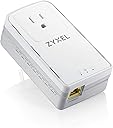
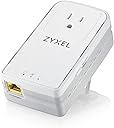

⚡ Power your home network with speed and style—no outlet left behind!
The Zyxel G.hn 2400 Powerline Ethernet Adapter Kit leverages cutting-edge G.hn Wave 2 technology to deliver up to 2400 Mbps theoretical speeds with ultra-low latency and jitter, ideal for 4K/8K streaming, online gaming, and stable video conferencing. Its integrated pass-thru power socket ensures no outlet is wasted, while the gigabit Ethernet port guarantees a smooth wired connection. Designed for plug-and-play mesh networking, it intelligently optimizes connections across your home’s electrical wiring, making it a future-ready solution for professional-grade home networking.


| ASIN | B0892PRMHM |
| Best Sellers Rank | #162 in Powerline Network Adapters |
| Brand | ZYXEL |
| Color | Brown |
| Compatible Devices | Smartphone |
| Customer Reviews | 3.8 out of 5 stars 618 Reviews |
| Data Link Protocol | Ethernet |
| Data Transfer Rate | 2400 Megabits Per Second |
| Hardware Interface | Ethernet |
| Item Dimensions L x W x H | 2.52"L x 1.65"W x 4.45"H |
| Item Weight | 12.98 ounces |
| Manufacturer | Zyxel |
| Mfr Part Number | PLA6456KIT |
| Model Number | PLA6456KIT |
| Product Dimensions | 2.52"L x 1.65"W x 4.45"H |
| UPC | 760559127145 760559126841 |
| Warranty Description | 2 Years |
A**R
Low latency and jitter and decent usable bandwidth
These performed better than I expected. Make sure to get the newest "G.Hn Wave 2" model: 6456. These use a very modern and new encoding technique that outperforms all the older styles of powerline ethernet devices. My deployment used two of these kits, four devices total. In between each node had tested IPERF3 speeds of 200mbit average, usually higher. That sounds bad compared to the promised "gigabit" speeds, but we're talking real 200mbit throughput, both TCP and UDP both directions. The UDP traffic sometimes reached 400mbps in IPERF3 when the two devices were really close or on the same breaker-circuit. The important part of connections for many applications like gaming, VoiP, video calling, (zoom, teams, etc.) is latency and jitter. Wireless networks generally have lots of latency and jitter, and by nature the signal quality varies depending on the activities in the area. All those "real-time" applications actually needs very little bandwidth, a zoom meeting only uses about 1.5mbps both directions per participant. But the quality of the call is affected by even small amounts of latency and jitter. These 6456 units have extremely low latency and jitter, which is a great thing. Comparable to hard-wire ethernet. I deployed one to test way out in the garage, really far electrical path to its nearest partner 6456 device; it only got about 20mbps usable in IPERF3 for TCP and UDP, but the latency was 1-4ms, no jitter, just like the closer higher bandwidth units. So even though in the worst case these devices will give "terrible" 20mbps out of claimed 1000mbps, the latency and jitter is low. And consider even "bandwidth intensive" uses like video meetings and conferences really only use about 1.5mbps. Gaming generally uses less than 200kbps during live matches. Netflix streams even only use a 3-5mbps for HD, and 10-15mbps for 4K. And with low latency and jitter, things will feel snappy even if your using the "worst case" setup for these devices on a long electrical path to the far reaches of your home. The more of these you attach the better the system gets. Each device on the power grid in your home connects to all nearby devices and finds the best path. They form their own mesh on your powerlines. These little units all have a decent web interface too so you can check their connection strength and status and configure settings like IGMP snooping. They act like a switch from any attached devices perspective, perfectly transparent passing of all Ethernet traffic. They have broadcast storm limiting on by default, and IGMP snooping on by default to limit major traffic problems, but even that can be turned off to ensure perfect transparency. I setup a Deco M5 wifi mesh using "Ethernet Backhaul" with these 6456 powerline adapters actually serving the backhaul connections of all the Deco M5 mesh units. This allowed me to get the cheaper "dual band" instead of "tri-band" mesh setup, and have lower latency and jitter on the mesh backhaul itself. The deco M9 wifi mesh has powerline features built in, but it depends on the older AV1000 powerline ethernet technology.
O**.
G.HN version: Basic setup is easy, performs well; Extra options available for power users.
How I'm using this: I wanted to extend my wireless network from the basement to the 2nd floor. These do not have wifi built in, but they do allow me to extend my "wired" network. I have one end plugged into the router in the basement, and the other end in a room on the 2nd floor. I then have an old router I turned into a AP connected to the 2nd floor unit. My house was built in 1990. Basic topology: CableModem--->WirelessRouter-->Zyxel-(2nd floor)->Zyxel-->Switch\AP How hard was it? Basic setup is super simple. Plug in each unit, and press the sync button for them to find each other. One they've found each other, you can then plug them into different outlets, to see where they perform best. Advanced setup can be a bit more complex, but is not needed unless you want to toy with these further. You'll want some networking experience, or ask someone to help. In order to find these devices on my network to log into them, I had to run an ip scanner to identify them. Then I was able to log into their internal management web pages to fine tune. Specifically, I could see what speeds the devices negotiated between each other, I could statically assign their management IPs, so they're easier to manage in the future, and you can update their firmware, and disable power save. How does it perform? Using iperf, I get about 112Mbps between 2 PCs from top floor to basement. Ping is between 1ms-15ms. Jitter is low, and throughput is consistent. How does this compare against AV2000 tech? I tried the TP Link AV2000 solutions, and I would get around 70Mbps. G.HN is superior. How does this compare against wireless? I have an AC2300 (1625+600) router in the basement. My laptop is capable of using all the full AC feature set, and it achieves slightly better throughput from upstairs, over wireless, same latency as over the powerline backbone. 120Mbps. So it's more or less a wash for this device. However, I have older devices that use 802.11an or 802.11gn, and these see increased throughput by connecting to the AP upstairs, with the Zyxel backbone sending traffic out to the router. Bottom Line: They work exactly how I need them to. Tips\Tricks: What outlets you try really make a difference. Some outlets, I would get maybe 90Mbps, but if I moved one end to an outlet just next to the previous, performance could jump by 20Mbps. Try different combinations to see what performs best. If you don't know how to use iPerf, your next best bet is to test using an internet speed test site. Remember, that you'll never see a higher speed than you provider gives you, so if you're trying to test speeds between PCs, this wouldn't tell you max throughput within your network.
S**O
Wifi mesh routers are a more reliable, faster solution
I used to be a big fan of ethernet over power technology, but this product disappointed me greatly. It claims a max of 2400 Mbps, but in reality it delivers far below the stated specs. The speeds I got were below 10% of the theoretical max. I wasn’t expecting 2400 Mbps, but I was surprised it was as bad as it was, even between a router on one side of my home office and a computer on the other. The outlets are less than 20 feet apart. Adding more nodes is plug and play, but when I added a fourth node I started getting red light indicators that would intermittently switch between nodes. I ended up returning these and going with Wifi mesh routers. The tech on mesh routers has improved greatly and are a much better solution now.
J**J
Performs better than most powerline. Lacks rsyslog
Between the two locations they are bridging, generally get 80mbit/s, 30 on bad days and 120 on good days. When plugged in right next to each other they got around 500mbit/s. Performance and link stability was better when changing mode from "PLC 100MHz MIMO boost" to "PLC 100MHz boost". Adds a bit of latency, generally 15-20ms but I have seen some spikes up to 50 or 100+. Remember that latency, like bandwidth, will be heavily affected by local usage conditions, I have not yet started to dig into if anything specific causes issues or into a way of monitoring and charting the negotiated bandwidth, will edit if I get around to it. VLAN tagged traffic seems to be passed with the tags intact but I haven't done a lot of testing of any edge cases around VLANs. It doesn't seem to be possible to set a specific VLAN for the management UI. No support for syslog or rsyslog, the only option for logging is to run an FTP server and configure it to upload logs there (yuck.). I haven't got around to doing this yet but will edit when I do. There's some kind of shell running on port 40000 but I haven't been able to find a way in yet. IPv6 is supported and works fine. IGMP and MLD snooping are supported, as is multicast filtering, not run into any issues but also not thoroughly tested. Decent if plain web UI, supporting all the usual configuration. Unfortunately not available over HTTPS. One thing to note, the encryption button broke when first pressed on one of the two adapters. Not a big deal as you can set it up in the Web UI. Overall, works fairly well for something like a low traffic auxiliary wireless AP or a printer, maybe basic web browsing and video streaming, but nothing highly interactive or with very high bandwidth demands. 4 stars assuming you have reasonable expectations about the performance of powerline (no, it won't get anywhere close to 2.4gbit, ever), would be 5 stars if I could set a VLAN and use rsyslog, or there was an API exposed for monitoring but looks like I'm going to have to put a scraper together for the bandwidth.
D**N
Upgrade from prior gen AV2 size and speed! This thing plugs!
I owned 4 units of the AV2 1000 Mbps from Zyxel. It works great and even used it in 2 different homes. It's been almost 5 years and we know technology changes rapidly. I previously had cable internet about 150 Mbps and 802.11 AC networking. In a 2 story home there were some signal loss on wifi and I also needed to hook up a workstation with a wired connection. Thats where powerline came in and it was great. Fast forward - I upgraded to gig internet, AX networking and a bigger home. The previous zyxel AV2 clocked in at 180 Mbps on 1 Gbps internet. It was OK but the units rated powering was 1000 Mbps. I could've tried a AV2000 but saw the new G.hn products available. Instead of paying for brand names, I looked at Zyxel again. Mixed reviews but I had a GREAT experience the first time so I ordered the new G.hn Wave 2 2400 Mbps and a competing g.hn from nexuslink to compare. Connecting these things are literally plug and play. I'm skipping over the details that I have 2 separate networks in the home (for work and personal). Upon doing the speed tests I was surprised that the Nexuslink came in slower and took longer to create a secure network. Zyxel took less than 10 seconds to pair the network and these new PLA6456 increased the speed from 180 to 250 Mbps. Solid upgrade for just $69.99. Time will tell if these new g.hn products have issues. But my other units (all 4 zyxel PLA5256) are still working fine after 5 years. Never had to mess with firmware or latency issues. I'm returning the nexuslink and ordering another pair of these to complete my home network. My last point is the actual size improved on the predecessor. You can't plug in a 3 prong plug with the older PLA5256. The top comes in at an angle and plugs the plug. The new units are smaller and flat shaped allowing for a plug to be up top. The Nexuslink is flat too but it's the large like a brick! Google Speedtest average of 3 runs: Zyxel PLA5256: 180 Mbps/23 Mbps Zyxel PLA6456: 252 Mbps/23.4 Mbps Nexuslink GPL2000PT: 142 Mbps/23.4 Mbps Xfinity gig, cat 6 cables everywhere, 3500 Sq ft home 2 stories and no issues. Tip: try different plugs if speed and latency is an issue. I got GFCI plugs scattered around the house but the GFCI plug gave me the best performance going from the 1st floor to 2nd floor. I tried 3 other plugs so I stayed with the GFCI outlet. Generally you want a power plug with minimal filters for best throughput.
M**E
They Work
I have worked with these before on a home IT solution project for a client, so I am very familiar with the brand and usage. These devices allow you to run WiFi over your electrical home wiring, instead of having to run network cable. So you can plug these in and use an ethernet cable from the outlet device to get internet signal to devices that may have trouble with WiFi signals. And yes they work great. The first device is plugged in near your router in a wall outlet and you attach an RJ45 network cable from the device to one of your router ports; this connection provides the WiFI signal to the rest of the home via electric wiring. Use the second device in the location where you have a WiFi signal problem and plug into a wall out near your TV, Printer, gaming PC and attach the network cable to wall outlet ZyxelPowerline and the network connection on the back of your problem device ... like magic, no more over the air wifi issues--these really are a great solution for difficult areas to reach even if you have a Mesh network already set up. I see the product has a lot of returns, but it could be from users who may not understand how to get them installed correctly. All I can say is as an IT professional, these thing's really do solve WiFI problems for different areas in your home. I have an all Zyxel setup in my home to include router, APs, and Powerlines. Zyxel has a great website dashboard (Nebula) to manage it all and highly recommend this brand.
S**K
Extremely disappointing performance, but milage may vary
I purchased this to improve my internet performance, but results were terrible. 40 megabits down is what was recorded in various speed test results and is very low. Especially considering that I have gigabit internet. I then tested a wifi 6 card and got almost 20 times the speed and more consistent ping times. It is clear that while powerline can be extremely useful in certain scenarios, various conditions regarding home electrical wiring or other issues can easily kneecap the performance of this system. I think testing this is a good idea to see how well it works, but unless you are getting at least 150 megabits per second down, I do not see the point unless the device you are connecting does not need high speed internet (which at that point you might as well consider using wifi).
A**R
Fast but takes a nightly vacation
I tried a pair of these Zyxel adapters, for the purpose of TV streaming and recording inside my home (I have a MythTV setup). This was not my first use of ethernet-over-power, and my criteria is always the same -- can I stream and record three HD shows at the same time? Well the Zyxel's were fast enough. The problem was that they weren't reliable enough. I thought that my connection might be dropping overnight, and so I setup some ping tests. I found that on multiple occasions the adapters would lose their connection for 30-40 minutes at a time. Sure, the connections re-established itself, and sure, it was at 3 AM, but still, that is not what you want in a network adapter. My previous link, based on ancient Netgear AV500's, was slow-but-stable 24x7. So back they went to Amazon. Besides reliability, another thing to consider is that the G.hn technology is not compatible with earlier implementations and, if you love these adapters, you'll have to replace all of your e-o-p endpoints with new Zyxel's.
A**R
Stopped Working After Two Months
This product stopped working after 2 months. One of the units no longer powers on. After a week going back and forth with their support, I was sent an RMA form that stated I had to send the units to California at my own expense. There was no other option. Shipping from Toronto to California is not cheap and doesn’t make sense since I can by new, better units for that price. Do not buy from Zyxel.
A**Z
Best Powerline adapter I've used
Excellent speeds for what it is. I did 3 tests. On the same floor relatively close to the primary adapter, I got almost 500mpbs. In the basement, I got roughly 125mpbs in multiple tests. On the furthest outlet from the hub, also in the basement, I got 75mpbs. In all tests, I always had the same quality for upload and the pings were excellent with no drops (12-14). This thing can handle 4k streaming and possibly 8k within the proper setup with a relatively close distance on the same floor. If you can't run ethernet or use MoCA coaxial adapters, this is your best solution for a hard-wired connection. MoCA and Powerline are great solutions for freeing up your wireless traffic when you have many devices connecting to your router. Best: Ethernet Better: MoCA Good: G.hn Powerline
T**N
Solid connection
Works very well; solid connection from anywhere but WIFI is still faster. Use this if WIFI doesn’t work for you, you won’t be disapointed.
M**E
Booster
Not what we thought it would be but it does work
P**.
Works very well
I used to have connection issues out of nowhere on certain games on Xbox, which was was connected to wifi wirelessly. Now I don’t have any more issues! ++
Trustpilot
5 days ago
2 months ago