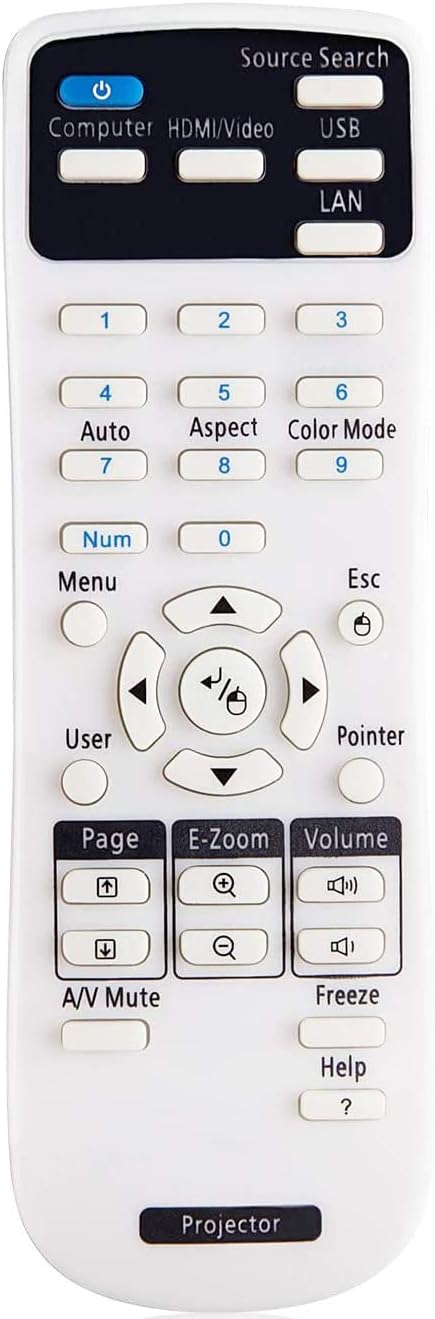
🎥 Command your Epson projector like a pro—fast, flawless, and fuss-free!
This Smartby remote control is engineered exclusively for Epson Powerlite, Home Cinema, EB, EX, VS, BrightLink, and EMP series projectors. Featuring infrared technology with a 10-meter range and lightning-fast 0.2-second response time, it requires no programming—just insert batteries and go. Built for durability with over 100,000 clicks tested, its ergonomic design ensures comfortable use during extended presentations or movie nights.
| ASIN | B09VWZX7S9 |
| Additional Features | Ergonomic, No Programming Required |
| Battery Type | Alkaline |
| Best Sellers Rank | #10,334 in Electronics ( See Top 100 in Electronics ) #556 in Remote Controls (Electronics) |
| Brand | Smartby |
| Button Quantity | 10 |
| Color | black |
| Compatible Devices | Projector |
| Connectivity Technology | Infrared |
| Controller Type | Button Control |
| Customer Reviews | 4.3 out of 5 stars 245 Reviews |
| Item Weight | 2 Ounces |
| Manufacturer | Smartby |
| Max Number of Supported Devices | 1 |
| Maximum Number of Supported Devices | 1 |
| Maximum Range | 10 Meters |
| Model Name | SMTB-Ep-Projector |
| Model Number | SMTB-Ep-Projector |
| Special Feature | Ergonomic, No Programming Required |
C**I
Universal and functional!
These go missing in my school all the time and I had low expectations after reading some of the views, but also desperate to find a way other than stacking chairs on top of each other to turn my projector on. It works perfectly and haven't had any issues since I started using it 3 months ago.
J**R
Very User Friendly
This is a replacement remote that is very user friendly.
M**N
Justo lo que necesitaba
Justo lo que necitaba al precio justo y la calidad ofrecida 100/100
M**D
Did not work at all for Epson EX3280.
Did not work at all for Epson EX3280. Had to order a different one using epson product code.
A**R
must change setting on projector for this remote to work
I bought this remote for my Epson PowerlitePro G6450WV that was missing a remote. I tried it and it didn't work. I ordered a replacement and that didn't work. But then I thought there might some kind of setting that needed to be adjusted to work with a non OEM replacement remote. I did some deep searching in the manual, available online, and sure enough I found instructions. In the Menu go to Extended Settings and then to Operation. Under Operation change the remote control setting from "Normal," which works with the original remote to "Simple," which works with remote controls from other Epson projectors and at least this generic remote control. It works fully and perfectly now, and at an amazingly low price. I suspect that following this procedure works for other projectors and other replacement remote controls. These instructions should come with the devices!
K**E
Did the job good
I got this remote for some projectors my buddies own to play a joke and freeze the screen stuff like that and it works great haven’t come across any that it doesn’t work on surprisingly but i did notice for some reason the battery was just randomly dying even when i didn’t use it so be warned sometimes batteries die sometimes they don’t but other than that works amazingly good range control buttons gets the job done well and efficiently.
R**O
No compatible siempre
No es compatible con modelos nuevos
L**A
Remote
Remote seem fine but didn't work with my particular projector but I kept may work with a different one. Would order again as long as I know it is correct remote
Trustpilot
4 days ago
2 months ago