🏷️ Label like a pro, organize like a boss!
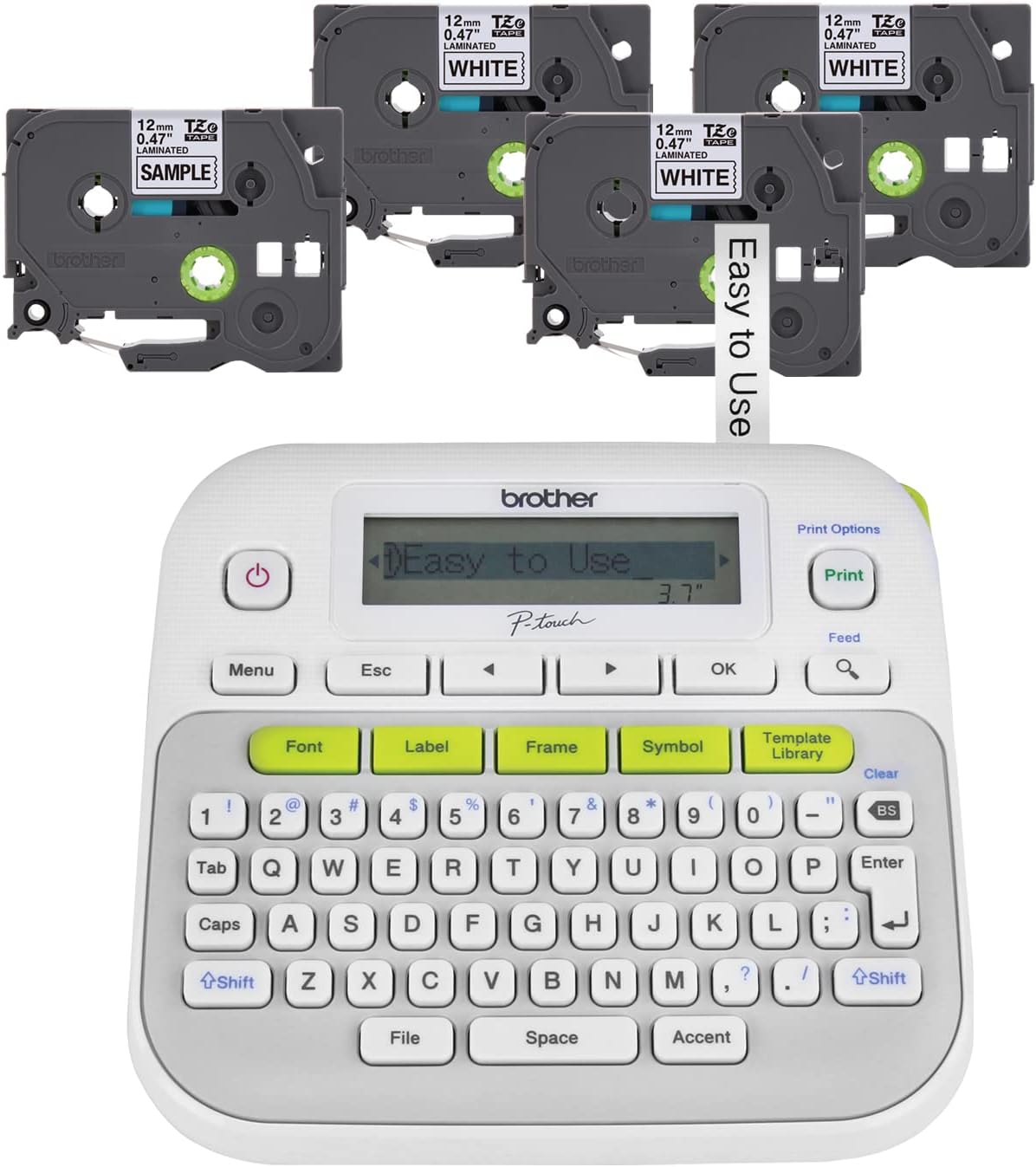
The Brother P-touch PT-D210 is a compact, easy-to-use label maker designed for home and office organization. It supports four tape widths (3.5mm to 12mm) and offers extensive customization with 14 fonts, 98 frames, and over 600 symbols. Its durable laminated tapes are water, fade, and heat resistant, perfect for indoor and outdoor use. Powered by six AAA batteries or an optional AC adapter, it’s portable and versatile. The bundle includes four black-on-white laminated tapes, making it a complete labeling solution for professionals and multitaskers alike.


| ASIN | B09QXZ7ZRD |
| Additional Printer Functions | Print Only |
| B&W Pages per Minute | 20 ppm |
| Best Sellers Rank | #481 in Office Products ( See Top 100 in Office Products ) #3 in Label Makers |
| Brand | Brother |
| Built-In Media | PT-D210 Label Maker, Black on White Standard Laminated TZe Label Tape 0.47” (12mm) wide x 13.1’ (4m) long, 3 Black on White Laminated TZe Label Tapes 0.47” (12mm) wide x 26.2’ (8m) long, User’s Guide |
| Color | White |
| Color Depth | 1 bpp |
| Connectivity Technology | wired |
| Control Method | Touch |
| Controller Type | Push Button |
| Customer Reviews | 4.6 out of 5 stars 3,867 Reviews |
| Display Type | LCD |
| Dual-sided printing | No |
| Duplex | Simplex |
| Global Trade Identification Number | 00012502668022 |
| Hardware Interface | USB |
| Ink Color | Black |
| Is Electric | Yes |
| Item Dimensions D x W x H | 5.9"D x 6.2"W x 2.7"H |
| Item Type Name | Dot Matrix Printer |
| Item Weight | 1.1 Pounds |
| Manufacturer | Brother |
| Maximum Copies Per Run | 9 |
| Maximum Copy Resolution Black and White | 180 |
| Maximum Copy Resolution Color | Black |
| Maximum Copy Speed Black and White | 20 ppm |
| Maximum Media Size | 12 x 9 mm |
| Maximum Print Resolution Black and White | 180 |
| Maximum Sheet Capacity | 150 |
| Model Name | Brother PTD210 |
| Model Number | PTD210BP |
| Model Series | P-touch |
| Number of Trays | 4 |
| Other Special Features of the Product | Portable |
| Output sheet capacity | 36 |
| Paper Size | 12 |
| Print media | Labels |
| Printer Connectivity Type | wired |
| Printer Output Type | Monochrome |
| Printer Type | Thermal |
| Printing Technology | Thermal |
| Processor Count | 1 |
| Resolution | 180 x 180 dpi |
| Scanner Type | Portable |
| Special Feature | Portable |
| Specific Uses For Product | Home/Office |
| Total USB 2.0 Ports | 1 |
| UPC | 012502668022 |
| Warranty Description | One-year (1) limited warranty and free phone support for the life of the product |
| Warranty Type | limited warranty |
L**A
Super Helpful for Organizing Storage
I have been using this great little Brother Label Maker to help me better organize my storage items. I recently used it to label all my the storage boxes for my Christmas decorations as well as my art supplies boxes. I create labels of each item in the box for all four sides so that no matter which direction the box gets put back on the shelf, I can still see the labels and easily know what's in there at a glance. It's been fairly easy to use as well. I feel the tape is a bit pricey, but overall I am very happy with this purchase and the quality of the resulting labels. I also like that it offers you a good variety of font sizes and style options to suit your labeling needs. It's been helpful to have the option of using either batteries or a plug. I have found that using it with batteries is easier, but if they were to run out unexpectedly, you could always just plug it in. The batteries have lasted a fairly long time too; longer than I had expected. I definitely feel I can recommend this label maker.
C**O
Easy to use and makes good labels
This label maker is not cheap, but it was worth the money for me. It works as a stand-alone unit (no connection to any device necessary) and is very easy to use. You can customize the fonts and font sizes. The label is also very durable and sticks on containers well. They have not faded nor come off after freezing and multiple hand washing.
A**N
Best quality and really worth it
Was wondering if it was worth the money before buying, but turns out to be worth every penny. Absolutely a breeze to use. Does waste a little tape at the beginning of each strip, but that's life. Make sure you set it to minimize the waste at the end of the label. Tape can be expensive, so be sure to take advantage of those sales and buy the original brand, not the cheap knock-offs.
D**.
Nice little label maker
This p-touch label maker is easy to operate and doesn’t have a lot of complicated commands to do what you need it to do. It’s output is clean and doesn’t smear. It’s easy to change the font size and type. You can change the margin of what is printed to the tape so that wasting of tape is kept to a minimum. Overall, this machine is well thought out and operates, simply. The one feature that it doesn’t have, which would be nice would be for it to maintain its font size and margin settings in memory after the unit is turned off. While it doesn’t require batteries, it can use them, and for short term storage, they save the text that’s on the screen. It would be nice if font type, size, margin and other settings could be backed up by the battery when the unit is turned off but these are quite easily changed. Other than that, I think this brother p-touch label printer is a fantastic, easy to use, high quality device that many would find useful in many home and professional applications. A very useful, easy to use, handy device.
C**S
It works well, but is super wasteful (probably by design)
It's a very well rounded and capable label maker. You can get accented letters, different styles, letter sizes, etc. I have two gripes with this label maker. First, the label tape is expensive. So if you use your label maker a lot, it's going to be like printer ink, worth its weight in gold. Second is my biggest gripe. It literally forces you to have an inch of unused space on either side of your text. You're quite literally wasting 2 inches of label FOR EACH PRINT. I can pretty much guarantee you they do this so you go through tape faster and have to buy more. There's no reason to have this much space on either side. Even if you needed it in some cases, you can always just add space characters on either side to get it. Edit: I should clarify, you CAN edit the margins a bit, but even with the setting to get it as close as possible ("Chain print") it still spits out a half inch of tape that you have to cut off before it prints your label with almost no margins. While that does save you 1.5" of tape, it's still such a waste.
G**E
Easy and fun to use
This is a great little machine. I’ve used it often without any problems. Easy to load the cartridges. Pretty self explanatory on use too.
J**.
Good quality, does what I need
Does everything and more. Good quality and very versatile.
A**F
Own Three for My Business — Super Reliable and Easy to Use!
I own three of these Brother P-Touch PTD210 label makers for my business, and they have been fantastic. They’re easy to use, even for quick labeling tasks, and the bundle with 4 label tapes included is a great value to get started immediately. The labels are clear, durable, and professional-looking, perfect for organizing files, shelves, and office supplies. The device is lightweight, portable, and simple enough that anyone on my team can pick it up and use it without instruction. Overall, this is a reliable, high-quality label maker that I’ve trusted across multiple locations in my business. Highly recommend for anyone needing efficient and professional labeling solutions! They are fast, and quiet. No Bluetooth Connectivity and batteries last forever! not really but a long long time.
Trustpilot
4 days ago
1 day ago