Buy anything from 5,000+ international stores. One checkout price. No surprise fees. Join 2M+ shoppers on Desertcart.
Desertcart purchases this item on your behalf and handles shipping, customs, and support to Indonesia.
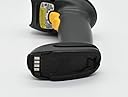
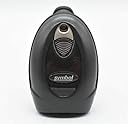
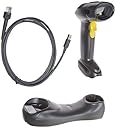
This pre-owned or refurbished product has been professionally inspected and tested to work and look like new. How a product becomes part of desertcart Renewed, your destination for pre-owned, refurbished products: A customer buys a new product and returns it or trades it in for a newer or different model. That product is inspected and tested to work and look like new by desertcart-qualified suppliers. Then, the product is sold as an desertcart Renewed product on desertcart. If not satisfied with the purchase, renewed products are eligible for replacement or refund under the desertcart Renewed Guarantee. Review: The Best scanner i ever used. I work at shipping place taking 100 or more packages a day in all sort of forms. This scanner can read em all! Wet or faded! In case the scanner failed to read. Contact the seler for a help. I m glad i did. Now mine reads 100% of times Thank you Review: Guys, to save money, this will be a good choice if you can figure out how to setup by yourself. battery capacity is not large, checked on desertcart, all such batery packs are much the same. scanner and cradle are worn heavily but can do the job. I bought 3 of them, 1st is ready to use, 2nd is able to scan but unable to transfer data to computer. 3rd is not able to scan. Follow below steps if you want to fix it.(connect 1 scanner to computer at 1 time. when it was done, start again for next scanner) 1. download quick guide online for DS6878 2. connect hardware and cables as instructed. 3. scan set default bacode in page 2. 4. scan the 1st barcode in the part of USB in page 1. If you are lucky, it works now. Test its output in an excel or word file. if not, continue, 1. scan "Cradle Host", the 1st barcode in page 2. 2. scan the barcode on your physical cradle. try again. if it doesn't work, try to read the full quick guide, the part of errors, to diagnose by yourself. if it works but barcode itself is partially recognized, download full instruction manual, and try switch decoding mode to barcode 128 or barcode 39. Good luck!
| ASIN | B07NG2VSQ8 |
| Best Sellers Rank | 6,165 in Amazon Renewed ( See Top 100 in Amazon Renewed ) 7 in Renewed Office Products 345 in Barcode Scanners |
| Brand Name | Zebra |
| Compatible Devices | Smartphone, Tablet |
| Country of Origin | China |
| Customer Reviews | 4.0 4.0 out of 5 stars (281) |
| Item Weight | 1 Pounds |
| Manufacturer | Zebra/Motorola |
| Maximum Storage Temperature | 158 Degrees Fahrenheit |
| Network Connectivity Technology | Bluetooth, USB Cable |
| Number of Batteries | 3 AAA batteries required. |
| Operating Voltage | 5 Volts |
| Power Source | Corded Electric |
| Product Warranty | 1 year limited warranty |
| Real Angle of View | 90 Degrees |
| UPC | 647213766561 |
R**T
The Best scanner i ever used. I work at shipping place taking 100 or more packages a day in all sort of forms. This scanner can read em all! Wet or faded! In case the scanner failed to read. Contact the seler for a help. I m glad i did. Now mine reads 100% of times Thank you
Y**X
Guys, to save money, this will be a good choice if you can figure out how to setup by yourself. battery capacity is not large, checked on amazon, all such batery packs are much the same. scanner and cradle are worn heavily but can do the job. I bought 3 of them, 1st is ready to use, 2nd is able to scan but unable to transfer data to computer. 3rd is not able to scan. Follow below steps if you want to fix it.(connect 1 scanner to computer at 1 time. when it was done, start again for next scanner) 1. download quick guide online for DS6878 2. connect hardware and cables as instructed. 3. scan set default bacode in page 2. 4. scan the 1st barcode in the part of USB in page 1. If you are lucky, it works now. Test its output in an excel or word file. if not, continue, 1. scan "Cradle Host", the 1st barcode in page 2. 2. scan the barcode on your physical cradle. try again. if it doesn't work, try to read the full quick guide, the part of errors, to diagnose by yourself. if it works but barcode itself is partially recognized, download full instruction manual, and try switch decoding mode to barcode 128 or barcode 39. Good luck!
J**N
The quality of refurbish was less then OK, still dirty and not clean properly.
P**V
Works great, solid high quality scanner.
A**.
was unable to connect with computer or update firmware. got a response from Zebra that said this was configured to a specific customer and can't be changed and is also no longer supported by Zebra.
Trustpilot
3 weeks ago
2 months ago