Desertcart purchases this item on your behalf and handles shipping, customs, and support to Indonesia.
🌍 Stay connected, secure, and ahead—wherever your journey takes you.
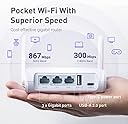
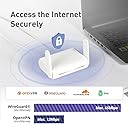
The GL.iNet GL-SFT1200 Opal Travel Router is a compact, lightweight AC1200 dual-band router featuring 3 gigabit Ethernet ports and pre-installed OpenVPN & WireGuard for robust security. Designed for travelers and remote professionals, it offers easy setup, retractable antennas for enhanced coverage, and the ability to convert public WiFi into a private network, ensuring fast, secure internet access on the go.


| ASIN | B09N72FMH5 |
| Antenna Location | Business, Gaming |
| Antenna Type | Retractable |
| Best Sellers Rank | #47 in Computers & Accessories ( See Top 100 in Computers & Accessories ) #4 in Computer Routers |
| Brand | GL.iNet |
| Built-In Media | Ethernet Cable, GL-SFT1200 (Opal) router with 2-year warranty, Power Adapter (US Plug), User Manual |
| Color | White |
| Compatible Devices | Gaming Console, Personal Computer, Security Camera, Smartphone, Tablet |
| Connectivity Protocol | Ethernet, Wi-Fi |
| Connectivity Technology | Ethernet, USB, Wi-Fi |
| Control Method | Touch |
| Controller Type | App Control |
| Coverage | Improved with Extended Antennas |
| Customer Reviews | 4.2 out of 5 stars 8,062 Reviews |
| Data Transfer Rate | 1200 megabits_per_second |
| Frequency | 5 GHz |
| Frequency Band Class | Dual-Band |
| Item Dimensions L x W x H | 4.65"L x 3.35"W x 1.18"H |
| Item Highlight | AC1200 dual-band Wi-Fi, 3 gigabit ports, OpenWrt with OpenVPN and WireGuard, 30+ VPN services, pocket 145g |
| Item Weight | 0.3 kg |
| LAN Port Bandwidth | 10/100/1000 megabits_per_second |
| Manufacturer | GL.iNET |
| Maximum Upstream Data Transfer Rate | 540 megabits_per_second |
| Mfr Part Number | GL-SFT1200 |
| Model Name | GL-SFT1200 |
| Model Number | SFT1200 |
| Number of Antennas | 2 |
| Number of Items | 1 |
| Number of Ports | 3 |
| Operating System | OpenWrt |
| Other Special Features of the Product | Access Point Mode, Internet Security |
| RAM Memory Installed | 128 MB |
| Router Firewall Security Level | High |
| Router Network Type | wired |
| Security Protocol | OpenVPN, WireGuard, WPA2-PSK, WPA3 |
| Special Feature | Access Point Mode, Internet Security |
| Unit Count | 1 Count |
| Voltage | 5 volts |
| Warranty Description | 2 Years |
| Wi-Fi Generation | Wi-Fi 5 |
| Wireless Communication Standard | 802.11a, 802.11ac, 802.11b, 802.11g, 802.11n |
| Wireless Compability | 802.11a, 802.11ac, 802.11b, 802.11g, 802.11n |
K**E
Made travel with wifi devices SO much more convenient.
This little travel router is an awesome little workhorse. It does a great job of keeping us connected when we travel with the benefit of not having to deal with limits on how many devices we can connect to hotel wifi like some places have. We connect this device only and enjoy the fact that all of our other devices already recognize if because they've already connected to it before, saving the need to log in to the hotel wifi separately for each device we have. The speed is quite sufficient for streaming when the available wifi is fast enough, signal strength is good and has never failed to provide great connectivity in any location we've taken it to. The setup is reasonably simple for anyone who understands what a router does, using the internal web app interface and the included instructions. I recommend setting it up at home on your home wifi and then connecting any devices you travel with to it with them set to remember the connection. This makes it a simple matter to connect the router at your destination and have all of your devices automatically connect to the router every time. The controls are simple and the instruction book is clearly written. One upgrade I'd recommend is to purchase a small case to keep the router and accessories in to minimize the chance of misplacing them. The one we bought was inexpensive and suggested by Amazon when we bought the router and it holds and organizes the router, power supply, and cables perfectly.
T**D
GL.iNet Opal Travel Router - Perfect VPN Companion for Trips
Small, easy to throw in a bag for travel. Pros: - Compact AC1200 dual band performance - Runs NordVPN or other VPN software directly on the hardware (no device configuration needed) - Multiple modes (router, repeater, bridge, access point) - Gigabit Ethernet + USB 2.0 ports - Easy setup with good guide Cons: - None noted for travel use Great for taking your full VPN protection with you, isolating a single device, or securing public WiFi. I use it to run VPN in hardware mode so all connected devices are protected without individual setup. Solid little router for travelers or anyone wanting more control over their network. Would I recommend? Yes, 5 stars.
S**U
So far, very good and easy to set up for tethering
So far, just by following the video instructions for tethering iPhone's internet (using iphone's hotspot) everything went very satisfactorily. I was able to set up my Wyze pan cam in my office , at work, where I usually have an enterprise wifi connection (that doesnt allow any private wireless cameras to their wifi network). By using my iPhone's hotspot I could use this router to broadcast a wifi signal that my wifi camera could detect. I used the browser from my iphone 11, to keep things easy. If you log into the Admin portal (gateway) while using a computer, the user interface might look different and can complicate things for those who are not used to working with computers. I made sure I turned off the 5Ghz bandwidth because my wifi camera only connects to 2.4Ghz. Then I followed the steps from the video shown on here (on amazon), where pictures show the features of the router. Then I renamed the SSID of router to make it less obvious on the network from work. I also changed the password for the SSID to something else because by default the password is "goodlife", and anyone could use your wifi if they see your default SSID (GL - ....) and google the manufacturer's default password for that device. In case you wanna use it (as I did) to connect your security wifi camera on your iphone in your office , or even in your car, while using your phone's hotspot, you can follow the instructions from the video of this router from amazon. You'll have to connect your iphone to the router at some point , according to the instructional video (I used the USB port too) , and then put your Wyze pan camera in set up mode, follow the steps for setting up your camera, and you're connected. I noticed that the connection might not be stable based on how good your Hotspot connection is in that area. That causes my router to show a "growing blue light " on the router as if it would keep try to get internet from the iphone. My LTE data in my office is bad because the building affects my cell signal. But Im glad because I can still record with my security camera even after i disconnect from the camera to leave home for the day. The camera keeps recording after that on its 256GB microSD card. And I can review the recordings next day on my phone's Wyze app, when I connect to the router. So, the point is that this router helped me achieve what other pocket routers like TPLink, could not. The easy user interface for tethering made the difference, plus the instructional video. I gotta say that this router still requires a basic willingness to learn how to use a computer or an iphone, because even the concept of "tethering" could be too difficult to people if they 're not used to spending some time with experimenting with technology. Shalom!
D**K
Previous Frustrations Now Fixed!
Firmware 4.8.3: this update, released 2026-07-03 has been a MAJOR improvement! Logging into captive portals is so much easier and reliable now with this update. I am therefore changing my review rating from 1 to 4 stars. Can’t give it 5 stars because of all the hours and hours of frustration this unit caused me with the previous firmware version. The VPN dashboard massively improved too. In the past week I’ve stayed in six different hotels and each time logging into the hotel’s captive portal has been very easy, unlike with the prior FW version. I’m glad this thing is working so well now because I’ve invested so much time documenting my setup with detailed screenshots of all my configuration requirements. (The online documentation for this device is not adequate, IMO). Another thing that may have improved operational reliability for me is enabling only one wireless 5G network. I’ve configured the two guest networks and the 2G network, but I leave those radios disabled, and that, at least with previous firmware, improved device reliability. The device is also setup to reboot itself each morning at 01:00 am. Sometimes, at some hotels, I will need to manually authenticate with the hotel network again in the morning, but I think that is due to older hotel systems that don’t cache successful client authentications. Anyway, I’m here to report good news with this firmware update! Previous Updated Review: On a recent trip overseas I had better luck with this thing, even successfully logging into a hotel's captive portal. HOWEVER, it's totally hit or miss. I got more success when I disabled the 5G radio and just used it in 2G mode all the time. Three different hotels over a 20 day period and a total of about 5 reboots -- it generally worked. However, on morning of my last day it seemed to crap out. I'm so tired of troubleshooting this thing. So many times I've resorted to the "nuclear option" of resetting the firmware and re-entering all settings and passwords. I don't want to do that anymore. I want to get something better, but I see comments like this for all the other "travel" sized routers too. Again, I think that deleting WAN access points no longer needed (like hotels you're not coming back to) is one part of this multi-faceted problem. I use a VPN with this device, but the real advantage is that after you connect this router to the host network, ALL your already paired WiFi devices then auto-connect to the router when you move from hotel to hotel. This is the convenience I'm seeking, but unable to get reliably from this model. Prior Review: Before traveling I had it set up for a few months at home and it worked fine in repeater mode for weeks without reboot or tweaking of any kind. I had my phone and tablet connect to this router and they were able to re-establish Wi-Fi connection without problem as I came and went. The device apparently was able to routinely re-negotiate DHCP leases transparently. No hiccups at all. I would give the device a 4+ rating. (My gripes would be with the organization of the web pages on the interface.) However, after more than four weeks of travel I have to downgrade my rating of the device due to near endless frustration trying to connect to “captive portals” some of my hotels use. Before upgrading to firmware 4.3.25 I was NEVER able to connect the device to a captive portal (where you need to log in on a web page and provide additional credentials to gain Wi-Fi access). I have spent hours and hours scouring the web and YouTube videos seeking help, but nothing seemed to work. At the three week mark I decided to upgrade the firmware to 4.3.25. It then seemed I was able to get through at least one captive portal. Just once, but not at the next hotel. Again, I spent hours on this. I finally decided on the nuclear option: reset the device to factory settings and reconfigure. That worked! For the next two hotels I didn’t have any problems. However, at a new hotel last night the device worked for an hour and then it is unable to reconnect to the internet — and there’s no captive portal here. My next step is to do a factory reset again, reconfigure, including VPN credentials, and I expect it will work again. One action that might correlate with this problem is deleting access points for hotels I’m not returning to. I am hoping for a firmware upgrade that will fix this annoying and recurring issue. I do not want to be doing a factory reset at each new hotel!
W**.
Great little Device!
I bought this for my son because he was traveling for work and had limited WiFi access, but he had an Ethernet jack in his room. He had mostly positive things to say about it. The GL.iNet GL-SFT1200 (Opal) Secure Travel WiFi Router is an impressive device designed for those who need secure and reliable internet access while on the go. Here are some key aspects of the router that make it stand out: Performance The Opal router is an AC1200 dual-band WiFi that ensures fast and stable internet connections. With support for both 2.4GHz and 5GHz bands, it provides flexibility and optimal performance, catering to different devices and environments. The dual-band capability ensures minimal interference and maximized speed, making it suitable for streaming, online gaming, and heavy browsing. Security One of the most notable features of this router is its emphasis on security. It supports multiple VPN protocols (OpenVPN, WireGuard), which helps maintain privacy and protect data while connected to public WiFi networks. This makes it an excellent choice for business travelers and those concerned about cybersecurity. Portability The GL-SFT1200 is compact and lightweight, making it highly portable. Its small size allows it to fit easily into a bag or even a pocket, making it a convenient companion for travelers. Despite its compact design, it doesn't compromise on performance or features. Ease of Use Thanks to the user-friendly interface, setting up the router is straightforward. The GL.iNet app provides an intuitive way to manage the router's settings, including setting up VPNs, configuring network settings, and monitoring connected devices. The router also supports a range of advanced features, such as network segmentation and guest WiFi, which are easy to configure even for non-tech-savvy users. Connectivity The router comes with three Gigabit Ethernet ports, providing flexible options for wired connections. This is particularly useful in hotel rooms or conference centers where wired connections may be more reliable or necessary. The Gigabit ports ensure that you can maximize your internet speed without bottlenecks. Value for Money Given its performance, security features, and portability, the GL.iNet GL-SFT1200 offers excellent value for money. It's competitively priced and provides features that are typically found in higher-end models. Its robust security and ease of use make it a worthwhile investment for anyone needing reliable internet access while traveling. Conclusion The GL.iNet GL-SFT1200 (Opal) Secure Travel WiFi Router is a powerful, secure, and portable solution for travelers. Its dual-band AC1200 performance, advanced security features, and ease of use make it an ideal choice for both personal and professional use. Whether you're a frequent traveler, a remote worker, or just need a reliable backup for your home network, the Opal router delivers exceptional value and performance. The only minor drawback is that it could benefit from a longer battery life for extended use without access to power, but overall, it's a top-notch travel router that delivers on all fronts.
T**S
Great router at a good price
Fantastic router! I just set it up for someone who needed to print, to a local printer, from her computer, iPhone and tablet. She was using her building's Internet service. This was relatively easy to setup and I managed to get the printer connected to it as well. Please note: This router DOES NOT have a WPS button, so if you need to connect a device via WPS, you'll need to program the wireless settings into that device some other way. In my case, it was a HP printer and it had a web-based control panel I could use to connect the printer to the travel router. The router is small, has gigabit Ethernet ports and runs OpenWRT, which provides a great (I think so) interface for configuration and monitoring the device. This is my first travel router and I'm totally sold!
J**E
Works very well in "Repeater mode".
The router performance is about the same as the Tenda AC1200 AC8 it replaced. It does that with MUCH smaller antenna and only two of them compared with 4 antennae of the AC8. Prepare for very small fonts in the start up instructions! I did have an issue and needed to go online to the site for clarification. Possibly due to language differences there was confusion as to which password to enter into the router once it rebooted. Either the new router password or the host password. That was resolved and the router has run smoothly since 12/11/24. It was setup in our house but it will be transferred to an office environment shortly where its host and password will again be changed before it settles into service at that location. Based on its performance we ordered three more. This router was approved for use by our national organization. We also bought the carry cases for them as Amazon offered a case designed for this router. We do need a case to protect the router when not in use. If you use "WISP" mode to connect to the host wirelessly this router does not have one. Its equivalent mode is "Repeater" and it works the same as WISP as it connects to the host and on to the Internet in our case. We have not used the router in any other mode, however we expect that it will meet our expectations. There are two LAN and one WAN port along with a 2.0 USB port. With its small size we may use a switch for allowing access to other devices. A four port switch device is very light and won't interfere with portability this router affords. The color blends in very well with our office surroundings. The AC8 was only offered in black or white colors and with 4 large antennae it did not blend in very well. Packing it for travel or storage was very annoying. This Opal router works well and has side benefits. The antennae design worked well in a TP-Link access point we used several years ago. The Internet speed test we ran did not differ very much from the AC8 design so we expect about the same performance from this smaller unit as compared to the larger Tenda AC8 design. I also bought one for our house. A nice touch was the power supply and cord. Both match the unit color and the plug has a unique design. The cord is a flat design that FOLDS very nice within itself. I am NOT going to purchase round cords any longer. When one coils (folds) this cord just follow the contours that you see when you first look at the unit in the box. You can then fold it back into the same size. I took a photo of it so I could refold it correctly and it DID! A nice small package without using an elastic. Its funny how the little things add up to a nice design. The Gli folks have a nice design throughout the product. Even the box design is very well done. BTW the route unit takes up about 1/2 the box and the cord and power supply take up the other half. The router is in a soft sleeve and one will realize it is only 1/2 of the box size. The plug of the power cord will need a 10 second assembly. It seems to be a universal plug that allows the unit to adapt to US, EU and other electrical systems. The contacts assembly are separate from the remainder of the cord assembly. The instructions indicate how to connect the contacts to assemble it to the cord unit by aligning the contact unit with the cord unit and then clicking the two into place with a slight twist of the wrist. Sounds complicated BUT it is like aligning an aspirin bottle top with the bottle edge and slightly twisting the top on. The U.S. model has a standard U.S. plug contacts. The units going to the EU probably have the EU type contact assembly. Slick! We do not need speed greater than the AC1200 standard right now. However, if we need more speed or more features the GLi company will be the first place we will look. GLi put a lot of thought into their design and it makes me confident that their electronics are designed with the same care and detail.
M**K
5ghz wifi stability fix!
Significant update for 5ghz wifi instability at the end of the review.... The following was earlier in the year.. I'm a little skeptical a out the 5ghz radio. My current setup is in my RV with this used as an access point to my wired router with Starlink. I have the wifi 2.5 and 5ghz seperated because of some older devices that wont connect to the combined setup. I've noticed throughout the day if i do a speedtest to fiber test servers I get speeds of less than 60 mbps while on the 5ghz. I will then toggle to the 2.4 ghz and back to the 5ghz and the speedtests are now where they should be at 260 mbps+. I've found myself having to do this multiple times throughout the day doing speed tests. I have both radios on max power and have adjusted the 5ghz frequency all over the operating spectrum with the same results. Don't know what to make of it. Other than that, the router seems to be capable of great stuff Update... Replacement ordered. 2.4ghz and 5ghz both throttle down to 20-30 mbs download after awhile. Could be 5 minutes or 2 hours Both have to be toggled or disconnected and reconnected to regain full capable download speeds. I have adjusted and locked each frequency on specific channels. Tried disabling and re enabling certain bands. Changing power supply cords. Swaped the cat 6 cables from wan to lan and back again. Used different cables. Firmware downgrades and upgrades. I have tested every changable option in the Luci advanced settings for the wifi. Absolutely nothing fixed this issue. Im hoping this was just a dud router Next update: New router recieved and setup. Problem persists in access point mode. Seems that 5g speeds kick down to 30mbps or less after awhile of connection. Only correction to this is to toggle to the 2.4ghz ssid and then toggle back to the 5ghz ssid. Simply turning wifi off and back on, without toggling out if the 5ghz, does nothing to correct the issue. My Roku device has been experiencing the same results. In my opinion, that makes this device a complete dud. Don't know its a hardware or firmware issue. Both Opal devices showed this problem. Months later..... Determined to figure out what was really going on, i found that my old Samsung s10+ did fine on 5ghz wifi for days. So i was set on the notion that possibly my pos Motorola edge 2023+ i use all the time was having the issue. Tried reseting the phone's network settings to no avail. Looking back into the opal's advanced settings (luci), I navigated to network:wireless: (radio 1:master "your ssid 5ghz". Scroll to the bottom for Interface Configuration. Select Advance settings tab underneath. At the bottom is an option to check "Disassociate On Low Acknowledgement". Mine was checked, so I unchecked it and it seams that this is the fix! My Motorola nows stays stable with the 5g wifi giving me full bandwidth without interruption. According to Google.... ""Disassociate On Low Acknowledgement" is a wireless setting in routers (common in OpenWrt, DD-WRT) that forces an access point (AP) to drop clients if they fail to acknowledge packets, often due to weak signals or inactivity. Disabling this feature often resolves random Wi-Fi disconnections, authentication errors, or sluggish throughput on mobile devices." Hoping this may help someone. I upgraded the stars from 1 to 4.
R**N
المنتج ممتاز كما بالوصف
الراوتر ممتاز والشركة محترمة جدا طلبت فاتورة وتم ارسالها
N**V
Money well spent
I am quite pleased with the product. Compact enough size for travel. Works great with almost any type of usb power source. Easy to set up, with a lot of features. The VPN functionality is especially straightforward.
S**2
Miracoloso per il Gaming in 5G/FWA: Addio Lag con l'SQM!" ⭐⭐⭐⭐⭐
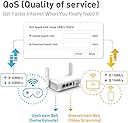
Se come me giocate online (Warzone, FIFA, Fortnite) ma avete soltanto una connessione 5G o FWA e soffrite di picchi di ping assurdi (800-1000ms) non appena qualcuno in casa apre un video o un social, questo router è la vostra salvezza. Il problema non è la velocità del 5G, ma il Bufferbloat (la saturazione della coda dei pacchetti). L'Opal, nonostante il prezzo contenuto, permette di attivare una funzione professionale chiamata SQM (Smart Queue Management) tramite le impostazioni avanzate (LuCI). Ecco come ho risolto il lag su Warzone con modem WindTre 5G: 1. Entrate in Advanced Settings (LuCI) -> Network -> SQM. 2. Impostate un limite di banda leggermente inferiore alla vostra velocità minima (nel mio caso 10 Mbps in Download e 3 Mbps in Upload). 3. Usate l'algoritmo fq_codel con script simplest.qos. 4. Impostate l'Overhead a 44 (fondamentale per linee mobili). Sono passato da picchi di 1000ms a un ping granitico tra i 35 e i 70ms, anche mentre in casa si guarda un film in 4K su YouTube contemporaneamente! Pro: • Costa poco ma ha funzioni da router professionale. • Gestisce perfettamente la priorità dei pacchetti gaming. • Dimensioni ridottissime, perfetto anche da viaggio. Contro: • Il processore fatica se volete gestire velocità sopra i 50-60 Mbps con SQM attivo, ma per il gaming 10-20 Mbps bastano e avanzano per azzerare il lag. Vi lascio la foto del test Waveform con grado A (prima era grado F)
A**I
Muy contento
Está muy bien, es pequeño y fácil de configurar, yo lo uso para controlar la mesa de sonido y me da cobertura tanto para salas como al aire libre sin problemas, no lo he probado a más de 35 o 40 metros pero hasta ahí todo ha ido genial, como repetidor lo probé en casa y también funcionó muy bien, el resto de cosas no las uso así que no las he probado, yo estoy muy contento con la compra.
U**N
🎉👍
Klockren liten router som passar fint i husbilen!
Trustpilot
2 weeks ago
5 days ago