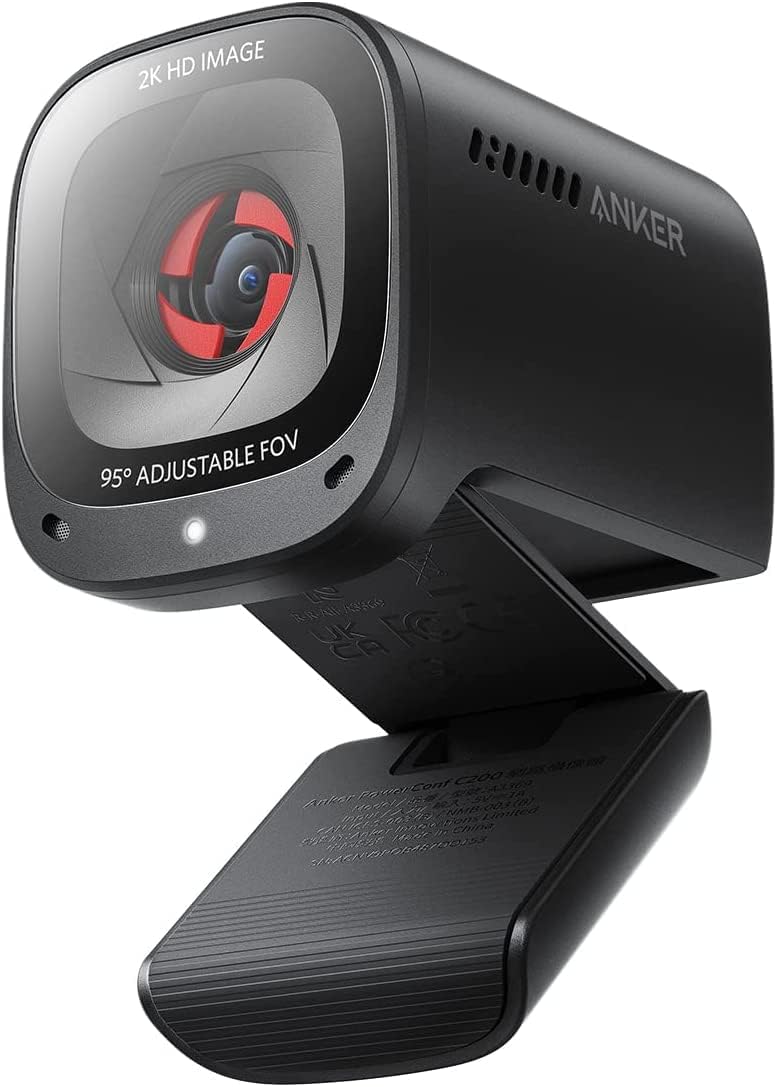
🚀 Upgrade your virtual presence with the Anker PowerConf C200 — where clarity meets confidence.
The Anker PowerConf C200 is a premium 2K resolution webcam designed for professionals seeking crisp video and crystal-clear audio. Featuring AI noise-canceling dual microphones, superior low-light performance, and an adjustable field of view, it ensures you look and sound your best in any virtual meeting. Its built-in privacy cover and broad OS compatibility make it a secure, versatile, and user-friendly choice for PC, Mac, and laptop users.


| ASIN | B09MFMTMPD |
| Antenna Location | video conferencing, computer camera applications |
| Are Batteries Included | No |
| Best Sellers Rank | #7 in Webcams |
| Brand | Anker |
| Built-In Media | Anker PowerConf C200, USB-C Cable |
| Camcorder Type | Webcam |
| Color | Black |
| Compatible Devices | Laptop |
| Connectivity Technology | USB |
| Customer Reviews | 4.4 out of 5 stars 8,650 Reviews |
| Display Resolution Maximum | 2K |
| Effective Still Resolution | 2 MP |
| Effective Video Resolution | 1440 Pixels |
| Exposure Control Type | Automatic |
| Features | Low Light |
| File Format | JPEG |
| Flash Memory Bus Interface Type | SD |
| Flash Memory Type | Micro SD |
| Focus Type | Auto Focus |
| Form Factor | Compact |
| Has Image Stabilization | No |
| Image Aspect Ratio | 16:9 |
| Item Dimensions D x W x H | 1.97"D x 1.57"W x 2.17"H |
| Item Weight | 7.04 ounces |
| Lens Type | Zoom |
| Manufacturer | Anker |
| Maximum Aperture | 2 f |
| Maximum Focal Length | 30 Millimeters |
| Minimum Aperture | 1 f |
| Minimum Focal Length | 15 Millimeters |
| Model Name | A3369 |
| Model Number | A3369 |
| Number of Speakers | 1 |
| Operating System | Windows 7 or later, macOS 10.11 or later |
| Photo Sensor Technology | CMOS |
| Screen Size | 2.7 Inches |
| Sensor Type | CMOS |
| Shooting Modes | Automatic, Easy |
| Style Name | 2K Webcam |
| Supported Audio Format | MP3 |
| Supported Image Format | JPEG |
| UPC | 194644088194 |
| Video Capture Format | MP4 |
| Video Capture Resolution | 2K |
| Video Resolution | 2K |
| Viewing Angle | 95 Degrees |
| Warranty Description | 18 months warranty |
| Water Resistance Level | Not Water Resistant |
| White Balance Settings | Auto |
| Zoom | Adjustable Zoom |
C**Y
After a few months, I'm still glad I bought this one.
I'm not a "techie" person, so I needed something simple to install, yet that would provide a clear and professional image to my clients when I do virtual meetings. I was replacing a camera that had stopped being reliable (sometimes worked, sometimes didn't), and I was dreading having to do through a setup or install process with a new one. Fortunately, the install process was a piece of cake! In fact, the install was MUCH simpler than tinkering around trying to get my old camera to work! What a relief! I've had it for a few months now, and it was a good choice for me. It was SO worth a little extra money to get this camera in terms of quality and ease of use. One small detail I really like is that the lens cover for privacy is INSIDE the camera. That is a nice design touch. It's orange, so you can easily tell whether the lens cover is on or off, but it doesn't attract and hold dust the way the little ridges on an external privacy cap does. At first, I thought the lens cover looked "thin" and I was waiting for the day when it would jam and ruin the image from the camera. That hasn't happened -- however, I might recommend that anyone with small children keep the camera and the kids away from one another. I can see a kid really enjoying making the orange appear and disappear with the slider -- until it breaks. The lens cover should be fine with adult use, but it's not a toy for children. The picture is clean and crisp. So far (knock on wood) the camera has been reliable and there have been no headaches. I've used it with Teams and Zoom without issues. I can recommend this one without hesitation.
R**N
amazing quality and usable AS-IS! (plug n play)
i needed a cheap webcam just for casual hang-outs in discord with friends. I looked through so many reviews (both on amazon and youtube) to get a gist of what to expect from the device. After looking through so many reviews, i was under the impression that one NEEDED to adjust the settings with the anker software to get decent use out of it. But that is not the case! Although the software IS useful for taking control of certain settings, I only ended up adjusting 2 settings. I lessened the viewing angle to 78 degrees, and i raised the saturation by 2 points. That is IT. Very minor adjustments. The camera works really well right out of the box! Don't get me wrong, I would still recommend everyone get the software. It took just a few seconds to install, and there's a lot of video, image, and sound settings to adjust to give the user full control of how they want the video to look. (There are resolution settings, anti-flicker settings, brightness, sharpness, contrast, focus settings, etc.) btw, my desk has a shelf above the monitor area, so i don't actually have any space to attach a webcam on top of the monitor. I ended up placing the webcam on top of the shelf, angled downwards a bit, and that worked just fine! I'm happy with it!
H**R
Excellent little Web Cam
I have been searching and searching for a home office web cam in order to have video calls with friends and family.....Amazon has a generous selection.....I first tried the Logitech C920 series consisting of the "e" and "x" models.....At first I returned the "e" because the color consistency....The "x" was better in color but had no real depth of field....every time I would push back a little, the focusing would go bananas and the lighting element would cause the picture to go very dark...it would equalize in about 4-7 seconds, but that is not acceptable......Also, the backlighting would not during bright periods of the day made the picture very white with flashing on one side of my face.... So then I saw a video comparing the Logitech Brio 4k and the Anker C200 2k....one was ~ $200 and one was ~ $60...this video has remarkable results and was very fair in the test performed.....The Brio 4k had warmer tones, a little better text sharpness but the auto-focus was very slow; especially when you moved side to side and up and back.....The Anker had a fast auto-focus and a fantastic ability to use low light...Even in a room with no light, the picture was excellent and had all room elements there and you could not tell, there was no light.... The price for the Logitech Brio 4k was unexplainably high considering the issues I observed....Don't get me wrong, Logitech make super products, and I have a key board that has lasted over 8 years. But for me, I believe they missed the boat on this one, or maybe I just got a bad unit....it was over-priced and the slow auto-focus was a no-go for me... As for the Anker C200 2k, I couldn't be happier...I own numerous ANker products as well, including chargers, EverFrost 40L dc cooler, ANker 767 solar generator and 3 Anker solar panels...But the main reason I chose this unit over the Logitech Brio 4k was because of the backlighting and low light feature and the near flawless auto-focus; not to mention it cost.... So, if you want a cheap and very good web cam , try this one out....it won't be a disappointing experience....
I**R
Surprisingly clean image for the price — solid everyday webcam
I bought this webcam for a mix of use cases: work meetings, online classes, occasional streaming, and letting my son use it for online chess tournaments. It’s not a single-purpose setup, and that’s actually where this camera shines. Setup was completely plug-and-play. I didn’t have to install or configure anything to get a good image. I’ve mounted it both on a tripod and directly on top of a monitor. The tripod mount worked as expected, but the monitor mount was a pleasant surprise — very stable and secure. I remove the camera after each use since it’s shared, but if this were staying on a monitor full-time, it would easily be a set-and-forget situation. Lighting in my space is mixed (standard room lighting plus Nanoleaf LED panels), and the camera handled it well without any tweaking. I haven’t needed to adjust settings beyond enabling or disabling the microphone. The image is clean and looks especially good for this price point. I did notice some difficulty when trying to use a green screen, but that’s likely more about my lighting or OBS setup than the camera itself. Autofocus has been solid — it stays locked and doesn’t hunt or distract during calls. I can’t really comment on the built-in microphone because I immediately disabled it and use dedicated RØDE audio gear instead. Likewise, if there’s optional Anker software, I didn’t feel the need to use it. Compared to other webcams I’ve used, this is definitely better than basic Logitech models. I haven’t used an Elgato webcam, but for most people this falls squarely into the “good enough, stop shopping” category. Who should NOT buy this: Anyone expecting 4K resolution or professional-level camera results. This is not a replacement for a real camera setup. I have limited need for a webcam, and this fits my needs perfectly. Bottom line: For the price, the image quality is surprisingly good, setup is painless, and the mounting is more solid than expected. Easy 4 stars.
A**R
So crisp and so clean
This is a great little camera. I was pleasantly surprised by how great it looks. I would suggest installing the software as there are some great control options you won’t have for the camera otherwise. The picture is crystal clear and the mic performs way above my expectations. If you’re looking for a great camera for meetings or streaming at a good price, I’d recommend you give this one a shot.
K**N
Amazing Webcam
Saw some reviews saying this is a bad choice but I used it and it’s pretty amazing. The auto focus works amazing. I got it on sale for 50 so it’s an even better deal. The recording is crisp and pretty good quality. Easy to install, and it’s got different ways to mount which are pretty stable.
E**T
Solid webcam, nice features, works well.
I got this Anker C200 webcam to replace my Logitech C270 webcam. I started having multiple crashes during Zoom meetings and read that it could be due to Logitech drivers. I've only used this Anker webcam for a couple of Zoom meetings, so far no crashes, I hope this solves the problem. I like the solid build quality of this Anker webcam, I like the indicator light that shows when the camera is in use, I like the built-in privacy shutter that not only physically covers the lens, but is also a switch that turns off the camera sensor, the webcam still shows up as a connected USB device, just no video signal. I like that there are multiple settings options for resolution, view angle and microphone modes in addition to the normal color / brightness settings. There are settings for 360P, 720P, 1080P and 2K resolution, angle of view for 65 degree, 78 degree and 95 degree. A selection for the microphone between omni-directional and directional pick-up. The microphone on my Logitech is not very good and produces a very low / weak audio signal, people in my Zoom meetings tell me the audio on the Anker is loud, clear and good quality. I have it set to directional pick-up, have not tried the omni-directional as I know that will just pick up sounds from the room. The camera has an auto focus which is nice, what I don't like is the what I call "focus hunting". Not as bad as other cameras and more of a pet peeve of mine, but it might be nice to have a setting between normal auto focus and a less aggressive auto focus that "hunts" for focus less. The picture quality is good, better than most webcams I've seen, but you can still see the compression / processing artifacts in the picture even at 2K. This might be helpful with bandwidth when streaming at 2K and for the price, it's really good picture quality. The Anker seems to have much better overall light and low-light quality. My Logitech camera would make me look washed-out here and there even after making settings adjustments. The Anker has a much more natural look without the washed-out forehead. Color Balance control seems to be better with the Anker. I can give my webcam image a nice warm light look which stays set. The Logitech and the Auto White Balance setting of the Anker pick up on the LED lighting in my room and set the camera to a blue-ish / daylight setting. The Logitech was hard to set differently and wouldn't always hold my settings, so two thumbs-up there for Anker. I'm very pleased with this Anker webcam. At about double the price for the Logitech C270, for me, it offers more than double the results. It has more settings and options than what Logitech offers. The Anker software is clean, intuitive and functions well. If you're tired of struggling with those cheaper, low quality, works just "OK" cameras and want something that looks and sounds nice, the Anker C200 2K webcam is certainly worth getting.
K**R
Great except for one majorly annoying flaw
TL;DR: If you are only going to use this camera in a brightly-lit room, it is a great bang for the buck. If you don't have ideal lighting conditions, this camera will autofocus/refocus constantly which may annoy you and others. I bought this camera two years ago in 2022 and have been using it almost daily, mostly for work and a bit for personal. I have used it on a few different Windows machines, mostly Win10 and Win11 and have used it a few different environments. I can say many nice things about this camera: it's priced well and offers great bang for the buck. It's small and unobtrusive, and the adjustable mounting works pretty well even on irregularly shaped surfaces or when hanging off of the back of a monitor. The video quality is great, both in terms of resolution and color. It feels solid and the software, while simple, is easy to use. Unfortunately, this camera has an issue that should be easily resolved in software, but even 2 years later Anker is acting like it's not an issue. In non-perfect lighting conditions, the camera will autofocus repeatedly. By non-perfect, I don't mean low lighting conditions at night, I mean anything less than very brightly-lit room. I've had this issue even with light from 2 monitors, a desk lamp, a soft overhead light, and large wide-open windows next to me with sunlight streaming in. I'll be in a work meeting and watching my camera unfocus and focus, unfocus and focus--repeatedly. Other people will comment or ask what my camera is doing. In Anker's software, there is a toggle option to disable autofocus but ridiculously it doesn't actually disable it. According to a comment by an Anker support person in their forums, the toggle simply decreases the frequency of autofocus. A statement I don't believe since I have watched it autofocus without stopping for entire meetings. I have followed all of Ankers advice regarding troubleshooting but it makes no difference. This issue has been consistent across firmware updates, computers, and different environments. Anker: I don't know how easy it is to change the fundamental behavior, but for Pete's sake at least make the toggle switch to disable autofocus actually work.
Trustpilot
2 months ago
3 weeks ago