Desertcart purchases this item on your behalf and handles shipping, customs, and support to Indonesia.
✨ Light up your stream, own every frame.
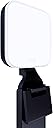
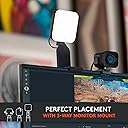
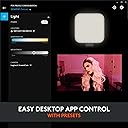
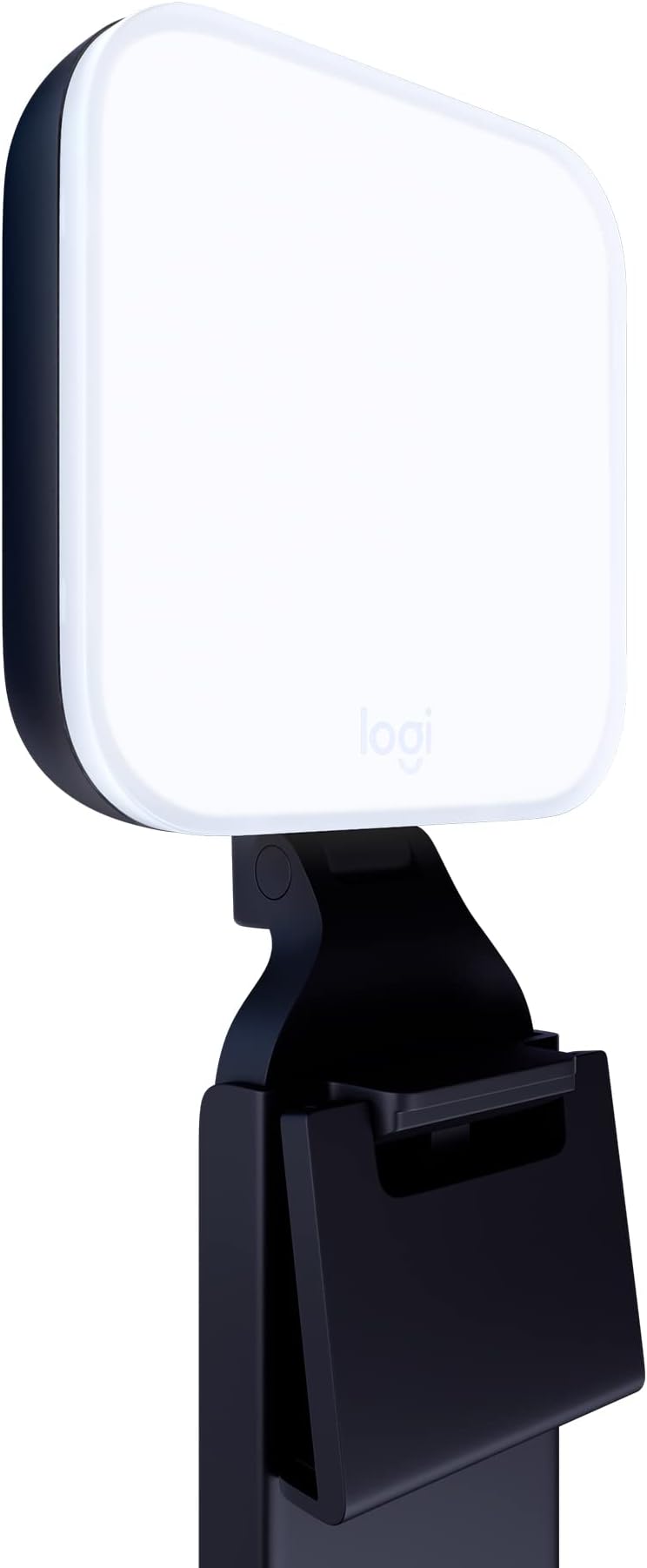
The Logitech Litra Glow is a premium USB-powered LED streaming light featuring TrueSoft full-spectrum technology for natural skin tones and wide, soft illumination. Its patent-pending 3-way adjustable mount allows precise desktop placement, while adjustable brightness and color temperature settings can be controlled manually or via the free G HUB app. Designed for all-day use with UL safety certification, it’s perfect for video conferencing, streaming, and content creation, delivering professional-quality lighting in a compact, portable form.


| ASIN | B097QZGRCQ |
| Audio Recording | No |
| Best Sellers Rank | #3 in Continuous Output Lighting |
| Brand | Logitech G |
| Built-In Media | Litra Light for Streaming |
| Compatible Devices | Desktop computers, Laptops |
| Connectivity Technology | USB |
| Customer Reviews | 4.5 out of 5 stars 3,349 Reviews |
| Flash Modes Description | adjustable brightness, adjustable color temperature |
| Global Trade Identification Number | 00097855172174 |
| Hardware Interface | USB |
| Has Self-Timer | No |
| Item Dimensions L x W x H | 3.56"L x 1.71"W x 3.56"H |
| Item Type Name | Light for streamers. |
| Item Weight | 13.44 ounces |
| Manufacturer | Logitech for Creators |
| Manufacturer Part Number | 946-000001 |
| Media Type | Video |
| Model Name | Litra Glow |
| Model Number | 946-000001 |
| Product Dimensions | 3.56"L x 1.71"W x 3.56"H |
| Screen Size | 3.6 Inches |
| UPC | 097855172174 |
| Unit Count | 1 Count |
| Warranty Description | 1 Year Limited Hardware Warranty |
| Water Resistance Level | Not Water Resistant |
K**R
An exceptional product for a reasonable price
I was a little concerned after reading reviews on this light. Some of the reviews are just incorrect. First, the design: I have a large curved monitor with a small bezel and a curved back panel. I had a tough time finding a webcam that would work with this monitor, so I expected to have trouble installing this light. Not a problem at all. I could put it anywhere on the top of the monitor with no problem. I chose to move it off to one side to create more pleasing shadows while its on. Next: usability. There are buttons on the back for power, color temperature and brightness of the light. Easy to control manually. You can also control the light via software. This is where it gets awesome. You can manually set the light from the software, which is not a huge benefit. On the other hand, you can configure it to turn on when you open specific applications and you can configure the light qualities (color temp and brightness) by application. I only use this light with Zoom and Teams, so I configured it to turn on when those apps are opened. Now I don't need to remember to reach up and turn the light on when meetings begin. I believe the light can also be controlled via a logitech keyboard, but I cannot confirm because I use an Apple keyboard. Finally: light quality. The light panel is about 4"x4". The larger the panel, the softer the light. This light is nicely diffused, but if it were just a bit larger, the light quality would be better. I'm not complaining at all. Just be prepared that the shadows aren't super-soft. Not a big deal for me. Highly recommended!
B**R
Makes a Bigger Difference Than I Expected
I wasn’t sure how much a small light would actually help, but this one really surprised me. It gives off a soft, even light that makes everything look clearer without being harsh or blinding. Setup was easy, and I like how simple it is to adjust the brightness and warmth depending on the time of day. It sits nicely on my desk and doesn’t feel bulky. I’ve mostly been using it for video calls and the occasional recording, and it just makes things look more polished without much effort. Nothing complicated, it just works really well.
S**B
Good light but form factor needs a couple of upgrades
1/ The clip is a too deep, meaning the light goes quite a bit to the back and with the weight, it can pull the screen down. Not sure why they made such a deep one, seems unnecessary since screens are very slim these days. 2/ the front of the clip itself (the part facing you) is quite large, meaning it covers the webcam if you put it in the middle of your screen. They should create a hole in the middle to allow the webcam to show. Other than that, the light quality is good and packs a good punch - it works better than bigger ones I've owned.
E**A
Great range of light options
Great supplementary light for video calls. Love the range of options for white/warm light and brightness settings. Easy and flexible setup, compact enough to travel with. Can get quite bright if you need it!
J**H
Loved it so much I bought a second one for my stream
I originally picked up one of these Logitech Litra Glows to improve my webcam lighting, and it worked so well that I just went back and bought a second one. The light it puts out is super soft and diffused, so it doesn't blind you or cause eye strain during long sessions. I use two of them now to get perfectly even lighting on both sides of my face for my stream, and the difference is massive compared to standard ring lights. They mount easily right to the top of my monitors, which keeps my desk completely clear of bulky light stands and tripods. Highly recommend these if you are looking for a clean, effective lighting setup.
R**D
Easy to set-up, this is a quality lighting product for light webcam use
Handy and effective, mounted easily. The PC software was downloaded from Logitech's support website and is simple to use. Controlling the brightness and the color temperature is nicely managed. I pair it with a Logitech C920 webcam that I have had a long time, and it makes a big difference during conference calls. Purchased for it's utility and usefulness for video-conferencing during medical interviews, and other aspects of communicating in today's on-line working world. Set up easily atop my 4k monitor.
S**R
Expensive but so thoughtfully designed, flexible, and extremely useful. Highly recommended.
Frequent pandemic Zoom meetings and classes made clear the importance of lighting. W/o any light, my face was typically dark because behind me are windows or lamps. Ring lights were an improvement, but they reflected in my glasses and the stands they came with took up too much space on my desk, or didn't allow me to get the light in the best position. The Logitech Litra Glow is an almost perfect solution for me. The light it gives off is perfect - not too harsh, doesn't make reflections in my glasses. The quality of the lighting is very adjustable: The light itself has 5 levels of brightness, and 5 levels of color temperature from warm candlelight to harsh blue office flourescent light. I like the middle setting for daytime, and one notch warmer than that for nighttime. The position of the light is also EXTREMELY adjustable: It rests reasonably securely on the back of your laptop screen or external monitor. The light can be raised or lowered, turned left or right, and tilted upward or downward. You can also remove the light from its monitor mount and put it on any tripod, which can be especially helpful for content creators. Also, you can adjust the monitor mount so it can be placed horizontally on your desktop, if you want the light to come at you from a different direction than your webcam, for example. You can use all these features without any app, but there's also an app called Logitech G Hub that you can use to control the brightness, color temperature, and power on/off from your computer. I like using the app because the physical buttons on the back of the lamp are a bit clickly, which isn't bad, but I prefer silent operation, especially if I need to make an adjustment while filming or while on a call. The app also shows you your face using your laptop's internal (or external if you wish) webcam, so you can find the best combination of brightness and color temperature. The light is powered via USB. You can plug it into any USB charger or portable battery, or you can plug it into a free USB port on your computer or computer hub. The light has a USB-C jack on the back and comes with a USB-C to USB-A cable. Since my Macbook has only USB-C ports, I am using a USB-C to USB-C cable (not included) to connect the light to my Macbook. The lamp and monitor mount are made of plastic, of course, but the build quality seems very good, certainly better and sturdier than other lamp I've tried for this purpose. I have only one minor criticism of the Litra Glow light: I wish the lowest brightness setting were a little dimmer. So far, it has not been a problem for me, but some content creators or some people with tricky lighting situations may find the lamp is a bit too bright at its lowest brightness setting. All things considered, the Litra Glow lamp is really excellent and highly recommended, and more than justifies its higher than average price.
M**R
Logitech for Creators Litra Glow Premium: A Great Value for the Money!
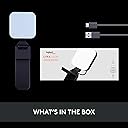
This light source is an excellent addition to any Videoconferencing setup. It is automatically detected by the Ghub app if you have it previously installed on your PC and it was instantly working on my PC within a minute of connecting the included USB cable and hanging it on my monitor. The controller software in the Ghub app is extremely easy to use and it is more convenient than manually adjusting the controls on the light when it is hanging on your monitor. The software has numerous presets for adjusting the color temperature and intensity of the light simultaneously. All-in-all I am very pleased with my purchase from Amazon and I consider the light to be a good value for the money.
J**E
Funciona excelente
Mal que no se pueda conseguir tan facil en México, es muy buen producto, buena calidad y hablando de iluminación, no deja nada que desear, añadiendo que se puede controlar desde el G Hub, controlar el brillo y tipo de luz, me gustó bastante
P**A
Logitech Glow - super equipamento
Equipamento fantástico, luz quente e luz fria com regulagem por software alem e claro de um ótimo adaptador.
S**I
Great lighting! Similar to desktop ring light. No photobiological hazards.
I wasn't sure what to expect with clip on lights like these little ones. I use a NEEWER 10 inch desktop ring light and really like it, but was hoping to minimize clutter on the desk and have a portable option for travel. I've tried mini clamp-on 4 inch ring lights that were useless, so I didn't have big expectations for a little clamp on light. I ended up buying 3 different laptop lights to compare, here's my feedback for each below. 1. LOGITECH Litra Glow Truesoft $64.99 PROS: 12 hr full-spectrum LED 5 brightness settings and 5 colour temperatures 5 very simple buttons on the back of the light - easy to navigate by feel when light is set up on monitor. Very easy to adjust by the feel of the buttons alone. Built-in cord organization USB powered No photobiological LED Hazard (UL verified* *see more info on this below). 2700K - 6500K (Kelvin) - this is a good colour temperature range. 250 Lumens max - this is decent as long as you're staying within 1 meter (~3 feet) of the light 360 degrees swivel top, plus angling - handy Tripod mountable - nice to have Truest natural tones - I agree. When I compared this to my 10 in ring light, and 2 other clamp-on lights, the Logitech had the best lighting - very natural looking. It performs as well as my 10 in desktop ring light, even in very low light conditions. CONS: No battery option means you can only use with laptop or desktop - doesn't clip to phone. Slight plastic smell to the light that went away after a few days of use. OPINION: It's worth the investment for good natural lighting that's very simple to use. I'd quickly buy an upgraded model if they were to release a rechargeable battery operated option. Overall this was the best of all three for ease of use, quality of the light. *The UL Verified Mark Program for laser/LED products was created in response to industry demand for an independent verification of laser/LED radiation output level claims by a trusted test laboratory. 2. NEEWER RGB LED Light VL66C $42.59 PROS: 2000mAh battery + USB. 2hr battery time at highest light setting. It charges while using, bonus. 66 LEDs (colour mix) 400 Lux max - it's bright 0-100% dimming 2500-8500K colour temp - this is a great range. Clips to phone, laptop screen, etc. It's very light, only 150g CONS: There are too many buttons options to switch the lighting intensity quickly if needed. Compared to the Logitech (with 5 simple buttons), this one has a whole menu of options to sift through, however the instructions provided are good. It comes with too many extra light features I didn't need, but for some that would be a bonus. I highly doubt I'll ever use the strobe light feature during my work calls. OPINION: I decided to keep this one as an option for travel or using with my iPhone on the go. Adjusting the light brightness and temperature can be a bit annoying, but once you get it right to your needs, it will stay on that setting until you change it. At the end of the day I like it and decided to keep it. 3. WELLCHOME Video conference light ~22.99 PROS: Very low price 3 colour temperatures, 10 brightness levels. USB only 120 LEDs 800 to 10,000 LUX - very bright 360 rotatable, 160 degree tiling CONS: The adjustment buttons are on a dangle attached to the cord, can be annoying as the cord often lands behind the monitor that you attach it to. No battery option means you can only use with laptop or desktop - doesn't clip to phone This is not a well known company. The product claims haven't been independently verified by UL to confirm the output levels or that there's no photobiological risks associated with long hours of use of the product. Claims to be a Canadian company but they fail to disclose that it's made in China. OPINION: I decided to pass on this one because it's not independently UL verified for safety. This is an area that the company may wish to consider having verified.
M**N
Es el producto que solicité
Es el producto que pedí y llegó en tiempo y forma.
W**.
It's simple and good, but you might need 2 of them
I also have an Elgato Key Light Mini, so will offer that comparison: +This is cheaper! +The buttons on the back are simple, big and easy to use for quick adjustments. You don't need an app! +No fuss worrying about battery charge/health/maintenance (it really is a bizarre combo for the Mini that it has battery powered "portability", but also it needs a wi-fi network to connect to the app for proper functionality ... where would you put it that you have wi-fi but not power? And before you say it, no, phone hotspots *don't* work) -It doesn't get quite as bright as the Mini. It'd be fine for most indoor use, but I think a problem if you're competing with a strong backlight in the frame. 2 of these will reliably do the job. And having 2 lights is better anyways, for proper lighting of a human subject you *want* a key light and a (not as bright) fill light.
Trustpilot
2 weeks ago
1 month ago