We remain fully operational. Our teams are working around the clock to ensure your deliveries continue safely.

DOWNLOAD THE APP


Copyright © 2025 Desertcart Holdings Limited
DOWNLOAD THE APP




Buy anything from 5,000+ international stores. One checkout price. No surprise fees. Join 2M+ shoppers on Desertcart.
Desertcart purchases this item on your behalf and handles shipping, customs, and support to Indonesia.
💡 Light up your life smarter, not harder.
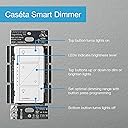
The Lutron Caseta Original Smart Dimmer Switch Kit includes 2 in-wall dimmers, 2 wall plates, 2 Pico remotes, and a smart hub that enables seamless voice and app control of your lighting. Designed for easy installation without a neutral wire, it supports up to 150W LED and 600W incandescent bulbs. The system integrates with major smart home platforms like Alexa, Apple Home, and Google Home, while the hub’s Wi-Fi-independent connection ensures ultra-reliable performance. Perfect for modernizing any home with customizable lighting scenes, schedules, and remote control from anywhere.


| ASIN | B01M3XJUAD |
| Actuator Type | Push Button |
| Best Sellers Rank | #1,264 in Tools & Home Improvement ( See Top 100 in Tools & Home Improvement ) #4 in Dimmer Switches |
| Brand | Lutron |
| Brand Name | Lutron |
| Circuit Type | 3-way |
| Color | White |
| Compatible Devices | Amazon Alexa, Apple Home, Google Home, Ring, Sonos, Samsung, Honeywell, Serena shades |
| Connectivity Protocol | N.A |
| Connector Type | Wires |
| Contact Material | Brass |
| Contact Type | Normally Closed |
| Control Method | Voice |
| Control Type | remote and voice control |
| Controller Type | Amazon Alexa, SmartThings |
| Current Rating | 1.25 Amps |
| Customer Reviews | 4.7 out of 5 stars 2,585 Reviews |
| Global Trade Identification Number | 00784276221528 |
| Included Components | (1) Smart Bridge, (2) In-wall Dimmers, (2) Wallplates, and (2) Pico Remotes |
| International Protection Rating | IP00 |
| Item Dimensions | 1.13 x 2.93 x 4.69 inches |
| Item Weight | 0.01 Ounces |
| Lower Temperature Rating | 32 Degrees Fahrenheit |
| Manufacturer | Lutron |
| Material Type | Plastic |
| Model | P-BDG-PKG2W-A |
| Mounting Type | Wall Mount |
| Number of Items | 2 |
| Number of Positions | 4 |
| Operating Voltage | 120 Volts |
| Operation Mode | ON-DIM-OFF |
| Part Number | P-BDG-PKG2W-A |
| Smart Home Compatibility | Smart Home Compatible |
| Specification Met | cULus |
| Switch Type | Push Button |
| Terminal | Screw |
| UPC | 784276221528 |
| Unit Count | 2.0 Count |
| Upper Temperature Rating | 104 Degrees Fahrenheit |
| Wattage | 600 watts |
J**1
3 year review
In 2020 I lived in an older house with no neutral wires. I wanted to upgraded the lights in the living room and kitchen to smart lights, but most of the available options were expensive smart bulbs or systems that only work with neutral wires. Like everything else I purchase, I do TONS of research first. I eventually found this system and it matched my needs exactly. I purchased this kit plus a single additional dimmer to use in a 3-way switch setup. It was very easy to install, even for the 3-way switch. The included plate covers hide the screw holes giving it a more modern and clean look. It even comes with a remote. After installing the hub and switches I downloaded and installed the free mobile app. With the app you have complete control of every switch individually, thanks to the tiny hub that ties them all together using its own wireless network. The hub plugs into your wireless router so you can control your switches from anywhere over the internet. You can also create scenes and schedules to control them separately or together in groups for different scenarios. For example, sometimes I wanted to turn off the kitchen and living rooms at the same time with a single action, or turn on/off the kitchen without affecting the living room. That same year we were gifted a Google home mini. After getting that setup I was able to easily integrate the Lutron system with it. I could now says "Hey Google, turn off all lights", or "set living room lights to 30 percent". It really was a game changer not having to jump up and run across the room just to adjust the lighting. It may sound like the next step in laziness, but I saw it as the next step in productivity, as I work from home and having to stop working for a simply task was a distraction I was happy to no longer be burdened with. Other times you just want to raise the lights to find something or to clean up a spill quickly or turn the lights off for a quick nap without having to move at all. We moved into a newer home in early 2022. After my previous experience with the Lutron products I installed the existing system in the new home and expanded it, making nearly all of the switches smart Lutron switches. I even have smart outlets outside over 100 feet away from the hub to turn on and off exterior lighting as the sun rises and sets. Adding new switches and outlets is a breeze. You just install them, select them in the mobile app and push a button to pair them to the hub. I have seen a lot of newcomers to the smart switch arena in the past three years, but most still have the same limitations as in the past, such the the neutral wire requirement. Even my newer home has some switches that lack neutral wires, so Lutron is still the best option. Lutron does of course also offer many switches that do work with neutral wires, such as where you only want on/off switching without the need to dim. For those switches you do wish to use as a dimmer, make sure the bulbs you use are compatible. Incandescent as dimmable. Most newer LED bulbs are NOT dimmable, so be sure to read the box to make sure they will work with your switch. This has been a solid and outstanding system with zero issues that I have used to run my homes for the past three years. Anyone with light switches will love this system as much as I have.
B**A
Best and Easiest Smart Lighting System - No Neutral Wire Important - Better than Philips Hue
Review: Lutron Caseta Switches I have tried several other smart lighting systems, including smart light bulbs (Philips Hue, Lifx) as well as smart switches (WeMo, TP-Link, etc.), but the Lutron Caseta system is the best system because of its versatility and integration with Alexa, Google, Apple, etc. Below are my reasons for being a big fan of the Lutron Caseta System: BIG SAVINGS by Using Smart Switches Instead of Smart Bulbs I prefer installing smart switches over using smart light bulbs like Philips Hue because of the cost over time. While the Hue bulb is fantastic, it is also extremely costly when you have to pay for every single light bulb. With a smart switch system like Lutron, you only pay for the switch that controls all the light bulbs. I have 10 overhead lights in my kitchen alone. That would cost me almost $500 if I installed Philips Hue or Lifx Bulbs. By using the Lutron Caseta Switch, I was able to "Smart-ify" my kitchen lights for only 10% of the cost of what it would have been had I used Philips Hue Smart Bulbs! EASY INSTALLATION I am not handy in any way, but I was easily able to follow the instructions through the Lutron Caseta app to install the switches. I have installed more than a dozen switches (without getting zapped once!) NO NEUTRAL WIRE REQUIRED - bigger benefit than most consider We had an electrician come to fix some wiring issues in our house. When he saw our Lutron system, he commented how most electricians prefer this smart lighting system to most because older homes often don't have neutral wires and since the Lutron Caseta doesn't require neutral wires to operate, the system is easiest to install without any hassles in adding neutral wiring. INTEGRATION and EASE OF USE Our home uses Alexa as its primary system to integrate all of our smart home equipment and appliances. Lutron switches integrate seamlessly with Alexa and it's really easy to set up. Additionally, we have a lot of guests stay with us (non-tech savvy grandparents) and it's easy to use for them without knowing how to use Alexa because the switches work traditionally too. Not all smart switches can be used as traditional switches too so it helps that Lutron switches can be used traditionally too.
L**Y
Perfect smart home switch, for a price
I use a few of these around the house, and I plan to expand the use of them. These work great for a smart home setup, and I use the Amazon Echo to control the lights. However, these are not perfect....they are just closer to perfect than any other option I have seen. So I will make a Pro's and Con's list, and then explain a bit of why I prefer them over other brands. Pro's: Easy install Replaces existing switches Works with Amazon Echo Clean flat appearance (adjustable) Optional remote (I do not use) Works with nearly all light fixture styles You only need a single IP address Con's: You need a dimmable light Does not dim LED the same way it does other lights Expensive Requires use of Lutron App Now, lets start with the install. This is simple, just shut off the power, remove the old switch, and connect this one to the existing ground, positive, and negative (and the pos & neg are not in any specific order!). They even include the screws and plastic wire caps, so it is twist on and screw it in. No tape (although you SHOULD use it!). So since you are replacing the existing light switch you do not need to do anything else, no wire runs and no electrical box install. So now we move to working with Alexa, or the Amazon Echo device. I don't call mine Alexa, because my daughters name is Alexis. So everytime we talk to her the other her responds....whichever her we were talking to. I use Amazon. But it is nice, just say "amazon turn off the bedroom light" and get a quick "ok" and boom, darkness. It makes us lazy. Or rather, it stops the "It's your turn to get the light" arguments with my wife, and makes it easier to take care of the baby at 2 am without getting out of bed. But here is the catch, Amazon can only pull the information from the Lutron App. You CANNOT use ONLY Amazon Echo to set it up! You cannot even rename the device. So you are forced to use the Lutron app to set up all the home devices, and name them properly so they are usable with Amazon Echo. Once your entire setup is done you are free to uninstall the app. Although to be fair the Lutron app is pretty good in itself. But this leads to another concern here, if you use the device as part of a smart home you absolutely MUST purchase the Lutron hub....in this case I used Casetta, but since I do not use the PICO remotes I am unlikely to cross the 50 device limit. This is another $150 ish, but it is worth it. Why would a $150 hub for controlling light switches be worth it? Well, if you are like me and are setting up a real smart home, you probably have a lot of other tech stuff in the house. A smart thermostat for example, or maybe even a server or two, a cloud device, and a firewall. For those of us tech geeks who have all of this, but do not want to pay for t-he expensive licenses, we use a free version of whatever we are using. In some cases for the firewalls you are limited on your number of devices. So, if I was going to connect 50 light switches in my house I would use up all of my devices....just to create a smart home. This is not worth it. However, Lutron made it easier, that little hub takes an IP address and that is it. All other switches connect to the hub, not using an IP address that would be counted as a device on the firewall. You have no idea how hard I looked for this particular feature! With all my kids tablets, the computers, phones, servers and cloud....not to mention the other smart home devices....I am already near my limit. This keeps me under it. That covers almost all of the real issues. But the not so real issue that people forget about is that not all lights are made equal, ESPECIALLY with the older filament style bulbs being illegal to produce now. A dimmer on these bulbs worked every time, without any changes needed. But this is not the case anymore, the new light bulbs are required to be dimmable. If they are not you get little flashes in your light bulb while it is off....all....night.....long.Get a dimmable one and this problem goes away, however the LED lights do not dim well. You get off, 75%, 100%. Nothing lower then that....so dimming is not really possible here. However, I got the dimmer because it is cheaper than the regular switch, and who knows....I might find a good bulb that dims properly.
A**R
Made voice control with Alexa a total breeze!!!
I recently purchased two Amazon Echo Dots and have quickly fallen in love with the ability to voice control just about everything around my house. The first integration was with my AT&T Digital Life security system, which allows me to control lots of stuff around the house that is already integrated to my Digital Life system. After doing some research about the best way to replace existing light switches with Alexa compatible hardware, I decided to go with the Lutron Caseta system. I ordered the two switch/dimmer starter kit with the hub and two wireless remotes. I have an older home that doesn't have neutral wires in most of the junction boxes, so it was imperative to have switches that don't require a neutral wire and the Lutron Caseta switches fit the bill. The hub system can acommodate up to 50 wireless switches, and each one can be up to 30 feet away from the hub. I have Chicago bungalow, and the hub is centrally located, so there is no problem communicating with the switches. The installation of each switch took less than 15 minutes and simply requires grounding on the junction box and connection of the two hot wires connected to your current switch. They fit into any standard Decora style faceplate, and are not any bigger than my existing non-smart lutron dimmer switches. Once the switches were installed, I connected the hub to my router, downloaded the Lutron app from the iOS app store and followed the instructions within the app. The setup of the hub took less than 5 minutes, most of which was a required software update. Once the hub was installed I followed the in app steps for adding each of the new smart dimmers that I had installed. Again, it worked flawlessly and took about 2 minutes per switch. I then went into the Alexa app and clicked on smart home. Alexa started looking for devices and within 20 seconds found both switches, and gave me the ability to change the name and edit the properties. Once everything was setup in the Alexa app, I simply asked Alexa to "turn on the living room lights"... and voila! The lights turned on! If you're on the fence about getting into the whole Alexa / Echo Dot scene, and using it to control the lights and other smart devices around your house... I HIGHLY RECOMMEND IT, and HIGHLY RECOMMEND THE LUTRON CASETA system. I'll certainly be upgrading every switch in the house to the Caseta wireless switches.
C**R
Smart Home Made Easy - Lutron Caseta is Superb
Lutron Caseta smart home products are amazing. Easy to install and use, this super reliable product line can make your home more secure by enabling you to schedule changing patterns of lighting (on/dim/off) on Caseta-enabled lights to discourage thieves who are casing homes to rob. Caseta also provides an excellent way to reduce energy costs through managing your use of (Caseta-enabled) lights. For example, you're watching TV in the living room and recall that you forgot to turn off lights in your bedroom. Easy - open the Caseta phone app and turn off unneeded lights without leaving the comfort of your chair. Have Amazon Alexa (Echo, Dot 2, etc.) products? From your chair, skip opening the Caseta app and tell Alexa "turn off bedroom lights". While you're at it, if it's too bright in the living room TV viewing area, tell Alexa "dim living lights to 20% (of full brightness)". Away from home and become concerned that you have not properly lit your home for security, arriving guests, etc.? Open the Caseta phone app wherever you are (nearby pizza shop, sightseeing in a city far away, etc.) and adjust any lights you have set up with Caseta. It's also easy to set up Caseta so lights are automatically turned on to full brightness as you reach a pre-set distance from home (e.g., 1 or 2 miles). If burglars are in your home, sudden bright lights could shock them into leaving before you arrive. The Caseta Wireless system works with more than lighting, it will enable control of motorized shades, thermostats and other devices. I have only used Caseta for lighting. Lutron installation and tech support (phone assistance, installation videos and product installation videos on the web, etc.) is great. I bought the excellent P-BDG-PKG2W-A starter kit at its current great price for my daughter's home. She will install it by herself using the Lutron videos. For the record, I have had Caseta wireless products throughout my home for the last two years. I have zero connection with the maker, Lutron, nor have I received any discounts or compensation whatsoever. I am simply amazed by the features, quality and proven reliability of Caseta products.
L**P
Reliable and Simple Installation for Automated Home Lighting
This and several other Lutron Caseta wireless dimmer products were bought to replace my previous but now unsupported X-10 "smart home" automated lighting system. Bottom line is the system works as advertised and has several advantages over my previous system. Most notable is the reliability of switching. The preprogrammed switching and dimming works all the time - no exceptions. The installation is straight forward - simple plug in with the plug in modules. The switches, of course, require replacing the old switches so you have to be comfortable working with your 120 VAC house circuits. The wireless control is convenient but range can be limited by walls or other barriers between the control and the dimmer. As compared to X-10 with it's software based control, Caseta does not have the ability to be programmed with complex, random appearing light switching schedules. However, it does allow coupling switching times to sunrise, sunset and be different on each day of the week which largely circumvents this limitation. I have not used it with Alexa so I can't comment on that. It accomplished what I needed and does it effectively.
S**T
The best addition to our smart home
This is honestly the best part of our smart home. We started adding smart lights and devices to our home in 2021, and I was recently making a list of the different smart devices in our house and I almost forgot about the Lutron lights. This is because I have NEVER, in more than 4 years, had an issue with them (a rarity, right?) They just always work, and they have such fast response times when toggling them via Alexa, Google Home, and Home Assistant. Our house is older, so we don't have neutral wires, and I was a bit disappointed at first that this was basically our only option. We installed three lights (dining room and two hallways), and we've added two Picos as well so we can turn a couple on from different points. Installation was quick and easy, and they look really nice. We also purchased one of the motion sensors and added it to our upstairs hallway so that the light turns on automatically on a dim setting so the person can see their way to the bathroom without waking up someone sleeping in a different room off the hallway. The dimmers work great also. Just make sure you check the list of compatible bulbs. I believe we purchased the wrong ones at first and had some flickering at the beginning. Once we had them up and running, we've never had an issue.
R**E
Perfect for use for smart lighting
I did a lot of research when deciding on a smart dimmer switch option. I ended up choosing lutron because it uses the bridge and won't clog up our Wi-Fi. We don't have any kind of general smart bridge to use the z-wave or zigsbee other types of smart options. The bridge is tiny and unobtrusive, but does need to connect to an ethernet port. The dimmers work perfectly, and connect to Alexa seamlessly, which was the most important part to me. We have it set up so our lights come on automatically based on certain conditions and can all be turned off with 1 command, so we rarely use the actual switches. They work perfectly for our needs. A few caveats/responses to other reviews that initially made me hesitant: Buzzing - when dimmed, we could hear a very faint buzzing from the lights in our kitchen when we had a few panels of our drop ceiling down. Once the drop ceiling was replaced this was no longer noticeable. If you have literally any other noise in your house, like a refrigerator, the buzzing pretty much can't be heard. No 'last setting' button - this is 100% the biggest downside to these. The actual hardwired switches only have on/off and increase /decrease buttons. If you walk into a dark room and want to turn the lights on your options are 1) turn them on 100% or 2)slowly increase them from 0 to whatever you want by repeatedly tapping the dim up button. The remotes this set comes with do have a button in the middle that will turn the lights up to whatever you last had them set at, so I have no idea why they didn't include that on the actual switch. We created a 2-way with a switch and remote bracket and mostly use the remote 'switch' when needed, which is rare. We specifically bought these to use with phones and Alexa so this is a minor issue for us that we were willing to overlook. However, if you plan on mostly using the switch it's probably worth considering getting the more expensive switch version that comes with the button in the middle. For us, the extra money wasn't worth it. Alternatively, if you plan on mostly using the wall switch it may not be worth getting smart switches at all, to be honest. Installation - we had these installed by professionals as part of a larger electrical overhaul so I can't speak to the ease of installation. I did not have any issues connecting them to my phone once I set up the bridge though. Overall, if you want a smart switch because you plan on mostly using your phone, timers, or a virtual assistant to control your lights these are perfect. Especially if you plan on installing a number of them, since they come with the bridge to use instead of Wi-Fi. If you plan on mostly using the wall switch itself, or if you only plan to install 1 or 2 smart devices in your house, the design and cost of these might not be worth it - smart bulbs or another product are probably better options in that scenerio.
Trustpilot
2 months ago
4 days ago