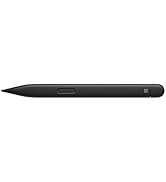
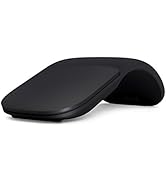
✍️ Elevate your digital creativity with the pen that feels like paper, but works like magic.
The Surface Slim Pen 2 in Matte Black combines cutting-edge Bluetooth 5.0 connectivity with an ultra-responsive 4,096-level pressure-sensitive tip and a haptic motor that simulates real writing feedback. Designed for professionals who demand precision and style, its slim, ergonomic form factor fits perfectly in your hand and charges seamlessly with compatible Surface devices. Ideal for note-taking, sketching, and shading, this pen transforms your Surface into a natural creative workspace.


| ASIN | B09DK2YSH2 |
| Batteries | 1 Lithium Polymer batteries required. (included) |
| Battery Type | Lithium_Polymer, Lithium_Ion |
| Best Sellers Rank | #14 in Digital Pens |
| Brand | Microsoft |
| Color | Matte Black |
| Customer Reviews | 4.5 4.5 out of 5 stars (1,569) |
| Date First Available | September 22, 2021 |
| Hardware Platform | Microsoft |
| Item Dimensions LxWxH | 7.96 x 2.06 x 0.75 inches |
| Item Weight | 0.48 ounces |
| Item model number | 8WV-00001 |
| Manufacturer | Microsoft |
| Product Dimensions | 7.96 x 2.06 x 0.75 inches |
| Series | MS8WV00001 |
J**L
Great product
Had it for more than two years. No issues. Sturdy design and construction. Great product
F**.
Best pen money can buy
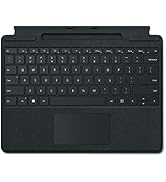
Probably the best pen I've gotten for my Surface Pro 8. It's got a convenient side key button, so you don't have to press and hold to right click. The short key button on top is really nice, and can be programmed to do three different things. The haptic feedback is a really nice feature, it vibrates when I write, to make it feel like writing on paper (this setting can be adjusted). It instantly connects to my computer when I take it out of the charging dock, there's no extra buttons to be pressed to turn on and connect it. It writes really smoothly and the cursor can be moved just by hovering the pen over the screen, for up to about an inch or so away. Feeling wise, the pen has its disadvantages. The slim design is really nice for the portability, and I like the ability to hide it on the signature keyboard, but that also comes with a disadvantage. The flat design makes it a little awkward to hold at times, and the side key button can sometimes be easy to press on accident (I typically fix that issue by holding it the other way around). The matte finish to it though does make it nice to feel, not course or slippery on the fingers, which is a nice touch. The only other disadvantage I could see is charging and the battery. It comes with a non-replaceable rechargeable battery. This can be charged one of three ways, by placing it in the pen dock on the signature type keyboard covers (pictured), if you have a Surface Studio, they also come with a built-in charging dock, and the third way being to buy the separate wireless charger. Unfortunately, there isn't another way to charge it, so do make sure you have (or get) one of those things before buying this pen. The battery life is pretty good, I haven't had it die on me yet, even after a while of use. If it does get low on battery, placing it in the dock for a few minutes gives it a good charge and I can use it again without having to wait too long. From what I've read, it's about an hour and a half charge time from a dead battery, which is pretty basic for electronics. When I'm not using my laptop, I always store the pen in the dock so it has a full battery when I come back. I've seen a lot of negative reviews solely for the reason that the pen doesn't come with a charger. Ignore those, that's just from people who didn't bother to read the description for the device before buying it. Overall, 10/10 product so far, works really well, and I'll definitely have much use for it.
J**M
Perfect
Perfect, my daughter loves it
H**I
The Slim Pen 2 for Seamless Digital Writing
The Microsoft Slim Pen 2, has become an indispensable tool for my digital writing needs. This pen offers an good haptic feedback feature, providing a realistic writing experience (as realistic as you'll get on a screen). Contrary to some reviews, I find the haptic feedback to be noticeable and satisfying, especially at the default setting, which closely resembles writing on paper. The Slim Pen 2's precision and ease of use are commendable. It fits comfortably in my hand, allowing for extended writing sessions without any discomfort. The eraser on the back doubles as a button, which can be customized for single, double, triple clicks, and hold functions. Additionally, the pen's battery life has been exceptional, lasting me for extended periods without needing a recharge (never had to think about it having a battery tbh). The pen's unique rectangular shape took a bit of getting used to, but it has grown on me over time. The integration with the Surface keyboard is seamless, and the magnetic attachment ensures convenient storage.
W**S
Durable, long battery life, best with office apps
My daughter used the iPad pencil, offbrand pens, and this one combined with Microsoft notes just smokes the competition. The stock tip lasted her two semesters of an engineering degree of nonstop writing for hours and hours every day and drops on every surface imaginable from concrete to sharp gravel. Just don't expect Epaper level cause it's still a tablet pen. Just buy it used and get a pack of tips from the manufacturer (or metal offbrand and a thick plastic protector) and you'll be set for a couple years if not to the end of support for this pen imo. Only downside is no included charger (which you should buy used if you don't use a keyboard with charging support cause it's as durable as the pen). It's pretty useless without Microsoft apps so don't recommend if you're not using their programs. I cannot comment on its art capabilities but for design and writing it's only bested by literal Epaper devices.
O**O
Nice pen
Good
J**C
This pen works great with Surface products
I have used this pen with both the Surface Laptop Studio and the Surface Pro 8. Both charge the pen. I was worried that the pen would not stick to the Surface Laptop Studio well, but it sticks WAY better than I thought it would. It is not going to fall from casual use. Accuracy. This is pretty much why you buy a surface pen. It is very accurate. You can write and draw with it. I am not an artist, so I can not speak to that, but I do use it to draw diagrams and sketches for office work. It is great for that. Surface also does a good job of recognizing hand writing and converting to text. Ease of use. I can only comment on the ease of use with the two Surface Laptops I have used this with. It is super easy to use. It was detected and set itself up for both of my Surface laptops. No fuss. It has a brief tutorial (that you can skip). Click the back of the pen and the white board opens up. You can share your whiteboard with others (I think you do this through MS Teams, so you may need a teams account). Summary. If you own a Surface Laptop Studio or Surface Pro 8 (or probably any Surface product that will charge this pen) and you draw or write, this is your product.
J**L
Defective Design Breaks Itself
I have gone through 3 of these pens in the last month on my new Surface Laptop Studio 2. One directly from Microsoft, two from Amazon, so it isn't a bad batch thing. I think the magnet is stronger on the new laptop and it breaks something inside the pen. After a week or two of use you can hear some spring sounding thing come loose in the pen then it starts loosing connection ever second. Ended up buying an aftermarket pen. Hopefully Microsoft comes out with a Surface Slim Pen 3 that fixes this, because I like the fact that this one tucks up on the bottom of the laptop.
V**.
Good product fast delivery
M**Y
Amazing product, the best surface pen. I thank the seller and Amazon for providing the pen in a well preserved original packaging, with additional protective package.
F**A
Fácil conectar! Escrita fina!
A**E
Je recommande, il fonctionne très bien, sans souci. Je pourrais affirmer qu'il fonctionne mieux que d'autre compagnie.
N**I
Pencil is working fine
Trustpilot
2 weeks ago
2 weeks ago