🔍 Level Up Your Printing Game!
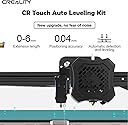
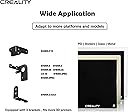
The Creality CR Touch Auto Bed Leveling Sensor is a cutting-edge upgrade for 3D printers, featuring a durable metal probe and advanced noise-reducing technology. With an impressive positioning accuracy of ≤0.04mm and compatibility with various Creality models, this sensor ensures optimal performance and longevity, making it an essential tool for any serious 3D printing enthusiast.


| ASIN | B09936TNJV |
| Best Sellers Rank | #309,418 in Industrial & Scientific ( See Top 100 in Industrial & Scientific ) #4,853 in 3D Printer Accessories |
| Date First Available | July 18, 2021 |
| Is Discontinued By Manufacturer | No |
| Item Weight | 5 ounces |
| Item model number | CR-666 |
| Manufacturer | yoopai |
| Product Dimensions | 3.94 x 11.81 x 3.94 inches |
P**L
Great product adds to the quality of prints
Easy to install but didnt give much instructuon on figuring out what firmware to use i found a few great videos to help figure it out that also helped show how to install over all helped add quality of my prints by making the base layer uniform
J**R
Great investment
This was a great buy for the money, very easy to install and it perform great. Very durable and help with print quality by making sure you're level. It doesn't help with any adhesion to the bed but it will help keep you level and in tune.
D**R
Original CR-10 w/CR Touch
Used with Creality firmware: "CR-10-Marlin2.0.1-20201207-HW-V4.2.7-SW-V1.1.1 BL touch-English.bin". Seems to work. This is for their v4.2.7 32 bit silent stepper board. The probe offset did not work as instructed (manual ridiculously small). For me, at the status screen after homing z is shown as 10. To get your offset, you have to move z to 0, then see how much further you need to go to get to resistance with the paper test, in my case 1.9mm. So for me the probe offset needs to be -1.9mm, save that setting. So if I home the CR-10 now, Z is shown as 11.9. Prints fine. I'm not certain the CR touch is necessary as I have the stronger springs and White wheels to adjust, I marked them for level. They do move on a long print but if you return the marks to their correct spot, level is always correct, can be done during the print as well. Might use the silicone support columns or not. Just figured if I'm going to dig into it...
M**E
Easy to install, difficult to update firmware for new folks.
I bought this to help improve print quality. It does help. It does its job. But the part that I found frustrating with this was the firmware update. No videos currently help in the new software update, there are links that lead you to where the software is. But the naming convention doesn't make it easy to find, once you get it, the set up and all that is done by the machine, just be careful because you can download the wrong files.
M**S
Junk
Instructions for CR-10 series is virtually non-existent. Had to resort to forums and online videos made by amateurs for help. Once installed, firmware needs to be acquired. Creality makes it difficult to find on their site. When you do find it, it's on GOOGLE DRIVE. Really?!? Creality can't afford to host its own files? Then you learn on a CR10 series you have to flash via USB cable, not SD. Not a problem, except the cheap USB chipsets/adaptors they use have very temperamental drivers and might recognise the connection about 1 in 30 times. Finally. We're flashed, but... There is something wrong with Creality's current firmware for the CR Touch. That's right; Creality's own updated for 2022 product doesn't even have properly working firmware for the CR10 series! When you set your Z offset, it will store, but not register when doing any movements or printing. After some research I found this is a known issue that has been brought up by the community for quite a while and nothing is being done about it by Creality. So thankfully, some frustrated individuals came up with their own firmware solution that actually works. So it is flashed and working now, but when I removed the USB cable for the last time, the board's USB adaptor snapped off, meaning now whatever is there is forever. A nice visual analogy and summary to the quality I have experienced from Creality. Never again. So next time you have $400 and some change lying around, don't buy one of these garbage Chinese printers. Just find someone special to take out on a really nice date instead.
R**R
Awesome, But not needed
So I bought this to hopefully win the battle of bed leveling and failed prints, and I surely did just that. I couldn't be happier with the performance of this thing. I have no noise issues it plugged right into my ender 3 without any modification to the 4.2.2 mainboard.it probes the bed in 9 locations(by default) and if you are running a raspberry pi this is how you get your bed leveling mesh.it does a really good job of adjusting the z height of your printer and getting a really good first layer. with all that said I don't even use it anymore. after getting better bedsprings and a glass build plate I found that I get better performance with manual bed leveling and this thing now only exists to pull mesh data if for some reason I want it. I installed this on my 11-year-old son's ender 3 to make his life easier while he learns the proper way to tram a build plate,which is exactly what I recommend you do and save yourself 40$ and use it somewhere else :D Happy Printing!
M**G
A great upgrade
I'd highly recommend picking up an auto bed leveling probe for anyone who wants to upgrade their 3D printing experience. It can be a little confusing to set up, but if you look up video guides and have some understanding of the hardware, you should be able to get it working in a couple of hours. Once it's set up, you're going to love it. You'll still need to adjust your bed on occasion to get the best results, but this decreases the need to adjust things every time you print. Plus, you get better bed adhesion because it can tell where your specific print bed might have slight dips or rises (since no bed is perfectly flat). Highly recommend.
R**0
Makes 3D printing a bit easier for some
If your Creality 3D printer does not have auto leveling, AND the printer support a CL Touch or BL Touch, this is a great addition. Note that adding this auto leveler, or any auto leveler, will likely require that one updates/flashes the firmware on the 3D printer. While CR Touch likely works with older Creality printers, some very early models had a control board that requires additional cables and steps to make it work. Prior to purchasing a CL Touch or BL Touch make verify the installation steps.
C**S
this little thing is a must for 3d printing - if you don't have a spare, keep one.
M**A
This is the 2nd one I have bought! The first I used on mine and I am now gifting them to other because I like them soo much! Works great and good price !
J**A
Added more BLT to my ender 3 v2 Bed levelling is much convenient. Machine works great. bed levelling is great 3-D printing is improved
D**S
Yep it works
A**Y
Comparing this with a traditional BLtouch, the CRTouch lasts wayyy longer. And it has a much higher accuracy comparing to the Bltouch I've swapped all my printers' probes to this. And it's always good to have a spare in your kit in case one dies
Trustpilot
2 months ago
2 weeks ago