🎨 Master your edits with the ultimate customizable tactile controller!
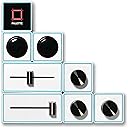
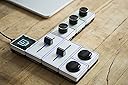
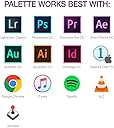
The Palette Expert Kit is a modular, customizable editing controller featuring 7 magnetic snap-together modules including sliders, dials, and buttons, anchored by a color OLED screen. Designed for professional photo and video editors, it supports major software like Adobe Lightroom, Photoshop, Premiere Pro, and Capture One. Its tactile controls and customizable LED indicators enhance precision and workflow efficiency, making it a must-have for creative pros seeking a personalized editing experience.
| ASIN | B014E9543U |
| Customer Reviews | 3.0 3.0 out of 5 stars (29) |
| Date First Available | August 25, 2015 |
| Is Discontinued By Manufacturer | No |
| Item Weight | 1.61 pounds |
| Item model number | PAL006 |
| Manufacturer | Palette Gear |
| Package Dimensions | 8.7 x 7.09 x 2.01 inches |
| UPC | 627843551126 |
3**D
great idea needs a lot of work to get it there.
The construction of the product is very nice. However 199 would be more of fair price if the software was more developed. But software driver where you actually can make this device useful is years away. Well months for good development team, but years in their case. I tried writing them to get scope of response, waited a week no response, so decided to return the items and get gaming pad keyboard from RAZOR which allows for much better keyboard mapping then their solution. Sad cause I really like the construction and the idea of the device.
S**T
Fantastic for Editing & so much more!
I used this for editing professionally on FCPX and it works great! My initial kit shipped with a glitchy core but Palette customer service was amazing & took care of the issue incredibly quickly! I was so impressed! I’ve had no issues since and I love all the fine-tune controll I get with the device when I’m editing. It’s really added an extra level of speed and it brought back some of the tactical feeling that has been lacking in the process for me. I highly recommend it to all editors, digital artists, musicians, photographer, ect…that use one of the programs they support it’s so worth it!
T**Y
Amazing!
Have really increased my work flow. Works best for Photoshop not sure about other applications.. 3.5 stars will update to 5 when they support more applications and better mapping. Really wanna see an application for Ableton live.
T**R
Great, but limited in functionality depending on the app you're buying it for
I really like my Palette, but they need to add more functionality to Premier. I love how you can scrub through the timeline using a slider for AfterEffects, but no such function exists for Premier. The sliders are pretty much useless for Premier, in fact... and this is too bad because i can imagine a lot of ways to use the sliders to make them useful! Still, it works great overall for a budding product. If they continue to make this product better, it has a very bright future. If they consider this a completed product, then it's not worth investing such a large amount of money in.
A**M
good idea.
good idea.. just doesnt perform the way I need it too. also the blocks connect with very strong magnets which is not good to be around computers, drives and some displays...
S**E
Don't buy for Premiere Pro or After Effects. Everything else works fine.
I bought this hoping that it'd be able to speed up my workflow in Premiere since I spend all day on Premiere and AE. The amount of speeding up it did was very very minimal for $300. If anything I felt like I needed to buy 2-3 more buttons and knobs to even make it have enough functions. I kept having to swap through 2 layers of separate editing functions. I had 2 coloring layers, and 2 editing tools layers, and I'd have to go back and forth between Editing 1 and Editing 2 over and over just to be able to have enough space for cutting, ripple edit, timeline zoom, go to in and out points, etc. At that point, I just had to revert back to my keyboard shortcuts, which beats the whole point of having this Palette. The worst part is the sliders are absolutely USELESS for editing on Premiere. Basically the sliders are a shuttle function, which you can just use J and L for on your keyboard with a TON more accuracy. The problem too is if you left the slider not on the neutral position, then switching between layers would sometimes cause your timeline to shuttle depending on where your slider was left. That was annoying beyond belief. So, in both of my editing function layers I had to disable both sliders because of how it was more of a hassle than anything. Even when coloring with the sliders I had to disable them because, again, depending on where you left them they'd change that value to where the slider was. I had my sliders on saturation, contrast, exposure and randomly those 3 values would shoot up or down and I'd have to go back and undo each value change. Talk about a hassle. Basically, if you buy this for video editing just know that you're paying for 2 useless sliders that you won't be able to use on any of your Premiere or AE layers. Very disappointed. If you use this for Lightroom or Illustrator it'll be fine, but this isn't a Premiere Pro tool first and foremost. It was made for LR and PS with some Premiere Pro functionality and compatibility added later on. It definitely shows.
T**N
Worth it!
I don't write reviews often but this is an amazing product. I work in video production and spend half my time split between the road and being stuck behind a desk. Keyboard shortcuts are great but still a bit clunky and slow and often means I need to look around at different panels to change values. With this setup, you have direct control on your most used adjustments for instant control without having to take attention away from your work... and it lets you set up multiple profiles so you can switch between different cutting/grading/motion profiles for all for your buttons. I have one button assigned to switching profiles and another to jump to the next track. WIth these, I can switch to the next track, quickly make a general adjustment for exposure, scale, rotation, and x/y position, switch modes to the grade profile and now I can adjust exposure, highlights, shadows, contrast, and saturation. Tap the next track button and repeat. Easily reconfigure and you can add more modules as your needs change.... And MAGNETS. who doesn't love magnets!
L**N
DOESNT INCLUDE WHAT IS LISTED
Received my package yesterday and was super excited to get started. Unfortunately, I did not receive the product listed in the description or in the photos. I only receive 1 slider, 2 buttons, and one knob. Bummer. Would not recommend unless you are able to get what is in the product photos
Z**I
Endlich mal etwas womit ich Photoshop und Lightroom sehr gut bearbeiten kann. Daumen hoch
C**N
Pour le moment je mets 1 étoile et copie du message envoyé au vendeur "Camera Tools" "Bonjour, J'ai bien reçu le colis. Par contre, j'ai commandé un produit neuf! Et non d'occasion! Lorsque j'ai ouvert la boite j'ai constaté que le Kit avait déjà été utilisé! La protection du contrôleur a été remise donc enlevé. Les boutons poussoirs présentent des marques de rayures. On voit clairement qu'ils ont été utilisés! J'ai même trouvé un poil ou plutôt un cil coincé sous l'un des curseurs. Le câble USB présente des rayures et a même une entaille! J'ai pris plusieurs photographie et on voit clairement qu'il s'agit d'un produit d'occasion ou d'exposition! Merci bien vouloir me tenir informé!" Edit: Bonne communication avec le vendeur. Après avoir exposé mon problème, ils ont reconnu qu'il y avait surement une erreur de leur part et que les "palettes" avaient bien été utilisées. J'ai donc retourné le produit, qu'ils ont pris à leur frais et m'ont remboursé mon achat. Ajout d'une étoile, mais dommage car les palettes sont vraiment intéressantes!
J**D
For midi work, not that great! ... for the price
A**R
When it works, it is great. However it is still in it's developmental stages so customization and compatible programs are still very limited for now. Wait a few years before spending $400 plus on this.
Trustpilot
3 weeks ago
4 days ago