Buy anything from 5,000+ international stores. One checkout price. No surprise fees. Join 2M+ shoppers on Desertcart.
Desertcart purchases this item on your behalf and handles shipping, customs, and support to Indonesia.
🔧 Fuse your filament, fuel your creativity!
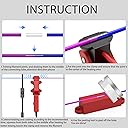
The VIT SPORT Filament Connector is a compact, easy-to-use filament welder designed for 1.75mm and 2.85mm PLA, ABS, PC, PETG, and TPU filaments. It enables seamless, durable filament splicing that reduces waste and enhances print continuity. Ideal for professionals and enthusiasts alike, it comes with a complete kit and a year of customer support, making filament recycling effortless and eco-conscious.


| ASIN | B091Y9WSH6 |
| Additional Features | Filament Joining Capability, Easy Operation |
| Best Sellers Rank | #49,349 in Industrial & Scientific ( See Top 100 in Industrial & Scientific ) #727 in 3D Printing Filament |
| Brand | VIT SPORT |
| Brand Name | VIT SPORT |
| Color | Red |
| Customer Reviews | 4.0 out of 5 stars 841 Reviews |
| Item Diameter | 1.75 Millimeters |
| Item Weight | 150 Grams |
| Manufacturer | VIT SPORT |
| Manufacturer Part Number | 5267 |
| Material | Polyethylene Terephthalate Glycol, Polylactic Acid, Thermoplastic Polyurethane |
| Material Type | Polyethylene Terephthalate Glycol, Polylactic Acid, Thermoplastic Polyurethane |
| Model Number | 5267 |
| Number of Items | 50 |
| Special Feature | Filament Joining Capability, Easy Operation |
| UPC | 734257461375 |
| Unit Count | 1 Count |
T**.
I'm glad I got this - it's not that hard to use and works really well if you do it right.
I own a 3D Printing business running 30 printers pretty much non stop 24/7. I've been wasting a TON of filament as most of the products I sell use more than 50g of filament. So when a roll get's low I just chuck it. while I do have a lot of prints that use less, it's just too big a hassle to swap out a running roll for a roll that is low for a short and quick print. Over the last month I've been setting aside the low rolls with the intention of figuring out a way to reuse them. In the last day I was able to take the scraps and turn them into 2 full rolls ready to go. This was the solution. Not only does this save some money, but it's sooo much better for the environment. I've tried other DYI methods of splicing filament and am a bit familiar with how it works so I knew what I was getting into with this. I was pleasantly surprised with how well and easy this worked. I'm using mostly Duramic PLA Pro that prints well at 215-220C, and that's what my experience is based on so far, but I suspect my method will work for any filament that prints between 200-220. Here's how I do it: Turn on the splicer and let it warm up for 3 minutes. while it's warming up, cut both ends of the filament to be spliced nice and square and straighten out the ends of the filament with about 1" straight on both. Once 3 minutes is up, turn off the splicer and immediately open the clamp and put one end of the filament in the middle of the clamp (in the center of the metal heating part). Close the clamp and then push the other filament end into the other end of the clamp till you feel it touch the clamped filament. With both hands push both ends of the filament together about 1mm, you'll feel them mushing together, you don't need to push mush, just making sure they're well contacted. Now let everything rest and cool. Be sure the clamp doesn't move around (I just use a vicegrips on the base to weight it down and position the rolls so they're not pulling on it, this takes a little fiddling but isn't hard). Cooling is the key, let it cool for like 8-10 minutes. Then just open the clamp, pop out the line and you can tear off the little wings that might be there with your fingernails. Then a little sanding (I use 220 grit) and you're good to go. So far this has worked great for me. I'm hoping the splicer holds up, and will update the review if it doesn't.
J**R
Works Exactly As Described!! PETG Confirmed
I'm not quite sure why people are saying that it doesn't work well or doesn't work at all with PETG filament. I followed the incredibly easy 5-step instructions and I was able to splice a piece of PETG with zero effort. I powered it on, set the timer for 3 minutes, once the timer went off I removed power and opened and inserted one end in the middle of the clamp and closed, then I inserted the other end to be spliced through the opening and pushed together with very little force. After about 4 minutes I opened the clamp and BOOM, perfectly spliced PETG rolls. My recommendation for getting a perfect splice with little touchups needed is to use very little force when pushing the to ends together. On my first attempt, I pushed both ends in with a fair amount of force because I was worried that the reviews were correct about PETG so I wanted to give it the best possible chance. Well, it turns out that I used too much force. When I removed the splice I had a beautifully splice, but there was a thin pancake of filament around the splice from where it began to push out of the clamp. Nothing ever leaked and the pancake portion was incredibly thin so it was easily removed with a craft knife and 5 seconds of sanding. On my second attempt, I pushed with far less force and this time it came out perfect. Pulled on both ends with a LOT of force and they stayed together with ease. Very easy, very efficient, and HIGHLY recommend. Thank you!
G**R
Stuck together
It works the only issue is my wife hands aren’t strong enough to hold it open till it’s ready
W**S
Actually works!
I have a lot of small pieces of filament that came with a 3D pen. They are too short for any sizeable print on my FDM and I didn't want to waste it so I ordered this. It REALLY works! Once I got the hang of it and reread the directions (I'm a guy; I know!), it does a great job. To help others, do these steps: 1) trim the end square. 2) open the jaws and place the first end in the middle of the element (silver section), 3) slide the second end in until it james against the first. 4) turn the unit on and let it heat for about 2 minutes --you'll learn what amount of time works best for your filaments and climate. After a minute or so GENTLY push the two filaments toward each other--just a little. Dont overdo it. 5) turn the unit off---AND WALK AWAY! 6) after 4-5 minutes open the unit. Be advised that the filament sticks and you'll have to squeeze the handles HARD to open. It's going to pop loud (not going to hurt your ears, just more than you'll expect). The filament will be slightly stuck, so gently pry it off. DONE! You may need to gently sand the joint. Sometimes yes; sometimes no. The only issues I have with it are the sticking (add a non-stick coating manufacturer?) and it is lightweight so it slides around. I'll come up with a way to add traction to the bottom. Overall, easily 5 stars!
R**K
Cheap, doesn't work.
It's garbage. I'm sure in theory it should work, but it doesn't. You're forced to guess when a solid connection has been made, and if your wrong you have to cut that section and try again. Even when it appears to have worked it's a brittle connection that snaps easily. Cheap, doesn't work, snaps easily.
C**R
Works okay in a pinch, but other options are easier
I've successfully fused filament with this device about 50% of the time. Unfortunately, if you don't get a really clean joint, it will jam somewhere in the filament path. The trick to getting it to come out clean is to make sure you give it at least 5 minutes after you turn the clamp off before you remove the filament from it, and then use a blade to shave off the flash on the sides followed by some light sanding to get a really smooth joint. I've personally found it easier to switch filament "on the run" by feeding in the new filament while the printer is running. It's probably not the BEST way to handle the need to change filaments, but with an open frame printer it's fairly easy to do as long as your print speed isn't crazy high.
A**1
Compared to the Black Model
Red VS Black Red doesn't use parchment paper. This may prove to be a bad thing after extended use, due to build up of filament on the clamp. Having said that, using parchment paper with Black is a little tricky. I now know why so many reviews comment on needing the 3rd hand. It takes a bit, but after a few attempts, I was getting it with minimal trouble. Black comes with standard paper clamps which are essentially useless, they tend to slip and release the filament, messing up the weld positioning. I'm surprised the manufacturer didnt 3d print some small U clips. Took me 30 minutes to draw something and have it printed. These work MUCH better than paper clips. Red has a stand. VERY convenient, especially considering the filament is spooled up and keeps pushing the black over. Not having the clamp level is a bad thing. The filament coming out of the sides gets hot enough to easily deform. I'll design something similar for Black that holds it in position. Black worked quite well with the settings listed (at least for PETG), whereas Red overheated the filament coming from the sides. After the cool down period, the filament had folded almost 90°. This should be an easy enough fix, just have to tweak the timing. Black came out "cleaner" whereas red needed more clean up. This is probably due to the parchment paper. Red comes with 3 files, Black only has 1. Red came with a timer, which was much more convenient than using my phone. Black seems to be built slightly better, but that might just be due to the size difference. Red is cheaper. In my opinion, there isn't a clear winner. They both work as advertised and with a little bit of practice, I think will have similar results. If nothing else, there shouldn't be buyer's remorse wishing you went the other way. HAPPY PRINTING!! Revision: After more experimenting, I'm growing fonder of Red. The omission of parchment paper just makes its SOO much easier. Tip - I coated the business end of Red with a Plastic Repellent product available from Slice Engineering. Hopefully using this stuff will add longevity to Red, as I had my initial concerns as to the parchment paper providing a line of defense. I tried to coat Black with the same product, but I still had some filaments adhere to the clamp, which scared me into resorting back to parchment paper. Only time will tell how many splices I can get from either type, but for now, my go to will be RED. Just easier to use, and it doesnt hurt that its cheaper.
Z**R
Small learning curve
I love this thing! It is relatively easy to use. Some things to help you I think: you will get breaks because of moisture and filament issues and it can get frustrating, keep trying I only had to give up on one after 5 failures. Check the metal plates placement, I had a small issue with the molten plastic getting between the clamp and the heat plate pushing it out of the way. Once I realized what was going on I was able to push the plate back in place while the heat is on to fix the issue. I have expanded on their steps a bit. 1) make sure you put the PTFE tube on one of the ends before you press it together, especially if you have two large amounts you are joining. 2) turn on the clamp for 2 minutes to heat up. while this is happening I work to straighten out the first foot or so of each spool to cut down on extra stress during the heating process. I start a timer once I turn on the clamp, the entire process takes as little as 8 minutes 3) At the 2 minute mark, turn off the clamp. Open it up and place one filament approximately in the middle of the metal plates and close the clamp. 4) Keeping the clamp closed and holding the other filament in place, push the other length of filament through the other side of the clamp until you feel the resistance of the other filament. Press the sides together slightly to ensure they join and press the clamp closed to cut down on clean up as much as possible. This is when you want to check the metal plates, look at the back of the clap area at the two metal plates. make sure they are both pressed all the way into the clamp mouth or the notches wont line up. I use the back side of some tweezers to push it back in, all while the clamp stays closed. 5) this is a step I added, turn on the heater again for about 10-20 seconds, should be done by the time your timer hits 3min. This should help to ensure the filament gets hot enough to fully fuse, at least in my head it does. 6) wait 5 minutes for everything to cool naturally before opening the clamp, or wait until your timer gets to at least 8 minutes if you are keeping a running timer. It is ok if it sits longer. 7) Remove from the clamp and clean. To help remove and minimize the risk of breaking, once I get the clamp opened I turn on the heating element to start heating. That helps loosen the filament without getting hot enough to mess up the joint, just be sure you are pulling it out as it heats up or it could get too hot. Use the cutters to cut away any ooze and the sandpaper to get it down to size. Once the PTFE tube can pass by the seam without issue it is all done. I hope this helps someone!
F**L
Excelente
Este empalmador funciona excelente, uní dos filamentos y con la herramienta de lijado queda bien unida y al grosor estandar del filamento. Estoy muy satisfecho con este empalmador
A**Y
It works great.
There's a learning curve to every filament splicer I've ever touch. It always takes a while to get the process down. I've got it working really well for me. If you get this, follow the instructions, and practice a bunch of times. I've finally got it making splices that are almost perfect every time.
ぱ**す
素晴らしい
半端に残ったフィラメントがきれいに繋げられました その後印刷に使いましたが、切れることも引っかかることもなく普通に使えました この普通にが大事!
A**F
This works AWESOME!!
The instructions are pretty thin but it's pretty obvious how it works. The first splice I made worked out perfect. The second splice bombed out, had to do it again. Now I've done about thirty splices without anymore failures. What I found made the difference was how I cut the filament ends for splicing. The instructions don't tell you how to cut but I followed the general rule for inserting it into the printer, cut them to a 45° angle then insert them. Great tool for what it does. Sure cleaned up all those leftover rolls of filament I had cluttering my shop area.
S**E
ニコイチで最後まで使い切る最高のアイテム
フィラメントが中途半端に余ってしまうのが悩みでした。その様な悩みを解決できるものがないか探したところこちらの商品を見つけました。まさに理想的! フィラメントの重なりを維持しながら挟むのに少しコツと経験が必要ですが、ニコイチにできるようになってからは余ったフィラメントをいつまでも保管しなくてもいいので最高です。物自体は軽いので、もっとテープカッター並みの重量感があってもいいとは思います。
Trustpilot
2 weeks ago
2 weeks ago