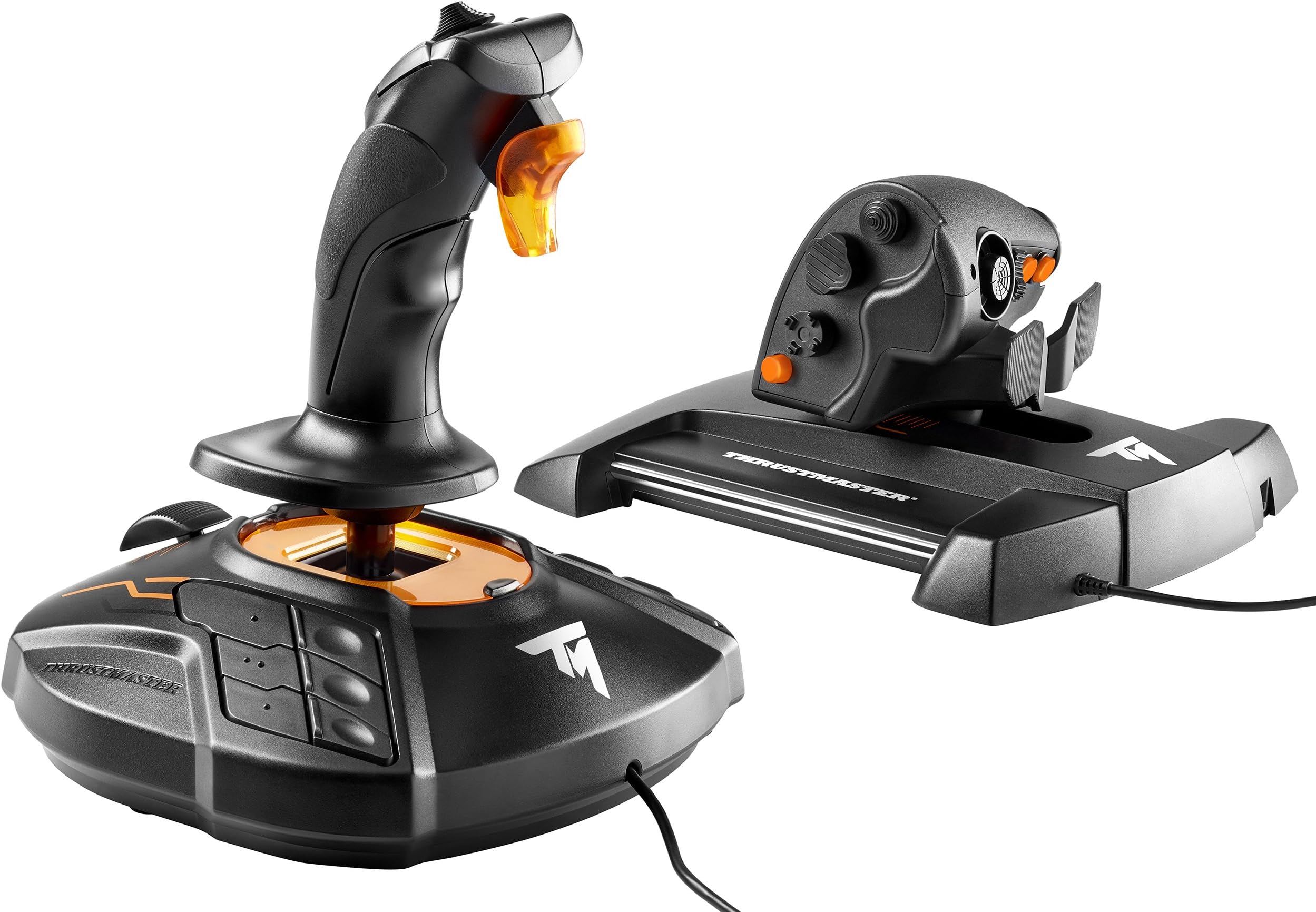
Thrustmaster T16000M FCS HOTAS (Compatible with PC)
Product ID: 32883610
🎮30 programmable buttons
🔄4 independent axes with twist rudder
🧲Hall effect magnetic sensors
Buy anything from 5,000+ international stores. One checkout price. No surprise fees. Join 2M+ shoppers on Desertcart.
Desertcart purchases this item on your behalf and handles shipping, customs, and support to Indonesia.
🕹️ Elevate your flight game—precision and control that make every mission legendary!
The Thrustmaster T16000M FCS HOTAS is a high-performance PC flight stick featuring patented Hall effect magnetic sensors for precise control, 30 programmable buttons with braille-style identification, and 4 independent axes including a twist rudder. Ergonomically designed and USB compatible with Windows, it delivers professional-grade accuracy and comfort for serious flight sim enthusiasts.


| Additional Features | Ergonomic |
| Asin | B01KCHPRXA |
| Best Sellers Rank | #558 in Video Games (See Top 100 in Video Games) #2 in PC Game Flight Controls |
| Brand Name | Thrustmaster |
| Button Quantity | 30 |
| Color | Black |
| Compatible Devices | PC |
| Connectivity Technology | USB |
| Controller Type | Flight Stick |
| Customer Reviews | 4.2 4.2 out of 5 stars (3,450) 4.2 out of 5 stars |
| External Testing Certification | Não Aplicavel |
| Global Trade Identification Number | 00663296420732 |
| Hardware Platform | PC (Windows 10, 8, 7, Vista) |
| Included Components | Instructions manual & flightstick |
| Item Dimensions | 9.01 x 10.39 x 10.7 inches |
| Item Type Name | Thrustmaster VG T.16000M Fcs HOTAS Controller (2960778) |
| Item Weight | 3 Pounds |
| Manufacturer | Thrustmaster VG |
| Manufacturer Part Number | 2960778 |
| Model Name | Thrustmaster T.16000M FCS HOTAS Controller |
| Model Number | 2960778 |
| Package Quantity | 1 |
| Power Source | Corded Electric |
| Warranty Description | One year |
M**L
Great quality Hotas...was very impressed!!
UPDATE: I am keeping the Hotas as I bought 2 Vesa clamps and added to my chair. Bumble from Youtube has a fantastic tutorial on how to mount. Made an additional step by fabricating some PlexiGlas mounting panels, screwed into platform and adhered each unit by Velcro to panels. You know what's better than having these at 13...having them at 46! Remapped gamepad and Hotas to a Custom Binding and was able to input ALL buttons / funcitons in. Mainly using gamepad for map / SRV as it feels more natural. Definatelty an awesome product...will update if unit degrades over normal use. I absolutely love this controller for Elite Dangerous! Not sure what other flight sims are out, but would like to try on X3 and Microsoft Flight X. All the buttons, toggles, and switches were used and had a pre-programmed setting. Elite is great / intuitave with a controller...it was better with this Hotas (not sure about the SRV...read one person's review that stated he used Hotas for flying and controller for SRV - I could see myself mirroring this). It did take some getting used to, and I am still not at the same proficiency as a controller. Remember boosting into a station was when you first played Elite...yeah that will happen again. The flight stick was good with a large number of buttons, but felt like other flight sticks I used in the past. I loved the throttle, slap paddles, and analog on the throttle portion - this unit added the most immersion to the game as it allowed for multiple articulating inputs to happening simutensiously. Same can be done with the controller, but when inputting the same actions using the Hotas it felt more alive (left hand was controlling throttle, left pinky / middle finger was the rudder, left index looking around with analog, right hand on flight stick, with right thumb on power allocation). Unfortunately I will need to return the unit for now as I found out I still have a few old shoulder / neck injuries and using this for too long causes aggrevation if placed on the desk. I will prepare a chair with Hotas mounts in preperation of re-purchasing this sometime in 2019 and let the good times roll. Hats off to a good product, wish your company the best! Trust me, I'm an engineer. Writing this review with the unit boxed up behind me feels like I'm saying good bye to an old friend : (
B**7
Acutally Very Good HOTAS!
It works great, but I dock a star on Range of motion because sometimes the throttle movement on the TWCS is a bit stiicky. A little Graphite basically took care of that, but it should not have been necessary. I dock it on Ergonomic because the head of the stick could be designed better. A little lacking, but it works well enough for Elite Dangerous with a MASSIVE keybind requirement! A second HAT or two more buttons would have been better, but I am comparing it to the Warthog stick and strangely enough, the Logitech Extreme 3D. Let's face it, we rarely use the buttons on the base of the joystick when the room is dark, the monitors are bright, and it;s hard to differentiate the base keys! Lighting would be good. Multiple color buttons would be good too. (The throttle slider on the Stick base does work great for changing the radar range level!) The TWCS throttle could use a couple more buttons, but overall it works great for my use with E.D. The stick works well for Descent/Overload/Descent: Underground also. Starting to use the HOTAS for my old Flight Sim 10, but there are some compatibility issues there, working around it, but only cuz it;s an old program. For the price it's excellent. And unlike the very expensive Warthog HOTAS, this stick has the twist that works very nicely. It they made the Warthog available with a stick twist for rudder/Yaw, I might have considered it.
N**T
Good for arcade gaming, so-so for plane simulator, unacceptable for helicopter simulator.
I've been using this kit for 4 months now. Good: - Very good quality. - The joystick and throttle are both quite friendly for left-handed (yep, I am). - Nice set of features - a lot of buttons, switches, sliders and so. - Allows conveniently assign all critical controls on buttons - roll/pitch/yawn/throttle/prop/flaps/breaks/reverse/gears + 8-way look-around and return to default view. Ok: - Throttle requires to be adjusted and lubricated to provide really smooth movement. - Yawn control at throttle is ok. The pedal set is better but definitely better than nothing. I would say it is enough to regular operations with no-wind/low wind, but not precise enough to work through shifting winds or to fly helicopter. Bad: - Twist control on joystick is useless at best. - Worse, to provide twist abilities they have use quite a complex suspension and therefore it is almost impossible to manipulate one axis without significantly disturbing the others. - The spring is really heavy making precise manipulation almost impossible. All together make the joystick not the best one for flying in aviasim, especially in heavy weather, or to fly a helo. After 4 months I am still using the throttle and quite satisfied with it, but finally replaced the joystick with CH Flightstick pro and CH Pedals.
J**.
Decent stick, questionable QC, god-awful config software.
This stick +throttle set is overvalued at $160, so the prospect of having to buy it for as much as $300 (as was the case for a long time) made it a no-go. But, finally the price dropped back down to sanity, and I pulled the trigger. I'll say-- a month or two in, I'm not disappointed. Having upgraded from a 6-7 year old Logitech 3D Pro, having a throttle in hand, along with the greater variety of buttons and axes makes this worth it as an entry level HOTAS set. I only have two major gripes. One: the build quality on the stick is very questionable for the price. The plastic feels good, but pretty much every button wiggles and the hand rest does not lock firm and wobbles around where it is affixed to the stick-- there are several screws but none of them appear to tighten it down. None of this really affects playability, as the switches feel good to the press, but the QC is on par or below my 3D Pro. The TWCS also has wobbly controls but it is much more apparent on the stick. Second gripe... this is not about the stick, but the TARGET software that Thrustmaster provides for profiling, axis customization, etc... TARGET is GOD-AWFUL. Pretty much nothing about it works consistently. Creating a profile is convoluted the first time, and even the manual does not explain properly how to do some functions. But even after you've created your profile, the jank does not end there. Half the time, when I boot up TARGET and boot up Arma 3 and get into a game, TARGET will have messed up in such a way that something does not work. It's a real pain in the ass to be rolling halfway down a runway and hit V2 only to discover that my pitch does not work. I believe this has something to do with the fact that when you "run" a TARGET profile, it essentially creates a new device while attempting to suppress the existing devices. I believe this can cause the game to be confused as to which controller it's supposed to listen to. TARGET also has issues if it's not installed properly. And since the control mapping cannot be adjusted manually onto the virtual device, frequently you will end up with conflicts... such as pulling the trigger on the stick (button #1) causing my landing gear to come down-- button #1 on the TWCS. Apparently TARGET can be made quite nice with programming, but that is not something I am gonna do. In short: Don't use TARGET with this stick. I switched to the combination of vJoy and Joystick Gremlin, which does everything TARGET is supposed to do but miles better. vJoy is an active device regardless of whether a profile is running, so the game never gets confused. I believe JG has integration with a program that will suppress the original controller inputs, but I haven't tested this yet. Discovering JG was a godsend for me, because the last thing I need flying active ops in Arma 3 is janky controls. Another thing: I picked up a $20 mod from CoreHawk3D on Etsy that replaces the original rail slider on the TWCS (the piece that slides on internal rails that the throttle body sits on) with a 3D printed piece that allows you to insert linear standard sized linear bearings/bushings-- either polymer or metal ball bearing can be had-- or buy your own and experiment. It also comes with an optional magnetic detent. This is all absolutely worth it. Many TWCS users complain about static friction that develops as the original rail slider wears down. Mine had an acceptable level of stiction, but the CH3D mod with polymer bushings makes the throttle extremely smooth. Installation basically just involves some careful disassembly, not hard but should be done carefully. Polymer is smooth while also being quiet, while ball bearings slide far easier but do make some noise. Overall, I give 3 stars... the TARGET issue is big, but it's not the stick's fault. The 3 stars comes from the QC issues and also just the feeling that I'm paying more for what I'm getting. If this set was, say, $140 new, I would feel more like the cost is on par with what you get, especially compared to a $40 3DPro. If you can catch this set used in good condition for a reasonable price, or if it goes on sale, go for it. Addendum: Over a year into owning this HOTAS, my setup has changed. I have stopped using the T.16000M and now instead use a VKB NXT EVO Space Combat Mk3 with the TWCS. I personally feel this is one of the best controller combos that you can get for less than Virpil or Winwing prices. The T.16000M is a decent stick, but the VKB places almost all of the controls on the entire unit on the stick itself-- reaching for buttons on the base is rarely necessary. The T.16000M is alright for games that are not super control heavy, like Arma 3, but once I hopped into DCS I found my experience was significantly degraded by this issue. The VKB is pricier, but worth every single penny if your plan is an involved simulator like DCS. Secondly, I had to do a repair on my TWCS. The main throttle potentiometer has always had jitter, but after a point it got unacceptably unstable. I replaced it with another pot that was compatible with modificaton. However, this new pot outputs a different range of values, and Windows is unable to calibrate the type of USB controller that TWCS appears as. In order to work around this, running Joystick Gremlin is now a must in order for the throttle values to be correct.
S**Y
Excellent.
I've only owned this for a day or so, but whew! Set up was quite easy and coming from a Logitech Extreme 3D pro and keyboard setup all I can say is wow - what a difference! I wanted to get this mostly to try out the HOTAS experience after logging some ~200-300 hours in Elite: Dangerous with stick and keyboard, and let me just say I'm not going back! What surprised me quite a bit honestly is just how good the stick feels. The movement is super smooth and the accuracy is there down to the tiniest little movement. I personally set up a very small deadzone so I can rest my hand on the stick without accidentally moving about in game, but that's more a testament to the accuracy of the stick than anything. The tension is very good, if a little bit firm, but all the same it feels quite good. One other tiny thing to note is that when you move the joystick, the orange bit underneath the stick lights up - pretty cool! The throttle moves very smoothly as well and it is a joy to finally have analog control over my speed. I mapped horizontal thrusters to the paddle in the front of the throttle and vertical movement to the analog nub, and it seems to work pretty well. Overall I'd say the build quality of both items is excellent. Okay, so now some cons. These may be limited to me as I have small hands, but I find the stick just a bit too thick to grasp comfortably. My thumb ends up feeling stretched and in a bit of pain after extended use. The hat switch on top and the top three buttons are more or less off limits. I bound them to things I use very rarely, so it's not the end of the world or anything. However, use of them again just leaves my thumb in pain. Oh well. The cons of having smaller hands, I guess. I will learn to live with it being that the stick is of high quality in basically every other regard. Highly recommended if you're coming from a Logitech Extreme 3D pro or just looking to try out HOTAS for the first time!
J**S
Good mid-ish priced flight stick and throttle.
So far works fine. I have a few nitpicks. Wish the buttons on the flight stick, on the base, were lighted or have reflective paint on them. I play in a dimly lit room and it is hard to see where the buttons are on the fly. I know they have markings on them but when you need to hit a button fast (like to deploy flares) you don't have time to feel around for them. The throttle tends to stick making it hard to get precision movement when needed, and it would be nice to have a detente to indicate the center of the throttle. Once again, these are all my personal nitpicks. Adding all these into the design would probably add to the price, and it is a very good deal for what you get. Also, the Target program does not like windows 11. I was receiving all types of error messages when installing it, and when it finally finished, I tried loading a preset configuration (for Star Citizen) and it was giving me all types of errors again. I instead just went into the games own menu and manually set all the buttons myself. So, until they update the Target program to run on windows 11 properly, I will not be using this feature.
T**M
Magnum Opus of Joysticks and amazing throttle
I upgraded from a Thrustmaster HOTAS X because I wanted something a little more serious. The throttle is excellent, though as is to be expected with small joysticks, the stick on the throttle doesn't center perfectly, setting the deadzones to 20% resolves this however. Being such a small joystick, a bit of deadzone is preferred regardless of its ability to center itself adequately (for contrast, a standard xbox 360 controller has roughly 20% deadzone for both its sticks by default.) It's also worth noting that the throttle does not have a tactile center point but this is personally a preference of mine, though I know the HOTAS X had it. While mostly inconsequential from a keybinding standpoint, its worth noting that of the 3 hat switches on the throttle, only the top most switch registers as an actual POV hat in windows settings. The middle and lower two register all their directions as individual buttons. The joystick is arguably the most interesting thing to note. Compared to the "normal" T.16000M, it's better in a number of ways. The POV hat and face buttons have grooves for better grip, the joystick throttle is now a proper rubber grip instead of some weird thumb catch as in the original. The base buttons have divots and nubs for distinction, the originals were all flat and it was hard to tell which button you were pressing without looking at it. While this joystick still lacks a switch to turn off the annoying lights, orange is a much less offensive color than green. The original green could not be ignored, but the orange in this version can be easily ignored, even in dark conditions. Honestly, considering the technology and features behind the T.16000M Joystick and the improvements in this revision, I would personally be willing to pay $130 for the joystick alone. The throttle, while amazing in its own right, was merely the icing on the cake. Thrustmaster, if you guys are reading this, consider selling the revised joystick on its own as you have with the throttle. It's a flawless version of an already great joystick. I want to buy a second joystick like this one for a dual stick setup but I don't need, nor can I use a second throttle.
M**B
EDIT #2: Second time is a charm
Pretty darn impressive for the price vs features and quality. The next closest option is the Saitek/Mad Catz X52 Pro at around $150 which I also own. I have a full review on Youtube as promised however amazon will not allow me to link it. Look for - Thrustmaster T.16000m FCS HOTAS and X52 Pro Comparison. EDIT: Was great for the first week or so.. Unfortunately the throttle started to develop a tacky, sticky, hitching when slidding it forward. I had to apply a bit extra downward pressure to get it to slide smoothly. I tried adjusting the tension and working it in but it just kept getting worse. Once you open the thing to re-lubricate it you void the warranty so I decided to send it back instead. Really disappointing this thing had so much potential. EDIT 2: Well, I've come full circle. I had to return the first one for the reasons I just described in my first edit. I ended up trying a Logitech/Saitek X56. That did not go well at all. I kinda knew that the X56 had really bad quality control but I gave it a shot hoping I would get lucky. I did not and I do NOT recommend wasting you money or time with that one. As you all know if you are reading these reviews, there simply are not a lot of HOTAS options out there. Especially in the sub $200 range. Due to that, I decided to try another T.16000M FCS HOTAS. I waited a solid month before writing this latest edit because I wanted to be sure that the newest one didn't have the same issues and my first one. So far so good! Im not sure if the new one is simply better lubricated or a newer version but its good and im happy. You simply cannot beat the price for what this offers.
G**S
Very Good.
Works well. Feels solid and durable.
B**U
Good quality, precious control
I am very happy with the purchase. Only downside that noticed is the 'stickiness' in the trust slider, which makes it difficult to do finer adjustments. I mostly fly airliners so it doesn't matter much.
R**.
Sensor excelente y la mejor calidad-precio. No hay nada mejor por este precio
Es claramente lo mejor en calidad-precio. Al principio me pensaba comprar el TCA (que es el mismo que este joystick, pero con la apariencia de Airbus) pero estaba agotadisimo, y al final decidí gastarme un poco más y comprarme este con el HOTAS. Juego al Flight Simulator con este set y es UNA DELICIA. Es de plástico pero no se nota para nada "plasticoso". Es un plástico de buena calidad. Lo bueno que tiene el joystick es que tiene exactamente el mismo sensor que el Warthog de ThrustMaster de 500€. La sensibilidad es excelente y se siente muy cómoda la mano. Además tiene muchas setas y joysticks que son muy útiles para mover la cámara, etc. Al igual que el HOTAS. Hablando del Hotas, además de ser comodísimo, dispone de una ruede cita de trim (compensador) que es muy muy útil y cómoda de utilizar. Compra totalmente recomendada. Estoy contentísimo. Muy recomendado. Lo estoy disfrutando mucho.
H**Y
Parfait pour ED
Produit de bonne qualité ! Parfait pour les sessions sur ED
R**A
De los mejores productos calidad precio
Es un producto de muy buena calidad y funcionalidad, en Windows se reconoce de inmediato y la comunicación es muy buena. Yo lo utilicé para aplicaciones de realidad virtual y la compatibilidad es muy buena con Unreal y con Uniti.
Trustpilot
1 month ago
2 weeks ago