


💾 Capture More, Worry Less — The Ultimate SDXC Powerhouse
The Transcend 64GB SDXC Class 10 memory card delivers robust 64GB storage with fast read/write speeds up to 30MB/s, ideal for DSLR cameras and HD camcorders. Featuring error correction technology and a limited lifetime warranty, it ensures reliable, lag-free performance for high-resolution photography and Full HD video recording. Compatible exclusively with SDXC devices, this waterproof card offers plug-and-play ease and durability for professionals and enthusiasts ready to elevate their creative workflow.


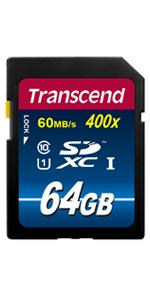


| ASIN | B003P3Q0DU |
| Additional Features | Water Proof |
| Best Sellers Rank | #186 in SecureDigital Memory Cards |
| Brand | Transcend |
| Color | Blue |
| Compatible Devices | Camera |
| Customer Reviews | 4.6 out of 5 stars 7,676 Reviews |
| Flash Memory Type | SDHC |
| Flash Memory Video Speed Class | V10 |
| Global Trade Identification Number | 00132017782423, 00778888339214, 04052305275412 |
| Hardware Connectivity | SDXC |
| Item Part Number | TS64GSDXC10 |
| Item Weight | 2 g |
| Manufacturer | Transcend Information |
| Media Speed | Up to 30MB/s |
| Memory Storage Capacity | 64 GB |
| Mfr Part Number | TS64GSDXC10 |
| Model Name | TS64GSDXC10 |
| Model Number | TS64GSDXC10 |
| Number of Items | 1 |
| Number of Packs | 1 |
| Secure Digital Association Speed Class | Class 10 |
| UPC | 887545997701 885782165204 012304081289 880959945221 885782165259 634392937134 763616003925 806291854748 132017782423 778888339214 760557818380 |
| Unit Count | 1 Count |
| Warranty Description | Limited Lifetime Warranty |
| Warranty Type | Lifetime |
D**M
Amazing card for SDHC
I use this SD card for my lower end cameras, such as the Canon Rebel T2i, otherwise known as the 550D. Even though that camera supports SDXC memory cards, I didn't think I needed that much speed for this little camera, so I bought this memory card. Overall, the speed of this card is very nice. I notice that when copying files onto your computer, it can be a little slow, even with a high-end card reader, but it doesn't seem to bug me. While taking photos, This card saves it immediately. When I'm shooting RAW, I notice some lag after about three to four shots, which isn't excellent, but I don't shoot RAW all that often, so I don't mind. When shooting large JPEGs with this memory card (The camera I am using is 18 MP), I need to shoot about 30-40 pictures before it starts lagging, which is pretty nice, seeing the burst speed is only 3.7 fps on the camera I use. Also, beware that when this card starts to get full, the performance does slow down a bit, and sadly, the lag starts when this card gets to be about half full. For the videographers out there, this card works really well. This card is able to save 1080p video at 30fps with ISO all the way up at 6400 until the card is full. I find that really rare in a memory card, but it handles HD video really well. Whenever I take movies with this card, it never randomly stops recording because of lag. To sum this up, this is a nice and cheap card for the capacity and speed, and I find this card works very well. Of course, if your camera has an SD slot and you're using it for RAW photography, you will need to find a faster card, such as a Sandisk Extreme Pro SDHC card or an SDXC card, if your camera can support it. Otherwise, this is a great card for DSLRs and works great with point-and-shoot cameras as well, although for point-and-shoot cameras, this card is a bit overkill, unless you are shooting movies with it.
D**T
Solid Value. Just what I expected.
I ordered this card after reading a bunch of reviews on high speed SD cards, with the expectation that I would get a good card at a good value, and that it exactly what I got. The first thing I did was test the card with both of my flash testing programs including h2testw. I have had too many 'fake' E-Bay cards lately. My worst of 3 tests is as follows: Transcend 16GB sdhc class10 ser# Test finished without errors. You can now delete the test files *.h2w or verify them again. Writing speed: 14.6 MByte/s Reading speed: 18.0 MByte/s H2testw v1.4 This result lands it solidly in the class 10 group and exceeds min test requirements. This is faster than my Sandisk Ultra (12.2/14.8) by a little and it is a larger card, and faster than my 8GB Kingston class4 (6.8/9.6). This is the fastest SD card I have personally tested. I immediately recorded my Daughters College play, all 2-1/2 hours of it, on my Casio H20 high speed camera and the card work wonderfully. Videos and 40fps stills and without issue. No problem at all. I still had 4 GB left when it was over. That was nice not having to swap cards. Overall purchase experience is very good with a very good product so far.
J**E
Happy With This SDHC Card
I was a little reluctant to purchase a memory card from Transcend, mainly because I was concerned about quality control and I typically purchase more well known cards. Nonetheless, the price was right so I opted to pick up two of them for my point and shoot. My concerns have been put to rest and I've run them through their paces without any trouble. Some might say that these cards are not quite up to par with a true class 10 card, but for my purposes, that hasn't mattered. I've been able to capture full HD video with my Canon SX130IS and haven't experienced the slightest bit of trouble. Image capture seems to be fast enough and the card doesn't keep me waiting. No unexpected failures or other problems to report so far. I can get just over 5000 12-megapixel images on one of these cards or about an hour and a half of HD video. If you're working with HD video, the 32GB cards might be more suitable - but I've always been a fan of using more, smaller density cards than putting all my eggs in one basket with very large density cards. As an amateur photographer with occasional client projects, I probably would opt for a better known brand for some of my critical shoots...but for less critical applications and personal work, I now feel comfortable with using these cards. Eventually, I'll probably get another 2-3 of these cards since I've been getting into HD video more and the space requirements for that are crazy! Overall, five stars for a good product at a great price!
J**S
Slow but Great Value
At the time I am writing this review, the Transcend 8gb class 10 SDHC card is priced at an incredible value. That is the primary reason why I am giving this SDHC card a high rating. Frankly, as far as class 10 memory goes, this is a pretty slow card, and I think it performs more like a class 4 in terms of write speed. However, for most people, this card is really fast enough. It can copy images to a computer very quickly, and most people don't even have a camera with shooting speeds that are limited by the memory card. If you own a dSLR, and speed is your concern, check out SanDisk class 10. If getting reasonable speeds at a bargain price is your concern, look no further and buy this card. I compared the following four SD memory cards: 1) Kingston 2 GB SD Flash Memory Card 2-Pack SD/2GB-2P 2) Lexar SDHC 4 GB Class 6 Flash Memory Card 100x Jewel Case Envelope Bulk LSD4GBBE100 3) Transcend 8GB Class 10 SDHC Card (TS8GSDHC10) 4) Sandisk 8GB Extreme SDHC Card-Class 10 (SDSDX3-008G-A31) I compared the photo shooting speeds and the speeds to copy pictures onto a computer for the four different SD cards. I inserted the SD card into my Canon T1i dSRL, formatted the SD card, and shot in RAW+jpeg (which in this case was two files, 19.5mb and 4.7mb respectively). I timed how long it took to shoot 20 pictures, and then I timed how long it took to move those 40 files onto my computer. The T1i buffer filled up after 4.5 shots, so the remaining shots all depended on the write speed of the memory card. I didn't see too much difference in the time it took to copy the files to my computer, but there was a noticeable difference in the shooting speeds. The SanDisk class 10 SDHC card was clearly the fastest, but it was also the most expensive. Shooting Speed 1) SanDisk 8gb class 10 SDHC (24 sec) 2) Kingston 2gb SD (38 sec) 3) Lexar 4gb class 6 SDHC (39 sec) 4) Transcend 8gb class 10 SDHC (45 sec) Copy to Computer Speed 1) SanDisk 8gb class 10 SDHC (34 sec) 2) Kingston 2gb SD (34 sec) 3) Lexar 4gb class 6 SDHC (38 sec) 4) Transcend 8gb class 10 SDHC (40 sec) Besides the speed differences, I have not noticed any other difference between these four memory cards. They are all compatible with everything I have (except for a few things that do not take SDHC cards). I have never lost anything on an SD card, and none of my cards have ever broken or failed. However, I do take very good care of them, and I always format the cards after copying pictures onto my computer. Depending on your needs, you may not need 8gb, or you may not need very fast write speeds. If speed matters to you, go with SanDisk...it is the fastest. Otherwise, consider a cheaper alternative.
S**C
Great Value for the Price
Update 3/6/2012 I own about 20 Transcend cards now. They have all worked without an issue untill today. I dread calling any company for return support because it usually is such a tortured experience...(Ever tried calling SanDisk for product support?) Withing 20 seconds of dialing I was connected to their representative Marc Crawford. He was able to quickly and clearly guide me to the support I needed. It was such a shockingly great experience that I wanted to pass it along to potential purchasers. UPDATE 9-10 I own 4 of these cards now. I have more of these than any other card I own because they are a very good value for capacity/price/and speed. My initial disappointment over the lack of super high speed is outweighed by the reality that this card is an exceptional value. If you own a compact digital camera, or SD/HD video camera, this card will exceed the capabilities of all of them. For compact cameras the card isn't usually the slowest part of the data write process, it's the camera. This card unloads very quickly with a 20MB/s read speed. You will need a SDHC card reader if you don't have one. A standard SD card reader will not read a HC (high capacity) card. These cards make great gifts. I have given several of the 8 Gig cards as gifts and have received appreciation and great comments from all the recipients. UPDATED REVIEW: I purchased this card making the assumption that all class 10 cards had the same read and write speed. This was a poor assumption on my part. In order for a card to qualify for class 10 speed the card needs to be certified to have 10MB/s write and read speed. Some manufacturers classify their cards at a slower speed even though they qualify for a higher class. SanDisk make some cards that would qualify for class 10 and rates them as class 6. The product photo on Amazon does not have the card's speed printed on it. The card that was shipped shows the front of the card printed with "20MB/s" which is the cards read speed. The cards write speed is 16MB/s. I own a SanDisk Extreme III class 10 card that has (up to) 30MB/s read and write speed. My Nikon D-90 that can take advantage of the SanDisk cards speed. The difference is the SanDisk card can capture 100 photos at fine resolution in 24 seconds. The Transcend card captures 66 photos in the same time/resolution. I reality very few people will ever have the need to drill off 100 photos in 24 seconds, but I can't stand to lose a good shot because the camera is slow while writing to the card and I can't fire the shutter. You can hear this happen at about 4.5 seconds in the video review. This does not happen with the SanDisk class 10 30MB/s card. If you own an SLR that is capable of rapid fire, high-resolution photography you may want to consider the SanDisk Extreme III 30 MB/s card. It is expensive. This card is reasonably priced for a class 10 card. Just know what you are getting, what your needs may be, and what else is available. I own other Transcend cards and they have always worked properly without any issues. The video that I attached shows this card with the same 24 seconds that I gave the SanDisk Card. To see the SanDisk Extreme III 30MB/s video demo and review on Amazon go to: Sandisk SDSDX3-008G-E31 8GB Extreme III SD Card 30MB/s (RETAIL PACKAGE)
R**Y
High Capacity, Low Price, Good Value, Slow w/ RAW Photos
I recently purchased a Canon Rebel T2i since I didn't need the relatively minor updates made in the T3i (at least not enough to justify the higher price). I wanted to get a few SDHC cards to test for performance purposes, since the T2i strongly recommends a class 6 or higher for optimum performance. Many have reported that less than class 6 will also slow down HD video recording, but that is specific to the T2i... If you understand SDHC card speeds and rating, skip ahead, otherwise, please read on... SDHC classes are used to define minimum read and write speeds. In my opinion, the write speed is much more important than the read speed since it allows your camera/video to process what you're doing and not slow down due to buffering or waiting for the card to write. SDHC Class 10 is defined as achieving a minimum r/w of 10MB/s (according to wikipedia: [...]. There does not appear to be a higher class than 10, at least according to wiki. A class 10 card is associated with a 66x rating. So class 10 = 66x "speed". (I'm not a major techie, so please correct me if this is not accurate... I generally rely on wikipedia for this stuff). This card is rated as a class 10, 133x speed (speed is noted on the package, not the card itself). For a card integrity and performance "simulation", I used H2testw with the Sandisk MicroMate SD / SDHC Memory Card Reader (Static Pack, New, SDDR-113) connected to a USB 2.0 port. The following are my test results: Warning: Only 15378 of 15379 MByte tested. Test finished without errors. You can now delete the test files *.h2w or verify them again. Writing speed: 15.9 MByte/s Reading speed: 17.1 MByte/s H2testw v1.4 The warning message can be disregarded due to the FAT file structure and the program cannot test the portion of the SDHC card that has basic file structure data. Photo Testing: (1) Raw + Large Superfine (5184x3456): On continuous shooting mode it shot at maximum speed for about 3-5 photos and then slowed considerably, taking a photo every 0.75-1.00 seconds (again, using the T2i). (2) Raw only (5184x3456): On continuous shooting mode it shot at maximum speed for 6 shots and then slowed down as noted in (1). (3) Large Superfine (5183x3456): It does not slow down after taking 32 continuous photos, but note that if your goal is to get raw photos, this may not be your best option if you need multiple bursts. Video Testing: Used HD 1920x1080 30fps and the video recorded for 2 minutes with no issues. Conclusion: The card exceeds the minimums for a Class 10 designation. However, it does not achieve the 133x (20MB/s) speeds that it claims. For most people, this should not be an issue. Check your device and do some research on the web to determine the appropriate memory card for your use. Overall, the 15.9MB/s vs. claimed 20Mb/s is not a deal breaker by any means to me, so I plan to keep the card and use it in this camera as a backup (using a 32GB card as a primary). I'll update this review if there are any performance and/or product issues.
G**N
Works great with Nexus 7!
UPDATE 2012-12-21 ---------------------------------- I am updating to let you guys know my speed test results using the Blackmagic app on my mac pro and macbook. My Mac Pro only has USB2 and my Macbook has USB3 so the USB2 test is with the Mac Pro and the USB3 test is with the Macbook. The SD card is formatted in exfat at the moment so please also keep that in mind. USB2 Speed Test Write - 16.2MB/s USB2 Speed Test Read - 20.4MB/s USB3 Speed Test Write - 16.1MB/s USB3 Speed Test Read - 20.1MB/s I certainly find this interesting to say the least. I would have expected the USB3 to be significantly faster since it is over USB3 but they are roughly the same. I'm not sure if it's a limitation on the software or what... in any case, I'm still satisfied with the card, just thought I'd get better speeds on USB3. ---------------------------------- I got this along with an eForCity Micro USB OTG to USB 2.0 Adapter Compatible with Google Nexus 7 and an Uspeed USB 3.0 Card Reader 8-in-1 for SDXC, SDHC, SD, MMC, RS-MMC, Micro SDXC, Micro SD, Micro SDHC Card - support UHS-I to use with my Nexus 7. So far everything is working great. I transfer files from my mac pro to the card and then access from my tablet. The transfer speeds (over USB 2.0) so far have been good... about twice as fast as my SanDisk Cruzer Glide 128 GB USB Flash Drive SDCZ60-128G-B35 .
R**L
Received a fake replica!
I have purchased other Transcend cards from Amazon previously with no issue, however the 64gb turned out to be a fake and was not actually made by Transcend. It was unable to record video for more than a few seconds, even after formatting. I did a little research and there is a company who makes and sells fake Transcend cards on Ebay, perhaps this company has provided the stock for Amazons warehouse. Either way I will help you differentiate between the fake and authentic cards below: How to tell if your card is fake: 1. Authentic cards will usually have a yellow lock tab, fakes usually have a white one. 2. The transcend logo on the sticker is a bit too small and not the exact font as the logo in the picture on Amazon or Transcend's official website 3. The rainbow doesn't blend together well and some of the color spectrum is missing 4. On the back of the card there is no writing, on the genuine there is a large CE, various numbers, a serial number, size of card, and "Made in Taiwan" written on the bottom. 5. The read and write speed will not be as fast as advertised, hence it cannot keep up with video playback. Additionally, to verify the cards authenticity, contact Transcend and check the serial number provided on the back of the card, if you don't have one this is a pretty strong indication it is fake. Since the order is fulfilled by Amazon, they made it very easy to return the card for a full refund. I don't believe they know they are selling fakes, however I strongly suggest they do an inventory check. After receiving my refund I ordered another Transcend card from Amazon, this time the 45MB/s version of the 64gb class 10 card for the same price and it is genuine and working perfectly. The product is listed here: http://www.amazon.com/gp/product/B00FB465IG Hope this helps others determine if their cards are fake so they can exchange and get the full performance of a genuine Transcend card!
R**.
Velocità di trasferimento al top
Ottimo prodotto, rapporto qualità/prezzo buona. Abbastanza veloce nel trasferimento di dati, nessun problema riscontrato, la utilizzo per una fotocamera e va che è una meraviglia, nonostate il continuo caricare e scaricare di foto. Consigliata
T**6
trés bon produits conforme a mes attentes
J**O
Excelente tarjeta SD
Ya tenía una SD de 8 GB de la misma clase. Y esto es lo mismo pero en 16GB No hay muchas palabras sobre este producto, con un excelente rendimiento en escritura y todavía más en lectura. Utilizada en diferentes dispositivos multimedia sin ningún problema de compatibilidad. Igualmente usado en diferentes ordenadores y "miniordenadores" con Windows, Linux y Android, sin problemas de ninguna clase, incluso sirviendo como disco de arranque. En conclusión, rápida y barata. Funcionando 24 horas en una Raspberry Pi sin ningún desfallecimiento.
W**D
it's original and working good
it's original and working good.
D**E
Passt!
Superschnelle Datenübertragung und funktioniert problemlos.
Trustpilot
1 month ago
1 week ago