🚀 Elevate your creativity with precision and speed—print like a pro, even if you’re just starting out!
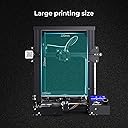
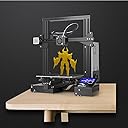
The WOL3D Creality Ender 3 is a beginner-friendly DIY FDM 3D printer featuring a fast-heating 220x220x250mm heated bed, patented MK10 extrusion for clog-free printing, and a resume print function that safeguards your projects against power interruptions. Its ergonomic design and stable mechanics deliver high-precision prints with easy assembly, making it the ideal choice for hobbyists and professionals eager to join the 3D printing revolution.


| Brand | WOL 3D |
| Colour | Black |
| Compatible Devices | Laptop, Personal Computer, Smartphone |
| Item Weight | 8 Kilograms |
| Material | Stainless Steel |
| Product Dimensions | 22D x 22W x 25H Centimeters |
B**W
Budget friendly, Less Messy 3D Printer
I've been using this WOL 3D Creality Ender 3 Pro model for over a year now. The 3D printer came in a Semi assembled form (means all the electronics were already assembled on the base... we just have to raise the pillars and it's attachments. It was easy to follow the instructions sheet in the beginning and most part of it... but few steps were tricky. I would suggest people to watch Assembly videos online when assembling, especially the printing head. Magnetic Surface Plate is good. It doesn't need any extra clamping and its flexible enough to easily remove the prints. The temperature is consistent through out the surface. The surface plate gets to the required temperature within 3-5 mins. We any power cut happens, the Resume Print function works well too... Just make sure to stick masking tape to the base so that the print doesn't come out. The SD card provided contains the easy-to-use 3D printing Cura software and a couple of 3D models to test the printer after assembling. The software to is easy to understand and use. Lots of YouTube videos are available for understanding the software too. It would be good if the software highlights if any discrepancies are present on a 3D Scanned models. The only time taking process is levelling the surface plate. Take as much time as required to level it to get a great print. The Customer support is also commendable as they are resolving any issues we face instantly or at the earliest. In short - Good printing quality, reasonable cost for the beginners and good performance for the enthusiasts. P.S. Place the printer in a ventilated area when using ABS filament and follow the temperature settings mentioned on the spool for any type of filament you buy. I'm planning to get the self-levelling and laser module next for my WOL 3D Creality Ender 3 Pro model.
D**T
Good for price range, but you may need to spend more money
PROS: 1. Nice printer for the price range. 2. Easy to assemble since. 3. The first print came up quite nicely using the models provided in the SD card that came with the printer. 4. Came with v-slot cover which is quite useful and adds some color to the printer. 5. Easily upgradable. 6. Using the magnetic bed came with printer, adhesion was good enough and prints came off quite nicely in the start. CONS: 1. The bed is slightly warped in the middle. So whenever you are tramming the bed, it would look fine on corners and the minute you go to the middle the nozzle is too close. And if you adjust it on middle the nozzle will be too far when it moves out from middle. Which I fixed initially using some tape under the magnetic top bed. 2. Print bed is not a good quality one. After few prints the top layer in the magnetic bed started coming off with the prints creating small black dots in the print. SO.... if you are ready to shell out some more money on a BL Touch/CR Touch sensor and/or a glass bed. This is a good printer.
M**N
Quality is excellent and comfortable
A**N
The replacement order is also not working
I recently purchased a laser engraving machine but was disappointed to find that it did not work properly. I contacted customer service and they sent me a replacement machine, but unfortunately that one did not work either. I have been extremely disappointed with the quality of this product and would not recommend it to others. Even customer service is not so grate and the product itself is not working as advertised. Save your money and purchase a more reliable brand. I actually bought this for my business and just believe Amazon to fulfill my business needs was the mistake which I did. This is no the first product i received like this and this will take more time that u expected to resolve. And Amazon have there saying always "we can process the refund" but what about the time wasted on this product. They don't value your time. Being a customer you will have to go according the their books only. And you can not escalate the issue above the second level of the customer service. What ever you do or what ever you say you can not get passed by these two level of customer service because they don't have there leadership team who can help a customer and I'm also disappointed these things are happening to me as a Prime Customer.
S**E
Outstanding 3D Printer for Beginners and Pros Alike
I recently purchased this 3D printer and have been thoroughly impressed with its performance. Assembly was straightforward, thanks to the clear instructions provided. Once set up, the printer produced high-quality prints with remarkable precision and detail. The user-friendly interface and reliable software make it easy to operate, whether you're a beginner or an experienced user. The build volume is generous, allowing for larger projects, and the printer handles a variety of materials with ease. It also features a heated bed, which helps prevent warping and ensures better adhesion. Maintenance is minimal, and any adjustments needed are easy to manage. Overall, this 3D printer offers excellent value for its price and delivers professional-grade results. I highly recommend it to anyone looking to enter the world of 3D printing or expand their current setup. It's a reliable and versatile machine that has significantly exceeded my expectations.
H**A
Best 3D printer for beginners and professionals alike
The seller is the authorised distributor for Creality 3D printers in India. They were prompt and cordial in responding to my queries. A no-frills experience that took less than an hour to set it up. Started printing right away. Good is you're just starting into 3D printing and dependable if you make money out of it. The bottom part of the machine comes assembled in the box. Easy to assemble the remaining parts with the help of provided manual, tools and Youtube Videos. The provided magnetic build-plate is textured, so parts stick very well without any tapes or adhesives. But it's a tad bigger than the build platform, so care must be taken to place it properly on the platform so as to not rub against the vertical extrusions or the power supply. The extruder and hot-end cables must be properly tied with the provided zip ties as they can go behind the build plate and prevent it from travelling fully to the back of the printer. There is a channel on the underside of the machine from which the cables are given out from the control board. As it's sharp, a cable protector part must be downloaded and printed from Thingiverse. The firmware must be upgraded to the latest Marlin for better safety and print quality. First, the Arduino bootloader needs to be flashed to the Creality 1.1.4 controller board which is based on Melzi controller. It is compatible with the Sanguino board having Atmel ATmega1284P. A USBasp programmer with 10 pin FRC to 6 Pin ICSP connector is needed. Then compile and flash latest Marlin firmware (currently v2.0.4.4 when reviewing). Refer online guides for flashing the bootloader and firmware. Other upgrades that can be done are: 1. Bullseye fan duct - better bridging. 2. Extruder knob - easy filament loading and unloading. 3. Glass build plate - smooth PLA first layer. 4. OctoPrint on a Raspberry Pi with printed cover. 5. Logitech C170 webcam for time-lapse with printed mount - webcam view in photos. Recommended filaments are WOL3D, e-Sun and Rever Fibreel. The provided filament in the box is very less. So buy a spool when you buy the printer to get started right away.
P**H
Great Printer for the money but lack Support
This is the best printer for the money we pay. But it lacks support in India. Installation and packing: The packing was nice, and I could install this within an hour. At some point, you may need to refer youtube for assembly. Build: The build quality is decent not that robust, but it will do the work. Make sure to check Bed alignment as it's always not the right alignment. Printing: Quality of prints comes very well. Mind that an average time to print for a 2"x2" would be around 2 hours. Board: It has The Creality 4.2.2 board with a boot loader. Support: Unfortunately, after 2 print, my printer went dead. I tried calling Amazon; they said it could only be refunded, and they had no support details from India. I sent a mail to Creality support but didn't get any reply from them. Their support phone number is from China. I fixed the issue by flashing the official firmware. You can download it from the Creality site and just past the .bin file on the SD card and plug it into the printer. I highly recommended flashing to new official firmware as the firmware which comes with the Printer is really old. I could see the difference in print quality and the more important printing speed; it improved slightly.
A**T
Decent quality prints. Cheaper than competitors
Reviewing after around a month of use and printing around 10 models. pros: The printer is good. The surface finish, print quality is good enough without any major upgrades/mods. Packaging was good, all the spares were in extra qty (seller probably repackaged and added that). all the tools required to assemble are provided in the package including allen-keys, spanner/wrenches, cutter, etc Bed heating and magnetic bed really is a plus. Never had an issue for adhesion or removing the print from the bed till now. cons and tips: Received faulty limit switch attached to Z-axis. My printer wasn't "auto-homing" on z-axis, tried re-assembling, reconnecting wires, opening circuit board and testing connections but none of it solved the problem till I replaced the limit switch with the one spare provided in the package. (minus one star) (hope you send me a working limit switch module) They have specified black and white filament spools in the listing. But I received grey and fluorescent yellow spool of PLA. Allen-head bolts are of shitty quality. DO NOT put too much pressure on bolts with allen-heads to unscrew. The allen head will wear out very easily even if you are using the right allen keys and the you won't be able to screw-unscrew that part. (I had to break a metal piece of the enclosure of the "mother-board" and now, z-stepper allen-bolt is also weared out.) (minus one star) Z-axis assembly is toughest. Also the z-axis bar/linear rail rod comes closer and tighter as you go down. You would need to print this part first - z-axis spacer and assemble it on the printer to avoid rapid wear-out (stl available on thingiverse) Assembly is going to be tough. Do it carefully or else it won't print good. Watch good youtube tutorials before starting out. Know what you are doing Bed leveling is important. Loosen out all the rollers and belt drives before assembling or it will damage the wheels. (they are too much tightened out of the box) Use ultimaker cura slicer instead of creality slicer, slicer software and settings largely affect the print quality. to conclude - This is my first 3D printer and despite of all the cons, when you see your model getting printed and see the output in your hands and fitting perfectly in your design assembly... it is the most satisfying feeling. So don't wait to buy one. I primarily use this printer to prototype my engineering designs for robotics and electronics assembly at my startup bitleaf.tech based in Dombivli, Maharashtra, India.
Trustpilot
4 days ago
3 days ago