
Buy anything from 5,000+ international stores. One checkout price. No surprise fees. Join 2M+ shoppers on Desertcart.
Desertcart purchases this item on your behalf and handles shipping, customs, and support to Indonesia.
🚀 Elevate your home network—fast, smart, and future-ready!
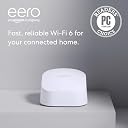
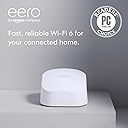
The Amazon eero 6 mesh Wi-Fi router delivers Wi-Fi 6 speeds up to 900 Mbps and covers up to 140 m², supporting over 75 devices simultaneously. Featuring mesh technology to eliminate dead zones, it doubles as a Zigbee smart home hub compatible with Alexa. Easy app-based setup and automatic updates ensure a secure, seamless, and scalable home network experience.
| Wi-Fi coverage | 1-pack: Covers up to 140 m². 2-pack: Covers up to 280 m². 3-pack: Covers up to 420 m². Coverage estimates are based on normal use conditions. Actual range and performance can vary, including due to factors such as interference, device usage, building materials and obstructions. Throughput and coverage estimates are a configuration reference, not a performance guarantee. |
| Type | Router (connects to modem as primary router). |
| Wireless network speed | Best for internet speeds of up to 900 Mbps. Internet connection speeds depend on your internet service provider. Maximum wireless signal rates are derived from IEEE standard 802.11 specifications. Specifications assume wired Ethernet connection, experienced speeds may vary based on network configuration. |
| Wi-Fi connectivity | Wi-Fi 6 dual-band concurrent 2:2 (802.11 ax), compatible with older Wi-Fi standards. |
| Wired connectivity | Two auto-sensing gigabit Ethernet ports for WAN and/or LAN connectivity. |
| Speed rating | AX1800 |
| Smart home connectivity | Works with Alexa, Amazon WiFi simple setup, 802.15.4 radio (Zigbee, Thread), Bluetooth Low Energy 5.0. Some features require linking your Amazon account, and/or downloading the Alexa application or using a compatible Alexa device. |
| Electrical rating | 100–240V AC, 50–60Hz |
| Processor, memory and storage | 1.2 GHz quad-core processor, 512 MB RAM, 4 GB flash storage |
| Network security and services | WPA3, WPA2, profiles, cloud connectivity: TLS v1.2+, AES, SHA-256, RSA, DHCP, IPv6, NAT, VPN pass-through, UPnP, port forwarding and static IP. |
| Required for setup | Supported iOS or Android device and internet service (with cable or DSL modem, if required). See eero.com/requirements. |
| Temperature rating | Operating: 0˚C to 40˚C Storage: -25˚C to 60˚C Operating humidity: 0% to 90%, non-condensing Operating altitude: <3000 m |
| Dimensions | 99.4 x 97 x 61.4 mm |
| eero Built-in | eero Built-in is available in US, CA and UK only. Your wifi network must use a compatible eero router and your Echo device must stay in range of a compatible eero device. You will need to link your eero and Amazon accounts and manage eero Built-in from the eero mobile application to use this feature. eero Built-in compatible Echo devices support up to 1,000 square feet (92 square metres) of additional coverage, speeds up to 100 Mbps, and 10 or fewer connected devices in the 5 GHz band. Actual performance can vary and certain eero, Echo, or Alexa features may be incompatible with eero Built-in. Learn more about eero Built-in performance, availability and compatibility. Use of eero and eero-related products and services, including eero Built-in, requires creation of an eero account and agreement to eero’s Terms of Service. Review eero’s Privacy Notice. |
| Warranty and support | 1-year limited warranty. Customer support is available 7 days a week. Learn more about warranty and support. |
M**K
WOW. It really does work 1.2mb to 174mb
I was Sceptical if it would work as purchased wifi booster’s before and they don’t do much, The Amazon eero system does work. We’re on Virgin Media broadband but the VM Router wifi signal never covered the front of the house ..until now. The eero system is easy to setup and boosted the wifi in the dead zones of the house from 1.2mb to 174mb Unbelievable !! well done Amazon Superb product. Tip - You will need the Gateway eero which plugs into a Ethernet socket on your broadband box and you will need at least one Extender that moves the wifi into the dead zones of the house.
B**N
Made a massive difference in my home
The eero 6 extender was incredibly easy to set up and blended straight into my existing network. It noticeably improved coverage in the weaker areas of my home, with a more stable connection for streaming and everyday use. Compact, reliable and unobtrusive — a great addition if you need to extend Wi-Fi without hassle.
A**R
WORKS WITH PPPoE IN UK
I read a lot of the reviews about this not working with UK providers, but this has been fixed, and the latest firmware now supports PPPoE. There is no need to bridge or double nat the router any longer. I connected the eero to my existing router first with an ethernet cable, got the eero app to upgrade the eero firmware which was very easy to do, then disconnected my old router and changed the eero networking settings to pppoe. Entered my credentials for my provider and it all just worked. I was also able to use the existing wifi name and password so all the existing devices on the network didn't need to be setup again, they just connected seamlessly to the eero. You will still need a fibre modem to connect to your phone socket, (but not mandatory, you can still use your old router to connect to the phone socket, just disable the WiFi on the old router), then connect the eero to the modem. These are typically a lot smaller than the routers provided by the internet providers and can be hidden a lot more easily than the bulky routers supplied by the providers. The coverage is about the same as the old router. I would recommend getting at least one extender or an additional router for better coverage. Also be aware that the extenders don't include any lan sockets, only the routers have the lan sockets. As a result I bought two routers so that I had the option of using the second router as an extender which benefits from having the lan sockets. Setting up the second router was also really easy in the app. The app allows profiles to be created and certain devices can be added to each profile. This way you can have your children's devices on a kids profile which has parental controls to prevent inappropriate content from making its way onto their devices. You can also pause the access to the profile too if needed. It also has an ad blocker feature. NOTE: The ad blocker and parental controls is a subscription based feature and costs extra on a monthly or annual subscription basis. I wasn't impressed when I found this out, so at least you are aware of this now too. The app also has a nice guest network feature. Simply enable the guest network for your friends to connect to. It automatically creates a new wifi name for them to connect to and creates a new password for that network, keeping your main network ring-fenced from your guest's devices. I had problems connecting my printer as it uses WPS which is now outdated, so am still struggling to get it working. The router provides access to a 2.4 GHz and a 5GHz network so old devices on 2.4GHz with still be able to connect without any issue. I haven't tried to use the built in Zigbee home hub yet, so I can't comment on that at this point. I will update this review once I have. All in all, a nice little router, with a handy app. Much nicer looking than the old router from my internet provider, and the app is much easier to use compared to the admin page on the old router. I would have given it 5 stars if the parental controls and ad blocker features were included as standard. This was disappointing to find out it came with an additional charge. PS: I have also discovered that the LED light on the device can be turned off from within the app. This is useful if you have a router in a bedroom as the light can be quite bright. A nice little feature.
W**N
For when Virgin's Sagemcom Hub 5 (their best ever) just doesn't cut it
We recently moved house. Virgin offered the best fibre offering so I switched. They provided their Hub 5 (their best yet!). If you have over 50 devices on your network, some fixed IP, within a month the hub would stop allocating IP addresses and then something inside the unit would fail where you couldn't even plug a laptop into the back of the unit and configure it via LAN. You can imagine my thoughts when paying for their 'top of the range' solution (at quite a price). So I've decided with my 3rd replacement Hub 5 to run it in full modem mode. This turns the light green on the front, and then you need an Eero router system to take over all the IP address allocation duties for the entire network. Within 30 minutes it was set up and running, no more hassle, devices dropping off the network, good speeds. I added two extenders. At this point if you plan to do the same I suggest reading on. When I added the extenders the majority of the wifi devices remained on the primary device that was installed first. To redistribute your devices across multiple Eero devices on your network I recommend the following: Go into Eero app (this is for iPhone app): Go to settings icon on bottom right hand side of the app (cog symbol) Scroll down to option 'Network settings' Scroll down to bottom of the page and click on 'Restart Network' Scroll down to bottom of the window and hit the big blue button It takes about 60 seconds to complete but when the network reboots it redistributes devices far better (I wouldn't say 100% as there are a few strange node choices made by the system), but you'll get a far greater spread of your equipment between the devices. Its about time Eero gave users the chance to point a device as the extender / router which the user knows is logically the closest! Other than this it's all been straightforward from unboxing to using, so no complaints so far with 71 devices on the network.
Trustpilot
1 day ago
2 weeks ago