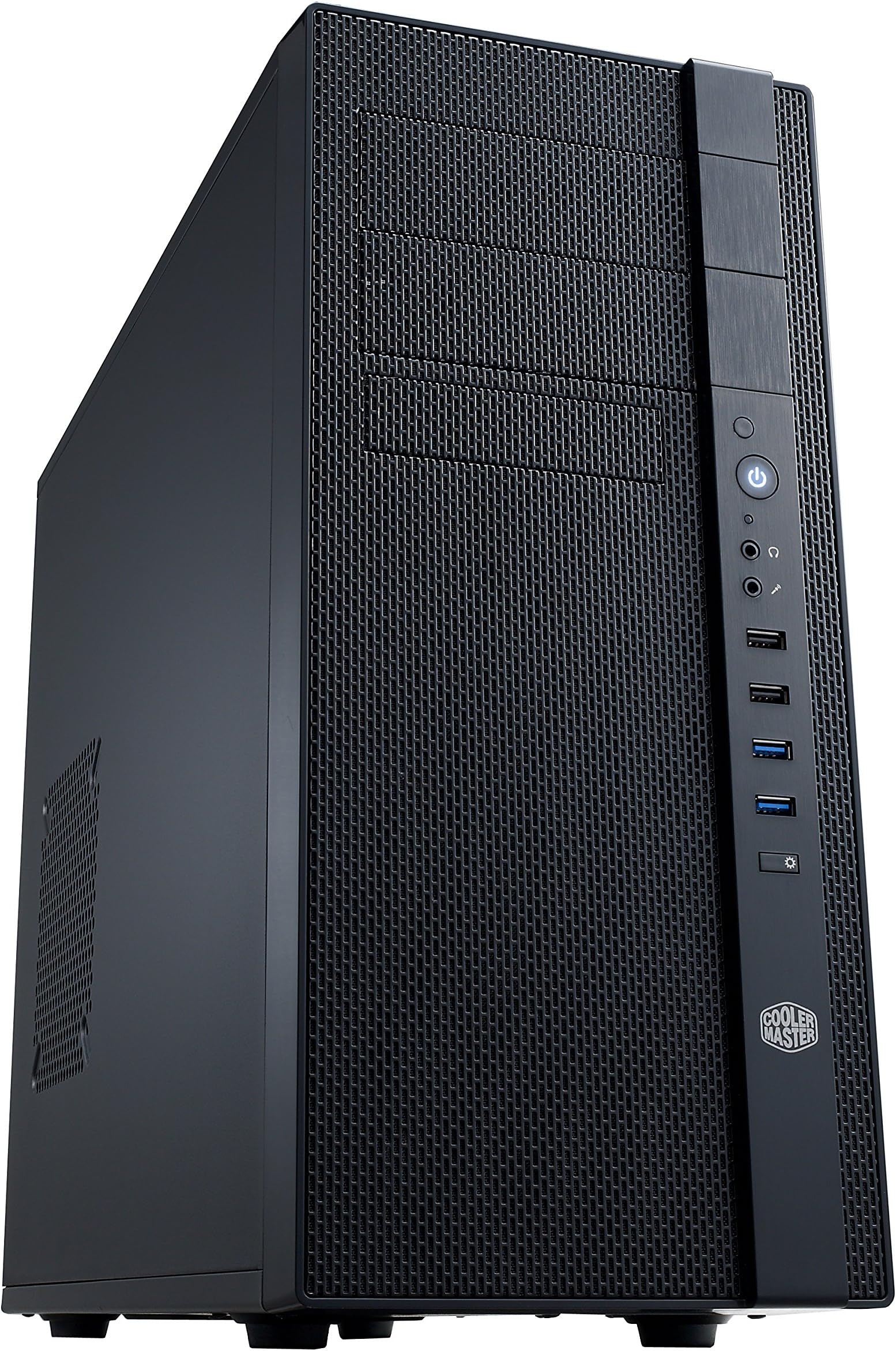
🖥️ Cool, Clean, and Ready to Build — Your Next-Level PC Case Awaits!
The Cooler Master N400 Mid Tower Case combines a fully meshed front panel with robust support for water cooling radiators up to 240mm, ensuring optimal airflow and thermal management. It features tool-less mounting for up to three SSDs, includes two pre-installed 120mm fans, and offers three dust filters for easy upkeep. With dual USB 3.0 ports and spacious drive bays, the N400 is engineered for professional-grade builds that demand performance, durability, and effortless customization.


| ASIN | B00DKXXBU0 |
| Antenna Location | Business |
| Best Sellers Rank | #49 in Computer Cases |
| Brand | Cooler Master |
| Built-In Media | case |
| Case Type | Full Tower |
| Color | N400 |
| Compatible Devices | NVIDIA GTX 690, AMD HD 7990 |
| Cooling Method | Air |
| Customer Reviews | 4.1 out of 5 stars 752 Reviews |
| Enclosure Material | Metal |
| Fan Size | 120 Millimeters |
| Global Trade Identification Number | 00094553537311, 00884102023293 |
| Hard Disk Form Factor | 2.5 Inches |
| Internal Bays Quantity | 3 |
| Item Dimensions D x W x H | 19.7"D x 7.5"W x 16.7"H |
| Item Height | 16.7 inches |
| Item Weight | 12.4 Pounds |
| Manufacturer | Cooler Master USA, Inc. |
| Model Name | NSE-400-KKN2 |
| Number of Fans | 3, 8 |
| Other Special Features of the Product | Built-In Fan |
| Power Supply Mounting Type | Rear Mount or Bottom Mount |
| Supported Motherboard | ATX |
| Total Expansion Slots Quantity | 7 |
| Total USB 3.0 Ports | 2 |
| Total Usb Ports | 2 |
| UPC | 172302889338 132017921501 172304224540 677291407810 809385175682 808111663608 731215288159 094553537311 151904886167 782386490674 884102023293 804066544528 809185326475 603467947378 |
| Unit Count | 1.0 Count |
| Warranty Description | 2 years |
I**C
7x3.5mm drive bays... PERFECT FOR SERVERS!
I bought this case for my home server. I was looking all over the internet for sub $80 cases with more than 6 drive bays. This is the one I pulled the trigger on. I could not be more happy. There is more than enough drive bays for my needs, the quality of the case is amazing, the value is fantastic, it is super easy to build in, and it comes with all the screws needed for a complete build. The drive bays were the main reason behind buying this case. There are other cases from other brands that feature similar amounts of drive bays, but at almost double the cost. The case quality is amazing, it felt really sturdy with all my hardware inside of it, there was not metal bending or anything. At roughly $75 (when I bought it) it gives a great value compared to other cases. It was super easy to build my server in this case as well, it only took me about 30 minutes for everything. Thankfully this case came with all the proper installation hardware for components, I have had to deal with some cases before that actually did not have all the necessary screws included.
M**E
Very nice case to build with lots of storage
I don't tend to spend a lot on my components. I want solid, long life, but for bells and whistles I save that for the software. This lower-priced case seemed to fit the bill, so I figured I'd give it a whirl. One of the things I noticed again and again: no sharp edges. I have been doing this long enough that I remember when several serious cuts were always part of the deal when building or repairing a computer. This case has rounded all the edges, and it makes it feel like quality. Also, it improves the rigidity of the metal just a bit. The case is spacious, with lots of drive bays. I'm not sure how one would use the bottom bay, unless the drive was installed upside down (which would have its own retention issues), but I'm not using anywhere close to the available drive bays. Also, although I thought I had used up the tool-free mounting hardware, when I looked on the other side, I found some more, so I'm not even using all of the drive mounting clips. I've heard that some new computer cases have foundation panels that can be removed. While I can see that being handy, this isn't one of those cases. However, by focusing on getting the motherboard and power supply in first, it was easy to access everything I needed, and there's plenty of space to run cables behind the foundation for drives or front panel. I haven't tested out the audio, etc. on the front panel, but that's not hugely important to me. Bottom line for me: if you want lots of drive bays, including exposed 5.25" bays (for optical drives, or the like) this is a good case for a reasonable price. I added a fan on the side panel, and I understand the complaints about the meshes being impossible to remove for cleaning once the system is built, but it seems to have good airflow. I like the tool-free installation of drives, including the optical drive, and I even used the SSD slot on the back side of the drive bays. The only improvement possible for the drive bays would be to mount them laterally, but that would have airflow consequences, and the case would be slightly less stiff.
D**R
Provides able storage drive space at a budget friendly price
I bought the Cooler Master N400 to hold my modest TrueNAS CORE build. I had 4 x 3.5" hard drives cramped into a smaller OEM case, and wanted something that could neatly hold my current system, with space for 8-10 3.5" drives total for future growth. The N400 checked those boxes, and was only about $70. There are more premium cases with lots of room for storage, but many cost twice as much. I completed the build, and this case was what I hoped for. I particularly liked the 2 quality 120mm Cooler Master fans it comes with. I put both in front as intake, and added another fan I had in back as exhaust. Air flow is good, and there is enough space for cable management to make the drive cage clear for maintenance and new future drives. However, this does feel like a cheaper case, and there were a few annoyances: Pros: - Space for 10 total 3.5" drives (8 + 2 more if you adapt the 5.25" bays) plus 2 x 2.5" SSDs - mATX and ATC mobo support - ample ventilation and options for case fan configuration - 2 included 120mm fans (3-pin) - adequate included standoffs, screws, etc. for mounting hardware - inexpensive Some cons: - 2.5" SSDs aren't held too well by the included plastic bracket, and when in place the screws are blocked on one side of several of the 3.5" drives - Dust filter for the PSU intake on the bottom of the case is on the inside, between the PSU and the floor of the case. This means that to remove and clean it you'd have to remove the PSU (?). I chose to flip the PSU so that it draws air from the case and exhausts it out the back. - No cutout for routing the CPU power cable up behind the mobo and down from the corner where most plugs are - Other space for cable management behind the mobo tray isn't great (just a channel along the bottom) It's not perfect, but overall this case is just what I needed at the right price.
A**)
Perfect ATX case with optical bays and great airflow
Purchase to house a plex server because of the dual 5.25 bays for optical drives. The case is solid. Weight is actually light for the size. Sufficient airflow has kept the 5080 cool. It looks like a standard office pc. And just like the little MATX case it is perfect for cable management.
J**.
Quirky design that limits full functionality
This is a budget case and it is pretty good for the cost. You do, however, get what you pay for. Pros: Quality materials, dust filters over most fan outlets, some cable management offsets, comes with a bag full of lots of zip ties, the normal case screws, speaker, etc. Cons: Somewhat wonky sizing: there is no hole to feed the CPU power cord back behind and over the motherboard. My cables are pretty short from the PSU, so my CPU cable is kind of floating there. There's also a strange decision to have the case rise to the right of where the motherboard lays. On my ATX board, this blocks the lower SATA ports so I can't use about 3 of them. Additionally, I bought two of these; one of them i noticed the GPU shield doesn't slide into the back correctly. Same with the shield after breaking off the case shield for PCI access: these just keep hitting something in the back and dont allow quite the right connection for a full length GPU.
M**.
My favorite computer case N400
I really like this case a lot. I always put a DVD burner in my case and the good cases that have 5.25 inch opening are getting to be rare. I like the layout of the hard drives because they are easy to get to and there are a lot of places to put a lot of drives. The quantity of fans is really useful to keep the inside cool and the placement of the fans is great. The hardware is good and there are no sharp edges. It is very sturdy and has no flimsy places on it like some cases. I like the USB ports on the front but I just wish they could have been just a little bit higher up but it works well anyway. I don't need any clear sides so this case is just what i wanted. If I need another case, this is the one I will buy.
J**T
Absolutely awful case for watercooling, abysmal layout
Want to watercool or potentially watercool your PC, than STOP!! This case is 100% not for you. Despite it stating in its description that it can handle a 240mm or 120mm radiator those claims are VERY false. Granted it has the cutouts for either, they are setup in a fashion that they will collide with your motherboard and therefore be useless. The rear 120mm fan cutout is so close to the motherboard I/O panel that it will hit it. with a basic 120mm radiator. The top 240mm radiator cutout has the same problem as its not offset to take into account a motherbaord with chipset heatsink. Therefore it is useless for both a 240mm radiator and a 120mm radiator. The front panel is only good for fans as it has a restrictive plate attached to the frame so you cannot mount anything but a fan there. There is also a really strange motherboard side cutout for a fan or radiator, but once again the weird structural layout doesn't even allow for a narrow fan to be installed. Which begs the question as to why its even there. You could take a grinder and cut a hole out and fit one in, but that would be messy and since the metal is tied into the rigidity of the case it would make it weak. Ive assembled 100's of PC's over the course of 30 years and even the awful late 90's pastel cases were at least built with some thought of the layout. This case is very highly unsuited for any type of enthusiast build. I was going to donate this to a local goodwill, however I dont think I could sleep at night knowing how much frustration and pain it would bring someone else trying to build a PC inside of it. The only recourse was to put it out of its misery and toss it in the recycling bin. I will say it made a good holder for target paper and took quite a few good hits from a .22 and a airgun. Thats about the best use for this case in my mind.
M**G
First time purchasing Cooler Master case, pleasantly surprised...
I've been building computers for a long time. I've used Antec, Thermaltake, In-Win, Rosewill and NZHT in the past. This build was during the pandemic and finding a case was tough. I've known of Cooler Master for a long time and have used some of their CPU Coolers, but never used their cases before. I was pleasantly surprised. I was happy it was void of annoying LED lighting. The case was well thought out and the design was simple, yet elegant. I liked that the stand off locations were indicated using letters and the letters corresponded to which side board the standoff was used for, instead of trying to read the abbreviation for the board size stamped on the case. The screw free connectors for the hard drives and optical drives were simple to use and effective. Even though it only came with 2 fans, there was plenty of room for more. For my build, the 2 fans were sufficient. I used a Cooler Master RR-212X-20PM-A1 Hyper 212X CPU Cooler which is a great cooler. I've used it on several builds and it does a great job. With this case, I was a little concerned about it fitting. Fortunately, the side cover fit with a little bit of room to spare. The case is light weight, but feels sturdy. It is an attractive design and easy to work with. I like that it included a 3.5" external drive bay. Most of my customers want card readers. It is nice not having to bother with a 3.5" to 5.25" mounting bracket to install the card reader. For $60, this is a great case. I will definitely buy it again.
Trustpilot
5 days ago
1 month ago