We remain fully operational. Our teams are working around the clock to ensure your deliveries continue safely.

DOWNLOAD THE APP


Customer Services
Copyright © 2025 Desertcart Holdings Limited
DOWNLOAD THE APP


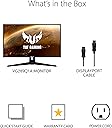


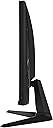


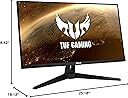

🔥 Level up your visual game with ASUS TUF VG289Q1A – where every pixel counts!
The ASUS TUF Gaming VG289Q1A is a 28-inch 4K UHD IPS monitor designed for gamers and professionals seeking ultra-high resolution and color accuracy. Featuring Adaptive-Sync and FreeSync technologies, it delivers smooth, tear-free gameplay. With 90% DCI-P3 color gamut and HDR10 support, it offers vibrant, lifelike visuals. Exclusive Shadow Boost enhances visibility in dark scenes, while multiple HDMI and DisplayPort inputs ensure broad compatibility. Ideal for those who demand premium image quality and responsive performance in a sleek, durable design.



























| ASIN | B083Z2RPB9 |
| Adaptive Sync | FreeSync |
| Additional Features | What's in the box: DisplayPort cable, Power cord, Warranty card, Quick Start Guide, freesync monitor;adaptive sync monitor, gaming monitor;computer monitor;28 inch monitor;pc monitor;4k monitor;displayport monitor;hdmi monitor;led monitor;desktop monitor;28 monitor;lcd monitor;hd monitor;external monitor;dual monitor;uhd monitor;monitor with speakers;ips monitor;eye care monitor |
| Aspect Ratio | 16:9 |
| Best Sellers Rank | #2,504 in Electronics ( See Top 100 in Electronics ) #96 in Computer Monitors |
| Brand | ASUS |
| Brightness | 250-350 nits |
| Built-In Media | DisplayPort cable, Power cord, Quick start guide, Warranty Card |
| Color | BLACK |
| Compatible Devices | Computers (laptops and desktops), Gaming Consoles |
| Connectivity Technology | HDMI, display port |
| Contrast Ratio | 1200:1 |
| Customer Reviews | 4.4 4.4 out of 5 stars (1,062) |
| Display Resolution Maximum | 3840 x 2160 Pixels |
| Display Technology | IPS |
| Display Type | LED |
| Hardware Connectivity | DisplayPort, HDMI |
| Has Color Screen | Yes |
| Is Electric | Yes |
| Item Dimensions D x W x H | 18.13"D x 25.18"W x 8.42"H |
| Item Type Name | monitors |
| Item Weight | 12.6 Pounds |
| Manufacturer | ASUS |
| Model Name | VG289Q1A |
| Model Number | VG249Q1A |
| Mounting Type | Wall Mount |
| Native Resolution | 3840x2160 |
| Number of Component Outputs | 2 |
| Picture Quality Enhancement Technology | HDR10, FreeSync, Shadow Boost |
| Processor Count | 1 |
| Refresh Rate | 60 Hz |
| Resolution | 4K UHD 2160p |
| Response Time | 5 Milliseconds |
| Screen Finish | Matte |
| Screen Size | 28 Inches |
| Shape | Flat |
| Specific Uses For Product | Gaming, Personal, Photo Video Editing |
| Total Number of HDMI Ports | 2 |
| UPC | 192876953457 |
| Viewing Angle | 178 Degrees |
| Voltage | 240 Volts |
| Warranty Description | 3 Year Warranty with ARR |
| Warranty Type | 3 Years Manufacturer Full Warranty |
R**S
Excellent display...no issues and looks great.
Not a gamer so really don't have anything to share on that. However, this thing looks great. Colors are vibrant and sharp, the resolution makes text easy to read. Been working quite well and better than the previous Asus display I had. I tried to order a 2nd one this same size (28") but that doesn't seem to be available any longer.
R**U
Excellent Monitor and Great Value!
Great monitor and excellent price to value ratio product. This monitor doesn't have any backlight bleeding problem which is even common on other high end IPS monitor I had. The color coverage and brightness level put it comparable with other HDR400 certified monitors. At least I didn't notice any difference between the HDR content generated by this and Acer XV 282K (it has peak brightness around 450 nits). The gaming experience is great overall, especially you play 3A games instead of FPS games which require higher refresh rate, but highly recommend to set the monitor to higher level overdrive to reduce response time. The only down side is its relative low refresh rate. You will notice some lags in motions when playing competitive FPS games. Watching shows and daily work (like programming, Word, Excel) are also very enjoyable on this monitor. I feel like the contrast ratio is better than the stated measurement when I watch shows, perhaps because it doesn't have any backlight bleeding problem. The experience with this monitor makes me feel other high-end monitors are way overpriced. I even bought another Acer XV282K to compare with, but I only kept this one.
B**K
Good
This screen is seriously awesome. The visuals are so crisp and vibrant, it's like looking through a window. I love how smooth everything is; gaming feels so much more immersive. Definitely a great upgrade if you're considering a new display. You won't be disappointed with this one!
S**.
Not too bad for a budget monitor. Hindered by poor design choices.
This monitor is not bad for a budget monitor. If it were a higher priced monitor I would be disappointed, but since it is relatively inexpensive it is ok. My monitor has some light bleed in the lower right corner, presumably from the power indicator light. The picture is fairly good out of the box, but it is greatly hindered by the lack of controls in HDR. When the monitor is in HDR, most of the controls are locked out. The monitor is locked into "racing mode" and even basic controls like brightness and gamma are locked out. There are also some very poor design choices. The controls are all on the back of the monitor, so if your monitor is wall mounted as mine is, you will really struggle with the controls, if you can manage to use them at all. The controls use an odd combination of strangely wedge-shaped buttons and a round, button-shaped joystick for controls. Trying to manage the controls on the back without being able to see them is very difficult, particularly with the oddly shaped controls. The power indicator light is buried on the back of the bottom right-hand side, so it is completely invisible to the user unless the monitor is inexplicably mounted above your head. Why even bother install an indicator light if the user can't see it?! The power indicator light also seems to cause some light bleed through to the panel, at least on my unit. So there is my review - a slightly above average monitor with poor design choices, but its forgivable because you do get good 4K image quality for a bargain price.
M**Y
Excellent choice. High quality, well priced!
I'm switching from 2021 Sam sung 4k 28" monitors that both failed right after the warranty expired. I've always had good luck with Asus products, so I chose to go back to Asus on my monitors as well. No regrets with buying two of these to replace them! 1st improvement is that these do not have wall warts or power supply bricks, so cabling was a breeze with the standard PC 3-pin power cables. 2nd feature I like is the super thin, almost frameless design. While the viewable size isn't the size of the actual display when off, it adds for a sleek look, especially when running two side-by-side. The image quality is excellent, brightness is good, and response time is perfect. I have a gaming PC connected to both, A PS5 to one, and a Raspberry Pi 4 and MS Surface connected to the other. The monitors transition seamlessly from one input to the other as things are powered on.. a feature with my Sam sungs that was a pain because I had to cycle inputs manually behind the monitors. The stand has 4 screws holding it in that can be used for the VESA mounting which is a great design. Last but not least, these have a gaming mode.. so playing hardcore in COD, the displays have a customizable and adjustable on-screen sight to assist. Love it!
M**G
You should buy this one, it's best for the price. Try using SVP software, it made my monitor look 10 times better after adjusting brightness, contrast & saturation settings in my media players (you also need to setup the proper codecs in media players or HDR will not work at all, google how to get your media players to work with SVP to get HDR to work... mine wasn't even working even though I thought it was). I seek through the video to a dark spot and set your brightness, contrast and saturation in the media player there. After this, the darks and brights are so unbelievably awesome because there is 60 times more color than SDR, and the rest of the colors makes a difference too. I never had a clue it could look this good!! Use the DisplayPort Cable they give you in the box (it is superior to hdmi). Also, make sure you go Windows > Settings > System > HDR Option (turn on), and click above that option for more HDR options. There, the windows "HDR/SDR brightness balance" slider controls the SDR still visible (only the HDR pictures and videos can be HDR, so the rest is SDR, and therefore that slider does not affect the HDR at all. Change settings in monitor before switching to HDR mode in Windows, because you cannot change any monitor settings in HDR mode. (choose different modes in "GameVisual" category, I think Cinema Mode and Racing Mode or something allows you to change brightness, contrast, and even saturation.) After that, you never would have guessed it could make such a difference! Just remember to turn the HDR back off and on. Also, it literally gives off any heat at all somehow even though it's so huge and powerful! It even has cheesy speakers don't expect much there though haha. The DisplayPort cord they gave stopped working (or something? idk haha) It's just a cheap cord, you should buy a good one! Overall, since I always use headphones, not the speakers, I give this monitor 10 out of 10 in everything else.
W**Y
i love this 4K monitor i originally bought two on April 1, 2022 ,....but one died luckily i bought an Amazon 4-year insurance package and was refunded for the broken unit
A**R
Works just as mentioned 4K 60 FPS I tried with Mac and Windows systems using digitalport wire and StarTech USB C to DisplayPort Adapter with Power Delivery - 4K 60Hz HBR2.
C**R
For the money, this is very okay. I use this moniter for both video/photo editing, along with some gaming (fall guys, black ops 1, world at war, etc...) Positives: - Easy set-up - Asthetically it looks cool - Great value for the price - Built in speakers (pretty weak but better than nothing) - Brightness/Contrast in "user" mode has a huge range Negatives: - I found that most of the built in profiles make the screen feel very washed out - Bare minimum requirement for 4k (but still 4k nevertheless), 60hz, 3840 x 2160, 8-bit colours Overall, it does it's job good enough and it's a very well made solid montior
B**E
les image ne correspond pas au spécification a 165 hz a 1ms il est de 60hz par second pour 5ms!PAS FUN ,j ai meme validé ecran avec un autre site (best buy)il disait avec le numero artic ASUS TUF Gaming VG289Q1A que la vitesse est de 1ms second.alors la conclusion de cela est avec des image éronné sur amazon et la description sur Best Buy fait en sorte que j ai pas les propriété voulu!je voulais 165 image seconde ou plus avec 1ms second en 4k!une autre remarque les troup assemblage pour support mural ne se centre pas avec ecran de la meme marque asus vp278!tres bon produit!merci
Trustpilot
2 months ago
2 months ago