⚡ Dominate the game with speed and style – your keyboard, your rules!
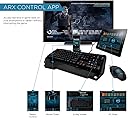
The Logitech G910 Orion Spark is the world's fastest RGB mechanical gaming keyboard featuring exclusive Romer-G switches with 25% faster actuation, 9 programmable G-keys for custom macros, and fully customizable RGB lighting with 16 million colors. It includes dedicated media controls and smartphone integration via the Arx Control app, designed to elevate your gaming performance and immersive experience.


| ASIN | B00N3OELPU |
| Additional Features | Customizable RGB illumination, Arx Control App and smartphone dock, 9 programmable G-keys |
| Antenna Location | Gaming |
| Brand | Logitech G |
| Built-In Media | USB Cable |
| Button Quantity | 104 |
| Color | Customizable (RGB) |
| Compatible Devices | Devices with USB port and compatible operating system |
| Compatible Operating System Family | Windows |
| Compatible devices | Devices with USB port and compatible operating system |
| Connectivity Technology | usb |
| Connectivity technology | usb |
| Customer Reviews | 4.4 out of 5 stars 3,026 Reviews |
| Enclosure Material | Plastic |
| Generation | 1 |
| Hand Orientation | Ambidextrous |
| Item Dimensions L x W x H | 50.3L x 20.8W x 3.6H centimeters |
| Item Weight | 3.31 Pounds |
| Keyboard Backlighting Color Support | RGB |
| Keyboard Description | Full-sized mechanical gaming keyboard with Romer-G switches and customizable RGB backlighting, designed for enhanced gaming performance |
| Keyboard Layout | QWERTY |
| Keyboard description | Full-sized mechanical gaming keyboard with Romer-G switches and customizable RGB backlighting, designed for enhanced gaming performance Keyboard description Full-sized mechanical gaming keyboard with Romer-G switches and customizable RGB backlighting, designed for enhanced gaming performance See more |
| Manufacturer | Logitech |
| Mfr Part Number | 920-006385 |
| Model Name | G910 |
| Model Number | 920-006385 |
| Number of Items | 1 |
| Number of Keys | 113 |
| Number of Packs | 1 |
| Number of Sections | 5 |
| Power Source | USB |
| Recommended uses for product | Gaming |
| Series Number | 910 |
| Style Name | Keyboard |
| Switch Type | Romer-G |
| Theme | Gaming |
| UPC | 097855107671 |
| Unit Count | 1 Count |
| Water Resistance Level | Not Water Resistant |
A**X
Great keyboard, keycaps take getting used to
To start this review off, this is the second keyboard of this model that I have bought. The first keyboard's numpad stopped working after I spilled milk on it. That being said, I absolutely love this keyboard and would recommend it to anyone looking for a keyboard at this price point. My use case: -Programming -Gaming -Paper writing -Listening to music (I listen to a lot of music and it's great having the media buttons/volume control wheel readily available) The great: *Ergonomic and convenient volume & media controls. *Full keyboard including numpad. *Keys are reliable and press great no matter where on the keycap or what direction of force is applied. *Easy to position fingers onto the center of key due to raised edges. *Just a fun keyboard to use, not sure how to articulate it, but it just feels like a really natural device to play games, and type with. *It's RGB! I don't use the Logitech profiling software much, but it's very nice having the backlight ambiance. *Gaming toggle button is nice and can save you from those sad windows key presses. The not so great: *Keycaps are laid out slightly differently than other keyboards I have used in the past and took some getting used to. All other keyboards feel off to me now :P *Perhaps not as liquid-proof as I would have liked. *The price is higher than I would normally like to pay for a device, but I use my computer enough to get a great amount of joy out of it. Conclusion: If you are looking for keyboard to fall in love with at a reasonable price, this is a fantastic option. It's a pleasure to use and has everything that I need/like in a keyboard.
A**Z
Excelente Producto y Servicio
Primero quiero hacer énfasis en el servicio por parte de Amazon, el teclado fue enviado por Amazon USA y estaba previsto para llegar en una semana aproximadamente, me lleve una sorpresa cuando al darle seguimiento al paquete me notificaron que llegarÃa en 3 dÃas pero al final la entrega fue en 2. Todo estuvo perfecto y el paquete estaba en perfectas condiciones. Es una maravilla el servicio y la logÃstica por parte de Amazon, 5 estrellas. En cuanto al teclado, no sé que pueda decir que no se haya dicho ya. Está en la élite de teclados mecánicos y cuenta con algunas caracterÃsticas que son exclusivas de Logitech. PROS Como por ejemplo los switches Romer-G, no suenan tanto lo cual te permite jugar a altas horas de la noche sin molestar tanto a las personas que están durmiendo, tienen una sensación suave pero a la vez firme cada que presionas una tecla y esto hace que tengas una experiencia de juego completamente distinta, además de que la misma arquitectura te permite una rapidez de respuesta superior a los switches tradicionales (cherry). Cuenta con software para poder configurar el teclado y las muchas teclas que te permiten realizar macros, las posibilidades son infinitas. En cuanto a la iluminación, me parece algo bastante delicado y bien cuidado, no es una luminosidad invasiva y por ende no te distrae. Puedes instalar una App en tu smartphone (en mi caso iOS) que te permite monitorear tu computadora y sus componentes, además de que incluye una interfaz para los contenidos multimedia (subir volumen, cambiar de canción, pausa/play, etc). El teclado cuenta con teclas multimedia lo cual facilita el poder mutear el sonido de forma rápida, por ejemplo cuando tienes que tomar una llamada o diversas situaciones donde se necesita. También cuenta con una tecla que deshabilita las teclas de windows para evitar algún tipo de accidente en los momentos importantes durante las jornadas de juego. Otra cosa que me gusto mucho, es que puedes fácilmente usar este teclado para trabajar, soy desarrollador y se siente realmente bien escribir código con estilo :P CONTRAS Al inicio las teclas se sienten algo altas y tus dedos tienen que acostumbrarse, tarde unos cuantos dÃas en dejar de errar habilidades en los juegos a causa de este pequeño inconveniente, no es algo grave ya que con el tiempo tus manos y dedos se acostumbran sin problemas. El teclado está configurado en inglés, esto quiere decir que no tiene la tecla ñ, esto te llegará a confundir en unas cuantas ocasiones. Es demasiado grande y aunque sé que no tiene el propósito de ser transportado, hubiese sido excelente poder llevarlo de vez en cuando a la oficina para trabajar más a gusto, esto es un punto particular, si no tienes pensado transportarlo y tenerlo estático en tu estación no tendrás ningún inconveniente. Tal vez el precio no está al alcance de todos, pero la verdad es que vale la pena cada peso. CONCLUSIÓN Jamas habÃa tenido un teclado mecánico y me decante por este ya que habÃa escuchado muy buenas reseñas e impresiones, además de que uso un mouse G502 y hacen una excelente dupla. Si tienes ganas de un teclado mecánico y no tienes problema en gastar una cantidad un poco elevada, es un producto realmente recomendado, te aseguro que no te vas a arrepentir. Estoy bastante contento y satisfecho con está compra. Felicidades a Amazon por su excelente servicio. :D
C**E
A huge THUMBS UP for this keyboard's new Romer-G switches!!!
I've tried both the Corsair K95 (with Cherry MX Reds) and the Razer Black Widow Chroma (with "clicky" keys). This review is based on a direct side-by-side comparison between the Logitech G910 and these two competitors' keyboards. In my opinion, the Logitech G910 beats them both. First and most importantly, the Romer-G switches on the Logitech G910 are simply excellent. They have a very nice feel. They don't require a lot of pressure to activate and they are utterly silent. They provide a slight tactile bump when being pressed. And the keys feel solid with little to no wobble. The spacebar feels great as well. It's very easy to activate with no noticeable "friction" or torsion when pressing the spacebar from one of its edges. I'd go as far as saying this keyboard has the best spacebar for gaming that I've ever used. What I'd say about the Romer-G switches is... don't get hung up on the fact that they are not Cherrys. The truth is, they are better. Logitech has done its homework here and the results are quite excellent. The Logitech switches are also designed with RGB lighting in mind. The light passes up through the middle of the switch as opposed to the top most edge of the Cherry switches on the Corsair K95. The G910 keys are evenly lit and the brightness is excellent. the Corsair K95 is dim in comparison. The Razer BlackWidow Chroma is also a very brightly lit RGB keyboard but it suffers from light spillover. In fact, the Razer is actually designed with a white plate beneath the keys to enhance and brighten the lights. But on the Logitech G910 there is no light spillover. Only the key faces themselves are illuminated. The result is a very clean, crisp and bright set of keys. The comma and period keys are easily readable. By comparison, you can't even see the comma and period on the Corsair K95 due to the way the light comes through at the top of the key rather thahhhhhhn at the center. I read some complaints about the G910's angular sculpted key caps. Maybe this comes down to a matter of preference, or maybe some people just don't like the change from standard keys. But I have to say I really like these key caps. They do what they are designed to do... they give your fingers a solid sense of place on the keys. They are by no means uncomfortable and they serve the purpose of centering your fingers on the key. To me it just feels good. I really don't have any complaints about these keycaps. My suggestion is... don't be put off by their funky appearance. They work. Period. The G910 has a complete set of media keys including a rubber coated volume wheel as well as a dedicated mute button. There is also a key for toggling the lighting feature on and off. And there is a "gaming mode" button which disables the Windows key (and perhaps a few other things as well... I am not exactly sure). The g910 comes with an extended palm rest but it was not to my liking. I intend to use this keyboard only for gaming, so the asymetric palm rest is not a problem or an issue for me. It serves as a palm rest for my left hand while using the WASD keys. But it doesn't really detract from my right hand when using the keyboard for typing. But I suppose this might be an issue for some. But for me, it didn't really cause any problems. I was initially hesitant when I saw this odd looking palm rest. But after using it a few days it is not a problem. Now on to some negatives... 1) The USB cable is not braided. It's just a plain ol rubber coated cable. Nothing special. 2) There is no external USB port on the keyboard. The ARX "dock" is mostly useless. I can stick my Android tablet in it as simply a holder for it. But it doesn't provide any charging or serve any other purpose. In fact, I would have preferred if they simply ommited this dock since it is mostly useless. Finally, I was disappointed in the limited feature set with the Logitech Gaming Software (LGS) for handling advanced lighting profiles. The software supports the following modes... - Freestyle (pick each key and color it independantly) - Zone (WASD, G keys, num keys etc) - Commands (Show active game keys while playing a game) - Effects The Effects section provides the following "fancy" color modes... - Key press (each key changes color momentariliy when activated) - Breathing (all keys cycle between two color states as if breathing in and out) - Star Effect (random pattern of "twinkling" keys) - Color Cycle (all keys cycle through a range of colors) - Color Wave (a wave of color travelling across the keyboard. There are options for setting the starting point and dirtection of the wave) But that is it. There is no way (yet?) to create your own color profiles or to import third party profiles. There is no way to build advanced color profiles. This is a major oversight in my opinion. Both the Corsair and Razer RGB keyboards provide tools for creating advanced lighting profiles that can be exported and shared with other users. Some of the lighting effects for the Razer and Corsair RGB keyboards are amazing to behold. Yes, these fancy color profiles are just a gimmick, but they are cool nonetheless. It's a real shame that the Logitech software doesn't come with a lighting profile creation kit that lets you create advanced lighting effects and share them with a community of users like you can with the Razer and Corsair keyboards. Hopefully this is something that Logitech is working on. There's no reason it can't be done. The competition does it already, so Logitech is noticably behind in this area. Apart from that, I have nothing but praise for this keyboard (well, except for the price I suppose ;-). The G910 is a very nice piece of kit. I love the new Romer G switches and I really like the way these keys feel. The chiseled key caps are a nice touch that I also really like a lot.
F**E
Excelente
O mais completo do mercado, ARX dock otimo para jogos, teclado confortavel para jogos e com muitos detalhes que facilitam a vida tambem, no dia a dia
H**N
Great Keyboard. Not sure what the ARX dock is for.
Been using this for about a month now. Upgraded from a normal keyboard (not a mechanical or all out membrane). The Romer G switches feel good. Will take some getting used to for everyday typing, but that's to be expected for upgrading to a mechanical keyboard. One thing I have to mention about the ARX Dock(this is mainly my fault for not doing enough research, before buying this) is that I barely use it. Don't get me wrong, I use the Logitech app, it is very good, but you do not need to plug your phone into the dock for the app to work, but I have a wireless network at home (even though I use LAN on my desktop) and it detects the components via the wireless network. So what I really want to say is... Why is there an ARX Dock in the first place? Just to hold your phone? Hmm. Other than that, it is still a 5/5.
Trustpilot
1 month ago
1 month ago