Buy anything from 5,000+ international stores. One checkout price. No surprise fees. Join 2M+ shoppers on Desertcart.
Desertcart purchases this item on your behalf and handles shipping, customs, and support to Indonesia.
๐ Double Your Screens, Double Your Impact!
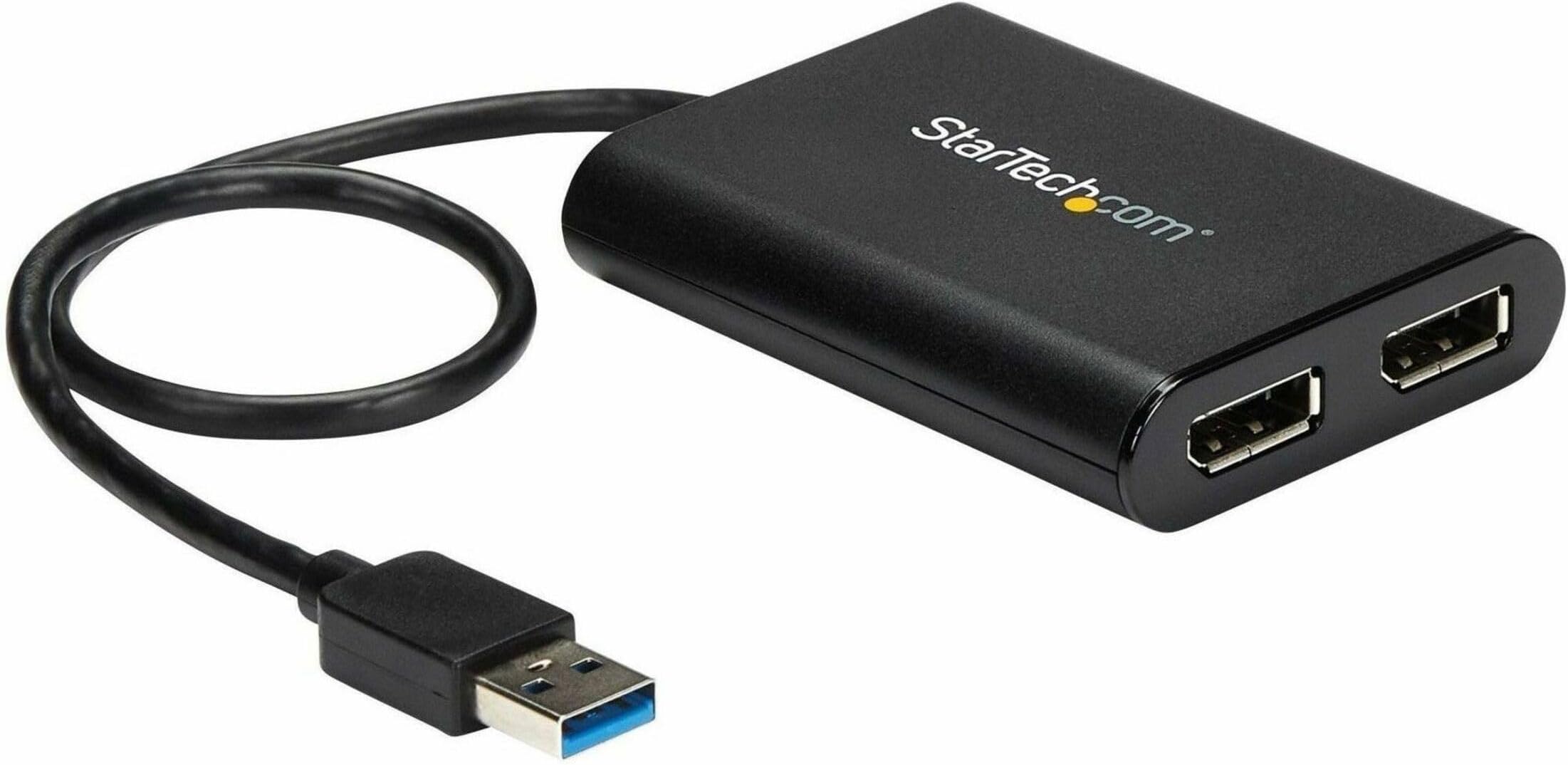
The StarTech.com USB to Dual DisplayPort Adapter transforms any USB-A port into a powerhouse dual 4K 60Hz display setup. Perfect for professionals craving expanded screen real estate without upgrading their GPU, this USB 3.2 Gen2 adapter delivers ultra-high-definition visuals with plug-and-play ease. Compatible with both Mac (M1/M2/M3) and Windows, itโs USB-powered and built for IT-grade reliability, making it the ultimate productivity booster for modern workstations.


| ASIN | B07C69HG33 |
| Best Sellers Rank | #20,724 in Computers ( See Top 100 in Computers ) #68 in Computer DisplayPort Cables |
| Brand | StarTech |
| Built-In Media | USB video adapter (1), quick-start guide (1) |
| Color | Black |
| Compatible Devices | Audio/Video Device, Laptop, MAC, Monitor, Workstation |
| Connector Type | DisplayPort/USB |
| Current Rating | 3 Amps |
| Customer Reviews | 4.4 4.4 out of 5 stars (557) |
| External Testing Certification | CE, FCC |
| Finish | Matte |
| Global Trade Identification Number | 00065030878487, 00650308784876 |
| Input Voltage | 5 Volts |
| Item Dimensions | 15.5 x 14.2 x 3 centimeters |
| Item Length | 11.8 Inches |
| Item Type Name | A/V Cable |
| Item Weight | 73 g |
| Item Width | 5.6 Inches |
| Manufacturer | StarTech.com |
| Mfr Part Number | USB32DP24K60 |
| Model Number | USB32DP24K60 |
| Nominal Power | 4.5 Watts |
| Number of Items | 1 |
| Number of Ports | 2 |
| Package Quantity | 1 |
| Power Plug Type | No Plug |
| Smart Home Compatibility | Not Smart Home Compatible |
| Specific Uses For Product | personal, gaming, business |
| UPC | 065030878487 650308784876 |
| Unit Count | 1 Count |
| Warranty Type | Limited |
A**R
Works on M1 Mac to add 2 more monitors, but fails after a month due to heat issues
Works on Windows and M1 Apple for 2 large monitors 3k and 4k. No visible lag for web browsing etc. After a few weeks, the unit started overheating and picture output started dropping out after about an hour of use. There are more reports of this issue on the web, so it seems this might be a general heat dissipation issue with the product.
ใฒ**ใ
ไปไบPCใHDMIใฑใผใใซใง2560ร1440 144Hzใฎใขใใฟใผใซๆฅ็ถใใฆใ60Hzใพใงใใ่จญๅฎๅบๆฅใชใใฃใใใใๆฌ่ฃฝๅใ่ณผๅ ฅใใพใใใ DP1.4ใฑใผใใซใไฝฟใใๆฌ่ฃฝๅใไฝฟ็จใใฆ2560ร1440 144Hzใฎใขใใฟใผใซๆฅ็ถใใใจใใใ144Hzใง่จญๅฎๅบๆฅใพใใใ ใใฃในใใฌใคใใงใใซใผใตใคใใง่ฆใฆใ144Hzใซใชใฃใฆใใพใใใใ ใใฌใผใ ใฌใผใใฏไฝฟ็จ็ถๆณใซใใฃใฆใฏในใฏใญใผใซใง60fpsใปใฉใซ่ฝใกใฆใใใจๆใใใใจใฏใใใพใใใใ ใใฆในใซใผใฝใซใฏใใฃใจใใซใใซใงใใ ไฝฟ็จ็ฐๅขใฏ ไธ่ฌ็ใชใใธใในใใผใPCใงใ CPU core i5 10210U ใกใขใช 8GBร2๏ผ4GBร1ใใๅ ฅใๆฟใใพใใใ๏ผ ๅ ่ตใฐใฉใใฃใใฏใงๆฎ้ใซไฝฟใๅใซใฏๅบๆฌใฉใฐใใชใไฝฟ็จใงใใUSBใฎ้ไฟก้ๅบฆใงใฉใใใฃใฆๅฎ็พใใฆใใใฎใใใใใชใใใธใใฏใขใคใใ ใงใใ ไปไบPCใง็ฎก็่ ๆจฉ้ใ็กใใฃใใใใใPCใฎUSB็ซฏๅญใซๆฟใใใ ใใงใฏใใฉใคใใฏๅ ฅใใชใใฃใใงใใใใตใใผใใใผใธใใใใฉใคใใใใฆใณใญใผใใใฆใคใณในใใผใซใใใฐๅใใพใใใ ๆณจๆ็นใฏPCใซ็ดๆฟใๆจๅฅจใช็นใงใใ USB3.0ใฎๅปถ้ทใฑใผใใซใไฝฟใฃใใจใใใใฆใฃใณใใฆใฎใใฉใใฐใใในใฏใญใผใซใซใฆใฉใฐใ็บ็ใใพใใใ๏ผ็งใฎไฝฟใฃใๅปถ้ทใฑใผใใซใใใกใชใฎใใใใใพใใใ๏ผ ็ดๆฟใใชใๅ้กใชใไฝฟใใใฎใง็ดๆฟใใงไฝฟ็จใใใใจใซใใพใใ 1ใใผใใใๆฅ็ถใใฆใใพใใใฎใงใ2ใใผใไฝฟใฃใๆใฎๆๅใฏๅใใใพใใใใใจใฆใ่ฏใๅๅใ ใจๆใใพใใ ่ไน ๆงใซใคใใฆใฏใพใ ไฝฟ็จใๅงใใใจใใใชใฎใงใๆๅพ ใ่พผใใฆๆ4ใจใใฆใใใพใใ
D**O
Sui nuovi MacBook Air con chip M (1 o 2) c'รจ una limitazione e non gestiscono piรน di un monitor esterno. Con questo prodotto ne ho collegati TRE (quattro quindi con lo schermo del MacBook!) Due sulle uscite dello startech e un Arzopa USB direttamente sulla usb-c. Ricordatevi solo di installare i DisplayLink drivers ;)
A**R
I got a 2015 Macbook Air model that neither has a USB port and wish to extend the display to my dual screen set up. While my work laptop has consumed HDMI ports, I was on the lookout for DP adapters for 4K 60Hz display. After about 6 months of lookout, I am lucky to have my hands on this. USB 3.0 ports cannot transmit 4K @60Hz, this adapter processes the signal so you get what you are looking for. I am reluctant to upgrade my macbook yet and feel my current one has some life left in it yet. Cons: The device gets too hot on prolonged usage - about to 2 hours. Then the media starts to distort a bit, however this isn't a device made for streaming media on your large screen. Other productivity apps work mighty fine.
G**A
The product was easy to hook up and install on my Windows Laptop. For me, there was no need tp download any drivers, it just recognised the screens and functioned first up without any hassles.
C**R
I hope this helps others to figure this out... This may be informative for anyone regardless of the cabling they need. Please read the entire review. I have a regular PC with USB 3 Ports...nothing special. I have 2 external Dell monitors. I need 3 screens for work. Make sure you have a USB 3 port available...the plastic tab visible within the port will be BLUE. The blue tab means USB 3. With this slick little adapter, you can use a USB 3 port to plug this in AFTER YOU INSTALL THE DRIVER. The packaging materials provide the URL from which to download the driver. 5 minutes tops from reading the instructions to having the download complete. Note: this adapter is for DisplayPort. My Dell monitors accept several different cables including DisplayPort. MAKE SURE YOU HAVE DisplayPort CONNECTORS ON YOUR MONITORS AND DisplayPort cables (I bought my cables from Amazon, too. I believe they were about $10.00 each). Plug the cables into your monitors, plug the other end of the cables into this adapter, then... plug this beauty into the USB 3 port. I believe I rebooted. after plugging in, too. Voila...3 working monitors. Excellent resolution, no lag time, no flicker...everything I had hoped for. Why This Works: This adapter is basically another graphics card...it can handle the 2 monitors. Your PC's internal graphics card might not be able to handle 3 monitors but all your PC knows is that a USB port is in use. What it is being used for does not matter. (Yes, I know...gross oversimplification but effectively accurate.) This adapter simply WORKS!!! You can count on it working if it has no internal problem. I mention that because the first one I received worked for about 15 seconds then I'd either see blank screens or vertical bars on one or both external screens. Nobody mentioned that so I wasted time troubleshooting. Just return it; it's not working if that happens.. NO BIG DEAL. Sending it back via Amazon returns is as simple as possible. Amazon, true to form, IMMEDIATELY sent me a replacement adapter. My new adapter was in use well before Amazon got the defective adapter back. This is a great product. 5 stars across the board The tech support at StarTech was good when I was troubleshooting, too. They did think it might be my PC but it was not. Naturally they had no way to be certain so kudos to them for faith in their product. I've waited months to write this review. I wanted to make sure. 100% endorsement. If you have external monitors with DisplayPort connections...this will WORK. BTW...I went to one of the big chain computer stores prior to figuring this out on my own. I spent HOURS and $185 on cabling and adapters the simply COULD NOT WORK. My monitors came with cables for one of the other connections on them. I tried to daisy-chain connections into the USB port. That will not work. Don't waste time trying. You may not have DisplayPort connections...I expect StarTech makes some other adapter that might work for you. Bottom line...monitor connects to adapter. Adapter connects to USB. NOTHING ELSE IN THAT CONNECTION CHAIN...and you are good. One final note...I believe this adapter is what is referred to as an "active" adapter.
Trustpilot
2 days ago
2 months ago