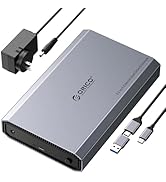
💼 Elevate your data game with speed, capacity, and zero hassle!
The ORICO 3588US3 External Hard Drive Enclosure supports 3.5/2.5 inch SATA HDDs and SSDs up to 20TB, delivering USB 3.0 transfer speeds up to 5 Gbps. Featuring tool-free installation, broad OS compatibility, UASP acceleration, and energy-saving auto sleep mode, it’s designed for professionals who demand high capacity, fast data access, and effortless setup.


| ASIN | B00GAML7OK |
| Best Sellers Rank | #12 in Enclosures |
| Compatible Devices | Desktop |
| Connectivity Technology | USB |
| Customer Reviews | 4.4 4.4 out of 5 stars (6,425) |
| Data Transfer Rate | 5 Gigabits Per Second |
| Date First Available | October 30, 2013 |
| Hard Disk Form Factor | 3.5 Inches |
| Is Discontinued By Manufacturer | No |
| Item Weight | 8.4 ounces |
| Item model number | 3588US3-CA-BK |
| Manufacturer | SHENZHEN ORICO TECHNOLOGIES CO.,LTD |
| Max Number of Supported Devices | 1 |
| Memory Storage Capacity | 20 TB |
| Product Dimensions | 3.46 x 8.19 x 5.2 inches |
R**J
Workmanship good, a solid HDD enclosure, does the job intended.
Plug and play. Simple to use. Workmanship solid for the price you pay. No problems so far and works as intended.
N**Y
Great enclosure for the price
This enclosure works perfectly and was ready to go in less than a minute. It's a tool-less design so all you really have to do is slide off the cover, pop in your drive, and close it up. My drive sat a bit loose in the enclosure, but they provide two foam pads (one thick, one thin) to make the fit more snug. I stuck the thick pad down on the lid towards the end away from the ports, and it immediately stopped any rattling and clunking when moving it around. The lid feels a bit too easy to slide off, which isn't terribly confidence inspiring. However it still seems to hold well even if the latch disengages. I wasn't able to feel much wiggle room when I pulled on the cover, you have to slide it all the way out for it to come off. For the price, I'll give it a pass on this point. In the enclosure my hard drive mounts like any other removable storage, and it fully supports SMART. The drive supports USB 3 over its USB-C port, which is more than sufficient for my mechanical drive. Using the included USB-A to USB-C cable, I hit about 150 MB/s read speeds, which is pretty close to the drive's performance over SATA. I didn't bother to test write speeds since it's an SMR drive, so it would be limited by the drive itself. I noticed read speeds dropping after a few benchmarks, though I'm not sure whether that's because of the enclosure or the drive itself. The drive will even go into standby after a period of inactivity, just like it did when I had it in my desktop. Do note that pressing the power button will cause the drive to immediately power off without confirmation. It doesn't unmount or wait until it's finished writing, it will instantly cut power to the drive. I wished it would've taken at least a long press to power off. To summarize, I'm pretty happy with this drive, and it seems to be one of the few nicer enclosures that supports USB-C.
M**R
Great quality that works perfectly fine.
I just pulled a 3 TB HDD from my machine as I upgraded. It works fine, but I didn't want to burden the power supply anymore, while I do have an M.2 alternative. This enclosure is the best solution to create a backup drive that sit on the desk, and is used to have a redundant copy of all the data. The plastic/ metal combination is very well made and it's very sturdy. The charger gave me a hard time trying to install the socket head to the brick, but it wasn't a deal breaker. The USB cable has ample length and works great. The drive was a bit loose inside the container, but the manufacturer thought of that so they included a sponge with double-sided tape that you can put where it's needed, and it works. One more thing, the pamphlet doesn't tell you how to open the incluser correctly. Please slide it horizontally and don't pull it up (as the sketch on the pamphlet shows). It slides out.
-**-
Very good for the price, no SMART/ATA.
My expensive 14TB Seagate "Expansion" drive died. I was able to determine, by plugging in a data-copier, that the drive itself was fine, and via multimeter than the power supply was also fine, so ordered this enclosure. It is tool-less and easy to use. Almost plug-and-play. With a few foibles. First, it is extremely finicky about connection. The other interface I have just plain works with the drive. This one, I don't know why the connection is tricky, but it is. But once the drive is recognized, it's stable. Second, the power button and activity LED are on the same end as the cable plugs. Which is inexpensive to manufacture, but not particularly ergonomic. Third, no SMART / ATA passthrough. So no ability to use APM (advanced power management), control stand-by, etc. on the drive itself. (Orico does claim their firmware has auto-sleep.) Note that another reviewer claims the C3 variant does support SMART. That could be. This variant was half the price. The enclosure seems quieter than the original Seagate enclosure, perhaps because the Seagate was very well vented. I did try this on Windows 11 Pro, Mac Tahoe and QNAP QuTS Hero. Other than the finicky cabling, it worked flawlessly on all three.
G**R
Easy to use case
Worked perfectly. Easy to put the drives into and take out of the case
T**S
Easy to add hard drive
Very easy to connect and works great. I had an old computer with a large hard drive and before tossing it out, I pulled it and popped it in this box, now I have a much more robust storage system.
D**N
Power On Failed After Using Only Six Times
I purchased this item in Dec 2024. After receipt, I installed a 3.5-inch SATA 3.0 drive (Western Digital Caviar Black with low mileage) into the enclosure, connected the enclosure to a USB 3.0 port on a relatively new Lenovo T580 laptop, attached the separately connected power supply to a wall socket, pushed the tiny power-on button, and the unit turned on (I think it showed a blue light next to the tiny power-on button). My laptop detected the external drive, and I could review and load all the files just fine. Used it maybe 5 or 6 times with two different 3.5-inch hard-disk drives. No problems. Today, I tried to review those files again, but the enclosure would not power on. No light. I tried several times and tried different wall outlets (all known to work). The unit would not power on. It has just been sitting unused. The enclosure is easy to use and tool-less, but I have to idea why the unit will not power on. I re-installed the WD drive and tried another one, a Toshiba. No power in the enclosure. That is poor reliability. Orico has been around a good while, but this is an unsatisfying experience. I don't know whether to try another Orico unit or another brand. Very frustrating since I have important files on the two drives I tried. Just passing my experience along for others.
R**I
O produto é muito bom, é uma marca reconhecida pela qualidade, preço razoável. Apesar de importado, veio rápido sem problemas.
N**O
Worked very good. Had a wifi WD home storage that failed so used to read the data. Good quality and works great
A**R
This product is best fpr for pocket drive.... Its very fast data transfer.......... Pc to drive....
D**G
Stopped turning on after a month.
G**L
Fantastic quality product & absolutely plug and play. Easy setup &worked perfectly. Buying another one !!
Trustpilot
1 month ago
2 weeks ago