Buy anything from 5,000+ international stores. One checkout price. No surprise fees. Join 2M+ shoppers on Desertcart.
Desertcart purchases this item on your behalf and handles shipping, customs, and support to Indonesia.
🎥 Elevate your video calls—because your image deserves the spotlight!
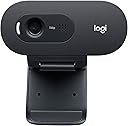
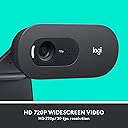
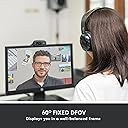
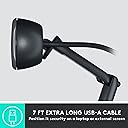
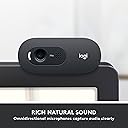
The Logitech C505 HD Webcam delivers crisp 720p HD video at 30fps with a 60° field of view and fixed focus, enhanced by auto light correction for optimal clarity. Its omnidirectional microphone with noise reduction supports clear audio up to 3 meters, perfect for professional calls in busy environments. Featuring a versatile universal clip and a 7-foot USB-A cable, it offers flexible placement on laptops or desktops. Compatible with Windows 8+, macOS 10.10+, and ChromeOS, this minimalist, lightweight webcam is designed for seamless plug-and-play use.


| ASIN | B07W7KB8L6 |
| Antenna Location | video conferencing, online meetings, remote work or education |
| Are Batteries Included? | No |
| Best Sellers Rank | 40,713 in Computers & Accessories ( See Top 100 in Computers & Accessories ) 291 in Webcams |
| Box Contents | USB Cable |
| Brand Name | Logitech |
| Camcorder Type | Webcam |
| Colour | Black |
| Compatible Devices | Personal Computers, Certain Smartphones, Certain Tablets |
| Country of Origin | China |
| Customer Reviews | 4.3 4.3 out of 5 stars (1,635) |
| Effective Still Resolution | 4 MP |
| Effective Video Resolution | 720 Pixels |
| Exposure Control Type | Automatic |
| File Format | JPEG |
| Flash Memory Installed | 128 GB |
| Flash Memory Speed Class | 2 |
| Flash Memory Type | Internal flash memory |
| Flash Memory Video Speed Class | V30 |
| Focus Type | Fixed Focus |
| Form Factor | Compact |
| Global Trade Identification Number | 05099206093690 |
| Has Image Stabilization | No |
| Image Aspect Ratio | 16:9 |
| Image Capture Speed | 30 fps |
| Image Stabilization Type | false |
| Item Dimensions D x W x H | 8.1D x 18.5W x 6.1H centimetres |
| Item Weight | 2.65 Ounces |
| Lens Type | Prime |
| Manufacturer | Logitech |
| Maximum Aperture | 2.8 Millimetres |
| Maximum Display Resolution | HD |
| Minimum Aperture | 10 Millimetres |
| Model Name | Logitech C505 |
| Model Number | 960-001364 |
| Network Connectivity Technology | USB |
| Number of Batteries | 1 A batteries required. |
| Operating System | Windows, macOS, Chrome OS |
| Optical Zoom | 3 x |
| Product Features | Low Light |
| Screen Size | 75 |
| Sensor Type | CMOS |
| Shooting Modes | Low Light |
| Style Name | Minimalist |
| Supported Audio Format | Multiple Common Formats |
| Supported Image Format | JPEG |
| Unit Count | 1.0 count |
| Video Capture Format | MP4 |
| Video Capture Resolution | 720p |
| Viewing Angle | 60 Degrees |
| Water Resistance Level | Not Water Resistant |
| White Balance Settings | Auto |
| Zoom | Optical |
H**N
Excellent Picture easy setup
One is left left wondering just how good the picture is on a device like this. Well; it's very good indeed. I was surprised by the quality relative to the size and price. The camera sits happily on top of a flat screen and comes with 2 metres of cable, and has a built-in microphone. it works with a PC or MAC. I intended to use it for skype, but now use it more for image and video capture. Price varies but good value regardless!, All documentation is available on the web.
R**)
Good image & good mic
I purchased this to replace my 15 year old Logitec camera that was still going well but needed somthing to improve the quality of my work calls. I bought a Vitade webcam a few weeks back but it was terrible with poor light settings and the widescreen was too large. So I sent it back and bought this one which was a good choice for a few £'s more. It has worked well on all my meeting platforms including FaceTime, Zoom & Teams but you will want something different if filming video blogs etc. The quality and light is perfect for my needs. There are no in-built functions to change the settings of the picture but you can download an app from Logitech that will allow you to adjust the following: > Standard or widescreen > Anti-flicker from 50hz to 60hz > Brightness > Colour intensity > Contrast > White light balance The app is called 'Camper Settings' and can be found on the Logitech C505 webpage. If you need more advanced functions such as zoom or more complex light settings there are apps like iGlasses that you can buy. Pros: - Fits on my monitor and laptop easily - Good quality picture - 702p is more than adequate for video calls (you only need 1080p if you have several people in the room) - Sound is excellent and works across the room - Plug & play - Good warranty from Logitech - Dedicated webpage with manuals, sofware/apps and help guides Cons - Can be a little grainy in low light conditions but this is a massive step up from my old camera
P**R
Very good budget camera.
Chip as chips. Good build quality and clear pictures with sound. Impossible to grumble for the average home or office user. I use it for work with ms teams and never had a problem. It has superior quality to the in build cam on the laptop.
S**S
It does what it's supposed to with no fuss
I bought this for WFH as my laptop camera is pretty poor with poor focus and very dark video. The logitech webcam was so simple to set up - it literally is plug and play. No setup or adjustments needed on my Win 10 laptop. The colours and picture quality were markedly improved and even the audio was better. The difference was so marked that colleagues commented on the difference without any prompting. It's not the cheapest on the market, but I'm glad I got it as the results were more than noticeable and it's so easy to use.
M**S
Good size, bad quality
Very compact webcam, doesn't cover too much of my display (although it does overlap the screen area slightly making some Chrome tabs hard to see). Unfortunately however the quality is just rubbish, it's maybe just about acceptable for very occasional use, but if you're looking for a long term Zoom solution this ain't it.
P**N
Clear video & audio, easy to install
Simply sits on top of screen & plugs into usb port. Clear picture & microphone. Downside perhaps is that with positioning at top of screen audience receive image looking elsewhere other than at them.
I**M
Excellent
This is a great piece of equipment. It's small and relatively unobtrusive, presents a very good picture and the sound is good. Installs almost instantly. Would recommend.
L**D
Good
I had to downgrade from my last cam as it was too good, captured too much detail with too large a field of view that my internet struggled and Teams would often start to fail. This camera is just bad enough, the picture quality is fine for work purposes and the microphone (used with Teams) picks my voice up well and handles the noise cancelation of other people talking on the call. It's great to not have to wear a headset and to be able to stay on camera for long calls!
U**.
Online'a geçişte en ucuza eba kameraları vardı, 480p ve metaryal kalitesi çok ucuz, onlardan kullanmaya başlamıştım. Yakın zamanda bozuldu ve işim gereği bir kameraya ihtiyaç duyuyordum. Piyasada en ucuz ve güvenilebilir/tanınınmış bunu buldum. Ürünün malzeme kalitesi şaşırttı. Kamera biraz zoomlu gözüküyor, ayarlayamadım onu, ama bir problem yaratıcak kadar farklı değil. F/P olarak başarılı, basit bir kamera ihtiyacını kolaylıkla giderir.
Z**B
ho comprato questa webcam per 37€ (usata - come nuova) PRO +si vede leggermente meglio della logitech brio, ha meno rumore visivo, il che penso faccia discutere +l'immagine è fluida, pensavo fosse tutta scattosa 5fps. chiaramente bisogna abbassare l'esposizione +il cavo sembra lungo circa 2 metri, molto buono CONTRO -messa a fuoco brutta, e non regolabile. non aspettatevi una immagine 720p ben definita e dettagliata -qualitativamente, ha abbastanza rumore visivo. ma per la fascia di prezzo 45EUR, è sopra le aspettative -non può essere avvitata su treppiede o braccio a giraffa. problema però raggirabile usando una clip per smartphone -il microfono è scarso, ma è abbastanza per far sentire la propria voce in genere ho usato webcam da 150-200€ circa, come la logitech brio 4k (qualità terribile, ha molto rumore), e la razer kiyo pro (qualità impeccabile, ma può dare problemi a lato software) da questa webcam non mi aspettavo granché, la volevo giusto usare per conferenze webex, ma direi che mi ha sorpreso. consigliata
J**N
Bovengemiddeld goede kwaliteit aan redelijke prijs.
M**N
Bästa webkameran hitills efter att ha kört med 2 andra kassa modeller tidigare. Bra ljus o klar o tydlig bild för teamsmöte, Ingen installation behövs. ”Just plug and play”
T**.
Für einen Preis von unter 50€ ist die Logitech C505 eine gute Option: + Die Kamera ist gut verarbeitet, macht einen soliden Eindruck + Plug & Play: Einfach an den PC anschließen, nach automatischer Treiberinstallation direkt einsatzbereit + Langes Kabel, so dass man die Webcam flexibel platzieren kann + Flexible Halterungklemme: Lässt sich einfach an jedem Monitor anbringen - Bei schlechten Lichtverhältnissen ist die Bildqualität leider nicht die beste - Ton könnte auch besser sein, aber noch vertretbar Fazit: Die Logitech C505 ist eine solide Webcam mit Abstrichen, mit denen man für den Preis aber durchaus leben kann.
Trustpilot
1 month ago
2 weeks ago