
🚀 Elevate your home network—fast, smart, and future-ready Wi-Fi for the connected pro.
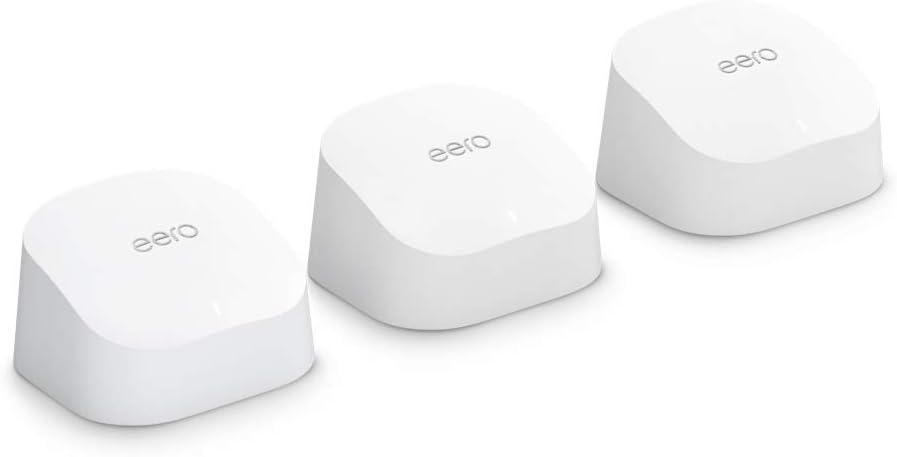
The Amazon eero 6 mesh Wi-Fi system delivers robust whole-home coverage up to 4,500 sq ft with Wi-Fi 6 speeds supporting internet plans up to 500 Mbps. This 3-pack includes one router and two extenders, enabling seamless connectivity for over 75 devices. Featuring a built-in Zigbee smart home hub, easy app-based setup, and automatic security updates, it’s designed to future-proof your smart home with reliable, high-speed internet everywhere.
| Title | Amazon eero 6 mesh wifi system |
| Wifi coverage | Covers up to 5,000 sq. ft. |
| Type | 1 Router, 2 extenders |
| Supported speeds | Best for internet speeds up to 500 mbps. |
| Wifi connectivity | Wi-Fi 6 dual-band concurrent 2:2 (802.11ax), compatible with older wifi standards |
| Wired connectivity | Two auto-sensing gigabit Ethernet ports for WAN and/or LAN connectivity |
| Speed rating | AX1800 |
| Smart home connectivity | Works with Alexa, Amazon Frustration Free Setup, 802.15.4 radio (Zigbee, Thread), Bluetooth Low Energy 5.0. |
| Electrical Rating | 100-240V AC, 50-60 Hz |
| Processor, memory, and storage | 1.2 GHz quad-core processor, 512 MB RAM, 4 GB flash storage |
| Network security and services | Profiles, WPA3 (eero Labs feature), WPA2, TLS v1.2+, VPN passthrough, IPv6, NAT, UPnP, port forwarding, DHCP, static IP, and cloud connectivity |
| Required for setup | Supported iOS or Android device and internet service (with cable or DSL modem, if required). See requirements. |
| Temperature Rating | Operating: 0˚C-40˚C Storage: -25˚C-60˚C Operating humidity: 0%-90%, non-condensing Operating altitude: <3000m |
| Dimensions | 3.9 in x 3.8 in x 2.4 in (99.4 mm x 97 mm x 61.4 mm). Actual size and weight may vary by manufacturing process. |
| Warranty and Support | 1-year limited warranty. Free customer support is available 7 days a week. Learn more about warranty and support.. |
| Subscription | 30-day eero Plus trial is limit one per new eero customer account. Additional terms apply, see the eero Plus Terms of Service for more details. eero Internet Backup performance will vary and you are responsible for data charges with backup connection providers. Learn more about eero Internet Backup requirements, performance, and compatibility here. |
| Software Security Updates | Learn more about these software security updates. |
| Legal Disclaimer | Some features require linking your Amazon account, and downloading the Alexa application or using a compatible Alexa device. Internet connection speeds and availability depend on your internet service provider; if your internet service provider does not provide you with the maximum supported speed, you will not experience that maximum speed. Maximum wireless signal rates are derived from IEEE 802.11 standard. Specifications assume wired Ethernet connection; your experienced speed may vary when connected to an eero device that is configured as a wireless extender. Coverage estimates are based on normal use conditions. Actual range and performance can vary, and maximum supported speeds may not be available to all customers, due to factors such as local regulations (including power limits), network configuration, interference, connected devices, device usage, building materials, and obstructions. Specifications are based on use of a Wi-Fi 6 or later generation client device. For more information about eero performance, visit support.eero.com. |
H**R
So Far So Good
My modem crashed a few months ago and Spectrum had to replace the system. I learned during that installation that I was being charged an extra $10/month for my router. Didn't realize that for 5 years, I was only "renting" my router. Which has been an absolute waste of $600. During the initial install, I was not informed of that and I have never seen an actual paper statement for my bill breaking down my plan. My first Spectrum router was very spotty towards the back of my house (1050sq ft. house) and the new router which was supposed to be an upgrade to Wi-Fi 6, was even worse. My phone would lose connection to the new router on my front porch which is 5 feet away from my router. I initially thought that all I needed was an extender and that is how the Spectrum guy and I got on the subject because I am NOT very tech savvy. I had already been looking at the Eero router and he recommended it. I found the one that is compatible to my internet plan (400Mbps) and went for it while it was on sale. This router is very well packaged. Very pretty packaging, too. OMG!! Super super easy to install. Your grandparents could install this. The only thing that I recommend is being sure of your password which you should be able to find in your providers app (at least I can with Spectrum). If you do happen to forget one digit to your password, and you accidentally change your password, you will have to reconnect each device individually. This router was compatible with my internet plan and provider. I'm very happy with the quality, signal strength, functionality. It has been very reliable for the three days that I have had it. I have not lost signal once. Not even on my front porch. My phone is now showing that I am connected to Wi-Fi 6 when before, it kept dropping it and dropping back down to 5G. Even with the 5G, it would buffer really bad. I got this on sale and I do think that the price is competitive for how well this router performs. The app is super easy to navigate and every device that is linked to your router is located in the app. You can monitor what devices are connecting to your router. I do think that this Eero router was the upgrade to my internet plan. I would recommend saving yourself the cost to "rent" your router through your service provider and upgrading to the Eero router. This will pay for itself in 6 months now that I am not "renting" my router.
J**O
Great Addition to My Eero Setup – Solved My Dead Zones
I recently added the Amazon eero Mesh WiFi Add-On Extender to my existing eero network, and it made a noticeable difference. Setup was incredibly simple — I just plugged it in and added it through the eero app. Within minutes, it was fully integrated into my system. Before installing the extender, I had weak signal areas in the back of my house and occasional buffering when streaming. After adding this unit, coverage became much more consistent. Speeds are stable, and devices switch seamlessly between nodes without dropping the connection. I also appreciate the compact design. It doesn’t take up much space and blends in well with the room. While it doesn’t have Ethernet ports like some of the larger eero units, it’s perfect if you just need to extend wireless coverage. Overall, if you already have an eero system and need better coverage in certain areas, this add-on extender is a reliable and easy solution. Definitely worth it.
L**L
Easy-to-add hub to for an existing Eero system
Ok, so I am NOT tech-y at all—but fortunately Eero caters to my ilk! I installed an Eero wireless "mesh" system when we moved into our home and it came with three hubs to extend the coverage of the wifi throughout the home. That system was very easy to set up and control with an app, even for those without high-tech capacity like myself. Now, the good thing about a Midcentury home is that it is built insanely well—but the same thing that makes it soundproof and sturdy is also the thing that makes it a little troublesome when it comes to wifi coverage. I made my son a "kid-cave" out of the outdoor shed, which is about 15 feet away from the house. And as good as the Eero was inside the home, it was not able to deliver a consistent signal through the solid concrete walls to the shed. After much grumping from my 13-year-old gamer, I ordered one more extender hub to solve the issue. It arrived in a timely manner, and I brought it into the shed and plugged it into the wall. Fortunately for me, it was super easy to add this new hub to the existing system. All it took was one click in the app, and in less than a minute, the shed had full, high-speed wifi coverage like the rest of the home. I cannot recommend Eero enough - it is sleek, small and powerful, and the system is easily extended to suit all your wifi needs.
P**.
Easy Setup, But Only 1 Extra Port Though!
Love this thing. It doubled my wi-fi speed/MBPS. I got the three-piece set because I have a two-story home, and my office is one floor up and diagonally opposite of where the main router is set up. Therefore, this mesh setup is ideal. This was very easy to setup with the app. No problems and pretty quick. No passwords or serial numbers to remember or enter: it does it all for you. Click, click, click—done! So yeah, it's fast and easy all around. However, I noticed only one extra port (you monopolize one to your modem. (I didn't have to buy a new modem.) If you have an Apple TV, that's it. You can only hook that up. If you have something else, like pluggin in a laptop to have a super-fast wired connect or to see on the big screen, no-can-do (unless you unplug the Apple/Roju/etc). Why can't you buy a splitter? You need all eight wires, a splitter would turn it into a four-wire connection which means whatever you are running will be so slow, it's not worth it. That equals bad speed and bad quality. My old NightHawk router had five extra ports and I miss that. However, I'll deal with this since I got it to actually get a strong signal upstairs. It's just something you need to know before buying. Also, they are surprisingly warm. Probably fine to have on the rug, but I elevated mine. If they ever make wireless ones, that would next level as you have to put these next to an outlet. Flaws and all, happy with my wi-fi speed upstairs.
Trustpilot
2 weeks ago
2 weeks ago