Buy anything from 5,000+ international stores. One checkout price. No surprise fees. Join 2M+ shoppers on Desertcart.
Desertcart purchases this item on your behalf and handles shipping, customs, and support to Indonesia.
🖱️ Elevate your workspace with precision and comfort — because your wrist deserves the best!
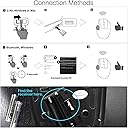
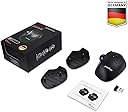
The Perixx PERIMICE-720 is a wireless ergonomic trackball mouse featuring dual-mode connectivity (Bluetooth and 2.4 GHz), adjustable angle stands (0°, 10°, 20°) to minimize wrist strain, and two DPI levels for customizable pointer precision. Its tilted scroll-wheel supports both vertical and horizontal scrolling, enhancing navigation efficiency. Designed for Windows 7 and newer, it offers plug-and-play convenience without driver installation, making it a versatile and comfortable choice for professionals seeking productivity and ergonomic support.


| ASIN | B084TJS4H9 |
| Antenna Location | Office |
| Are Batteries Included? | No |
| Are Batteries Required | Yes |
| Best Sellers Rank | 46,348 in Computers & Accessories ( See Top 100 in Computers & Accessories ) 980 in Mice |
| Box Contents | Perimice-720, 10 degree support, 20 degree support and user manual |
| Brand Name | perixx |
| Button Quantity | 6 |
| Colour | Black Wireless |
| Compatible Devices | Laptop, Personal Computer |
| Country of Origin | China |
| Customer Reviews | 4.3 4.3 out of 5 stars (2,197) |
| EU Spare Part Availability Duration | 1 Years |
| Enclosure Material | ABS |
| Global Trade Identification Number | 04049571000954 |
| Hand Orientation | Right |
| Hardware Platform | PC |
| Item Dimensions L x W | 13.9L x 10.3W centimetres |
| Item Type Name | PM-720-11449 |
| Item Weight | 4.6 Ounces |
| Manufacturer | Perixx |
| Manufacturer Part Number | 11574 |
| Minimum Required Operating System Version | Windows 7 |
| Model Name | PERIMICE-720 |
| Model Number | 11449 |
| Mouse Maximum Sensitivity | 1600 Dots per Inch |
| Movement Detection | Laser, Trackball |
| Network Connectivity Technology | Bluetooth |
| Number of Batteries | 1 Lithium Polymer batteries required. |
| Operating System | Window 7, 8, 10 |
| Power Source | Battery Powered |
| Product Features | Wireless |
| Product Finish Type | Glossy |
| Product Warranty | 24-Seller-Limited-Warranty |
| Range | 10 |
| Style Name | Modern |
| Theme | Ergonomic Office Mouse |
| Unit Count | 1.0 count |
K**S
A great product!
I have been using Logitech 'Trackball' mice ever since they arrived in 2001 and never changed even though I've tried others, they were never, ever close. I decided to try this mouse because I really wanted a 'wired' trackball (thumb) mouse. What a brilliant design! So far it's been great! The buttons are shallow and smooth to the click. The ball is in perfect position for my hand and the the height is very comfortable. It is performing very well so far and I even like the purple colour of the ball :P I really hope the ball stays smooth over the coming months as some trackballs become scratchy after a while...here's hoping! A great price for a great product.
G**R
Great wired alternative to the Logitech M570
The Logitech M570 wireless trackball is my go-to for pointing devices now - it dramatically reduces arm movement across your desk, and only requires the footprint of the device to rest on to be usable. My one criticism is that the M570 is only available in a wireless variant; for something that (usually) lives on my desk, and unlike a mouse does not need to move from its spot, the wireless aspect adds more trouble than it solves. This trackball is very similar in design - it uses a thumb ball, has navigation buttons and even an adjustable base angle - but it's wired USB. So no batteries and no wireless interference. The ergonomics are very similar and it's extremely comfortable to use day to day. It has a few additional features over the Logitech trackball too - first it has adjustable DPI sensitivity, it has an Alt-Tab button to switch windows mounted below the scroll wheel, and the wheel tilts for horizontal scrolling. These are all very nice additions. It has a generous USB cable length and very clicky buttons, so you have positive feedback. The downsides are that it's not quite as nice quality plastic as Logitech use - the build quality seems less when you go from one to the other. It's much lighter and not as keen to stay in one place on your desk. The ball is also lighter; this means it has less momentum - one of my favourite tricks is to flick the ball and have it carry the cursor all the way across my large screen (or dual screens). This works, just not as well as the Logitech one. For cleaning, I can extract the ball from the Logitech with just a finger, but I have to use a pen or similar to pop the ball out of the Perixx one. The Back button is easy to push, but the Forward button is located closer to the edge of the mouse than the Logitech one, so it's a little harder to click. Also, the tilt wheel is quite firm and requires a good push to engage horizontal scrolling, needing a firm grip on the mouse. One final difference, the Perixx uses a red LED optical sensor, whereas the Logitech and most newer mice have moved onto invisible optics; it's not a problem, just a bit interesting to see what feels like 'old' tech. Overall, not perfect, but an excellent trackball for those who want the ergonomics of the M570 with a wired connection.
J**Y
Good quality and comfortable to use
Good quality product, well packaged and easy to set up. I use one of the two plates fitted to the bottom of the mouse, to achieve the correct angle for my hand. I find the mouse to be a little too responsive at times - the cursor speeds across the screen sometimes, but overall I'm very happy with it. A worthy successor to my old Logitech mouse.
V**V
Nice.
Good quality and has worked well. Very ergonomic, nice to use.
A**R
Rollerball
It's a good rollerball. Like all rollerballs, you will need to occasionally 'pop' out the ball to clean any dust from the sensors (usually the end of a biro works), plus clean the ball itself (important in these virus days - hand santizer will do). I am currently using it with a Chromebook and it has no issues with that. You can also use it with a bluetooth connection. Using a rollerball for the first time does take a bit of practice 'cos you will try and move the whole thing instead of just rolling the ball.
S**C
Good Bluetooth trackball but no dedicated Mac support.
I like trackballs - have not had issues with RSI since changing to a Logitech M570 more than 10 years ago. I saw this had Bluetooth, which was my one niggle with the Logitech. Overall, it's good, with a nice solid trackball that loosened up nicely after a couple of days. The Bluetooth frees up a USB slot and seems less prone to interruptions in signal than the Logitech, at first acquaintance at least. There are nice touches like interchangeable bases to change the angle the trackball sits in your hand. I prefer it without, though. If you use a Mac like me, you will find the trackball works fine, but the two small buttons on the side don't work as browser back/forward buttons, and the little mission control button doesn't do anything. This is not an issue for me as I don't use these as a rule anyway. The scroll wheel and left/right buttons work as they should. If you prefer the 2.4 Ghz USB connection in preference to Bluetooth, you will find the dongle neatly concealed in the battery compartment. It's not obvious! Overall, it's a good trackball mouse that would be excellent if it provided Mac support and the ability to custom-configure the buttons.
"**"
Reliable product.
Works well, used for sometime now with mo issues. Happy customer
L**Y
Scroller broke after some months
Very Comfortable, responsive trackball but ultimately useless after the scroller broke - It gets stuck in a cycle of going up when you scroll down, then goes back and forth small amounts repeatedly, has even done it when your not touching the mouse. Seems to be a recurring problem, drivers up to date & no info on support page, Replaced with another brand.
B**Y
19 out of 10
F**U
Heerlijk zo muis wil niks anders mee
T**T
Hatte hohe Erwartungen an die Ergonomie und war doch recht enttäuscht. Es wird mit einem einstellbaren Winkel geworben. Dazu muss eines der beiden Kunststoffteile unter die Maus gelegt werden. Dadurch passt dann der Winkel, aber die Maus ist höher und somit passt die Höhe nicht mehr. Lösung: 3 Kunststoffteile, eines für jeden Winkel. Aber dann hätte man noch mehr Plastikmüll produziert. Und die nicht benötigten Teile - wohin damit. Gute Idee, aber keine gute Realisation. Der Kunststoff ist außerdem recht glatt, die Hand rutscht weg. Kugel läuft auch nicht so satt, wie man sich das wünscht. Dann habe ich das Teil von Logitec bestellt, das passt alles.
A**R
J'avais souvent employé par le passé, des trackball, pour finalement retourner à la souris classique. À mon avis, le trackball est à réserver à des usages spécifiques, où l'espace est compté, ce qui est le cas pour cet achat. En cas d'usage intensif, il y a quand même une grosse fatigue du pouce... C'est peut être pas dramatique, mais les tendinites peuvent être très gênantes et compliquées à gérer. Ce trackball est de très bonne qualité. Je n'ai pas hésité à racheter du Perixx, car, que ce soit les claviers ou les souris, je n'ai pas été déçu. Pourvu que ça dure...
A**X
Der Trackball ist echt nicht schlecht! Er passt unter meine großen Hände was schon mal nicht selbstverständlich ist. Die Winkelstücke hab ich ausprobiert, ohne Adapter ist aber am besten. Look & feel ist nicht gerade hochwertig und auch die Lager für den Ball sind aus Plastik. Muss aber sagen in der Praxis taugt er. Ich kann noch nichts zur Langlebigkeit sagen, habe ihn erst 2-3 Wochen in Gebrauch. Den Ball nutze ich für CAD Zeichen und Musikproduktion und das macht er wirklich gut. Habe auch verstanden, dass die Kunststofflager des Balls besser gleiten. Er läuft auch tadellos unter Linux- einfach - alle tasten sofort da. Alles was mir an dem Trackball fehlt ist ein besseres Mausrad mit Schalter für Freilauf.
Trustpilot
2 weeks ago
1 week ago