


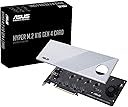
🚀 Unlock lightning-fast storage with ASUS Hyper M.2 X16 – because speed waits for no one!
The ASUS Hyper M.2 X16 PCIe 4.0 expansion card supports up to four NVMe M.2 SSDs (2242/2260/2280/22110) simultaneously, delivering up to 256Gbps bandwidth via PCIe 4.0 x16 interface. Designed for AMD 3rd Gen Ryzen sTRX40, AM4 sockets, and Intel VROC NVMe RAID, it features a premium low-loss PCB, supports 14W power SSDs, and includes a stylish heatsink with an integrated blower fan to prevent thermal throttling, ensuring sustained high performance for professional-grade storage solutions.


| ASIN | B084HMHGSP |
| Best Sellers Rank | 158,942 in Computers & Accessories ( See Top 100 in Computers & Accessories ) 1,510 in Motherboards |
| Brand | ASUS |
| Brand Name | ASUS |
| Compatible Devices | Motherboards with AMD TRX40/X570 Series PCIe 4.0 support and Intel VROC NVMe Raid |
| Compatible devices | Motherboards with AMD TRX40/X570 Series PCIe 4.0 support and Intel VROC NVMe Raid |
| Customer Reviews | 4.2 out of 5 stars 736 Reviews |
| Hardware Interface | PCI Express 4.0 |
| Hardware interface | PCI Express 4.0 |
| Item Dimensions L x W x H | 26L x 30W x 5H millimetres |
| Item Type Name | ASUS Hyper M.2 X16 PCIe 4.0 X4 Expansion Card Supports 4 NVMe M.2 (2242/2260/2280/22110) up to 256Gbps for AMD 3rd Ryzen sTRX40, AM4 Socket and Intel VROC NVMe Raid |
| Item Weight | 1.95 Pounds |
| Item weight | 1.95 Pounds |
| Manufacturer | Asus |
| Manufacturer Part Number | HYPER M.2 X16 GEN 4 Card |
| Model Number | HYPER M.2 X16 GEN 4 Card |
| Number of Items | 1 |
| Operating System | Windows, macOS, Linux |
| Product dimensions | 26L x 30W x 5H millimetres |
| Style | Modern |
| Style Name | Modern |
| UPC | 192876624920 |
| Unit Count | 1.00 count |
C**T
Check your Mobo before use
Not all Mobo's will support this. Make sure you get one that supports "Gen 4" Also you will need to reconfigure your PCIE lanes in Bios to 4*4*4*4*, if you leave them at default/16x this won't work
D**E
Noisy card delivers on most of manufacturers promises
Works as designed. In an MSI trx40 creator Motherboard that already has an MSI pcie card in the one x16 slot and a GPU in the other I was therefore only able to divide the channels for this 3rd card into two lanes => 3 on board nvme drives, 4 more in MSI card and 2 (out of four slots) for the Asus extension card. Asus card is noisy but it runs fine. Used AMD raidexpert2 to manage "both" cards
D**.
Solves AER issues on AMD boards with Gen4 NVMe drives
Preface: This card is NOT intended to just be dropped in to a commodity PC motherboard. This is a card you install in a server or high-end workstation that has more x16 slots than the number of graphics cards you have. Reviewers complaining that their BIOS doesn't recognize all 4 slots probably plugged it into an x4 or x8 slot on their motherboard. Make sure to check your motherboard specifications before you buy! Background of why I got this: I have an ASRock Rack ROMED8-2T with an AMD EPYC 7443P processor and 128GB of ECC PC4-25600. I have a pair of Samsung 980 PRO 500GB NVMe drives installed which are used for the root filesystem (RAID1), ZFS L2ARC and ZFS secondary log (SLOG/ZIL) device. Since completing the initial build, I noticed frequent correctable PCIe bus errors in dmesg (see 1st and 2nd screenshots). Communication with the NVMe drive would shut down for second or two after each AER event, which got *really* bad when I enabled the ZIL on them. Approximately once every 3 months I'd also get a hard lockup necessitating a hard reset of the server over IPMI, which I strongly suspect was related to this. The hard lockups became less frequent with the 6.1 LTS kernel and P3.50 firmware but I was still able to upset it under heavy write workloads. The PCI device implicated in these messages was "AMD Starship/Matisse GPP Bridge" at 0000:40:01.1, the only child device of which was the NVMe drive at 41:00.0. The other bridge device and NVMe drive did not experience the issue. Research online indicated that an NVMe riser card such as this one would resolve the issue. There are numerous alphabet-soup brand cards for a half or third of the price here on Amazon, but to me $80 is cheap insurance to protect my NVMe drives and the data on them by using a card with a hefty heatsink, a high quality fan and a warranty. I had two hiccups during installation, which were: - This card is quite long, and will interfere with the fan connectors on the ROMED8-2T in PCIE slots 1-4. It will fit in slots 5-7, although 5 and 6 will bring the card quite close to the SAS connectors. - The NVMe drives were not detected until I manually changed the link speed on the slot to "x4x4x4x4" in the BIOS setup. After setting everything correctly I confirmed that both drives are running at full gen4 speed of 16GT/s (see 3rd screenshot).
S**R
Works Great
Works great on a Asus Motherboard. 4TB M.2 SSD's with no SATA cables needed. Great help on you tube to set it up & running
G**E
Great product for those who understand
I almost didn’t buy this product due to negative ratings and that would have been a mistake. After use and re-reading it is clear all negative reviews on this product simply don’t understand the technical limitations of the environment, to wit: Each NVME requires x4 PCIE lanes, and many motherboards have a single x16 slot (which furthermore requires firmware support for 4x4x4x4 bifurcation). Simply check the support and know that to use all four slots on this card you likely will need to move your graphics card to an x4/x8 slot and/or update BIOS and/or make configuration changes. These options might not be called “bifurcation” and may be “pcie raid” … these firmware and hardware inconsistencies are not Asus’ fault. Just because your PCIE slot looks like a full-sized x16 slot does not mean this product will work. No, this is not an active raid controller. That said, this product for those with the technical aptitude to understand the limitations and requirements is fantastic. There are power filtering capacitors on the board, and other passive components populated to protect our expensive PCIE4-era NVMEs. There is a huge solid block of machined aluminium and the correct riser rubbers/thermal adhesives/risers/screws to mount four single- or double-sided NVMEs. The fan isn’t super useful in a system with above average cooling, and you can simply turn it off. My NVMEs went from circa 90 degrees (on motherboard with no heat sinks, in the random access RW work I use them for) to barely above ambient. The maximum theoretical throughput of x4 PCIE is approaching 8Gb/sec and I see RW speeds at random access approaching 16Gb across 4 drives, I don’t know if sequential RW is at full x16 speed, but with the 4x 980 Pros I use I see ever-so-slightly more than double speed of 2x 980 Pros, so it definitely scales in a linear fashion IF YOU USE x16 IN 4x4x4x4 BIFURCATION!
T**G
Works as advertised.
The expansion card is well made. I added 4 more NVME. Now trying to workout how to configure it as RAID10..
A**R
شغال100%
شغال100%
Trustpilot
1 month ago
2 weeks ago