Buy anything from 5,000+ international stores. One checkout price. No surprise fees. Join 2M+ shoppers on Desertcart.
Desertcart purchases this item on your behalf and handles shipping, customs, and support to Indonesia.
🚀 Elevate your AV game with seamless 4K KVM extension—because your setup deserves zero compromises!
The Basicolor 4K PoE HDMI KVM Extender delivers ultra-high-definition 4K video at 30Hz over Cat5e/6 cables up to 328 feet with near-zero latency under 50ms. Featuring Power over Ethernet support and four USB 2.0 ports, it enables streamlined, plug-and-play connectivity for professional environments requiring flawless video, audio, and peripheral extension.


| ASIN | B081W94ZNF |
| Best Sellers Rank | #557 in KVM Switches |
| Brand Name | Basicolor |
| Circuit Type | 2-way |
| Color | Purple |
| Compatible Devices | Almost all devices with HDMI |
| Connectivity Protocol | Ethernet |
| Connector Type | Plug In |
| Contact Material | Silver |
| Contact Type | Normally Open |
| Control Method | Touch |
| Control Type | remote |
| Controller Type | Push Button |
| Current Rating | 1 Amps |
| Customer Reviews | 3.7 3.7 out of 5 stars (50) |
| Included Components | HDMI KVM USB Extender TX&RX, 2x5V/1A Power Adapter, 1xUSB2.0 Cable, User Manual |
| International Protection Rating | IP40 |
| Item Dimensions | 4.72 x 3.15 x 0.79 inches |
| Item Weight | 1.1 Pounds |
| Manufacturer | ARX TECH |
| Material Type | Metal |
| Model | ARX 5631 |
| Mounting Type | Plug-In Mount |
| Number of Positions | 1 |
| Operating Voltage | 120 Volts |
| Operation Mode | ON-NONE-ON |
| Part Number | ARX 5631 |
| Switch Type | Push Button |
| Terminal | Blade |
| Unit Count | 1.0 Count |
| Wattage | 5 watts |
T**C
It totally WORKS! Use dedicated ethernet cables.
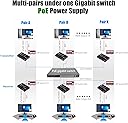
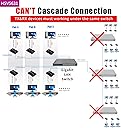
Used this to remote the 4K monitor on my Lorex NVR with 4K HDMI output. Initially had issues trying to get the boxes to connect to each other when I ran them through a PoE switch on their own VLAN. After trying a few times via the switch, I directly connected them to each other with a single CAT6 cable and using the supplied power adapters and they quickly linked up. I then moved them back to the PoE switch on an isolated VLAN and they were able to link up just fine. Has been reliable for the last few weeks with no hiccups. PRO TIP- You really should put these on their own dedicated ethernet cables to each box. Do not share the cable bandwidth with other computers, etc. Why? Because these boxes are using about 800 Mbps of bandwidth at 4K 30FPS. 1080p doesn't drop the bandwidth much (uses 650-700 Mbps). -----UPDATE 10/20/2022----- This is a followup from my original review on 1/8/2021. Happy to report this 4K HDMI extender is still going with no issues so far. Both sender and receiver are connected to a PoE gigabit switch (wall warts not being used). Used in 4K30 mode with a mouse for a camera NVR.
E**D
Good concept but poor implimentation, documentation and high price for an extender with issues
I really regret purchasing this system and even more regret not fully testing before the return period was up. That part was my fault. My use case: I have two head3dless servers in a computer rack that I needed to have keyboard and video connectivity when changing bios settings, repairing OS, upgrades, etc. Having some experience with KVM extenders in general, I am a little leery of trying ones I have had no experience with but needed one over IP so decided to give this one a try. The POSITIVE: The receiver and sender did see each other quickly and connected without a problem. I am (was) using this KVM extender through a Cisco POE switch on a dedicated VLAN (with POE for power) which all worked fine as well. The NEGATIVE: As mentioned 99% of my need for this system is only to see the BIOS screen, POST info and Linux and DOS based boot (USB) drives to run diagnostics/ upgrades, etc. And this is where I have had a miserable experience. The first server I tried it on was a Ryzen based system (with a GeForce GT 710 1GB dedicated only to this video requirement) and running Proxmox. On this system, I could not get ANY intelligible video (just video noise) at any time- POST, BIOS, etc. The second system (also Ryzen with the same video card running Proxmox Backup OS) is almost as frustrating! The screen will NOT stop blinking on and off no matter what I try! I have rebooted many times, reset the extender many times, tried other configurations, in BIOS, DOS, Linux but still it keeps blinking. Sometimes it loses the keyboard but always keeps f-ing blinking so much it is hard to do anything, much less how crazy annoying it gets. And it doesn't help that the documentation is so ridiculously basic and so little detail that it is no help with troubleshooting any issues! I'm not sure how it works with a "standard" video signal but BEWARE if you are trying to use it like I am.
G**S
Works as intended.
I use tons of these. However IF you’re bouncing them through a networking switch. Make sure the switch can handle them.
D**S
Great for 4K Security Cameras
I had some 1080p HDMI to Ethernet adapters for bringing the video output from my security camera NVR (in the basement network closet) upstairs to my living room television. When the transmitter died, unexpectedly, I bought these units to replace the dead ones. I can see my 4K cameras so much clearer. The quality is amazing and there seems to be no latency or image ripping. Plus, if I need to pull video, I can plug-in a USB key right here, and not have to go to the basement. I might have to buy another just to play around with. Very happy with this product.
J**E
Works! EDIT: stopped working! No product support available
Finishing my garage I ran Ethernet from my media center to a location for a TV. What I didn’t run was HDMI. This solved that problem. I can control and view the PC from my garage now. My only disappointment so far is that when I tried to add a network switch and run another network device, the other device (a camera) wouldn’t work. This could be me not knowing how to set it up or it could be that it’s just that the system isn’t capable of transmitting network data on top of video. But either way, plug and play I wasn’t able to get a IP camera to join my LAN through this. Otherwise, works great, 4K video and function, no noticeable lag over straight HDMI. EDIT: Product stopped working just days after return window. I cannot find any manufacturer information or product support contact information. I do not recommend this product
J**B
Works as intended. No complaints.
I have one device plugged into a server in a closet. That device plugs into the network. Then on the other side of the facilities 3 network switches away I have the receiving end plugged into a monitor, keyboard, and mouse. I can now control the remote server. Screen refresh is decent enough for non-animated work. i haven't tried to stress test it yet - don't really have a need to. It's POE as well so I didn't need to use the included power adapter. Very slick. Ordering a second set for use elsewhere.
B**E
Good Product!
This is a good product. It does what it says it does.
J**H
It worked up to HD but failed on UHD
I tried it with two of my 4k display and two HDMI sources; as I can tell the UHD mode (4k@30, 444) mode can't pass this extender, it changes EDID content so it limits to 1080P (HD) modes. The pictures shows the Apple 4K HDR adapter shows 1080P and 720P modes. The CEC also not working, could not use one remote to control multiple devices. I used it with 80M, Cat6 cable without problem for 1080P and USB together. The users manual is not clear at all, you may need to guess or try it to get a feeling. The build quality is not that impressive, consider this is a $160 of product, I expect it should deliver better. Overall, if you intend to use it for 4k video then forget it, don't waste time on it.
Trustpilot
1 month ago
2 weeks ago