Buy anything from 5,000+ international stores. One checkout price. No surprise fees. Join 2M+ shoppers on Desertcart.
Desertcart purchases this item on your behalf and handles shipping, customs, and support to Indonesia.
🔒 Elevate your home security game with smart HD clarity and total control!
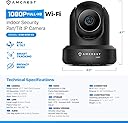
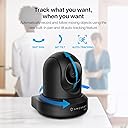
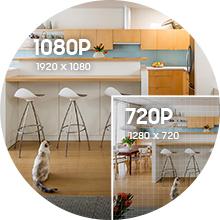
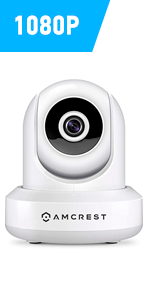
The Amcrest ProHD 1080P WiFi Indoor Pan/Tilt Security Camera delivers professional-grade 2MP video at 30fps with a 90° viewing angle and 360° remote pan/tilt. Equipped with advanced low-light Exmor sensor and IR LEDs, it ensures crisp night vision up to 32 feet. Compatible with Alexa and Amcrest Cloud, it offers motion alerts, two-way audio, and secure cloud backup. UL listed with AES/WPA2 encryption, it guarantees reliable, easy setup and lifetime support—perfect for millennial professionals seeking smart, stylish, and comprehensive indoor surveillance.


| ASIN | B0145OQTPG |
| Alert Type | Motion Only |
| Antenna Location | Indoor Security |
| Are Batteries Required | No |
| Best Sellers Rank | #247 in Dome Surveillance Cameras |
| Brand | Amcrest |
| Built-In Media | 1080p Wi-fi Ip Pan/tilt 2-way Camera With Cloud Recording (black) |
| Color | Black |
| Compatible Devices | Smartphone |
| Connectivity Protocol | Ethernet, Wi-Fi |
| Connectivity Technology | Wireless |
| Control Method | Voice |
| Controller Type | Amazon Alexa, Vera |
| Customer Reviews | 4.0 out of 5 stars 17,229 Reviews |
| Effective Video Resolution | 1080 Pixels |
| Field Of View | 360 Degrees |
| Form Factor | Dome |
| Frame Rate | 30 fps |
| Global Trade Identification Number | 00859888005535 |
| Indoor Outdoor Usage | Indoor |
| Indoor/Outdoor Usage | Indoor |
| Item Dimensions | 8 x 12 x 10 inches |
| Item Type Name | FCM-IP2M-841B |
| Item Weight | 0.5 Pounds |
| Manufacturer | AMCREST |
| Manufacturer Warranty Description | 1 Year Warranty |
| Model Name | Amcrest 2MP WiFi Security Camera |
| Model Number | IP2M-841B |
| Mount Type | Ceiling Mount |
| Night Vision | Night Color |
| Night Vision Range | 32 Feet |
| Number of Channels | 2 |
| Number of Items | 1 |
| Other Special Features of the Product | Image Sensor, Motion Sensor, Night Vision, Portable |
| Photo Sensor Resolution | 2 MP |
| Photo Sensor Technology | CMOS |
| Power Source | Corded Electric |
| Recommended Uses For Product | Indoor Security |
| Room Type | Bedroom, Classroom, Hallway, Kitchen, Living Room, Office, Study Room |
| Special Feature | Image Sensor, Motion Sensor, Night Vision, Portable |
| Specific Uses For Product | Surveillance |
| UPC | 659424885887 661094063489 859888005535 659424885115 798068901307 647971367208 601420008104 662187376387 |
| Unit Count | 1.0 Count |
| Video Capture Format | ASF |
| Video Capture Resolution | 1080p, Security System with Motion Detection, Nightvision |
| Viewing Angle | 90 Degrees |
| Voltage | 5 Volts |
| Waterproof Rating | IP67 |
| Wattage | 7.5 watts |
| Wireless Technology | Wi-Fi |
| Zoom Type | Digital Zoom |
L**M
Protecting Mom's independence & my peace of mind for a decade: A 10-year review of the Amcrest ProHD
As the sole caregiver to my mom, I had to find a way to be in multiple places at the same time. I turned to Amcrest cameras and installed this Amcrest ProHD 1080P WiFi Camera back in 2016, and it remains a key part of my home safety and peace of mind. Unlike fixed cameras, this was my "active sentinel." When I had to leave her at home alone, I could remotely check on her, talk to her, and even pan the camera a full 360 degrees. It allowed me to check the entire room without having to physically disrupt the peace of my mother's environment. The motion detection also made it convenient to monitor her safety. I have so many clips that I kept of her just doing her thing, watching old westerns, Wheel of Fortune, and playing with the dogs. It gave me peace of mind when I was away. Also, if I tried to call her and she didn’t pick up, or vice versa, I could just pull up the camera on my phone and check to see if she was OK. Sometimes I would tell her that I was trying to call her, and I would watch her pick up her phone and call me! That built-in microphone and speaker were great since they allowed for a gentle "voice in the room" when I was gone. The 1080p resolution, even ten years later, provided the clarity I needed to easily check on her from my phone when I needed to step away for work or errands. It’s 2026 when I’m writing this review and mom passed last year at 95 years young. This camera has been running since 2016 because it's a workhorse. For those working alone, I recommend also using the microSD card slot for local recording, it gives you a "black box" of the room without needing a monthly subscription cloud fee. I would also let the home health providers know they were monitored just by showing them the cameras and telling them how convenient they were. They got the message! Just make sure if you take my approach, they can actually “read between the lines” or you might just have to say to them, “Smile, you’re going to be on candid camera!” Hope this helps! Finish strong with a peaceful heart. — Lon | CaregivingFM
K**N
Brilliant & Smart Looking Little Camera
I received my Amcrest ProHD 1080P WiFi Wireless IP Security Camera on October 20th, and set it up for the 1st time on October 22nd. Been using the Foscam FI8910W since February 2014 and that has not missed a beat. Works everyday like a true soldier. But needed an upgrade as the Foscam FI8910W was 1st released in November 2011 (way back when) so it's not that user friendly unless you are a mid level techy and I wanted more recent features. So when Foscam sent me an email on the new Amcrest ProHD 1080P WiFi Wireless IP Security Camera, I jumped on it. I bought it because it had all the festures of the FI8910W but more friendlier (the biggest difference, setting up Port Forwarding so you can stream your camera live anywhere in the world from your Amcrest App). So here goes: Pros: - it truly is a 30 second set up (including port forwarding). The App does everything for you. Currently I am at work and I can tap into my Amcrest App and view my Live feed. - HD Quality is great - The camera is very responsive when you change the Pan & Tilt from your phone app...even if you are miles away - It looks great. Does not stand out like the Foscam FI8910W Cons - Wi-Fi Connectivity (as someone else mentioned): I am still testing this one but the range doesn't seem to be that wide. I moved the camera from being 5 ft away from the router to 20 ft away inside my TV stand on the bottom shelf and it had problems. Would not connect. Which is very disappointing because that is the spot my Foscam FI8910W has been in for the past year and a half. But the FI8910W does come with an antenna on the back which will help with range. The Amcrest does not have an antenna. - Going Deep in the Set Up: Ok, it is 30 seconds to set up....if you stick to the basics (install app, scan QR code, and you have Live Feed with Port Forwarding). However, if you want to go deeper and set up email forward on motion alerts, etc, that does take sometime and you will probably have to email Armcrest for support as this will involve using their web interface which you can access by using the camera's IP address in your browser. The instructions on using the web interface so far are non existent, but again, i've only opened the box last night so maybe the instructions are somewhere on their website. Will investigate this further. UPDATE: 03/11/2015 After having the Amcrest ProHD Camera for roughly 2 weeks now, it is truly an amazing camera with surprising features for a DIY system Pros: - The online User Interface is very extensive. Unfortunately there is no instruction manual on how to navigate the Amcrest web browser UI, but once you have figured it out, you will be quickly impressed. - Motion Detection settings are very detailed. Within the cameras field of vision, you can set up detection zones for the camera to focus on and focus on only. It does this by dividing the field of view into little squares and you can activate/de-activate each square - Motion Detection Sensitivity & Motion Graph: Saw a review where a customer complained the camera was too sensitive. This is not the case in my situation. You can get very detailed again with the settings here. They are two settings: Sensitivity and Threshold. 1st, you can set how sensitive you want the camera to be for motion, which is then transposed onto a motion graph shown on the web browser UI, and then you can set the threshold. Continuous motion caused the graph to rise and once the graph as risen above your set threshold value on the vertical axis, the alarm is triggered (whether this alarm is email or audio if you have a siren hooked up to it) Ethernet Connection: Having some issue with WiFi connectivity, so set mines up via Ethernet. Works absolutely brilliant using the Amcrest Android App when connected by Ethernet....and this is regardless of whether you are at home and miles away. I can open my app anytime, anywhere and be guaranteed it will log into the camera. Remote Pan, Tilt & Zoom: Again, this review is based on connecting the camera via Ethernet. The remote pan, zoom & tilt from the app is very response. If you are miles away and want to pan,zoom or tilt the camera via the android app, there is little to no delay. Cons: Still, WiFi range is my only issue. I took the camera by a friend and it did not even pick up her router that was 5 ft away (that was odd)....but she is using the ISP basic router. As with any WiFi product, your router and all other wifi devices in your home will play a big role in each device performance Bottom Line: Brilliant Camera, but gets 4 stars from me as the WiFi range is not impressive, in my set up. Remember this can is dependent on your router & number of wifi devices in your home. UPDATE: 16/11/2015 Purchased a 2nd one of these cameras lately. Showed a friend who was so in love with it that she took my original one and so I purchased this replacement. With this one, the Wi Fi on it works like a dream. It's only been two days, but I have not experienced any WiFi issues with it like I did with the 1st Amcrest. And I have tested it both while at home connected to the same network and when away from connected to the local cell phone network. Ethernet Connection is still faster....but the wifi connection only has a very small delay....less than 1 second, which is pretty good. The Ethernet connection is instant....even if away from home. What I must say though is I need to go back and check the Firmware version on the 1st Amcrest. This time for sure I updated the firmware from the .5.R which the camera came with, to the 2.420.AC00.8.R which is available for download at http://amcrest.com/firmware . So maybe if the Firmware on the previous is out of date, perhaps that maybe what caused the poor WiFi performance issues. So, I am changing my review from a 4 star to a 5 star because thus far, with the 2.420.AC00.8.R Firmware, the WiFi performance on this 2nd Amcrest it outstanding.
R**E
Glad I picked this camera
Amcrest Pro/HD 1080P Pan/Tilt Wireless Camera, Model IP2M-841B In spite of my complaints here, I am happy I purchased the Amcrest Pro HD Video Camera and will purchase additional cameras from Amcrest if I need to remotely view other areas of my home. I bought the camera to monitor my 95-year-old mother so I know when she wanders out of her room into our living room and to make sure she wanders back! For my purposes, the camera is perfect. I have used this camera for about a month. I am a former English teacher, raised with erasable bond paper and a portable typewriter and am not tech savvy, but I can follow instructions if they are clear. (More on that below.) PROS: When motion is detected, an Amcrest Cloud icon appears on my Android smartphone. At the same time, I receive an email notification that motion has been detected. I open the Amcrest Cloud app, click the REFRESH arrow, click RECORDINGS, and select the video I want to see from the list of stored videos. (The most recent appears on top of the list and includes the date and time of recording). The camera comes with 4 free hours of cloud storage via Amcrest Cloud. It is enough storage time for my needs since I view and then delete, usually right after viewing. The video clarity even on the substream setting is good with true-to-life color. The motion detector picks up not only movement in the room but also caught my husband blowing leaves on the patio outside (about 20 feet from the camera which sits unobtrusively on a bookcase in the corner across the room). It sent me a motion alert when my mother took a tissue out of her pocket. My husband is impressed at the range of rotation of the camera and how quietly it moves. When I want to see a live view, I use the Amcrest View Lite App, and it works well. CONS: INSTALLATION took me a long time (see below): all of one Saturday and part of another afternoon. To install the camera on our WiFi network with Smartphone access, I followed the Amcrest Quick Start Guide, but the process was neither quick nor smooth. The process included IP Config software installation and setup (using DVD provided with purchase), Desktop Access and P2P Setup, and installation and setup of Amcrest View Lite App and Amcrest Cloud App. Note: Directions are serious that you must use Internet Explorer or Safari for installation. 1. Instructions are woefully insufficient if you have a dual band router. We have a dual band router and the instructions NOWHERE say the camera can only connect to a 2.4Ghz band. Step 1 of the Quick Start Guide App Setup should be ESSENTIAL! Before beginning the setup process, go to your Smartphone. Select SETTINGS and WIFI and then select your 2.4 Ghz network. Locate your 5Ghz network and select FORGET. I learned the hard way this action is essential even after following the Quick Start Guide Desktop Access directions and then the P2P Setup directions. My smartphone could not detect the camera until I got our 5 Ghz network out of the way. Amcrest, please include this information in your next printing of the Quick Start Guide. 2. Instructions are non-existent for accessing the camera after the IP address changes after setting up WiFi after completing the Desktop Access. Quick Start Guide Desktop Access was frustrating at Step 9 which blithely notes, Note that the IP address may have changed once connected to WiFi. Be sure to use the IP Config tool to access the camera using it’s [sic] updated IP address. Yes, the IP address does change here and NO, the camera will not work until you access the camera using the updated IP address. Amcrest, please include step-by-step instructions on how to use the IP Config tool here. WHERE AND HOW does one access the camera using its (no apostrophe, please) updated IP address? I finally resorted to calling Amcrest Support because the online guide included no help for this action. I spoke with a guy with an Indian accent who sounded peeved when I could not select STATIC from a dropdown menu I could not find. He offered to remotely take control of my computer to do it, which I declined, and then he did stick with me until I realized the settings that needed to be changed were via a dropdown arrow beside the subheading ETHERNET which he never mentioned. I would love to include the steps and a screenshot, but I do not remember what they were. Amcrest, please include all the necessary steps related to the changing IP address in your next printing of the Quick Start Guide. PASSWORD protection on the camera is limited to six characters or less (though the online guide states eight). Please, Amcrest, fix this quickly so I can use a password with some complexity. PIXILATION of the video on the Amcrest Cloud playback occasionally occurs for a split second which may be a result of my using the substream setting. It picks back up and completes the motion, so does not affect the information I need to know my mom is safe. EMAIL NOTIFICATIONS do not come through in areas with poor cellphone coverage (NOT the fault of Amcrest). Amcrest Cloud App is essential if you want to receive motion notifications in all locations. No camera yet is without problems. I am grateful for this young company and this developing technology. It gives caregivers of people living at home with dementia tools to help watch their loved ones. I read a lot of reviews and almost bought the Samsung Smart Things hub, motion detectors, and camera. The Amcrest Pro/HD actually is doing everything I need.
D**.
Worst Consumer Device Experience of My Life
IMPORTANT UPDATE: THIS CAMERA HAS A SERIOUS SECURITY FLAW--I RETURNED THE CAMERA AS DESCRIBED BELOW AND AM NOW ABLE TO SEE INTO THE NEW OWNER'S BEDROOM!! ONE REASON I RETURNED THE CAMERA WAS BECAUSE I WAS BOMBARDED BY NOTIFICATIONS EVERY TIME IT DETECTED MOVEMENT, SO I DELETED THE APP AND HAD ALL EMAIL NOTIFICATIONS SENT TO JUNK MAIL. THIS MORNING I NOTICED THAT EVEN THOUGH I HAD RETURNED THE CAMERA, I WAS STILL GETTING MOVEMENT NOTIFICATIONS IN MY JUNK MAIL. WHEN I OPENED THE NOTIFICATION TO INVESTIGATE, I WAS DIRECTED TO THE AMCREST CLOUD SITE, WHERE I COULD LOG IN WITH MY ACCOUNT AND STILL SEE THROUGH THE CAMERA, RIGHT INTO A YOUNG LADY'S BEDROOM. I WAS SICKENED THAT I COULD DO THAT. I IMMEDIATELY LOGGED OFF AND CONTACTED AMCREST, WHO WANTED THE CAMERA'S SERIAL NUMBER, WHICH OF COURSE I AM UNABLE TO OBTAIN BECAUSE THE CAMERA IS IN SOMEONE ELSE'S HOUSE. AMCREST TECH SUPPORT WAS BAFFLED AND COULD DO NOTHING--THEY SEEMED MORE INTERESTED IN TRYING TO HELP ME STOP THE NOTIFICATIONS THAN ABOUT THE HORRIFIC BREACH OF SECURITY AND PRIVACY. I REITERATED THAT THE ONGOING NOTIFICATIONS WERE THE LEAST OF THE PROBLEMS, AND NOT THE PROBLEM AT ALL. AMCREST HAS PROMISED TO CALL ME BACK FOR MORE INFORMATION. I FEEL SO SORRY FOR THIS YOUNG LADY, AND FOR WHOMEVER ELSE THIS MAY BE HAPPENING TO AND ARE COMPLETELY UNAWARE. I HAVE ALSO NOTIFIED AMAZON OF THE PROBLEM AND AM EXPECTING A CALL BACK FROM AMAZON AS WELL. FYI--BEFORE I RETURNED THE CAMERA, I WIPED IT AND RESET IT. YET--HERE WE ARE. I THOUGHT MY TERRIBLE USER EXPERIENCE HAD ENDED WHEN I RETURNED THIS CAMERA--NOW IT HAS BECOME A NIGHTMARE. THIS PRODUCT NEEDS TO BE REMOVED FOR SALE. When you read the reviews for this product, sort them by Rating, and start with lowest first. Then, believe everything you read. Before I bought, I thought, With all these 5-star reviews, the low ratings must be atypical. WRONG. I can say WITHOUT exaggeration that this was the worst consumer product experience of my life. I cannot express here my frustration and disappointment in the product. I often find Pro/Con reviews helpful, so I'll try that, too: PROS: Excellent quality device. Delivers excellent HD images and video, with crisp sharp resolution and true-to-life-colors. Night Vision is also excellent--clear and crisp. I was actually surprised by -how- good the night vision was. Actually pretty good customer support. When I finally had to call, I was frustrated with the product and I couldn't mask it in my voice. I was not rude, as support people are never the ones responsible for your problems or for the product. The support tech was helpful and did what I needed to get the device working in about 20 minutes. Took about 20 minutes to get through to tech support on a Sunday, but that was ok with me. Annnnnnnnd...that's about it for the pros. CONS As stated, worst product experience of my life. Don't take my word for it--look at this evidence and then judge for yourself: 1) If you're using the iPhone app as I was, read the reviews there for the app. They're spot on. And low. As they should be. The app offers NO device setup and barely function control, such as panning and zooming. 2) Count the number of apps for the iPhone. There are at least 3, depending on how you count them. Yes, three different apps for a single device. Now you can start to understand the product fragmentation that describes the essence of this product. In the 21st century, I would expect a single, well-designed app to handle access to the device, and probably at least minimum config capabilities. But no. Do you want a device that requires 3 apps to use? The fact that there are 3 apps should speak for itself and be warning enough. 3) The manual is worthless because it shows you user interfaces and how to use them--but doesn't tell you how to get to the user interfaces in the book. Also, download the manual first before you buy, and look at the info. When a technical/user manual points to a section of a user interface called "IP setup" and then explains "Setup IP using this function," without further explanation, you should expect trouble. 4) So, how do you get the interface to configure all those wonderful features, such as scheduling when the device is watching, will send alerts, etc? You have to go to the website and download what tech called "the most important software to install on your computer in order to configure the device." That's right. You go to the website and download software from there to configure the device, which actually turns out to be a plug-in for your web browser (unless your browser is Chrome, which is not supported). Once you determine your camera's IP address, you then type it into the browser address bar and it opens the config interface. That's right--configuring this camera is just like configuring a router. If you've ever configured a router for your wireless LAN, you know what I'm talking about. If you haven't, good luck. (HINT: tech support had me plug the camera directly into my own modem to grab the IP--but the IP for a camera plugged directly into the modem DIFFERS from the IP of a camera attached to your wireless LAN. Just an interesting side-note.) 5) Incontrovertible evidence against this device: prominently on the product support page is software that you download to your computer so that tech support CAN TAKE CONTROL OF YOUR COMPUTER TO CONFIGURE THE DEVICE JUST TO GET IT OPERATING PROPERLY. If NOTHING else that you read or think or wonder about should tell you stay far, far away from this product, it's the software on the support page that I finally had to download to give the support person access to my computer to make the device work. I can't say this enough or more plainly: if they anticipate to such an extent that you will need to have tech support take control of your computer to install the device that they put plainly and clearly this piece of software, then you know you should expect trouble. So, I figure by now you can guess that I returned my device. Not only was setup a horrible experience, I was getting hammered with notifications every 5 seconds or so when the camera caught the slightest motion, and no, apparently you can't make it stop sending you notifications by turning off notifications for the camera on your iPhone. I don't know if I'm allowed to say this, but I promptly bought the Canary instead--very good product, it knows when you leave the house and when you return using location services, camera quality is good (but I will say not as good as the Amcrest) and setup and management works right from the single app on your phone. I urge you, take heed!
C**Y
Great camera quality, great price and very easy to setup and use. The real deal.
I spent several weeks reading reviews and trying to decide which IP camera to buy for our home. I have always believed you get what you pay for so I was leaning toward the more known names in the IP camera world but the prices they are asking for their units where almost double the cost of the Amcrest camera. It seems this day and age you can't assume that the name brands are better. I have purchased several items lately based on the fact that they were name brand products and would be much better than the lower priced versions. I have been very disappointed by doing that. Seems the big companies are cost cutting and trying to sale products that are lower quality for the same price as usual and relying on their name to keep their sales. So the only thing to do now is to buy from sites like Amazon that provide feedback from verified buyers. That is even getting muddy now that some of the sellers are giving free products to buyers in return for their reviews. Thankfully this camera had a lot of buyers leave reviews and some with pictures so after reading every one of them I gave it a chance. I am very happy with this product. It was very well priced and has worked flawlessly since I bought it several months ago. I use the camera mainly to spy on my dogs while I'm away and to watch our home entryways. The picture quality is amazing and I don't experience much lag during movement unless I am in a location that has marginal cellular signal or WiFi speed. I mainly use my iPhone and the Amcrest app for viewing and it works great plus was easy to set up. I also use the Amcrest view webpage on my work desktop from time to time and it works just as well if not better due to the viewing being on a bigger screen. Initial setup thru my wireless router was simple as were the app and web page installations and setup. It has 1080P for high resolution streaming but also has the capability to dumb down to lower settings to work with VGA or networks with low bandwidth. The 2 way audio works great thru the built in speaker and mic but it also has connections for adding external speakers and mic. And one of the best features I think is that it has a SD card slot for recording. The SD cards that are out now can hold a lot of video and the setup is easy. I have my unit recording only the times we are away from home and set to record over the oldest file when it is full. By the time you get to that point if you haven't needed those old files you never will. The bottom line is, I did not get this by participating in free product testing, I payed for this with my hard earned money. You won't get a quality camera like this for any lower pricing, in fact I really believe that this camera is as good if not better than the more known brands at half the price. If you are considering this camera and will be using it indoors, just buy it. you won't be disappointed. I believe you can use up to 4 of these cameras on your home network and view them together thru the free app and PC software without the need for a DVR. That really saves on the cost of your home or small business system. I am planning to buy an additional camera this year but will more than likely get three since the DVR is not needed.
J**F
Crystal clear video and audio with an easy setup, make this the best wifi camera out ...
These cameras are absolutely phenomenal. Crystal clear video and audio with an easy setup, make this the best wifi camera out there for the price. I bought one of these for initial testing and within a week, I bought seven more. They will be used in a business setting for my review. GOOD: Setup - Initial setup was a breeze. All I had to do was scan the QR code on the bottom of the camera and it automatically populated all the information needed. Then you have to select which network to connect to as well as the wifi password and you are all set. Now anytime I wish to see what's going on at my workplace it takes 2 seconds to open the app and view the live feed. Use - Like I've stated before it takes 2 seconds to open the app and view the live feed. After you have configured your device(s), you can then add them into the main page in any order you want. By default, it is set to show four cameras at once. Each camera is shown as a box on the main screen and all you have to do is tap one of the boxes and add the camera of your choice. You can then double tap on a camera box to zoom in (works better if you rotate your smartphone horizontally). Once zoomed in you can access the pan/tilt/zoom features, audio, create favorites, take a snapshot, take a video and some others that I haven't toyed with yet. The app itself is very responsive especially with the pan/tilt/zoom being almost instant. You swipe in the direction you wish to move the camera and bam its there. On a lot of other cameras I have tried the pan/tilt/zoom was very sluggish and unresponsive. By clicking the audio button in the zoomed in state you can get live audio to your phone. Same goes with the video. Overall a well designed and thought out app. Video - The video on this thing is STELLAR. Very clear and crisp I can pick up the humidity reading on a thermometer from 15 ft away. This also comes with night vision, and I've gotta say, I have not seen a better night vision camera for this kind of price. It has a sensor that automatically switches on the IR LEDS given the appropriate lighting in the room. There is a very small delay in the video feed but it is significantly less than what I have seen in other cameras. Audio/Microphone - Works quite well. Once the microphone button is pressed on the app you can send audio through your phone to the camera. Same goes for receiving audio. Web Access - Pretty straightforward just type the ip address of the camera into your web browser. Supported browsers: IE Explorer, Safari, and Mozilla Firefox. The login page will popup so enter user and pass. You will also be asked to install Amcrest's plugin. From there, you can view live feed, pan/tilt/zoom, use playback (if you have a storage option) and change settings. The video on the web is outstanding compared to the app due to the increased screen size so definitely check it out. Another cool feature is the ability to get an email everytime the camera senses motion. You can set what time of the day you want this to happen as well. Cloud - I have not tried the amcrest cloud, but I did receive a free year of Amazon Cloud with this purchase as a bonus. Not sure at this point if Amazon Cloud can be used with this camera. Storage - Options include: Sd card, FTP, NAS and Amcrest Cloud. I do not know what the max storage of this camera is for a sd card, but sd cards these days can be up to 256GB. BAD: Audio/Microphone: I noticed when both audio and mic are on, there is a considerable amount of feedback. This is because the mic and speaker are too close together. There may be a workaround in the settings, but I have not found that yet. Web Access: Pan/tilt/zoom is not located in the same page as the live feed page. Therefore once you click on PTZ you lose all the other options such as audio/mic and others. Nothing major just something I thought to point out. All in all if you are looking for a security system to buy, look no further. These cameras will provide you with everything you are looking for and then some. There are countless features here to be used in any situation. You have a greater peace of mind with these around. If anyone tries to rob my business I know Amcrest has my back. UPDATE 12/1/15 If you head over to amcrest.com/firmware there is an update which puts PTZ on the same screen as the live view. UPDATE 6/11/16 Everything is still going very strong... I have installed 18 of these cameras now and use them in conjunction with Blue Iris. If anyone has questions about setup just ask.
Q**E
Easy to set up, good features, limited playback options
Update 2023-12-25: Knocked off another star. I have 13 of these. Several of them have to be restarted frequently. Even though they reboot on a schedule nightly, they're so unreliable that each one is now connected to a power plug that I can remotely power cycle. Several of the cameras reboot by themselves. When they do, they don't remember what time it is. Sometimes this can be resolved by factory defaulting the camera, and reconfiguring it. Networking is a mess. The cameras have wireless and wired Ethernet interfaces. Whatever address you set on the wireless interface, the camera will also respond on the wired interface. That is not good, and should never happen. One address should only be assigned to one interface at any time. Next camera setup, I'm going to skip Amcrest, and go with another vendor with PoE cameras, and a dedicated NVR. Bottom line, if you need cheap cameras for non-critical applications, these are fine. If you need security cameras and can swing it, spend the extra on a real security camera setup. Update 2023-05-26: Now that I've worked in these for longer, I have a few serious gripes about them. 1. You can't specify your own DNS server. Whatever DNS server you set will be reset to Google's public DNS so they can call some AWS address. That means you can't specify your internal DNS server, which means you have to use IP addresses for your storage server instead of DNS. You can get around it by redirecting client DNS requests from the cameras to your DNS server, if your router supports it. Mine does not, which is frustrating, but my old pfsense router did. 2. Slowly, several of my cameras have started randomly rebooting. When that happens, they usually reset their time to some default time in 2000. I haven't found a solution for this. Original review: First, the good. Setup is easy. You can install Amcrest View Pro from the app/play store. Setup basically involves scanning the QR code on the bottom of the camera, turning the volume up on your phone, and waiting while your phone makes noises at the camera. For a camera this inexpensive, the feature set is very good. It supports saving recordings to FTP (with username and password), SD card, or an NFS NAS. NFS support is likely NFSv2/3 and not v4. The SD card can be used as a primary or backup storage destination. HTTPS SSL certificates are supported, including certificate import and self signed certificates. Wired and wireless network configuration are both supported, and interfaces can be prioritized. Now the bad. - I bought two cameras. One of them has constant mechanical noise which makes it's way into the recordings, and can also be heard during live view. - There doesn't seem to be any playback software available from Amcrest which will play back media stored on anything except the SD card or their cloud product. I'm currently saving media to an FTP server, and will be rolling out ZoneMinder soon. Overall, I like these cameras. It's clear that whoever worked on the firmware knew what they were doing, and did a pretty good job of figuring out what users were going to expect. I will be buying more of these cameras, as long as ZoneMinder can fulfill the role of an NVR. Update 2021-01-23: ZoneMinder worked fine, but I couldn't get PTZ to work. I didn't try really hard. I like the cameras enough that I bought two more, and I'm about to buy two more.
V**N
Picture super on smartphone, instructions and PC compatibility leave something to be desired. See updates
Great image, very clear and detailed on my Nexus 6P smartphone. Setup was a bit confusing as it kept failing to connect to my router. Somehow I did something differently and was able to get it to prompt me for a password as the instructions state and then it worked. Unable to get the camera to work on my Windows PC Chrome browser. The instructions state I must use Explorer which sucks because I'm a diehard Chrome user as is most of the rest of the world. This product would rate 5 stars except for the 2 issues I've noted. I'm keeping it though as my smartphone is the really important device. Update: Other reviewers rate customer support as terrific. It might be if and that's a BIG if, one of their techs will chat with you. I've tried twice to get someone to chat and all I get is a "hello, how can I help you" and then nothing else no matter what I enter. Also the documentation tells you to check if the firmware is up to date. It says to go to the website. Well on the website is a firmware download but how am I supposed to know if I've got that load? The chat person doesn't answer questions or chat and after I downloaded the file I didn't know how to get it on the camera from my PC. I'm changing my rating to 2 stars. Second Update: A support tech named Carlos Barletta contacted me and did a bang up job of setting the camera up. He did it with Firefox since I no longer have Explorer on my Windows 10 machine. I am very happy with the camera now. I recommend calling Carlos or one of the other support techs named in other reviews. 2 stars upgraded to 5 stars. John M. Third update 9/1/16: I had to send the camera back as it stopped sending to my phone app. The tech said I had a faulty camera because it wouldn't go "online" so I sent it back and received a new one. The new one came in yesterday and while I could connect it to my router it would not appear on my phone Amcrest app. I called Amcrest support again and the tech also found that the camera wouldn't go "online" but he set the camera up as port forwarding on my router rather than the p2p that the camera installation instructions would have you do. The port forwarding is more complicated than the p2p and I will have to remember how to set it up should I ever need a new router. In short, this camera requires a lot of support which Amcrest does provide over the phone. The chat does not work. The tech that got me up this time was named Nelson and he was able to do what the other tech,that had me send the camera back, could not do. For Nelson I give 5 stars, for the camera I give 2.5 stars. It's too complex and you have to use either Explorer or Firefox which is antiquated since Chrome has over 60% of the browser market.
A**O
Sellos del fabricante rotos, manuales afuera y en la parte inferior de la camara no tenia codigo de barras
He pedido varias de estas camaras sin problemas, es el caso que esta llego con los sellos del fabricante rotos, instructivos por fuera y en la parte inferior de la camara que deberia traer la calca del numero de serie, llego sin esta y con pegamento como si se la hubieran arrancado. Tengo que preparar devolucion ya que no acepta cambios y si quiero ordenar la misma camara ya esta a un mayor precio.
S**I
Great product
Amazing product with amazing customer service Highly recommended
A**X
Brak ładowarki
Nie zostało wyraźnie powiedziane, że zasilacz jest standardem amerykańskim i że w zestawie nie ma adaptera. Tak więc w zasadzie musisz kupić adapter.
M**D
Top camera.
Great camera, connected it to my nasserver and works very good, delivery took a little bit long but correct seller.
J**O
Hardware Fehler?
Ich möchte darauf hinweisen, das die Cam womöglich einen Fehler hat. Sowohl in der Amcrest App, als auch in einer anderen TinyCam Monitor hat meine Cam ein Problem mit der Sound Detection. Nachdem der Sound erkannt worden und zurückgegeben ist, beginnt eine "Cosmic Sound" Übertragung - lauter Piepser und Ansammlung von Hoch- und Niedertönen. Man hört förmlich den unerträglichen Datenverkehr. Supportanfragen sind gestellt. Ich warte auf die Rückmeldung des Herstellers und Verkäufers. Amcrest antwortet generell nicht sehr schnell auf Supportanfragen - also ist Geduld, oder Selbsthilfe gefragt. Nach der Klärung des Falls kommt hier mehr Info. -- Update 10.04.2019 -- Nach dem Anschluss der Cam an ihrem Bestimmungsort funktioniert es Problemlos. (Ich habe durch den Standortwechsel einen Neustart [Reboot] der Cam durchgeführt) "Cosmic Sound" ist nun weg. Support von Amcrest (erst nach 2-3 Tagen) hat das gleiche vorgeschlagen. Bewertung wurde nun erhöht. 1 Stern Abzug, weil die Konfiguration ohne Chrom nicht so einfach ist.
Trustpilot
2 months ago
1 week ago