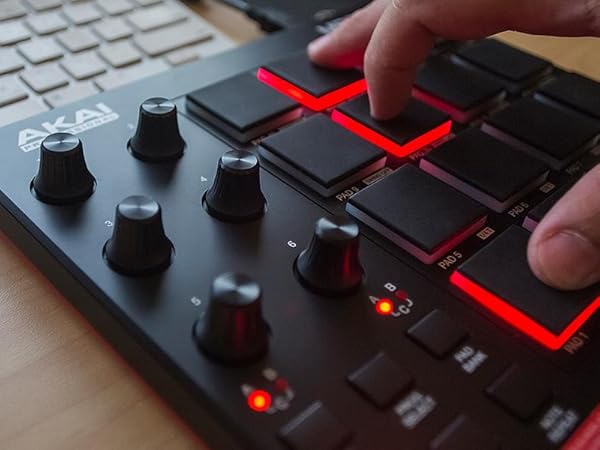
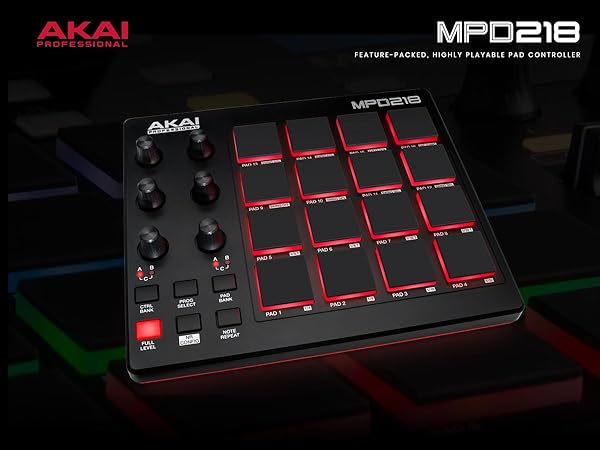
🔥 Unleash pro beats anywhere with the MPD218 — your pocket-sized rhythm powerhouse! 🎶
The Akai MPD218 is a compact USB MIDI controller featuring 16 velocity-sensitive MPC drum pads, 18 assignable 360-degree knobs, and three pad banks for a total of 48 assignable triggers. Designed for producers, DJs, and musicians, it offers MPC note repeat and full level controls for expressive beat making. Powered via USB and bundled with industry-standard software like Ableton Live Lite and MPC Beats, it delivers professional-grade production capabilities in a portable form factor compatible with PC, Mac, and iOS devices.


| ASIN | B0116X17JW |
| Best Sellers Rank | #1,315 in Musical Instruments ( See Top 100 in Musical Instruments ) #6 in Computer Recording MIDI Controllers |
| Color Name | Red LED Pads |
| Compatible Devices | Akai Professional’s MPD218 is a MIDI-over-USB pad controller perfect for producers, programmers, musicians and DJs alike. |
| Connector Type | USB |
| Customer Reviews | 4.5 4.5 out of 5 stars (5,772) |
| Date First Available | June 3, 2025 |
| Hardware Interface | USB |
| Hardware Platform | PC/Mac/iOS |
| Instrument Key | Any |
| Is Discontinued By Manufacturer | No |
| Item Weight | 2 pounds |
| Item model number | MPD218 |
| Material Type | Plastic |
| Musical Style | Electronic |
| Number of Keyboard Keys | 22 |
| Product Dimensions | 10 x 8 x 2 inches |
| Size | MPD218 |
| Supported Software | Ableton Live |
D**Y
In the right hands, this is a great MIDI controler!
I'll start off by saying that I'm a performing musician (woodwind and brass instruments) as well as a composer and arranger who works with music notation software. I bought this hoping it would help me in writing percussion parts. I have returned it. Having said that, however, I am very impressed with what it can do and recommend it for people who work mainly with Digital Audio Workstation (DAW) software. As a MIDI controller it has amazing capabilities and can work to control other MIDI devices such as synthesizers, modules, lighting and much much more. All of which make it a great tool for performers who work mainly in the rock/pop/rap/hip-hop/ska fields. It's compact, it responds nicely. The sensitivity of the pads can be adjusted only on a global scale, so either all the pads are very sensitive or not very sensitive according to how it's adjusted. I didn't use it enough to see how accurate the reviews which mention accidental double-strikes or accidentally triggering pads which aren't the ones being struck are, but I can imagine that if the sensitivity is set so that very little pressure is needed it would be possible to get responses from pads which aren't the ones being struck. The user should (as with all musical gear) spend a lot of time practicing with this device before trying to perform live with it. The price is a lot lower than many other drum pads so this is ideal for people just beginning to investigate the use of this sort of device. The sounds which come with it and the software that can be installed with it will be great for some but they left me less than impressed. But that didn't bother me and shouldn't bother anybody else because most people who will be using this will have their own preferred sound libraries to be working with. What this is NOT -- this is NOT a replacement for an electronic drum set. This is NOT an inexpensive device for learning to play the drums. What this IS -- it is a MIDI controller with which a person can create beats, with which a person can control other devices.
M**T
Electrical Tape is Your Friend
EDIT 7/14/2019: *There is 3/8" black cloth "pickup coil tape" on Stewmac.com. I use this for guitar work, so I had some on hand, but it just so happens it's the perfect width for this job. I also recommend the Double Stick tape, also available on Stewmac, and using this on the bottom of the black cloth tape. This ensures good adhesion to your rubber MPC pads. The black cloth tape seems to be more consistent than traditional electrical tape, and is easier to work with. Simply cut it into one inch strips and layer them together as needed, with double stick tape on the bottom. *I'm using 2 strips for most pads. Add more and see if you like the feel or not. Adjust accordingly. *I've found that setting these up is a balancing act. Every single screw makes a difference: installed/not installed, and how tightly installed, both on the circuit board itself and the red shell/cover that fits over the device. As for the tape: more tape can actually reduce the velocity range/sensitivity, which can be a good thing. Hyper-active pads that are triggering with too much velocity compared to the others may benefit from extra tape, not less. Balancing act. *Currently I'm using no screws on the circuit board at all. On the hard red plastic cover, I'm using only the 4 outside screws, and have them slightly backed off, about 1/4 turn. This seems to be enough to hold everything in place, and gives great sensitivity response with the least amount of accidental triggering. *I still get double triggering if I use the "Full Level" button, and I still get some accidental triggering of other pads, though they're usually at such a low velocity you can't hear it. My main problem was the Snare triggering the Closed Hi Hat pad(s), so when I'd do Snare and Open Hi Hat together, often the Open Hi Hat would be completely cancelled out by the Closed Hi Hat pad triggering. Setting up the pad as I've explained here fixed that. It may be that a lot of these pads are defective. But defective doesn't mean "not salvageable." It's a ton of work, and a major pain, yes -- but salvageable, and beyond that, transformable into a great pad controller. Now, back to my original review: I carefully disassembled the MPD218 and cut electrical tape to fit over the pads. This is a well-known trick online, and the simple idea is this: it reduces the force you need to strike the pads with in order to trigger them, and especially to trigger them fully. As others have mentioned, the other setup option is to very slightly back off on the screws that hold the circuit board down. You can even leave only the 4 outer screws attached and remove the 4 inner screws. Or remove all the screws on the circuit board completely. I've had the best luck so far by removing all of them completely, and only using the 4 outer screws on the hard red plastic back cover. Tape method: Step 1: Remove the screws holding the cover on. You're gonna want a magnetic holder or well-sealed plastic bag to keep the screws in as you remove them...trust me. Now take the cover off. Step 2: Now remove the smaller screws that are holding the circuit board in place. Then carefully lift the circuit board and place it out of harm's way. You'll see a thin plastic sheet underneath with squares on it. Remove the conductive plastic sheet once you get to it. Remember: it needs to go back on the right way, i.e. the conductive side facing the circuit board, or else it won't work when you plug it back in. Shiny side = insulated side. That goes down on top of the rubber pad. Make sure the conductive Matte finish side is facing up when you're all done. Step 3: Now you can easily remove the pads. It's literally just a floppy mass of rubber, all one piece, that you can just lift out. Take it out, and get some electrical tape and some scissors or an Xacto knife ready. Step 4: Cut the tape, similar to how I did it in the picture. On the MPD218, the LEDs are dead center. So if you cover them with tape, the LEDs will be obscured and your pads won't light up. You can customize it however you want. I'm using two layers of tape. You may like more. You may like less. Step 5: Reassemble. And you're done! Good job. Now test your MPD218 for responsiveness. Now I'm enjoying my newly set up MPD218 much more than before. Very, very light touches also seemed to trigger nothing before, whereas now they trigger exactly what I want: very light, soft sounds. Just be careful with the screws and the circuit board when dismantling and reassembling this thing, and you'll be fine. It's a very easy fix. Just a bit time consuming when it comes to dialing it in perfectly. Overall I'm very happy with this unit. It looks good, was very easy to work on, and with a couple tweaks, it's performing extremely well. It needs to be set up properly just like any other instrument. Which is always a pain. But it's to be expected. The only major issue is the "Full Level" button, which I simply don't use. Akai really needs to address whatever is going on with that.
M**S
Professional Quality 🤘🏾
I see quite a lot of negative reviews for this unit which is contrary.Akai,is an engineering staple with many versatile equipment.Once you download the free software and register the unit with updates it will allow you to be more intuitive.It is difficult to program but once you familiarize the pads, formated with an interface.. the rest is Rock,Funk,Jazz.. you will love it.🤘🏾
N**W
Amazing product! But...
I’ve been using this product for the past couple months and I’ve been loving it. I use it almost every single day for producing music, and it is a workhorse. I’ve used it for music production, finger drumming, and even live performances at my church. The 360 dials work great and give me a more tactile experience when automating filter sweeps and other effects. There is one caveat. The pad sensitivity is an issue that several other people have had, and I’ve dealt with it as well. Often times, the pads will register one “hit” as two. So when using on full velocity mode, there may be flams as you play. This bodes several issues. In finger drumming, when triggering samples, a double stroke can mess up the flow of the performance and create issues. When recording MIDI input, a double stroke means I have to search through the session to find the extra hit before I can quantize. In addition to double strokes when playing, sometimes other pads will actuate when not pressed. I may hit pad 1, and pad 9 may trigger as well. It also causes problems with finger drumming, as triggering a sample in the middle of the drum pattern ruins the flow of the session. If this was remedied, it would be a flawless product. Despite whatever issues I’ve had, I must say that I am in total love with this product! It’s portable, fun, and an efficient tool to get drum ideas into my Logic session! So much fun! Just wish the pad issues weren’t there...
B**E
Music equipment
Got this for a gift they absolutely love it. Great price easy to use.
D**N
Works as advertised! Reliable brand.
Product arrived as advertised!
J**O
Le gros kiffe , je fait du djembé avec , ça parait fou mais avec les bons logiciels , c'est plus que faisable et hyper réaliste . Sinon , ce controleur laisse une impression de robustesse , ce qui est rassurant puisque l'on va tapoter dessus . Les pads sont biens sensibles et réactifs , j'ai eté vraiment étonné de leur jouabilité compte tenu du prix raisonnable . Ils sont bien gros et c'est vraiment appréciable lorsque l'on a des gros doigts comme moi . Les potars sont fermes , ils tournent a l infini , ça on aime ou on aime pas , perso ça ne me derange pas . Un bundle complet de logiciels est fourni ( ableton version lite, MPC essentials et 2 versions de big band drum , il y a de quoi faire ) et l'editeur de banques des commandes du controleur qui est très bien fait et simple à utiliser. Le cable USB est fourni , merci , ce n'est pas toujours le cas . Pour ce qui est du "problème" de doublage des frappes lorsque l'on appuie une fois sur un pad mais que deux frappes sont induites (c'est un petit problème récurrent sur les drums pads), il s'observe en fait lorsque l'on veut réaliser des touchers à très très faible vélocité. En effet , dans ce cas, les frappes sont souvent doublées mais ce n'est pas un problème je pense dans la mesure où ces frappes produisent tellement peu de son qu'on ne les utilise pas et on frappera toujours à une vélocité supérieure. Pour être plus claire, on frappera toujours machinalement plus fort sur les pads et avec une vélocité telle qu'on ne gênérera jamais de doubles frappes. C'est ce que j'ai pu observer pour ma part . Le seul reproche que je lui ferai c'est sur le système de gestion des banques avec un seul bouton pour passer d'une banque a l'autre , pas très pratique et surtout pas assez rapide lorsque l'on veut changer de banque en jeux live . Un potar aurait reglé le problème et n'aurait , je pense , pas couté plus cher ; c 'est un peu dommage . Aussi , des sorties MIDI auraient été les bienvenues mais bon , on se doute bien qu'à ce prix , des choix ont dus être faits pour tenir le budget ; et il faut bien reconnaître que privilégier la fiabilité des pads et leur jouabilité était le bon choix . Bref , j'adore cet "instrument"!
S**N
works fine.
İ**M
Amatör işlerden tutun da Profesyonel işlere kadar herkesin kullanabileceği dayanıklı ve kullanışlı bir ürün.
R**Z
O produto é bom mesmo.
A**R
El producto llego bien. No pude probarlo pero las especificaciones tecnicas lo avalan.
Trustpilot
2 months ago
4 days ago