🚦 Own your availability—make your status impossible to miss!
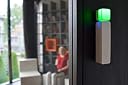
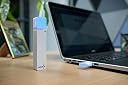
The Luxafor Bluetooth LED Busy Light Indicator is a wireless, customizable status light designed for modern professionals. With a 25-meter Bluetooth range, up to 6 months of battery life, and seamless integration with popular productivity apps like Slack and Microsoft Teams, it effortlessly signals your availability. Its compact, magnetic design fits any workspace, helping you manage meetings and focus time with style and ease.


| ASIN | B07WSDXGK9 |
| Average Life | 92 Hours |
| Batteries | 1 Lithium Ion batteries required. (included) |
| Batteries Required? | Yes |
| Batteries included? | Yes |
| Brand | LUXAFOR |
| Certification | FCC |
| Colour | Red, Green |
| Customer Reviews | 3.6 3.6 out of 5 stars (92) |
| Date First Available | 19 Aug. 2019 |
| EU Energy Efficiency Label | tall |
| Guaranteed software updates until | unknown |
| Incandescent Equivalent | 1 Watts |
| Included Components | Bluetooth dongle, 2600 mAh chargeable battery, charging wire, and magnetic adhesive mount |
| Item Weight | 69.9 g |
| Item model number | LUX_BT |
| Luminous Flux | 100 lumen |
| Manufacturer | Luxafor |
| Material | Electronic components, plastic, and metal |
| Number of Items | 1 |
| Part Number | LUX_BT |
| Power and Plug Description | Battery Powered |
| Product Dimensions | 2.4 x 0.03 x 12.4 cm; 69.99 g |
| Shape | rectangular prism or cylindrical |
| Special features | wireless connectivity, app integration, timer, Pomodoro features |
| Specific Uses | office settings, productivity, meeting room management, and professional communication |
| Style | Minimalistic |
| Type of Bulb | Light Emitting Diode (LED) |
| Voltage | 5 Volts |
| Wattage | 1 Watts |
G**N
So far, so good - but buy USB extension cable
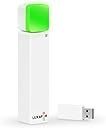
So far the product works well. I use Microsoft Teams throughout the day so its useful providing an indication of whether I'm on a conference call before anyone walks into the room. The Luxafor Bluetooth LED Busy Light is comprised of three main components. A USB transmitter (which also has a little LED light) A USB receiver with the main LED light A USB powerpack. The USB receiver plugs into the USB powerpack and using its useful magnetic/sticky backed attachments you can stick it outside your door and easily remove for charging. To boost the battery life I turned the bulb brightness down to about 25% (still plenty bright enough to see it). And I also set two timers - one to turn off the bulb from 6pm-midnight, another to turn off from midnight to 8am. I am hoping with this configuration I can get about 1 month of usage between charges. It supports a range of applications Skype, Teams, Zapier - however, only one at a time. I also bought a 2m USB extension cable (only £6). Some reviewers stated transmission issues so I figured this would give me more flexibility with placing the USB transmitter. Using the extension I'm able to attach the USB transmitter just above and behind my monitor. Because it also contains a light where the colour matches the one outside, I can easily see what my state is. I've also noticed that when my PC goes to sleep, the USB transmitter turns off and so does the USB light outside - which is useful. (and saves power). All in all - so far, so good!
D**Y
Works great with Microsoft Teams
I have also been looking for such a device that works so easily with Microsoft Teams, and I notice in the app it also works with a range of other software too. I like it a lot. Others have had a battery issue, but that has not affected me. I try to remember to unplug the battery and dongle on the remote device at the end of each day (and charge it) but sometimes I forget, and the light has been on constantly overnight and then on green or red for a least a two working days. I probably remember to charge it up twice a week. I also tend to close the lid on my Surface Pro and it goes to sleep, and generally Luxafor and teams are still in sync the following morning, and the colour changes automatically when I am on a call, but sometimes the remote colour doesn't change and I need to pull out the dongle on my laptop and disconnect the remote battery and dongle then reconnect the remote one before the local usb is put back in and that usually sorts it. Sometimes I need to do a restart of my laptop, and then do the unplug replug on the two Luxafor units. The convenience of others seeing the colour and knowing they can or can't speak to me means the occasional resync is no great problem for me.
M**S
VERY limited bluetooth range - WARNING
I wanted to install the light outside a wooden door to my office which is about 3m from my desk. The signal simply doesn't carry. Useless. The 25m cited in the product info is a wild exaggeration. I'm pretty sure this is a range issue - the connection and syncing works perfectly well on my desk.
A**Y
Connectivity Issues, but otherwise good product.
Good product other then it randomly loses connection, and to fix it I have to unplug the dongle and receiver for it to reconnect. Sometimes just have to replug the dongle.
R**B
Great concept but bluetooth signal too weak
I love this concept, it was just what I needed for my home office, however the bluetooth signal didn’t work 2 metres away on the other side of my home office door. Such a shame, hope they do an updated ‘beefed up’ version as the concept is brilliant.
F**T
Good idea, terrible implementation
The light works if I have it next to the USB dongle but as soon as I mount it outside my wooden office door just 2 metres away, it loses connection. Unusable. It's baffling, given that my BT headphones work across most of the house.
B**N
limited functionality when used with MS Teams
works ok, but limited fuctionality when used with Teams and the range is quite short.
T**E
I don't remember the last time I was so excited about a piece of technology. I've been looking for this for 8 years and finally found it. Because I use a small headset when I'm on the phone and I'm often times on Zoom calls without a headset, people will often times come into my office and start talking before they realize that I'm actually on a call. Or I would find myself giving them hand signals through the window of my office to try to tell them not to come in because I'm on a call. I really needed something to signal to people whether or not it was okay to come in. I wouldn't normally buy a product that just came out and has no reviews on Amazon, but I was so desperate that I figured I could take a risk. The danger of new technology that's paired with an app or other software is that the hardware is often times good but the app or PC software is unusable, which basically makes it worthless. This worked perfectly right out of the box. It took about 5 minutes to set up (including installing the PC software and the app on my phone). It doesn't require both to be installed, but I wanted to see how well it all worked. The PC software worked perfectly and was easy to use. I could choose from a list of pre-defined colors or easily create a custom color. There's a USB dongle that's about an inch long with two lights that match the light pattern on the indicator bar. That turned out to be really nice because the indicator bar is on the outside of my door frame and I can't see it from my desk, but I can take a quick look at the USB dongle to see what light color I have selected. The PC software also allows you to define custom hotkeys for different light colors, so you can change colors in a fraction of a second just by hitting a hotkey combination. I use three colors -- red (don't come in), yellow (I'm about to get on a call or go into a meeting so make it quick), and green (come in). Although the Android app also works perfectly, I don't use the app much to change the light color because it takes a couple more steps than just hitting a hotkey combination on my keyboard. I have to pick up my phone, unlock it, switch to the app, then select the color I want. Still pretty quick, but not as fast as just hitting a quick key combination on the keyboard. I can use it for a whole week without charging it, so I just charge it when I take it down on Friday, then put it back up when I come in on Monday. It has a magnet on the back and comes with a second magnet that can be attached to a wall, making it easy to mount or take down as needed. My office door frame is metal, so I didn't need to use the second mounting magnet. This thing has been getting a lot of attention in my office. My bet is that half the people in my office will have one of these within 6 months. I was not offered a discount for writing an unbiased review (although I would have taken it if they did), and I wouldn't be offended if the manufacturer sent me a thank you card for paying full price and being the first reviewer. :-)
S**3
Fonctionne très bien. Je l'utilise dans le couloir accédant à mon bureau. Cela permet de signaler si je ne veux pas être déranger et quand je le peux. Très pratique
T**A
È molto piccolo ma le misure sono descritte. Funziona benissimo , si programma facilmente . Funzionale. Personalmente x segnalare sulla porta ingresso camera Studio la situazione ( non disturbare , occupato , libero , ecc)
L**K
Okay, aber.... was mich am meisten stört ist die Haltbarkeit des Power Adapters, eigentlich ja ein mobiler Akku. Echt grottig, ca. 4h maximale Laufzeit. Habe das jetzt anders gelöst, mit einem direkten Kabel aus einem Netzteil. klappt auch gut. Sonst ganz gutes Produkt.
B**S
Battery is very poor and needs to be recharged almost every 3 workdays! Build quality not in line with the cost of the product.
Trustpilot
2 weeks ago
2 weeks ago