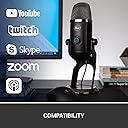
🎤 Own your voice, own the stream — pro sound made effortless.
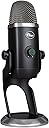
The Logitech Blue Yeti X is a professional USB microphone designed for creators who demand studio-quality sound with versatile four-polar pattern capture. Featuring a four-capsule array, high-resolution LED voice meter, and an intuitive multi-function smart knob, it offers precise real-time control. Compatible with PC and Mac, it integrates seamlessly with Logitech’s G HUB software for customizable Blue VO!CE vocal effects and lighting. Ideal for gaming, streaming, podcasting, and content creation, it combines plug-and-play ease with advanced audio customization to elevate your broadcast presence.


| ASIN | B07QKQJL17 |
| Antenna Location | Gaming, Streaming |
| Audible Noise | 120 db |
| Best Sellers Rank | #342 in Computer Microphones |
| Brand | Logitech for Creators |
| Built-In Media | 2 Meter USB Cable, Quick Start Guide, Yeti X Microphone |
| Color | Black |
| Compatible Devices | Personal Computer |
| Connectivity Technology | USB |
| Connector Type | USB |
| Customer Reviews | 4.6 out of 5 stars 4,596 Reviews |
| Enclosure Material | Aluminum |
| External Testing Certification | Grau 1, Não aplicável |
| Frequency Response | 20 hertz |
| Global Trade Identification Number | 00836213000441 |
| Hardware Platform | PC |
| Item Dimensions | 4.33 x 4.8 x 11.38 inches |
| Item Type Name | USB Microphone |
| Item Weight | 2.8 pounds |
| Manufacturer | Blue |
| Mfr Part Number | 988-000105 |
| Microphone Form Factor | Large Diaphragm |
| Model Name | Blue Yeti X Professional USB Microphone |
| Model Number | 988-000105 |
| Number of Batteries | 1 Lithium Ion batteries required. |
| Number of Channels | 2 |
| Number of Items | 1 |
| Polar Pattern | Bidirectional |
| Power Source | Usb Microphone |
| Recommended Uses For Product | Gaming, Streaming |
| Signal-to-Noise Ratio | 95 db |
| Special Feature | Mute Function, Voice Activated Recording |
| UPC | 836213000441 |
| Unit Count | 1 Count |
| Warranty Description | 2 years limited hardware warranty. |
F**N
Great USB microphone for my needs, However GHub not so great!
I bought this USB Yeti X specifically to be used in my Music Production Studio, in particular for my Arturia Vocoder V and Ableton Live. I think it’s a great sounding microphone and the interface with headphones and Microphone levels is well thought out. I use it on a Boom Arm instead of the supplied desk stand. The only issue I’ve had is not with the microphone but with the “Buggy” GHub Application. It would not install on my MacBook Pro M1 Chip but it did on my older iMac with a Intel Chip. After going back and forth with Logictec support here was how I had to install it in my MacBook Pro “I would like to confirm if your Mac Book PRO has an M1 or Intel Chip. If your Mac Book PRO has an M1 chip. Please kindly try the troubleshooting steps below. Drag "Logitech g hub installer" into the default application folder in terminal: sudo /Applications/lghub_installer.app/Contents/MacOS/lghub_installer ; exit; hit enter and enter your password. It'll download and install. It'll look like it gets stuck at 99.894669, but give it a minute and it ill prompt you to finish and relaunch.” So I had to use Terminal on my MacBook Pro to finally get it to install. Now here is the other issue, some of the features in GHub work fine, like changing the Polarity or selecting the different Blue Voice Presets but the feature to Record your voice in order to reference how you sound does not work properly. I can get it to record my Voice ONCE, then it will not do it again. The only way is to quit GHub, launch it again and try to record again. But same issue I can only record my voice sample 1 time. It won’t let me try to record a different voice sample after that Also none of the Ambient Sounds or Expressions in GHub play either. Logictec has been notified of the issue but has yet to resolve it. BTW, it is the same issue on my iMac so it’s not the computer. In any event I still think it’s a great microphone, nice quality, good sounding, easy USB Interface and the price was right. I hope the GHub issue gets resolved but it’s not stopping my workflow. UPDATE 4.14.2023 After several emails with Matt at Tech Support is was determined there was a problem and an Update to GHub would be done. Yesterday I received notification that the Update Version was available. I downloaded the Update and GHub is now working perfectly. One note, for some reason when I launched it my recorded voice sounded like an Alien. Anyway Matt mentioned to check the Effects settings and sure enough the an Effect was turned on. Once I set the Effects to off everything is working as it should. By the way if you record your voice for a long enough time (like 45 seconds or so) you can play it back and switch between hearing all of the Preset Mic Sounds and the Effects without having to re record or stop and start again. I have to say as much as the troubleshooting was annoying at times Matt and the Logitech Support Team did a great job.
R**M
Extremely easy to use
The signal quality is outstanding and then some. Plug in and record right away. Just plug v in usb cable. Attach headphones for zero latency monitoring. No driver download needed plug in change audio settings inside recording software. You'll be shocked at how much of your room is recorded; that you didn't hear before. Your ceiling fan is loud. Your air conditioning system screams. Your neighbors are playing loud music. Cleaning the wax out of your ears with an affordable option in a small green and yellow box labeled Debroxyl; will help you get a better understanding and more transparent veiw of what you are really recording. It's a really good microphone; considering it's price and ease of use. I recommend it for first timers. You'll be surprised at what you think needs to change within your environment to record the best quality vocals. It's an ideal microphone for vocals recorded by all skill levels. Not have to download drivers for it to work; us awesome. Plugging in and changing settings inside computer; is all You'll need to do for proper set up of this extremely affordable, effective, efficient way to record analog/acoustic audio into a digital format where undo can reduce the sound of failure. Free software like adove audacity is great for recording short wave files easily. I recommend Audacity, because it is a free software with a lot of powerful effects that are normally found inside expensive software like pro tools, logic pro, garage band, ableton live, cakewalk pro, sonar from cakewalk. Adobe has a lot of free software with a lot of powerful tools that don't require a large intelligence level to use.
D**S
Excellent sound quality, but use of micro USB connector is odd
I bought this as an upgrade to the Microsoft LifeChat LX-3000 that I have, specifically for use while working at home. This is a fantastic sounding microphone compared to Microsoft headset. Highly recommended to download the Logitech G Hub software as it has voice presets and allows you to customize the lighting of the display, as well as giving you fine-grained control of the sound and readout that you don't get otherwise. I wouldn't bother using the Blue Sherpa software, as the G Hub appears to give you everything in the Sherpa plus the color adjustments, and has a better UI. The Sherpa appears like legacy software. The mic and stand appear to be mostly metal. It's very solid and actually has quite a bit of weight to it. A minor gripe: One of the reasons I went with this mic is that it has a hardware mute button. Many mics don't, and are simply on all the time, forcing you to unplug them. However, when toggling the Yeti-X's mute button on/off during recording, it produces a very audible thump or clicking noise. Another issue with the mute button, is if you are not careful when you press it, you will inadvertently change the volume/gain. You won't know this using the built-in display on the mic, as it doesn't show the levels with any granularity. However, the G Hub software shows the level from 1 - 100, so it's easy to see. The gain display on the mic is not consistent, but one dot corresponds with about a 6 - 8 level adjustment in the G Hub software. The only odd thing, as mentioned in many reviews both here on Amazon and elsewhere on the web, is that the connection is the legacy micro USB port instead of USB-C, which is standard on most new devices. It makes no sense in 2020. However, that's a MINOR gripe and not worthy of a star deduction, as micro USB is a universal standard and replacement cords are easy to find. The people lamenting the fact that is has micro USB are being overly critical. I have many devices that are micro USB, and it's not going away anytime soon. Also, I haven't had any issues with the USB cord disconnecting. My guess is that's user error. The mic is supposed to sit vertical so I'm not sure how you manage to pull the cord out inadvertently. One thing to note, is that the mic with the stand is quite big. Bigger than I was expecting. On the included stand it sits about 11 and 1/4 inches high, and the base is about 4 and 1/2 inches wide, so be aware. I did buy a windscreen for it (https://www.amazon.com/gp/product/B01LXOJZJ9), but the mic sits far enough away from me that it's not really necessary. Plus the grille is pleasing to look at and it'd be a shame to cover it up. :) I'm glad I bought this when I did as it appears to be sold out in a lot of places.
D**M
Beautiful Mic!!!
I initially avoided considering this microphone, because it is software-driven, and I was using a Surface for some recording. Since replacing my CPU fan, I'm sticking to the tried and true computer, and this microphone is going to save me some serious time in post-production! I have a profile that is perfect for my single-narrative audio sessions. I will likely create multiple profiles, depending on what I'm producing! DO NOT judge this mic out of the box! You must install G Hub (downloaded from Logitech), and you must take time to configure it. There are community profiles available to get you a head-start. *** BIG HINT - You MUST create an account, set a profile name and icon to use downloaded profiles or to use the record/playback function within G Hub! *** This mic is a huge upgrade from the Yeti, and I've only started to explore my options! I'm currently using this for audiobook production. ** Update 10/1/2021 ** I've been using this mic for a full 9 months now, and have run into a HUGE issue - the G Hub software. If you run this mic without any setup, it's just loud and obnoxious. You must setup a profile and lock your settings. You should also disable updates! If you don't, the automatic update will wipe out your profile, and the update will NOT be compatible! It can take HOURS to find the sweet spot! That being said, this is where the Mic Test turns out to be a beautiful tool! The first time you run it, you'll be annoyed that it plays constantly in a loop. You'll be annoyed, until you figure out this gives you the opportunity to tweak your sound while listening to yourself in a steady loop! It's PERFECT! Use it, and you can get a good profile setup in minutes vs. hours! I'm actually debating letting another update come through!
R**S
Not worth the money, it's fine but you can do better....even if it's on sale.
It is a very good I don't want to be bothered with using software or hardware pre-amps kind of microphone. The Yeti X captures your voice well, but it doesn't seem to capture all the detail. This is not unlike a lot of compressor microphones though. My preference is for dynamic microphones because I think the sound quality is better. And in that instance I use Voice Meeter software or my GoMini XLR as a pre-amp. The later gives me lots of processing options such as bass, treble, mids, gate, and compressor settings. The Yeti X has a Gate in the onboard software or hardware that you can not see or adjust, you can hear the Gate a bit if you pay attention and it does a great job, but the mic itself seems only average quality. What does a Gate do, you ask? A gate cuts off the microphone unless there is sufficient sound levels, so the mic with a well functioning gate setting is only on when you are speaking. The gate level determines at what level of sound the mic turns on. This is very useful for minimizing background noise and helping to eliminate that very slight electrical hum that you might otherwise hear when the mic is on but not being actively used. I didn't hear a Compressor in the Yeti X, but maybe it is there and is mild. What is a Compressor, you ask? Compressor settings help to eliminate or reduce microphone clipping by reducing the loudest sounds or voice levels to below the maximum threshold that the microphone could handle. My overall take is that my preference would be for a less expensive dynamic mic with one of the pre-amp options I mentioned. If you are looking for plug and play, the Yeti X is a fine choice, just realize you are making compromises by taking that route.
D**S
A Stellar 4.5-Star Performer for Podcasters and YouTubers
The Blue Yeti X Professional has been an exceptional addition to my recording setup, proving its worth across various applications like podcasting and YouTube content creation. The high-resolution metering and LED lighting are not just visually appealing but also incredibly functional, providing real-time visual feedback that’s crucial during recording sessions. The Blue VO!CE effects are a standout feature, offering a suite of broadcast vocal effects that elevate the audio quality to professional standards. Whether it’s for gaming, streaming, or recording, this microphone delivers crisp, clear sound that captures the nuances of the human voice beautifully. I concur with the average rating of 4.5 stars. This microphone isn’t just a tool; it’s a game-changer for anyone serious about their audio quality. The ease of use, combined with its robust build and versatile features, makes the Blue Yeti X a top contender in its category.
G**3
Long-lasting quality
This is the second one that I had bought from my son. He says that he doesn't want any other brand. Good quality seems at last him few years before I have to buy him another. Comes with everything you need.
P**I
Realistic sound, highly recommend for video conference
Pro: It came in brand new box with perfect condition. (sometime Amazon ships returned goods as NEW :( ). Comparing to Macbook pro build in mic, this is heaven to earth, it's very clear and live. Test recorded hifi vocal songs from a good studio monitor (Adam A5X) via voice memo app in OSX, the play back is just the same as the original sound track, no noticeable distortion in any frequency by my ear, of course, this mic is not at the level of a top studio mic, but it's very very good for my purpose of online conferencing, and conference recording. Con: don't use a mechanical keyboard while talk with this mic, the key sound clearly blended into the recording. Shune MV7 is probably very good in canceling the ambient noise, but I don't like the MV7 for having to keep it close in front of mouth during meeting. I love Yeti X being able to be left on the table without getting into the camera's view. MV7 probably is trying hard in noise cancelation and not recording realistic sound in high frequency (e.g. instruments).
G**R
Extremamente bom
A qualidade de áudio dele é incrível e ele tem sensores muito bons para captar nos diversos modos dele. Uso diariamente e nunca apresentou nenhum defeito!
C**Z
¡SÚPER RECOMENDADO!!!!!!
No me arrepiento de haber hecho esta compra!! Sin duda es mayor a mis espectativas, la calidad del material, calidad de sonido, en verdad me siento muy feliz con mi nuevo amigo, lo podré usar para mis podcasts, videos, streaming, videollamadas, etc. Lo mejor es que tiene un software con el cual se pueden usar presets para distintos requerimientos del usuario, SÚPER RECOMENDADO!!!!!!
M**W
Great microphone - fiddly setup
Superb sound quality. Fussy to set up in Windows - the software is great, once working. You do need to play with windows sound settings and potentially also your onboard sound settings - this mic likes to be the default input. Also - use a powered USB hub to attach the device. If your USB socket is underpowered (very common) your sound quality can be hugely affected.
S**G
Super clear. Happy with it
Works very well,no complaints
B**U
Amazing Product
I love its metal body 😍 its a perfect mic i use quality is super cool 🩷💜❤️
Trustpilot
4 days ago
1 week ago