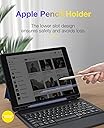
⌨️ Elevate your iPad Pro game with style, power, and precision.
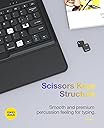
This ultra-thin, lightweight keyboard case is tailored for iPad Pro 12.9" 2015 and 2017 models, featuring a full-size laptop-style keyboard with tactile feedback, durable PU leather and silicone protection, a rechargeable battery lasting up to 70 hours, and a smart Apple Pencil holder. Designed for professionals on the move, it combines rugged protection with sleek portability and seamless functionality.



| ASIN | B07WGL1TTB |
| Batteries | 1 Lithium Ion batteries required. (included) |
| Best Sellers Rank | #1,112 in Tablet Keyboard Cases #5,958 in Tablet Cases |
| Customer Reviews | 4.2 4.2 out of 5 stars (3,364) |
| Date First Available | August 30, 2019 |
| Is Discontinued By Manufacturer | No |
| Item Weight | 2.04 pounds |
| Manufacturer | Sounwill |
| Product Dimensions | 12.2 x 0.7 x 9.25 inches |
B**M
New purchase
Since I just purchased this item, I have no idea of the actual battery life or sturdiness. I do like the feel of the keys (with tactile feedback) and the layout of the keyboard and special function buttons at the top above the numeric keys. The case unfolds and sets up easily and seems sturdy. I like the palmrest at the bottom and the Apple Pencil storage area. Here are some hints which make it easy to use: (1) To open the case and stand, set the iPad case flat on a table with the top side visible. Open the magnetic closure flap and lay the flap flat against the table behind the iPad. Then holt that closure flap down against the table with one hand while lifting the far side of the iPad up to the operating angle with your other hand. Let the closure flap slide toward you on the table and the stand will snap into the proper position. (2) To close the case and stand from a raised position, first close the front of the case (containing the kayboard). Hold that front cover and iPad at the top with one hand while pulling the closure flap back away from you. Let the iPad lay back onto the table and the stand will magnetically unhook and when the IPad is flat against the table you will be in position to close the magnetic closure flap. One I discovered this method I find it very easy to open and close the case into the landscape position with angled stand. (3) The rechargeable Apple Pencil snaps securely into the slot below the iPad display. The slot appears symmetrical so you can insert it pointed either direction. Remove the Apple Pencil by pushing on it through the large cutouts on the back side. To do this while the iPad is angled on the stand, raise the iPad a couple of inches with one hand while moving a finger of your other hand under the Apple Pencil area. You fill feel two slots, each about 2.5 cm (1 inch) wide. Push on the back side of the Apple Pencil through a slot to remove the Apple Pencil. (4) If you wish to add a label to the cover so it can be seen both while the cover is closed and open, stick the label to the magnetic closure clasp. While the stand is opened, the closure flap can be flipped back onto the stand and will magnetically stick. If you label it so it can be read in that position, when the case is closed and the magnetic clasp is closed that label can be send on the front side of the case.
J**Y
Sturdy and Good Looking
This cover is more than I expected. I am very pleased with the appearance and the functionality, and it seems to be pretty durable. It is still early days, so I will give an update on some point on how well it holds up. The color of the case in real life is more of a champagne pink, and I think it it prettier than the picture. This keyboard case is much more sturdy than what I was using before. The official Apple keyboard with cover I had before was lovely to use - the keyboard was smooth and light to the touch. I just wore the thing out. When I saw how much they cost now, I had to shop around. I am glad I did. This new cover has a stand that is very sturdy, the whole workmanship is so much better that I feel it really protects my iPad. This keyboard has a more tactile feel, and I am okay with that. I like the space for my Apple pencil, too. However, I find that to be a pretty tight fit and I have to use something else to pry out the pencil when I want to use it. This case also has tiny little compartments for the Apple pencil accessories, but I haven't used them yet for lack of an appropriate prying tool! All-in-all, I am really happy with this keyboard and cover and would recommend it to others.
M**N
A fully functional keyboard case for 2015-17 iPad Pro 12.9.
When I bought my iPad Pro 12.9 in 2015, the local Apple store did not have the Apple keyboard case in stock, so I bought a Logitech Create model. This worked fine until bits of plastic that held the iPad to the case began to crack, break, and fall out until it would no longer hold onto the iPad. To replace it, I didn’t want to go through that again. So I searched here and on other websites. The Apple site does not show a case for this model, so I don’t know whether they are still available. I finally settled on this one, in large part because Amazon labeled it “editors’ choice.” The case fits my iPad snugly. It is made of a more pliable material than the Logitech, so I don’t think it will have the breakage problem. Moreover, unlike the Logitech, the case grasps the iPad along all four of its edges, so it is more secure. The backside of the case has a clever mechanism for converting it into a laptop-style stance. As others have commented, it’s a little tricky and unintuitive how this works. You have to get a fingernail or a pencil under a sort of flap on the back and pull it outward. Hence the four stars rather than five. But it works fine and is secure. There is a magnetic flap that secures the case closed. The case has a storage slot for the Apple pencil, which the Logitech case did not have. I was unable to get the lightning adapter into the slot, but when I attach it to the pencil and put the assembly into the slot, it fits securely. The keyboard works fine. It is not backlit. The keyboard has the usual Apple keys (command, option, control), so you can easily control volume and screen intensity. I had to charge the keyboard using the supplied cable before it would connect to the iPad bluetooth. But no problem connecting, and the keyboard fells good and works perfectly. Observe that there is a blue bluetooth symbol on the C key. I learned from another review that in order to connect to bluetooth for the first time you have to hold the Fn key and the C key for a moment. Then it pops up on the iPad Bluetooth menu. After that, it automatically reconnects after sleep by touching any key. I can’t yet speak to durability, because I’ve only had it for 36 hours. The one durability concern I have is that the part of the case that holds the iPad is connected to the keyboard part of the case by a pretty thin silicone ribbon. It seems like it might tear easily, but I won’t know about that until I’ve used it much more. All in all, I’m happy with it.
L**S
Great case! Does the job much better than other cases I’ve had before, including Apples own. Recommend it.
S**N
Excellent rapport qualité prix. Durée de la charge est longue et le clavier est confortable.
R**N
Very well made but a little awkward to use. I think it is best suited and more designed to use on a table top .
V**S
I have the old 2015 Apple iPad Pro Gen 2. It's great. My former Logitech case & keyboard, however, finally failed out. Logitech no longer makes a case for my the generation of iPad... The choice between a new iPad or an aftermarket knockoff case is pretty easy. Buy a new iPad Pro... LOL... but then I saw the price. New knockoff case/keyboard it is... It took two days of repeatedly trying to pair it to my iPad. Seems bizarre... and normally I'd just complain and ask for my money back, but after years of therapy, hey... what have I got to lose? Instead of throwing the case into traffic, I exercised assertive patience and voila... the bloody thing works. Note to the manufacturer... please re-write your instructions and/or have you techs make pairing seamless. Yes, the keyboard is a little loud. It's a knockoff, not Apple or Logitech. Yes, the fit is good enough. Yes, I have a cat.
H**.
Die Tastatur mach einen Wertingen Eindruck und das I-Pad ist gut geschützt. Es wird aber auch um einiges schwerer und größer. Eines sollte man aber wissen. Das Keyboard hat eine Amerikanische Tastatur Beschriftung, mit der man sich nur arrangieren kann, wenn man im 10 Finger System schreiben kann, ohne die Beschriftung der Tastatur zu benötigen. Denn die sind bei Y / Z vertauscht. Auch stimmen die ganzen Sonderzeichen nicht zu der EU Tastatur
Trustpilot
3 days ago
2 months ago