🔌 Print Smarter, Not Harder: The Ultimate USB Switch for the Multi-Device Pro
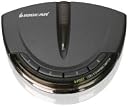
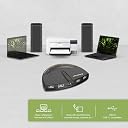
The IOGEAR 4-Port USB 2.0 Automatic Printer Switch (GUB431) enables seamless sharing of a single USB printer or device across up to four computers. Supporting USB 2.0 speeds up to 480Mbps and backward compatible with USB 1.1, it features automatic switching, a manual push-button toggle, and a switch-lock for secure access. Compatible with PCs and Macs, it requires no external power or drivers, making it an essential productivity booster for multi-device work environments.


| ASIN | B0036Z322Y |
| Actuator Type | Push Button |
| Best Sellers Rank | #31 in KVM Switches |
| Brand | IOGEAR |
| Circuit Type | 4-way |
| Color | Black |
| Compatible Devices | PCs, Macs, printers, multi-function printers, external hard drives, scanners, and other USB devices |
| Connectivity Protocol | Usb |
| Connector Type | Plug In |
| Contact Material | Plastic |
| Contact Type | Normally Closed |
| Control Method | Touch |
| Controller Type | Push Button |
| Current Rating | 5 Amps |
| Date First Available | February 3, 2010 |
| Global Trade Identification Number | 00132018317433, 00782386486950, 00881317504814 |
| International Protection Rating | IP00 |
| Is Discontinued By Manufacturer | No |
| Item Weight | 3.2 ounces |
| Item dimensions L x W x H | 1 x 4 x 3 inches |
| Item model number | GUB431 |
| Language | English |
| Lower Temperature Rating | 32 Degrees Fahrenheit |
| Manufacturer | IOGear |
| Number of Items | 1 |
| Number of Positions | 4 |
| Operating Voltage | 120 Volts |
| Operation Mode | OFF-NONE-ON |
| Product Dimensions | 1 x 4 x 3 inches |
| Specification Met | RoHS |
| Terminal | Button |
| UPC | 071020498191 782386486950 172302777062 854587036613 014445075301 132018317433 803982811738 999992960259 320127544769 809392576670 617407453133 971477684959 012303269961 881317504814 168141590504 |
| Unit Count | 1.0 Count |
| Upper Temperature Rating | 100 Degrees Fahrenheit |
| Wattage | 2.5 watts |
M**A
My nightmare is over THANK YOU!
If you work off of multiple computers and only have 1 printer and you have to keep un-plugging and then re-plugging the printer into your computer then this gadget is the easiest and best thing ever. Personally I have a printer that is supposed to be Wireless/Bluetooth and should be pretty straight forward however, sometimes it would connect and print with ease, but in many cases I was forced to use a plug/cable to connect the printer and then because I use multiple computers (3 of them to be exact) to do my work I would have to plug and unplug the cable from one printer to the other or email docs between computers just to print. Seriously a freaking nightmare. Oh and did I mention 2 Microsoft Computers and 1 Mac? Yep, this gadget works on both and took me all of maybe 5 minutes to set up, HELLO! The install instructions were east to follow, but this is what was in the box and how I set it up. In the box is the printer switch (the gadget I referred to) and 1 printer cable. I plugged the printer cable into the printer and the other end into the gadget. Then took 3 of the 20' long USB cables (yes too long, but plenty of length if I want to change things around later) and then I plugged them into each computer and plugged the other ends to the back of the gadget. This works up to 4 computers and plug them in from left to right. The switch/gadget shows you port 1, port 2, and so on. Doing this left to right allows me to know computer on the far left is port # 1, the one in the center is port 2, and the one on the right side is port 3. Then when I am using the computer I want to print from I just push a button which I have a few inches from my mouse and yep it prints EVERY SINGLE TIME -
M**.
Works Perfectly!
I recently purchased a label printer. It does not work off wifi, so it needs to be hardwired into a computer. The problem was that we have 2 computers that need access to the printer. I initially thought manually switching the cables would be easy, but it ended up being a pain for my wife, who is not tech savvy at all. This device ended up being the perfect solution! When either computer powers up, it automatically switches to that computer. If both computers are on, a simple press of the button switches between the 2 instantly. No drivers were needed, so it could not be easier to hook up and use.
J**E
Works great
This allows sharing a printer between two computers by USB but the automatic function does not work in Windows 11 because when the switch is selected for computer A, Windows on computer B shows "printer off line". Switching manually works as advertized and in this installation, the printer is between the two computers and within easy reach of either one, so I attached the switch to the printer with Velcro for easy access.
A**R
Great for sharing a single printer
Great for sharing one printer to two separate computers. Works manually or automatically
A**R
Did not work well for our purpose
Purchased this switch to share a thermal label printer between two PCs. Had two problems, first the software and driver installed correctly on our Windows 11 PC but would not install correctly on our Windows 10 PC. IOGEAR support worked with us but were unable to resolve that issue. Secondly we eventually found that this switch does not work using the software with a thermal label printer per IOGEAR support. One last tip: When installing the driver and software you must be running the setup.exe program as Administrator. This is not covered in the enclose instructions.
R**V
Printer Switch
This printer switch is perfect - easy to hook up and worked exactly as I hoped first time out - switch makes it easy to quickly see which computer is hooked up for printing, and changing over to the other computer only takes a moment and it confirms the change with a click sound - great device for home office or anyone sharing a printer.
I**E
Worked like a Dream on two old Intel Macs
Like others who have to use older Legacy OS's for scanners printers etc. This worked right out of the box. Very nice packaging and the booklet catalog and manual were unexpected delights as you kinda see that less and less in electronics packaging. IOGEAR reminds me of how Logitech was great with affordable high quality peripherals and based on this product I'm eager to explore their other offerings all based off of this purchase. Note: You will need two printer cables.
R**N
easy, easy, easy
I recently transitioned to working from home and have a separate work laptop. This product allowed me to connect two computers to one printer. I can push the button for which computer I want to print from (as opposed to unplugging, plugging into each computer). No software to download and has worked seamless so far.
T**N
funktioniert super
U**R
Just purchased this item. Was worried it would not be plug and play based on other reviews. I plugged it into my two printers, it beeped. It worked from both my primary and secondary printer immediately. Absolutely no issues and very straight forward. A worthwhile purchase. Of note, a printer cable is packaged/included with this device.
I**N
Works perfectly with an Epson docket printer.
L**A
Nonostante le istruzioni che vengono con l'attrezzo siano un po' intimidatorie (soprattutto quelle per Windows, con indicazioni a installare driver e impostare preferenze varie), io ho semplicemente attaccato la stampante e i due computer, un MacBook Air e un ecografo che gira con una vecchia versione di Windows, e tutto ha funzionato alla perfezione fin dal primo momento. Quando si dice Plug&Play!
E**8
Great piece of kit. Well worth the asking price.
Trustpilot
2 weeks ago
4 days ago