Desertcart purchases this item on your behalf and handles shipping, customs, and support to Indonesia.
📺 Effortless control, endless favorites—because your time deserves simplicity.
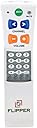
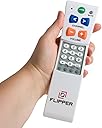
The Flipper Big Button Universal TV Remote is a senior-friendly, ergonomic remote designed to control both TV and cable/satellite set-top boxes with one device. It supports infrared connectivity, allows programming of up to 25 favorite channels, and features a lock to prevent accidental reprogramming. With large, tactile, color-coded buttons and a simple one-time setup, it enhances independence for users with impaired vision or cognitive challenges, making TV watching straightforward and frustration-free.


| ASIN | B002GR1YZ0 |
| Additional Features | Ergonomic |
| Battery Type | Alkaline |
| Best Sellers Rank | #2,676 in Electronics ( See Top 100 in Electronics ) #120 in Remote Controls (Electronics) |
| Brand | Flipper |
| Button Quantity | 4 |
| Color | White |
| Compatible Devices | Television |
| Connectivity Technology | Infrared |
| Controller Type | Flipper Universal |
| Customer Reviews | 4.2 out of 5 stars 8,325 Reviews |
| Item Weight | 5 ounces |
| Manufacturer | Flipper LLC |
| Max Number of Supported Devices | 2 |
| Maximum Number of Supported Devices | 2 |
| Maximum Range | 10 meters |
| Mfr Part Number | A22 |
| Model Name | FBA_A22 |
| Model Number | A22 |
| Number of Batteries | 2 AAA batteries required. |
| Number of Items | 1 |
| Special Feature | Ergonomic |
| UPC | 798304061529 |
| Unit Count | 1 Count |
| Warranty Description | 1 year |
T**E
FANTASTIC, with one small caveat...
I've purchased a number of remotes for my mother, and finally, one she can use, hooray! UNBELIEVABLE, the difference it makes in her mood and outlook, to have some autonomy and control. She is legally blind and has dementia, but even if she were totally blind, she could use it (to listen to the TV). Other remotes presented so many buttons that my mom was overwhelmed by them. This one has only six, and by their placement, it was an easy matter for her to learn their functions. I showed her, made sure she knew where the power button was, learned that one. She was confused when I tried to teach her the other buttons, so I told her: "Mom, you can't do any harm by experimenting. Just play around with it- push a button, and if it doesn't do what you want, try another one, until you find something you like" and that's what she did (I don't know if that sank in or helped, that's what she seemed to do naturally anyway. The important thing, I think, was encouraging her to experiment). The beauty of the design is that the buttons have been pared down to only those that actually do something tangible. If she hits mute, it mutes. Or, the channel is changed, or the volume changes. That's it. So learning is nearly automatic, stimulus-response, no thought processes required. She learned the button's functions in a couple of days, on her own, what a BLESSING. We have a large display clock that shows the time, and she knows what time her favorite shows are on, such as Jeopardy and Judge Judy. I programmed in her favorite channels (takes time and patience, but it was worth it), excluding all the foreign language channels that discombobulate her so, along with ones she never watches, and she just pushes the channel up or channel down button until she sees/hears Judge Judy or whatever. The Flipper's makers seem to have thought of everything. Depending on your situation, you can program the Power button to operate either the TV or the STB [Set Top Box], or both at the same time. The volume and Mute buttons work with the TV, the Channel buttons work with the STB and NOT the TV (on our old universal remote half the time it changed the STB's channel, half the time it changed the TV's channel, taking it off of channel 3, impossible). That's if you're using the Flipper with both an STB and a TV. The flipper also has a TV only mode, if you plan to use it with a TV alone, in which case all the buttons work with the TV. Another thing I specifically wanted to mention is that our Magnavox STB's remote doesn't have a dash (-) or dot (.) button, you tune offset channels by waiting a moment until the dot appears after what you've entered, for example, if you enter 56, you wait a beat, a dot appears after the 56 in the corner of the screen, you can then enter a 2 or 3 or whatever to get 56.2 or 56.3. Obviously, this is challenging enough, even for me (you must be quick), totally impossible for my mom. I wondered how this would work in programming the Flipper. The programming keys on the Flipper remote includes a dash (-) key, and using it accomplished the same thing, worked with our STB! When you push that key, it adds the dot or dash and you can then enter the next digit, immediately. I'm talking about the Flipper's programming buttons, when you're setting up the favorite channels. Once these channels are programmed in, no-one ever needs to worry about this issue again. The biggest issue to note is that although generally the owner's manual for the Flipper is specific and detailed, excellent, clear language, occasionally they leave out a step. As I get older I find it more challenging to do these things, I'm less intuitive and must follow instructions to the letter, so a missed step really screws me up. So, when you're doing this, anywhere where it specifies a number of steps in a procedure, just make sure you repeat them all if needed. For example, when you're entering the code for your TV brand, the owner's manual says if the code doesn't work, try the next one. To do that [AS I REMEMBER- I'm not about to do it again, undo all my hard work to double-check], I believe you need to go back to the 2nd step, "Press and hold TV until the light turns solid" before trying the next code. I may be mistaken about this specific example, just bear this in mind when programming, if what you're doing doesn't seem to be working. There were at least two instances in which I got stuck, and it was because steps needed to be repeated and that wasn't specifically stated. One other issue- at least with our Magnavox box, if you hit channel up or channel down too quickly, before the channel has actually changed, it adds the digits to the digits already entered and the box will return with "invalid channel", showing nothing on the TV screen. So I've explained to my mom to wait between presses, wait until the channel actually changes, before hitting the button again. "Slow down, Mom." That worked. Finally, if you happen to own a Homeworx STB and over-the-air DVR (LOVE IT)- I hoped this remote would work with it, but it didn't, unfortunately. If you have one, you might see the end of my Aug. 7th review of it (link below), for an explanation of how one CAN use the Flipper with a different STB AND the Homeworx unit together (along with a ROKU box, provided you have auxiliary jacks), for folks with cognitive or sensory deficits. The Flipper is the best, fantastic, WHATEVER you use it with, has provided my mom a measure of freedom and autonomy so sorely missed, needed- invaluable. Highest recommendation! Mediasonic HW-150PVR HomeWorx ATSC Digital TV Converter Box with Media Player and Recording PVR Function/HDMI Out (Black)
A**R
Miracle Remote
I purchased this item in desperation for my 91 YO parent who had completely lost the ability to properly use a standard Optimum remote control, which when combined with today's "smart" television multi-functionality, made the simple act of turning a tv on and watching a program a daily dive down the rabbit hole of pop-up menu's for services and settings, none of which she understood or had access to. And, of course, figuring out how to get back to simple functions using the same complicated remote was an even more pointless exercise in futility. None of which I could fix for her, my living an hour away. What made it even more maddening for me was the endless, repeat phone calls for help I was getting every 10 minutes. I don't know why it took me this long to research simple remotes, which led me to the Flipper, but better late than never. I will cut to the chase and detail what it took me to set up the device. 1. I powered up the Optimum cable box and brand new Hisense smart TV. 2. Placed 2 AAA batteries in the Flipper ( note- while standing less than 4 feet from both units, not sure if that mattered) 3. Tested the volume control buttons on the Flipper (the first step of installation instructions provided). THEY WORKED. 4. Instructions next directed me to try the channel controls. THEY WORKED TOO. Channel up, channel down, the numerical keypad...all performed perfectly. HOLY @#$%^& !!! 5. Tried the LC button (last channel) ALSO WORKS 6. As a test, I tried pushing the three additional buttons at the bottom of the keypad, to see if any of those, if hit by accident would cause a problem. NOPE NO PROBLEMS 7. Finally, I hit the green on/off button. Both units went dark. 8. Still not convinced I was out of the woods, I let the units stay dark for 15 minutes, then pressed the on/off button. Both units powered up immediately and correctly, ready for hassle free viewing. That was it. Could not have been simpler. No punching in of brand codes, no frustrating calls to tech support (hence the no star rating although if tech support is as good as the product...). One thing I did do was remove the sliding cover that conceals the keypad. My mom likes to use the keypad to go to her favorite stations and even a simple sliding cover could prove a problem for 90 year old arthritic fingers. I'd give this item 10 stars if I could. Still let's see how well it works on day 2.... can't see why it shouldn't, but anythings possible. POSTSCRIPT 2 years later and it's still functions perfectly!!!!
H**N
Great for simple TV and STB IR Control
I researched many remotes for my parents needs and I really like this remote for it's features and simplicity. It's simple to operate and set up. Getting your loved one to use it might be another story. :) I purchased it for my parents to use as their 100+ button remote was getting more difficult to use and I was tired of troubleshooting it over the phone or running over to their place to fix their 'tv' issue. Typically they were hitting an auxiliary/input button by accident. We are using the Flipper with a Cable Set Top Box and Visio TV now. I entered a code for the STB and that sends the signals for the channel up/down. I entered a code for the TV and that sends the signals for the mute and volume button. I believe the Power button sends a code to the STB and TV at the same time. Beware, you might think you found the proper code at first, but continue to test the setup. I'd recommend spending time .. 30-45 minutes setting it up, testing it and making sure you are 100% sure you have it right. I had it working in 5 minutes, but found out later that I still didn't have the right 'code' for the STB as there were 8 codes for the same vendor. Turns out the codes I needed probably were not included in the long list of codes in the setup instructions. But don't fear, you can either have the Flipper 'learn' or go through another process to find the code. I went through the process they document in the setup instructions to discover the correct codes for your TV and STB. Once I did that process it's been running 100% perfectly reliable since then. My point it just because you think you have the TV code correctly selected for ON/OFF, after more testing, you might find that channel up/down might not work. That all said, my parents still like to use their 100+ button cable remote, but over time as they have more difficultly using it or their memory fades, I believe this will be their 'go to' remote. The main reason they like their old remote it the ability to press the channel numbers and then 'enter' to jump directly to a station... I have both remotes sitting on their stand next to them. I did find my dad using it the other day, so I know he's sees the value in its simplicity. Again, over time, being able to enter the channel number and press enter will become harder to do.
B**B
Very Good Remote
I bought one to replace a broken remote for an older Admiral TV. Neither of the 3 supplied Admiral Remote Codes worked for my TV. Did some extensive Internet Searching, found the Original Remote for my TV. It was no longer available from the 2 online sources that sold remotes, but one site DID have a photo, and some specs as to which TV's the remote worked with. It was apparently a Generic Remote, also used for some model GE and RCA TVs. So, I went to the GE Remote Codes list provided with the Flipper Remote, and the second code I tried worked. Lucky me, cause there were 15 codes for GE remotes on the supplied Remote Codes List for GE TV's. This remote allows for One Tv, and One Satellite or Cable box. I have DirecTv, so programming the second item into the remote was simple. Go to the DirecTv Remote Code list, there were 35 codes to try, but AGAIN I got luckey, because my newer DirecTv non-HD, standard Satellite Box worked with the very first code. This remote is very cool. 6 BIG buttons, labeled with BIG letters, and BIG symbols. Don't need glasses to see these. Best of all, you NEVER accidently pick the remote up, upside down, like those stupid rectangle remotes with 50 minature buttons (44 of them are NEVER used). Someone should tell the Asian Remote Control Manufacturers, and buyers,....that having more buttons on your Remote, does NOT make you look smarter to guests. Make a simple Remote Control with the buttons people use most. Skip the Geekophile nonsense. If you want a really nice, simple to use Remote, this is it. The instructions for programming your TV code into it, are easy to follow. Step by step. One note: The instructions clearly point out, that before you try entering your first Remore Code (page 3 in the instruction booklet), you must first "Prime" the remote memory, by entering a 3 digit code 954, that empties or clears the Remotes memory for devices you want to program into it. Don't miss this step. Great Remote. By the way, all the supplied Codes on the Remote Code list supplied with the Flipper Remote, are only 3 digits long.
B**C
Great concept, lots of potential, but not a panacea
This was bought for my 85 yo mother. Her visual impairment makes it difficult for her to navigate the all-in-one remote that came from Brighthouse, requiring her to largely memorize the position of the buttons she uses frequently. Although this is a functional remote at a good price point, I first have to echo a few things mentioned by other reviewers. The fit and feel of the unit is in line with the cost of the remote, which means it's not that great. The tactile feel of the large buttons doesn't seem consistent (dependent on what part of the button is pushed), and the shape of the buttons itself can be confusing. The setup is fairly straightforward for someone already experienced, but was too intimidating for other members of my family to attempt. When trying to add additional channels to favorites, the unit became unresponsive and something in memory was corrupted, requiring me to reset to factory defaults and start over. The response of favorites was so slow (..1.....2......3..) that it lead to a lot of errors when my mom was trying to scan up or down. After watching my mom using this unit, there's a few things I haven't seen mentioned - the channel and volume buttons are oriented horizontally, whereas most remotes are oriented vertically (up channel/volume is up; down channel/volume is down). The side-to-side may not seem like a big deal, but after watching my mom for a few days, I noticed this made it hard for her to move from her other remote. There were more than a few times she thought she was moving down channel, but pressed the lower button and nothing changed on screen. Likewise when she tried to raise the volume and instead the channel changed. The IR also seems fairly weak, which means the user has to pay closer attention to the aim. A larger print version of the instructions would certainly help as well, given the audience this is aimed at. The manufacturer seems responsive and the concept behind this remote is solid. They do pack a lot of value into this product given the price. I've been using multi-device remotes myself for awhile (currently a Logitech Harmony), and I'm pretty certain there are others like me that would be happy to pay for a more upscale version of the Flipper.
C**.
Wonderful for Elderly
This remote has so many great features it's hard to know where to start. My mother is 95 and has AMD. She simply can't see well enough to handle the complex remotes of today's technology. This remote has 6 buttons that are easily identified by touch and are easy to learn. It does take someone to set up the first time. The instructions provided are excellent, but you MUST read the instructions thoroughly first. I have Comcast Xfinity, and my review only relates to how it works for X1 DVR and X1 receivers. The code they provided, of 1014 worked perfectly, including volume and channels. Xfinity requires you to press an "enter" button when you select a channel. The flipper has this covered so when you set up favorite channels, you must remember to press the mute key after each channel. It's explained in the Flipper instructions. One of my favorite features is that when you program favorite channels, they display in the order you input them. So, for my mother, I entered a music channel first, followed by her other favorite channels. So, when she gets to the music station, she knows that's the beginning of her favorites. While it's tempting to add a ton of stations, I was careful to only add the stations she actually watches. It was less than 10 but she had no trouble navigating or learning the order. When everything is complete and works, then you can lock the keys to prevent accidental inputs. We have had no trouble getting anything out of Sync. The X1 now has a feature under the Xfinity setup menu that allows you to sync your cable box to the HDMI cable, ensuring when your TV goes off, the box goes off too (and vice versa). Also, the Flipper company is very helpful with any questions or issues. They responded to my email in less than a day. I can't recommend this enough if you have someone who can't manage a complex remote.
F**W
Flipper big button remote
5 stars for a great product! Customer service was very responsive and helpful too. I love the design of this remote and thought it would be perfect for my 93-year-old mother. I bought 2 of them; one to keep by her chair for when she's sitting up and one for her bedside table. It has worked out very well. Unfortunately, I had a problem with programming due to a misprinted manual and no internet access. When I contacted Flipper, they responded quickly and resolved the issue to my satisfaction. So I can recommend their customer service as well as their product. Although I didnt see this in the Amazon listing, the remote has a 1 year warranty. When I made the return trip to finish the set-up armed with the full manual, the set-up was pretty easy and I found the instructions to be clear and not just translated from another language. I was using an older pre-HDTV and was concerned that I might not find a code for a set that old. But there was no need for concern; one of the codes listed for my brand (Sanyo) worked perfectly. The cable box was a newer digital model and I found a code listed for it that worked with no problem as well. Even if I couldn't have found the right code in the supplied booklet, the remote has a code search function, and if that didn't find the right code, it also has a function to learn from an existing remote. It works exactly as I expected, and my mom can once again enjoy watching TV by herself for the first time since Comcast switched to all-digital service that made her TVs remote unusable. Comcast did supply a universal remote, but it was not suitable for an older person (or even young people who need reading glasses). The bib button Flipper remote is the perfect solution It appears to be is well made; apparently durable materials; a clearly written manual as well as online and youtube instructions. The design is extremely well thought out and most importantly, my mom can use it! If you're considering other products for the elderly or disabled, you may be interested in some of
G**E
Works well - one minor problem (with a fix)
Like many reviewers, I got this for an elderly relative who was having trouble sending her TV off into limbo by pushing buttons on the complicated remote. Her favorite mixup was the "Source" button. What's HDMI? What's USB? There was no recovery from that rabbit hole. But she DID want to switch channels by pressing the numbers, not stepping (slowly) Up and Down. The Flipper has a full button keypad beneath the sliding panel that allowed direct access to channels. We only needed to control a TV - no cable box, no DVD, etc. The Flipper can be easily 'locked' (a four-button sequence) to lock out the buttons that would make the remote try to do anything but the TV. Programming was fairly easy, though none of the codes for the off-brand TV worked. One of the 'Generic' codes did work, so it was a bit of trial and error until we found that one. I'd tested it with a Samsung TV at home, and the first Samsung code worked on that TV. So good enough, and all the functions did what we needed them to do. ONE ODD PROBLEM: After about a week, my relative said the remote had stopped working. On my next visit, sure enough, it didn't work. There's a nice, bright, red LED that lights whenever you push a button, and it didn't light (and none of the functions worked with the TV). The old remote was doing OK, so I brought the Flipper home to see if I could make it play. None of the reset steps did anything. The only thing that lit the LED was taking the batteries out, and putting them back in. The light would come on for a few seconds, but still nothing worked. THE FIX: One of the number buttons under that sliding panel was 'stuck' pressed down. The edge of the button got caught under the faceplate, and it was holding the button down. I didn't notice, until I saw the red LED blinking after a few days. That's the indication that the battery is low. It dawned on me that maybe the remote was stuck 'ON', so I looked harder at all the buttons, and sure enough, one was stuck down. That little bit of design/manufacturing annoyance cost one star. It would be a 5-star device if it hadn't had that minor 'failure.'
F**M
Idéal pour une personne agée ...
Ma grand mère de 94 ans a tout de suite compris le principe, le gros boutons sont idéaux lorsqu'on ne voit plus clair, l'autonomie est très bonne, et l'essentiel y est .... CHAINE SUIVANTE, CHAINE PRECEDENTE, VOLUME +/- , BOUTON ON/OFF, (petit bouton MUET). Remplace avantageusement une télécommande trop complexe. Pour la configurer, c'est sous le capot que ça se passe, mais l'utilisateur n'a pas besoin de l'ouvrir au quotidien.
L**S
perfecto
Perfecto para una persona mayor, he comprado un par de ellos y asi no se equivocan y desconfiguran la tv
J**O
Funciona de maravilla con Izzi + Samsung (Mexico)
Me resolvió el problema para dar facilidad a adulto mayor para usar sistema de cable
C**L
Leider nicht verwertbar.
Die Anleitung ist leider nur auf Englisch, Nicht kompatibel mit dem TV, da angegebene Codes nicht verwertbar/ funktionierten. Ging deshalb zurück.
R**B
Works well
A little complicated to set up (I had to go to the online site for detail), but then suddenly worked perfectly. The big advantages are that, once set up, it is simple and can't easily be changed accidentally.
Trustpilot
2 weeks ago
2 weeks ago