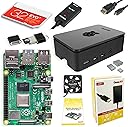
🚀 Elevate your DIY projects with the ultimate Raspberry Pi 4 PRO Starter Kit!
The CanaKit Raspberry Pi 4 4GB Starter PRO Kit bundles a powerful 1.5GHz 64-bit quad-core Raspberry Pi 4 with 4GB RAM, a pre-loaded 32GB Class 10 MicroSD card, and a premium high-gloss case featuring an integrated low-noise fan and heat sinks. It includes a 3.5A USB-C power supply with noise filtering, a 6-foot 4K-capable display cable, and a convenient PiSwitch for easy power control—everything you need for fast, reliable setup and high-performance computing or media projects.


| ASIN | B07V5JTMV9 |
| Best Sellers Rank | #9 in Single Board Computers (Computers & Accessories) |
| Customer Reviews | 4.8 4.8 out of 5 stars (10,429) |
| Date First Available | July 10, 2019 |
| Item Weight | 1.1 pounds |
| Item model number | 99295 |
| Manufacturer | CanaKit |
| Product Dimensions | 8.27 x 6.61 x 1.81 inches |
D**L
Super easy and quick assembly. Very cool product!
First of all, I'm brand new to Raspberry Pi. I loved the CanaKit Raspberry Pi kit. I had everything I needed to get up and running fast, except for a mouse and keyboard, which is clearly indicated in the description, so I was ready to go when the kit arrived (which it did VERY quickly!). INITAL HARDWARE SETUP The design of the included case did not even require one single screw. The top and bottom of the case "snap" off from the middle easily and the board drops into place onto the bottom plate. Be sure to attach the three heatsinks on the chips and the wire connectors for the fan before snapping it all back together if you are going to use them (which I strongly recommend). It's much easier to attach them with the full board exposed. Then you snap the top and bottom back on onto the middle and you're done. It would have been a tiny bit faster to assemble than it was but I had to search the internet for the right pins on the board to connect the fan to. The two rows of pins were not numbered on the board nor referenced in the quick guide included. It took like 10 seconds to verify the board pinout and another 10 seconds to find which pins the fan connects to. There were lots of videos and diagrams available to help, including videos specifically for this brand and model. Since the fan has two power/speed options I wanted to be sure I was connecting to the right pins. I chose the higher power/faster speed. Some review comments mention more noise with the higher speed but I found the "noise" to be almost silent, even at the higher level. I can save you a bit of time on the fan pinout bit. The row closest to the outside of the board are the even numbered pins. Since this is a computer (one's and zero's) that row starts with 0, then 2,4,6, etc. The row towards the inside starts with 1,3,5,7. The numbers go higher as you move from the outside edge to the inside along the row. For the higher fan speed, connect the red wire to pin 4. For the lower fan speed, connect the red wire to pin 3. The black wire is ground and always connects to pin 6. Easy peasy once you know! Overall this part took about 10-15 minutes. INITIAL OS SETUP The pre-loaded NOOBS (New Out Of Box Software) was fast in helping choosing which operating system and what options you wanted. Choosing other options like new password. time zone, wireless and keyboard went fast. After the OS booted up it took a while to check for and install any needed upgrades (perfectly normal and expected for any OS). If you have a 5G wireless wifi, be sure to connect to it (or use an ethernet cable) to save download times for OS and application software upgrades that may be needed. Overall this part took about 30 minutes including downloads, then it rebooted and started working perfectly. CONS The kit would be perfect if it included pin out instructions for the fan and a little more clarity on installing the heatsinks. That's the only parts that caused me any delay in putting it all together. SUMMARY Great kit and good price. It's possible that searching for the individual parts might have save a few pennies or dollars, but having almost everything from one manufacturer in one box, assured me that everything would work together and there would be only one place to go if troubles appeared. I would absolutely recommend this kit if you are getting started in the PI world, and even if you're more experienced. This kit is GREAT!
A**R
Great for making a media center
Excellent product and kit. Very easy to put together. I flashed LibreELEC to the Micro SD card that comes with the kit and made a media center.
F**R
Nice starter kit for my first Pi
Got me up and running quickly. The price varies but was a good value when I bought it for sure. I think the logo in the top is cool for ventilation but could be more efficient if the logo was either bigger or eliminated in favor of better flow for the fan attached to the case. It is working well for my ADSB feeder for the network. The WiFi and Ethernet seem sufficient. The board fits together nicely. Documentation is lacking a little bit but it wasn’t hard to figure it out but there is some helpful information if you have never set up a Pi before.
M**D
Update & Upgrade from Bridger General (1 Star) to General of the Army (5 Star)!
An update and upgrade from Bridger General (1 Star) to General of the Army (5 Star): Shortly after posting my review I was contacted by CanaKit. I went over the product review with them in addition to the only two options I can think of that I didn’t do were changing out the micro HDMI to standard HDMI cable that came with it, and a different make/model TV/monitor. At that point I thought maybe there wasn’t enough power coming out of the micro HDMI connector to the stand HDMI connector from the Pi 4 B to display an image blaming fault on the power supply as state in my review. After going through all the troubleshooting steps described in my Amazon review, and in addition to the ones just explained I felt that there wasn’t anything a technical support technician could do that I didn’t already do but willing to make another “go of it” because there has been a lot of exciting projects on YouTube about the Raspberry Pi 4 4GB. They sent me a new Raspberry Pi 4 4GB Starter Kit - 4GB RAM for me to try out. I received the kit Monday morning on the 4th. Again I followed the instructions to the letter supplied in the kit, putting the Pi together and setting it up correctly and taking my time. The basic same problem as before! No activity and nothing was displayed on the screen (monitor/TV)! I didn’t brother going through the standard troubleshooting steps again because I felt it had to be something entirely different. I decided to try using an old VIZO monitor/TV I had laying around the house instead of my newer Seiki 24-inch TV/monitor I had been using before contacting CanaKit. This time it worked flawlessly! As it turned I did a careful examination on both connectors on each monitor and notice that when I connected the HDMI cable to the newer Seiki 24-inch TV/monitor it wouldn’t fully seat like all the other HDMI cables would, including the one that came with my old Pi 3 B+. I would suggest to anyone having similar issues to first check your connectors on the TV/monitor you will be using before returning the device for a refund. Thanks CanaKit, very thoughtful and kind of you to go out of your way to do this, and much appreciated in helping me getting this amazing device up and running! I will be looking forward to the next upgrade soon! Very Disappointed, My Heart is Broken! Was looking forward to using this amazing device as a second desktop PC. Problem: the red power light illuminated on the board, but there is was no other activity and nothing was displayed on my screen (monitor/TV). I checked to ensure that the Micro-SD card was fully seated all the way in the Micro-SD card slot of the Raspberry Pi 4 B board itself, ensured that the Micro-SD card is properly formatted with compatible software, Raspbian Buster the official operating system (OS) for all models of the Raspberry Pi by downloading it and installing it on a Micro-SD card or use the NOOBS Micro-SD card that came with the kit which is the easy installer for the Raspbian OS. I tried booting first from the Micro-SD card with NOOBS installed on it and then using a 32GB Micro-SD card with the the new Raspbian Buster OS for the Raspberry Pi 4 B the new standard version of Raspbian OS, and for all earlier Raspberry Pi models too. Both with no success but both of these Micro-SD cards will work on my old Raspberry Pi 3 B+ that I purchased from Amazon April 1, 2018 and is working great so far! Finally, I checked to see if the device’s EEPROM had become corrupted (rare but possible) by following the recovery instructions on the Raspberry Pi 4 B’s website by removing the Micro-SD card, disconnecting the device from power, then reconnect it. If the green LED does not flash then the EEPROM will need to be reprogramed but the green LED was flashing. Returned the item for full refund. Maybe i'll purchased another one again but not sure when. Might wait until they come out with a Raspberry Pi 4+ next year. I suspect it might be the power supply that comes with the kit and is not enough to power the device. What else could it be?
J**N
Great product overall, power supply leaves something to be desired
This is a great kit, it's got just about everything you could need for your Raspberry Pi to function to its best ability. And it's got everything you need (apart from keyboard, mouse, monitor obviously) to get going. My main gripe is that the power supply has the shape of plug that makes it hog multiple slots in a vertical alignment of plugs so that it won't fit neatly into a power supply. The previous model I had from CanaKit for the 3+ had a plug with the sideways alignment so it wouldn't hog multiple slots, so this is a step down in that regard. This is kind of a big deal in today's world, and it's mystifying why they would've taken a step backward with this design. However, the fact that Amazon's version of this kit has the toggle-able power switch and the manufacturer's site doesn't, for the same price, makes this a better value. I suppose you could use a different power supply than what comes with the kit, but it's unfortunate that they provide one that's got this weakness.
O**8
Easy to use and great learning tool for kids
A**R
جهاز كمبيوتر مصغر جدا يخدم بشكل أساسي فئة المطورين والمبتكرين والمبرمجين ، استخدمته في مجالات عديدة وعلى عدة أنظمة وأثبت كفاءته بعد استخدامي له لأكثر من سنتين حيث يعمل 24 ساعة بدون توقف.
Trustpilot
1 month ago
1 month ago