We remain fully operational. Our teams are working around the clock to ensure your deliveries continue safely.

DOWNLOAD THE APP


Customer Services
Copyright © 2025 Desertcart Holdings Limited
DOWNLOAD THE APP
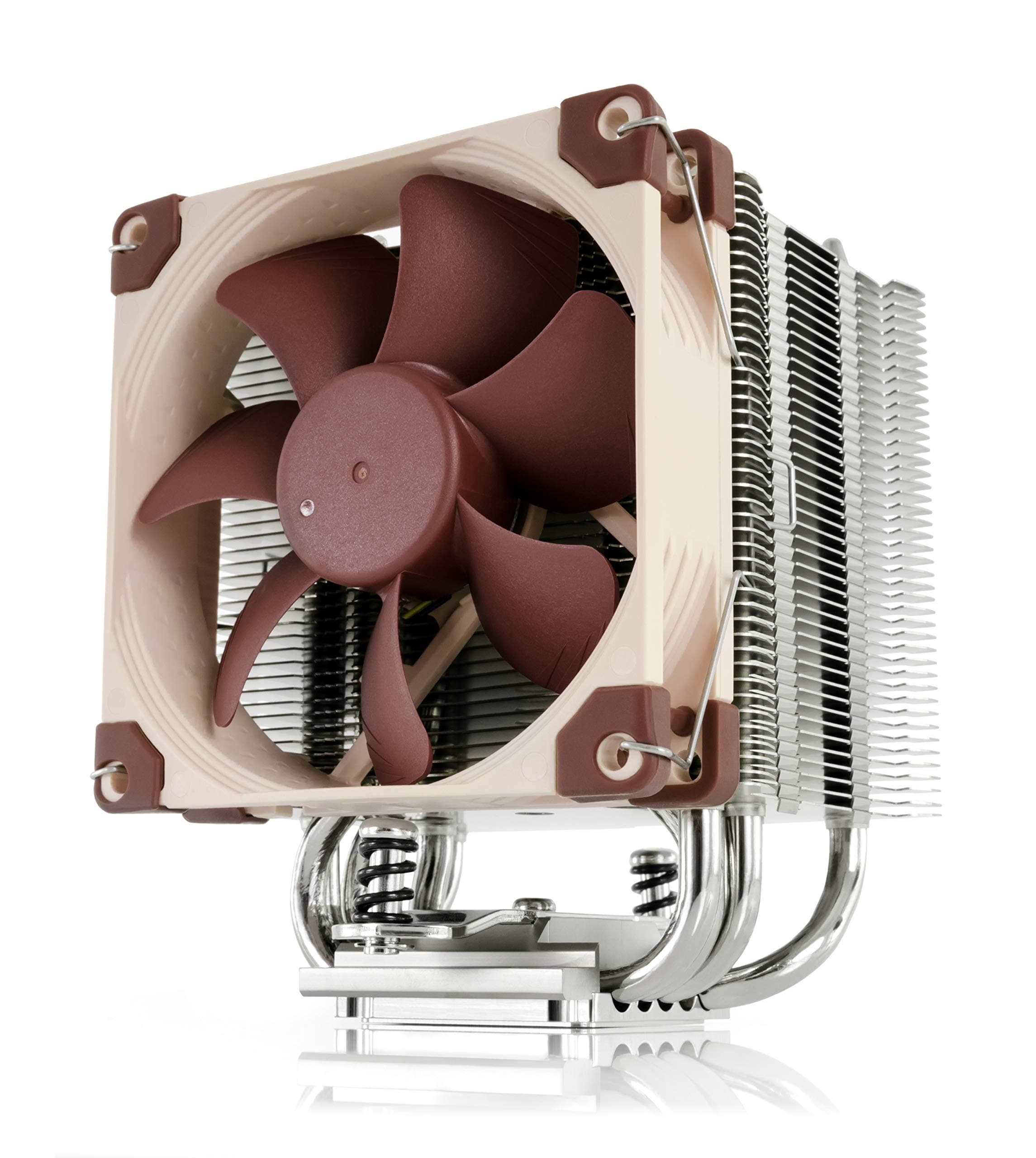

❄️ Keep your cool, stay ahead of the pack!
The Noctua NH-U9S is a premium, compact single-tower CPU cooler featuring a highly optimized 92mm NF-A9 PWM fan for ultra-quiet, efficient cooling. Its 125mm height ensures compatibility with small form factor builds without obstructing RAM or PCIe slots. Equipped with the SecuFirm2 mounting system and high-end NT-H1 thermal paste, it supports a wide range of Intel and AMD sockets. Renowned for its build quality and backed by a 6-year warranty, the NH-U9S delivers reliable cooling performance for demanding Intel Core Ultra and AMD Ryzen processors.


| ASIN | B00TBHYYFK |
| Best Sellers Rank | #36 in Computer CPU Cooling Fans |
| Brand Name | Noctua |
| CPU Socket | AMD Socket AM2/AMD Socket AM2+/AMD Socket FM2+/Intel LGA 1150/Intel LGA 2011-v3 |
| Cooler Heatsink Compatibility | Desktop |
| Cooler Heatsink Material | Copper |
| Customer Reviews | 4.8 4.8 out of 5 stars (1,811) |
| EU Spare Part Availability Duration | 6 Years |
| Global Trade Identification Number | 04716123315575 |
| Item Dimensions L x W x H | 4.92"L x 3.74"W x 3.74"H |
| Item Weight | 618 Grams |
| Manufacturer | Noctua |
| Mounting Type | Chassis Mount |
| UPC | 809395428884 801947306633 842431012463 782386488787 |
| Unit Count | 1 Count |
| Warranty Description | 6 year manufacturer’s warranty |
J**E
It fixed my overheating problem with my 13th gen i7!
I was recommended this cooling system for my 13th gen i7 because it was overheating real bad i was not sure about a air cooled when people tell you that the only way to go is liquid cooled but i do have to give it to this cooler i play lots of games and my temps used to go up to almost 100c and now under load the max i see is around 50c to 70c max and its super nice when gaming. I have had my system for a couple of years now and it works great for the price point and compatible with most fans. It fits in the case and super quiet. The build quality is nice and should stand the test of time. All round great solution when on a budget.
S**N
My First Noctua Purchase Won't Be My Last - UPDATE 2 Years After Purchase
My Dell Studio XPS 9100 desktop's cooler was not keeping my CPU cool - due to the well-known plastic tabs breaking on the cooler - keeping the cooler from making solid contact with the CPU. I tried to order a replacement from Dell for a perfect-working computer...but Dell no longer sells a cooler for that model. Planned obsolescence, I presume even though my XPS runs perfect in all other regards. So i checked a few aftermarket coolers that some said "might work" and after viewing some YT videos, this Noctua U9S cooler seemed to be my best option. Before, my core temps were almost "off-the-charts" reaching 90-100 Celsius regularly with very little load. After (easily) installing this cooler, my minimum core temps went from 50c to under 25c in all six cores. My maximum core temperatures decreased from over 95c in all six cores to about 55c. And the fan that comes with the cooler is much quieter than the OEM fan provided by Dell. All the positive reviews I've read about Noctua, turned out to be 100% true. To make this work, Noctua had to send me a modification kit for my Intel 1366 motherboard. I just had to provide proof of purchase of the U9S and my dell 1366 socket. Once I did that, Noctua customer support mailed me the kit I needed. Just great customer support. And my computer is now running cool and calm. Should help me get another year, or two, out of Michael Dell's computer. ****UPDATE - I bought this Noctua CPU Cooler Feb. 2022. March 2024 it is still working like new. My CPU never runs hot and the fan is extremely quiet. One of the best Amazon purchases I've made in the last 15 years. Good company to work with, too.
V**N
CPU temp went from 50 / 80+ down to 30 / 40 😮!! (NOT a gamer)
I usually wait a while before coming back to review a product, to see how things work out over time. This time I'll make an exception ... I have a i3 Skylake build for my home office. My CPU monitor was consistently pinging me that my temps were going over 80c under normal use...under idle, it usually hovered around 50 to 60. The case was free of dust and temps in the room were always not nearly hot enough to explain it. Opened my case up yesterday to install a new vid card and decided to also get rid of the original Intel fan and get a better solution. I searched Amazon and this option popped up on top of the list. The reviews and feedback were so good I only scanned a few other options before coming back to this one and pulling the trigger. Same day delivery was an added bonus! Installation is a bit of a project, but nothing anybody with a bit of experience with this kind of thing can't handle. On most mobos you will need to remove the whole board to get the included mounting bracket on the back. As a bonus its nice they include a (necessary) long screwdriver for the main mounting screws, and some quality thermal paste. The entire kit is very solid, quality materials. I mounted mine so the fan directly faces the rear fan in my case. That way the cooling fan pulls air through the block across the CPU, and the rear fan sucks it out the back of the case. Super quiet I hardly know its even on. I recommend searching YouTube for tutorials, I found a couple of guys that walked through the details of how they got it installed with minimal hassle and no errors. Always a huge help and makes it go that much smoother. Immediately after installation I booted up and checked the CPU monitor. CPU temp now hovers under 30c (27 / 29) at idle. In fact, with about 10 Brave tabs open and normal clicking around / typing, its *still* right there at the same temp. Does not even rise at all! Running 3 YouTube videos in separate tabs ... still does not even budge. I haven't tried any rendering or anything that seriously taxes the CPU yet but for normal every day use this thing is doing its job like a champ! Can't speak to long term use but based on all the positive reviews I'm confident its most likely going to continue to do so!
D**Y
Air Cooling in Tight Spaces - A must have!
I have been building PC's for over 30 years. So I have seen it all. Done it all. And went through all the trends with cooling, performance bumps and efficiency. Cooling is one of those things that things can go wrong even when all else is right. I bought a couple of these Noctua NH-U9S coolers because they were the best cooling for the footprint I had to work with (4U Size Server Rack Cases). These perform well IF you get a second fan for a push / pull configuration. Sure 1 fan is fine, but you really need to ensure your airflow is optimal. And believe me the extra money for a second fan is well worth it for this package size. If you do that this is a decent cooler. You cannot OC on this cooler, and in some cases even stock CPU speeds will be throttled a bit depending on how long you keep cycles pegged. It's a solid buy. If you do have room for something taller, Noctua makes other products better suited for a case with more room which you should definitely do.
E**G
Good stuff
So far, so good. Been using Noctua fans with my rig for years and have never had any issues. I figured I'd replace the crappy stock cooler that came with my HP Omen, and it appears to be worth it. Install was a bit of a pain because I had to remove the mobo. Also, the stock rear plate was glued in, so that took some patience to remove. In the end, I think it was worth it. CPU is running much cooler, and best of all—it's quiet! Good, quality product. Thanks!
Trustpilot
3 days ago
5 days ago