




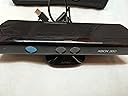

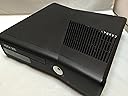
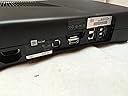
Xbox 360 4GB Console with Kinect
Product ID: 1322592
🎮4GB onboard storage
📶Built-in Wi-Fi connectivity
🕹️Wireless Xbox 360 controller
🎯 Level up your living room with Xbox 360 + Kinect — where gaming meets motion mastery!
The Xbox 360 4GB Console with Kinect combines a sleek, quiet design with built-in Wi-Fi and a wireless controller, delivering immersive, controller-free gaming through the Kinect sensor. Its 4GB storage is expandable, supporting a wide range of Kinect-enabled games that promote active play and social connectivity via Xbox LIVE. Ideal for millennials seeking a blend of entertainment, fitness, and social gaming in one compact system.
| Asin | B003O6EE4U |
| Batteries | 1 Lithium Ion batteries required. |
| Best Sellers Rank | #18,888 in Video Games (See Top 100 in Video Games) #424 in Xbox 360 Games |
| Customer Reviews | 4.3 4.3 out of 5 stars (1,318) 4.3 out of 5 stars |
| Date First Available | May 27, 2010 |
| Is Discontinued By Manufacturer | No |
| Item Model Number | S4G-00001 |
| Item Weight | 10.53 pounds |
| Manufacturer | Microsoft |
| Product Dimensions | 12 x 13 x 7.25 inches; 10.55 Pounds |
| Release Date | November 4, 2010 |
| Type Of Item | Video Game |
User
Finally, where the Wii failed, Kinect succeeded!
I was a hardcore wii fan when it was announced way back in e3 so many years ago and I thought to myself, this is the kind of videogame immersion experience im looking for! I bought it the month it came out and got the top reviewed games for it, and continued purchasing games. However, i noticed that the Wii did not provide the total immersion experience that many were looking for but in fact was just a gimmick. Nonetheless, it was a solid console (minus the graphics) for games and my family and I continued to buy games for it.Then, the kinect came out and after going thru my disappointed with my wii, I'm looking at it thinking its just an expensive PS2 eye toy, a major step back from the Wii itself! However, i kept up on kinect news and kept seeing many favorable reviews and crazy developer work and DIY hacking done with it. over the course of the year, hit games were developed for it, it became the fast selling entertainment device in US history, and.....they released FRUIT NINJA for it! All these were signs that maybe the kinect was on to something...maybe it wasnt a gimmick?So i kept reading on deals, and after missing the great black friday deal, i recently saw a deal for $100 amazon credit when buying the 4gb xbox with kinect for $299, effectively making it $199! not only that, but at the same time amazon was running a special on buy 2 get 1 free for kinect games! So i thought this is my chance! I made the move (and clicked the mouse) and bam, my familys xbox 360 kinect with three kinect games was on its way. Thanks Amazon for a great deal!Anyways, while it was on its way, amazons usually snappy 2 day prime shipping was taking an awfully long time so my sister and I coped with our anxiety by watching youtube videos of kinect demos at e3. And to say the least, we were impressed. Finally the kinect showed up, and since Im no stranger to videogames, setup was easy. I had read earlier and saw that many other amazon users reported that having the kinect above the tv made for better sensor recognition so i found a nice kinect tv mount clip from PDP on amazon for $20. However I could not wait even another day and suprisingly i saw that best buy was already price matcing amazon (quite the retailer war we have going on!) so I used some BB rewards and chose pick up at store to snag me one (i hope amazon can jump aboard some kind of pick up at store model, otherwise best buy/walmart/etc will slowly have them beat!)So everything was setup, I made sure to update our dashboard to the latest and had a hdmi cable setup to broadcast from our now ancient tv in 720p (most newer tvs can do 1080p but u gotta work with what you got). So I have to say, HD looked nice, much better than the 480p for the wii which i was getting from component cables.As for navigating, kinect navigation of the dashboard is great, works really nice and gives you a minority report feel to it (now all we need is a Jacuzzi for precursors and we're in business!)But the kinect games is where it really shines. This is THE VIDEOGAME IMMERSION you've been looking for. Im saying this after having tried kinect disneyland adventures (has some fun minigames in it even for the hardcore COD MW3 crowd), kinect adventures, kinect sports 2, power up heros, YSFE 2012, and fruit ninja kinect. It really gets you up and moving versus Wii, which most people to realized that it was all in the wrist so they got lazy and just sat down. Once you experience kinect, you will truly understand how and why this became the best selling device in US consumer history.As for xbox 360, it has some nice social features, xbox live gold integrates a plethora of online entertainment and the xbox live marketplace is jam packed which many items actually worth downloading. Also, there is a nice cloud saving feature for games for gold members. they give you one month of gold free after that they charge you (in my opinion an over priced subscription fee even for the 1 yr option). you will need gold to play online with your friends but you can download demoes and games (and i think video/audio content though im not sure) on the free silver membership.speaking of games and demoes, they do take up a lot of space, so if you plan on doing a lot of that you'll probably need to upgrade your xboxs harddrive. To be honest, i didnt buy the xbox for (nor will i be using) most of the features i mentioned above (though they definitely do add value) so im perfectly happy with my 4gb and silver membership. You can always add a usb flash drive (up to 16gb according to some users) or a bigger 250gb harddrive so at least your not stuck with 4gbAll in all, the xbox is a 5 star entertainment product that is now 10 stars with the addition of kinect! sadly, amazon only allows a max of 5 :D
User
Good All Around
First, let me review the XBOX 360 Slim. Prior to purchasing this I had owned 2 of the original XBOX 360s (bought the first, and Microsoft sent me a refurbished one when mine got the red ring of death). The Slim version is MUCH better than the original. The original one sounded like a jet engine when running with all the fans at full speed; the slim one is extremely quiet. The original would get very hot and raise the temperature in the room by a few degrees when running for an extended period of time; the slim runs pretty cool, and does not noticeably heat up the room. The slim version is smaller than the original. The slim version has built in wireless. And a few other minor improvements.Now on to the Kinect. One reason I purchased a Kinect was that I have a pretty sedentary life. I sit in front of a computer most of the day, and I play video games and watch TV at night. I was hoping that the Kinect would motivate me to move around more and get some exercise without breaking up my routine. I haven't owned it long enough to verify that I will use it over the long term, but in the short term, I believe I will use it often. As for the exercise, after playing it for an hour I was sweaty and tired, and the next morning, my muscles were pretty sore. It certainly requires a lot more movement than sitting in a chair with a controller, and I am pleased that I found doing it to be pretty fun (which is good since I abhor exercise in general).A lot of people are concerned about space requirements, but I find them to be very reasonable. I was worried about buying it because I live in an apartment, and I was going to set this up in a small room with a lot of furniture. However, I haven't had any problems. The Kinect sensor senses your "workspace" when setting it up, and it seems to know where I have to stop moving because it doesn't require me to go out of my furniture boundaries. I stand about 6-7 feet away from the Kinect sensor, and have about 1.5 arm lengths of space in front and to each side (no room behind me). With that, I am able to do everything required in the Kinect Adventures game without any issue.My largest problem is that Kinect Adventures wants you to do a lot of jumping. I live on the second floor of an apartment, so jumping is out of the question. I've found that if you squat down a little and stand up quickly on to the tip of your toes and shrug all at the same time, it recognizes that as a jump. It takes a little practice to get the hang of that, but once you do, it works while preserving the sanity of any downstairs neighbors.Next, the Kinect Adventures game. As someone who likes to play a lot of action games (Call of Duty, Halo, et cetera), I don't find the premise to be my cup of tea, but it's still fun. It seems to implement the Kinect sensor pretty well, and I think it's a good demonstration of what the Kinect can do. That being said, I don't think I'll be playing a lot of it once I get some other Kinect games.And a final note. If you intend to use the Kinect with an older XBOX 360, or to use it on a computer, you will need a "Kinect Sensor Power Supply." If you buy the Kinect standalone, it comes with one. I assumed that the bundle would come with one as well. It does not. I had to purchase it separately from the Microsoft Store for $34.99. Not too big of a deal, and I understand Microsoft's leaving it out, but it would have been nice to know.
User
Review after 2 hours of use - Beyond what I hoped for!
Starting off with a tip - if this is delivered, and has been sitting outside in cooler/colder weather, I would recommend holding off plugging it in right away. Give it a chance to 'warm' up to the room.I followed the quick start guide, skipped the network config, and I was playing within 15 minutes - including unboxing! While I was following the above tip, I cleared all furniture and removed the dog toys from the area in front of the Kinect. After that - everything went super fast (I did wait 2 hours for everything to get to warm up just to be safe). I was rafting and having a great time.No lag. None. Nada.Game play - totally blew me away. I ran through several levels of about 5 of the adventure games. CAUTION - you may find that you are having so much fun you get winded!I have not played multiplayer yet, but the dog has tried to help a few times.The interface took me about 10 minutes to get use to, and I still fumble around a bit, but it is easy to use.I do have a good amount of space - probably 8 to 9 feet from the front of the Kinect, and it is located about 3 feet off the ground - dead center in front of the TV. It does a good job of alerting you if you are too close or too far from the sensor. Also - watch the ceiling and be REALLY carful if you have a ceiling fan.Comment on the dog (or cat) - If they walk in the frame, strange things happen. Just expect it. Walk out of the frame and back in from the same side, and it seems to reset.Time to set up the wireless, download required content, set up media player from my PC, and fix an issue with Xbox live - about 45 minutes. Probably would have been faster if my PC was in the same room.I did have an issue with connecting to Xbox live - possibly because I did not connect to the network right away. I went out to the forum and found some tips.To recap - Have enough space. Move furniture and clutter off the floor before you start.Be prepared to have a fantastic time.***** Update *****Still a lot of fun. I have tried the Joy Ride, Your Shape, and Dance Central demos - all cool.The game does a very good job of letting you know when you are outside the play area.Regarding lighting, I have experimented playing during the day with the blinds open (lots of sunlight) and no artificial light source, with lots of overhead lights, low level over headlight, table lamps, and no light except from the TV. The only issue I can see is with good overhead lighting, the pictures from adventures seem to look less blurred.
User
A big goal from MS
This is my third XBox 360 system. The first one I bought in the spring of 2007, but it died, due to the RRoD, about half a year after. I made some repairs, because MS did not agreed to cover the warranty, arguing that I bought the system in the USA and used it in Colombia (my country), and it worked a couple of months more. Then I bought an XBox Arcade system from Amazon, and it's still running, though sometimes it gives the three red alert from time to time (it hasn't given the RRoD yet), and my kids and I have had a lot of fun with it. I am not a hardocre gamer, but mainly an occational gamer. Indeed I have very few hardcore games (mainly HALO 3 and two Tomb Raider), but for most of the time I use the console for fun and simply recreational purposes. With that in mind, I bought this amazing combo of the XBox 360 S and the Kinect, and I have received more than I expected, specially when you think of the reviews from professional gamers on the web.The Kinect works almost flawlessly and the games we have played are all amazing (Sports, Adventures and Dance Central). My kids and my family have had quite fun with it.I think MS has scored big on this bet they have made to control games with your body only. Though the technology is still naive, I am sure the software developers will take it to the next level, and maybe even to maturity, on the years to come.I am so glad I bougth this combo, because it saved me about U$60 when I compare it to the price I get for the same combo on my country where it sales for about U$480 (In Colombia it comes with one of the Halo games, apart from the Adventures, and taking into account the price for the air-carriage to my home).I love the XBox 360 and I'm sure my kids do love it too.For those who have kids and other members of the family not used to play games, this will be a very good surprise, when they discover they can play in any way and enjoy the games too.I highly recommend this combo, most of all, for those who are not hardcore gamers (like me) and are not interested in downloading a lot of material from the web. For those who want to do so, I'd say to stick with the 250 GB combo.
User
HOT! For even negative reasons!
I got a great deal on the XBOX 360 4gb w/Kinect and am ordering a 320GB HDD separately.Having played Kinect Sports, I can say a few things about it and the XBox:1. The Kinect has no controllers to hold and you have to put effort into your moves. As a result, Bowling is much more challenging than on a certain competitor, Volleyball was terribly exciting, and even Boxing was fun. I'm going to buy the Sports II set next month, as some thought has gone into usability and physics - at least from where I'm standing. And it's not easy to cheat as this thing really does figure out your speed when throwing balls, hitting your boxing opponent, et cetera. (Probably by analyzing several readouts from the sensor within x period of time; the larger the number means the quicker the movement... the programming involved is incredible...)2. If you're out of shape, don't get overzealous when playing. Don't injure yourself. And it's easy to do, given how addicting Sports is. A friend, who compelled me to buy one, managed to injure herself by playing a dance game for too long. :(3. Only official HDDs are supported; you can't plonk in any laptop drive and expect it to work. Oh well.4. The 360, the "Slim" model, does seem to get very warm on use. Not blistering hot, but definitely very warm. Do keep this console in an open area, and consider a third party cooling mechanism (amazon.com sells them and I ordered one.) By keeping the 360 cool, it will run for years and be less likely to die from the "red ring of death", or even when you attempted to fry and egg and the runny stuff got inside the vent grille and caused a short circuit.Yes, the system is programmed to shut down if it senses overheating, but if you want your product that was bought with hard-earned money to last a while, keeping it cool goes a long way. Even if you don't see mandatory shutdowns or red rings of death, keep in mind that electronics under hot temperatures will be more prone to locking up and requiring reboots over time. So it's good to run these things as cool as possible at all times.5. Many games save what's on the disc on the HDD, meaning better and faster performance, combined with longevity of the optical drive. If anything, the need to have the game disc installed when launching is tedious and adds to the risk of damaging the disc, but it's minimal. Still, at least one can save disc content onto the console. Let the kids, kittens, and rabid dogs scratch up every part of the disc, just leave the innermost part where the identifier can still be read by the system.6. 1080p looks pretty darn nice. Use HDMI if possible; the only built-in alternative is composite video (480i). Component video and other solutions might be possible with third party-add-ins, though.7. If you have downstairs neighbors, invite them up for a party but do ask them not to throw things at the TV mistaking the XBox 360 as one of its competitors.And, lastly,8. Don't use the internet to hack into the boxes of people who choose to play with no clothes on. Don't worry about me as I wear two parkas during each gaming session.Overall, I'm impressed with this console and its capabilities, and it makes formidable competition. I would take off a point over a very basic cooling assembly, but that's where third parties come in to make authorized add-ons. It's definitely worth the investment.
User
Best Motion Controller & Improved Xbox at a Great Price!
The xbox 360 slim with 4 GB is what the original arcade version should have been.10 new features of this model are:1. New Valhalla chip - hopefully improved design to prevent RRoD issue, but tech. reviews noted that the Jasper chip in the older Elite model runs cooler2. WiFi N - this is the newest wifi standard that is 12X faster (up to 600 Mbits/ sec) than wifi G; you'll need a Wifi N router to get the max. speed3. digital optical audio port (IF your sound system is separate from your TV, then you'll need this to get full 5.1 surround sound)4. 4 GB of flash memory (although 1.1 GB is used by the game system, but 0.3 GB can be reclaimed by deleting 4 game demos)5. 5 USB ports (2 in front & 3 in back)6. slimmer design with side vents (to prevent overheating)7. dedicated Kinect port (just a convenience feature)8. only 1 year of warranty (the only negative; older Elite models had 3 yrs.)9. USB flash drive support (this was a xbox software update released in April 2010)10. ESPN video streaming (will be included if you are a Gold member, $50/ yr)Slim 4 GB memory vs. 250 GB hard drive:I bought the 4 GB system over the model with 250 GB hard drive because the xbox now supports game saves/ installs/ downloads and pic/ audio/ video downloads to USB flash drives. It supports 1-2 USB flash drives with 1-16 GB memory (using a 16 GB drive, 1.6 GB is used for formatting). 2 advantages of USB drives: loading games and media is 3x faster with USB drives than disc reading and more reliable (flash memory rarely fails, while discs can get scratched). 2 disadvantages of USB drives: you can not install old xbox games on USB drives and certain games, like Halo Reach and Halo ODST, will not support online coop without a hard drive (having a USB drive will not help). If you have a big appetite for video downloads and game demos that 32 GB can not accommodate, then you can always upgrade later with a 360 GB hard drive. The original model's hard drive is not compatible with the slim model without modification - you would need to remove the original hard drive and insert it into a slim hard-drive case (non-Microsoft, sold separately). You can find a non-Microsoft 120 GB drive for 1/2 the price of the Microsoft drives, but you would need to manually install the "partition 2" xbox emulator (search google) to play old xbox games.XBOX vs. PS3:I am originally a PS3 and Wii gamer, but finally bought the xbox when the slim 4 GB model was released. To be competitive with the PS3, the xbox had to have the built-in wifi, optical audio port, and USB flash drive support. I was deciding whether to buy another PS3 since many games require 2 consoles for coop and multiplayer gaming, regardless of what system you choose. With this xbox priced at $200, I decided to choose the xbox since it has better coop games and more online gaming. However, Netflix on xbox requires gold membership and starting a movie is a lot slower than the PS3 even though the xbox has faster wifi. Xbox music and music videos library needs to expand to the size of their TV and movies selection to be comparable with iTunes. The PS3 has better graphics though not significantly better (expected since PS3 has a better processor), but the xbox has better coop and multiplayer games. The PS3 controller is better designed, better constructed, and has a rechargeable battery; the D-pad on the included xbox controller creaked without even playing a single game. Also the PS3 has a Blu-Ray player, which accounts for the small cost difference. The button to open the disc tray on the xbox is too sensitive and not recessed, so slightly brushing it with your clothes will activate it.Speed Comparison Update:The Witcher 2 game, which is highly recommended, inspired me to write this update. For the Slim 4 GB model, most game discs can not be installed to the internal memory due to insufficient space. The internal memory is 3x faster than hard drives, which is 3x faster than USB drives, which is 3x faster than disc reading. The approximate speeds are: 270 MB/s internal memory > 90 MB/s hard drive > 30 MB/s USB drives > 10 MB/s disc reading. NOTE: USB drives vary a lot in speed; check the speed and cost before buying - you get what you pay for. So loading a game installed on a USB drive is faster than loading it from the disc, but can be potentially 9x faster if installed to internal memory. The Slim model should be updated with at least 16 GB memory since a game DVD holds up to 8.5 GB of data, 1.5 GB is needed for system files, and 6 GB should be reserved for game saves and updates. With flash memory so cheap these days, Microsoft has no excuse to not increase the internal memory to at least 16 GB. I originally gave the Slim model 5 stars, but docked it 1 star for this issue since it's been more than 2 years since this model was released.Online Gaming & Media Sharing Update:I originally didn't mind paying for xbox gold membership since it included Last FM music and ESPN video streaming, but now there are better music streaming service (Sony's definitely better) and the videos within each sports category are disorganized and poorly label so it's hard to find specific clips. So when I discontinued my xbox gold memberships, I found out that you can not play online coop games, even privately hosted ones, without at least one person having gold membership. Microsoft should at least allow privately hosted, online coop games to account for the lack of LAN support by most games. Also, the xbox's support of DLNA media streaming from your computer is poor; you can not save your media, only stream it. DLNA media streaming and sharing is flawless with the PS3. Microsoft's greed is evident in these 2 issues so I docked the xbox another star to give it only 3 stars.While the concept of natural body movements translating into character's actions sounds intuitive, the implementation of this idea in games has eluded many game developers. Too much motion will tire out the gamer, repetitive motion will bore the gamer, and complicated motions can not be successfully detected by the controllers. I'll compare motion controllers for all 3 systems below.Usage Comparison:The Wii was wildly popular when it was released due to its novelty, however 4 years later, few Wii game innovations have appeared causing Nintendo to lose market share in the past year. The PS3 Move is more accurate than the Wii since the Move tracks motion in 3-D space while the Wii tracks motion in 2-D space (2 dimensional, like paper) and analyzes that data to interpret 3-D movements. The light globe on the PS3 Move looks cool initially, but the bright light becomes glaringly annoying soon, especially in a dark room. Both the Wii and PS3 motion controllers are less integrated to the console's navigations and functions than the Xbox Kinect. The Kinect allows users to say commands and motion gestures to navigate menus, browse online, interact with avatars, and play media content. Winner: Xbox Kinect.Price Comparison:The Wii system ($200) includes the 3 controllers (Wiimote, nunchuk, & motionPlus) needed for 1 player, but costs another $40-80 per player, depending on the accessories that you buy. The PS3 Move retails for $100 for 1 player and the XBOX Kinect retails for $150 for 2 players, but both are accessories so they require the original game system. Also, the PS3 Move requires $50-100 more per player, depending on the accessories that you buy, while the XBOX initially supports 2 players but is capable of tracking 6 players for future games. All 3 motion systems include a game to showcase the controller's features. For 2 players, the Wii is the cheapest system and the PS3 is the most expensive; but when the Xbox supports 4 players (probably via a software update in 1 year), it will be cheaper than getting a Wii. Winner: Xbox Kinect (assuming 4+ players).Technical Comparison:Motion detection differs in all 3 game systems. The Wii uses micromechanical components, such as an accelerometer and gyroscope, and an infrared sensor. The PS3 Move uses an accelerometer, angular-rate sensor, and visual tracking of a LED-lit globe. While the Wii & PS3 Move use similar components, the PS3 has the advantage since its components have 3-axis of motion detection compared to 2-axis sensors in the Wii; also the PS3 has a stronger processor to calculate position and distance. Instead of relying on micromechanical components, the XBOX Kinect uses a video camera, an infrared camera, and a 4-microphones array, which together is capable of gesture, facial, and voice recognition for tracking up to 6 players. The PS3's disadvantage is that micromechanical components may wear & tear and cause inaccurate motion detection, while the Xbox's disadvantage is that more processing overhead is needed when analyzing video and sound to interpret the players' motion. While the PS3 is the obvious winner over the Wii, the success of the PS3 Move vs. the Xbox Kinect will depend on the game developers' ability to translate motion into actions. Overall, the Xbox Kinect has a slight advantage because the motion software can always be improved by Microsoft, whereas the PS3 controllers will most likely remain unchanged since hardware redesigns are always expensive to both the company and its users. Winner: Xbox Kinect.
User
Lots of Fun! Definitely Give Kinect A Chance!
I've been an xbox 360 user since 2007 and have been happy with it (as a "hardcore" gamer). This purchase was for my parents in their living room to use netflix and video chat with family hundreds of miles away. Here are my pros and cons for the console itself, then kinect:PROS of the xbox 360 Console+ Easy setup, take it out of the box, plug in the power, the hdmi and pop the batteries in the controller (I setup kinect after the 360).+ 1 month free xbox live (bought a 12 month as well so 13 months).+ Easy wifi-N setup!+ The xbox itself has great wifi, I was worried about streaming netflix in HD but so far it's worked flawlessly, after the initial buffer, movies play perfectly from start to end. Also, streaming video files (like xvid and divx) on a home network wirelessly to the 360 works perfectly as well, in the midst of properly renaming my backed up tv shows and movies (no mkv support of course :/)+ With windows 7, setting up a shared folder for the xbox to find and use for video playback was pretty easy.+ Touch sensitive buttons for power and dvd eject is pretty cool, makes the unit feel a bit more high tech.+ Smaller size of the 360 (while not much smaller) is noticeable and looks very pleasing to the eye+ Adding 8gb of extra hdd space with a thumb drive is pretty sweet, later (if they need it the space) I'll buy a used hard drive.CONS of the xbox 360 Console- Unit gets pretty warm, DO NOT block the heat vent or keep the 360 in an enclosed space, you will find it a grave xbox.- While initial setup of the 360 was easy for me (a gamer) it is still confusing and not as easy as it should be for casual gamers- Not being able to plug thumb drives into the back of the console (via usb) is a drag, in a dark room my sandisk cruzer's orange glow is a bit distracting when watching a movie.*Note - none of these cons are serious problems/deal breakers, just things to notePROS of Kinect:+ Setup is pretty simple, nothing too difficult to figure out.+ With the new xbox 360, you don't need an additional power adapter (cord) for kinect.+ Awesome, NEW experience, completely new way to interact with games (everyone who has used it in the house has loved it or has been amazed by how well the technology works).+ Kinect video chat is great, the automatic tracking is just sick, person on the other end (my friend on a laptop) could hear me just fine and I was speaking normally in the livingroom.+ Love the hand gesture based gui navigation, just cool to wave your hand or say "xbox" and then say a command (I currently have a cold and my voice is garbled but it still recognizes my voice commands)!+ The price of the xbox/kinect bundle plus amazon's $40 game credit really made this deal worth it (also no tax and free 2 day shipping!).CONS of Kinect:- This is brand new technology, that being said you must be prepared for it to not work 100% of the time or exactly how you want (games and navigation).- Menu navigation for the dashboard is limited (for now), this includes Zune (which won't recognize my hand gestures now) and Last.FM isn't 100% kinect, you still need the controller to setup new stations (which I understand).- Some games work better than others. Kinect adventures is a fun package of mini games (and really, thats all it is, which is ok if you know that ahead of time) and tracks fairly well, sometimes my legs go crazy even though I repositioned kinect to clearly see the floor an my feet. Then Your Shape Fitness is about as precise as this tech can get (blew me away).- NETFLIX.. where are you?! I really wanted to try kinect with netflix, I tried out a zune video (when it let me navigate with my hands) and it was very cool. The hand navigation is pretty intuitive and just fun to use! Really want to have this experience with netflix!- YOU need a good amount of room! Do not blow this off, this is the most important thing you need to take into consideration. I measured it out and for my living room setup for kinect to work well I was 7 feet away from kinect and for most games needed 7 feet left and right. I thought kinect would readjust its space requirements around me, but thats not true it has a "sweet spot" depending on where it is placed and thats it. So, please measure your space first (or have a good idea of space).*Note - Although there are some hiccups with kinect, I'm so glad I bought this, its a completely new way to experience gaming. I've had an xbox for 3+ years now and I'm confident Microsoft will keep releasing updates and fixes as time goes by, giving us more features and apps than what we started with. This technology is truly innovative, first time I used it I was blown away.**Bonus Mini Game Reviews**Kinect Adventures - This is the game that comes with Kinect. Its touted as a "full game" but really its a collection of some mini games. The games are fun for the moment (and actually some give a really good workout!) but they're still mini games. I played them a few times but I don't see myself going back and playing them alone, in a party atmosphere, why not. Overall, the tracking is done quite well and its easy to pop in and play, there is some depth to each game type and achievements etc so there is stuff there to keep you in it.. if you like the mini games. For kids, they'll love it.Your Shape Fitness Evolved - Excellent game! For best tracking and menu system, in a dead heat tie between Your Shape and Dance Central! It has a collection of gym games which get your heart pumping and jump in and go type of cardio classes. These classes are quick and don't have a lot of help (like a break it down, slow mode) but considering what they are (cardio classes), in a real class you'd just jump in and try and learn as the class goes on. I haven't tried the actual personal trainer classes (which look very cool, slower and a complete workout - warm up, cardio, cool down) so I may edit this once I get around to that section. I didn't picture myself really out of shape but by the end of about 20 minutes of playing I was drenched in sweat and sore the next morning! Overall, I'm impressed by the flow of the game and how well they made it easy to use and yet challenging and fun. I look forward to my friends getting this game and smashing their records!Dance Central - Awesome game! This is my favorite game of the 3 we have right now! Its slick, the menu navigation is the best of any game (or xbox dash for that matter) and needs to be copied by the industry! I'm not a dancer and actually can't remember the last time I danced in public but my sister really wanted to try this out so we got it. I played the first song, lady gaga: poker face and went to break it down mode. What a great mode, this slows everything down and gives you a real shot at learning every move. Its deep and very intuitive. For instance: in break it down, you start with a new move, if you nail it flawlessly the first time you move on to the next move, if you don't you have to do the move 3 times in a row successfully (with a 3 second break in between). Then you move on to the next, you can slow it down any time and speed it back up when you've got it. I really believe the tracking system is monitoring me and giving me excellent feedback (I can also see my body outline as further proof). After dancing to the first song 2 times I was sweating pretty well but I actually felt like I was learning how to dance. Maybe not in a pro way but I felt more comfortable with certain moves, became more familiar, which I was surprised by, actually dancing and having fun! Add in leaderboards and dance offs and now you're dancing to win! They hit one out of the park with this game! Also, anyone who can beat multiple songs 1 after another on hard mode has my respect as a gamer because I cant!Overall, the xbox 360 + kinect bundle is a great product for the price. We're having a ton of fun with this and the technology is still hard to understand.. how does it work this well?! The video chat and hopefully addition of netflix (in the future) will make this a must own product. As I was playing these games with kinect I kept thinking in my head "if I was 8-12 years old my head would have exploded playing this..." Its a strange idea to think there will be kids out there thinking kinect is a standard in gaming, that this is where they started with gaming and technology.One last tip, while trying to navigate menus leaning back in my recliner I realized kinect needs to see my face, not just my hand to recognize a user and allow me to navigate menus. So if it doesn't recognize you waving at it, make sure your face is noticeable (not leaned back cloaked in a recliner).Hope this helps! Kinect is really a lot of fun!
User
Do not BUY
DO NOT BUY, Yes I read the reviews and Yes I was excited to receive it, this excitement was shortly lived upon trying to activate the Netflix program, this is when I found out that another email was substituted which is my secondary which Yahoo has been working on for about a month, which means it accepts NO passwords. Now they ask you to provide a secret question however there is NO prompt, you will be told that s your problem you should have wrote it down. Now calling 800-469-9269 is worthless the usual screw you and wait annoying we don't care prompts which will take you 3.27 minutes to get through, to a Bored your interfering with my talk time person. Who will transfer you to anther number, who in turn will transfer you back to the posted number, all the time asking you to repeat everything again and again, Now we come to Supervisors a word used and a person there WILL NOT talk to you, who even though you are told is free, is mysteriously busy for the next 30-45 minutes, NO other means or solutions will be offered to you.Please note, make sure the email is correct NO ONE at Microsoft can access anything other than to talk about MONEY.YOU WILL NOT be allowed access to YOUR information, You CAN NOT change your information or up date, and here is a kicker if you give the box away YOU have to give UP your email and PASSWORD.No one will help you with any problem that has your PERSONAL information or access to it and as I stated YOU CAN NOT change anything once submitted, even now I am on line talking to xbox live, THEY DO NOT listen in fact the lady hung up after I told her what she suggested has been tried and WILL NOT work.Myself I will ot use the PRODUCT and I will make sure that if it has or is connect to the microsoft company I will do my best NOT to use it or have anything to do with it (microsoft)
User
glad I took the chance...
so, so, so Very Happy, with my decision!Packed well, arrived very fast via UPS, they claim used/refurbished? However except for a vac sealed box. The Unit is pristine, and I get to retro game for awhile, already had a couple sleepless nights of Fable II...Flipping Vintage is a great seller. I was contacting with random questions, they were prompt, kind, and excited for me, which was very encouraging, glad I went this way... NFS HP thinks so too! oh I think there was an included game to ensure the kinect funciona bien, not my thing, a younger, more limber, youth...Flipping Vintage-Thank you, I purchased an orignal Pomya Xbox360 320GB slimHD, arrived this morning, everything is working GREAT!!!
User
Perfect
Fantastic. I was so impressed with this purchase. The xbox was so well protected in bubble wrap along with everything else. Everything looked brand new when I unwrapped them. I hooked everything up and it works great. I have not had a chance to use the Kinect yet but I can always do an update later. I recommend this seller for sure.
User
Works
Works, came on time
User
XBox 360 Kinect
This 4GB Kinect XBox 360 arrived as expected, on time. The box it came in was extremely battered, but the contents great. It took us quite a while to instal due to our inability to follow instructions. We’ve been using it regularly, and providing ourselves plenty of laughter in the process. Would highly recommend.
User
Great product and price
The XBOX 360 met our expectations. Easy setup. Great product and an excellent price
Trustpilot
1 day ago
2 weeks ago