Desertcart purchases this item on your behalf and handles shipping, customs, and support to Indonesia.
🎬 Edit smarter, not harder — the ultimate controller for pros who demand speed & precision.
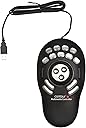
The Contour ShuttlePRO v2 is a compact, ambidextrous multimedia controller featuring a spring-loaded jog and shuttle wheel plus 15 programmable buttons. Designed for video, audio, and photo editing, it offers smart app detection for automatic profile switching and broad compatibility across Mac, PC, and Linux platforms. Its ergonomic design minimizes hand fatigue, making it ideal for intensive editing workflows.


| ASIN | B0032XQP1K |
| Additional Features | Control Jog & Shuttle Wheel,, Ergonomic Design, Programmable Buttons, Universal Compatibility |
| Antenna Location | Animation, Audio Mixing, Coding, Office, Video Editing |
| Are Batteries Included | No |
| Are Batteries Required | No |
| Best Sellers Rank | #939 in Computer Mice |
| Brand | Contour |
| Built-In Media | 1 X Multimedia Controller PRO v2, 1 X USB-C to USB-A adapter, 1 X User manual, Stickers |
| Button Quantity | 15 |
| Color | Black |
| Compatible Devices | Personal Computer |
| Connectivity Technology | USB |
| Customer Reviews | 4.1 out of 5 stars 735 Reviews |
| EU Spare Part Availability Duration | 1 Years |
| Enclosure Material | ABS |
| Finish | Matte |
| Global Trade Identification Number | 00743870004982 |
| Hand Orientation | Ambidextrous |
| Hardware Platform | Linux, Mac, PC |
| Item Dimensions L x W | 7.73"L x 1.12"W |
| Item Weight | 0.55 Ounces |
| Manufacturer | Contour Design Inc |
| Mfr Part Number | 00498-0 |
| Minimum Required Operating System Version | Fire OS 7, Linux Mint 7, Mac OS X 10.11 El Capitan, Windows 7, iPadOS 14 |
| Model Name | SPROV2 |
| Model Number | SPROV2 |
| Movement Detection | Optical, Trackball |
| Movement Detection Technology | Optical , Trackball |
| Number of Buttons | 15 |
| Operating System | Android, DOS, Linux, Windows 7, iOS |
| Pattern | Solid |
| Power Source | Corded Electric |
| Special Feature | Control Jog & Shuttle Wheel,, Ergonomic Design, Programmable Buttons, Universal Compatibility |
| Style Name | PRO V2 |
| UPC | 743870004982 795327721270 191120090443 |
| Unit Count | 1.0 Count |
| Warranty Description | 2 years manufacturer warranty |
R**S
Adaptable and Effective
I bought this for use in audio production. I'll start with the only real drawback. I wish there were a few more buttons. That said, I now use it daily and have found that it makes my work easier. It is fairly easy to program to fit whatever you need. There is a bit of a learning curve on the scrub and scroll wheels, but there are plenty of people who have posted their setups to follow. It is very light, but the rubber feet on the bottom keep it in place very well. The button layout is really ergonomic to the hand. I didn't end up using the labels, so I don't know how easy those are to apply. I use it more by feel than looking at it. What I did not expect was learning to use it with applications other than my editing software. Browsers, media players. It's configurable to any application. I now use it outside of editing on a pretty regular basis.
M**O
Wish I had found this a long time ago!
This works like magic. I use it on my MacMini, and windows 10 Desktop. Works with different software with tons of built in presets. You can also create your own custom key settings. I use it on software such as Final cut, photoshop, lightroom, 3shape design, autocad, etc. This is a life saver and not to mention its easy on your wallet too. Best value out there for anything in its class. I've seen it outperform some products 3X its price! This has saved me hours of my editing time. I would highly recommend this to anyone looking for a great editing companion.
J**E
Unusable with Blender, but FINE for After EFFECTS
(revised update five days later) ... So I got my old computer set up again and happily found the Shuttle ProV2 to work with an old (but maxed out AEPro 6.5) I expect to be glad I got it. (previous impression) ... The description states " includes pre-configured setup for over a 100 popular creative editing applications. "I bought it to use for basic timeline scrub / shuttle, and frame-by-frame jog. Blender I have later discovered is not on their VERY SHORT LIST of compatible applications ( nowhere near 100 ). Left-mouse click-hold drag Left or Right does Timeline forward and reverse. I thought that was common. I have not gotten the Contour custom programming instructions to work. I can't interupt my current project to obtain and start to learn a dedicated editing package again. When I get around to that I will try again but reluctantly, the ShuttleProv2 is gonna sit on the shelf for now.
A**A
The Brand Doesn't Care - Stay Away!!
Okay, I've been holding off writing this review because I wanted to provide the seller an opportunity to stand up and redeem themselves. Since they show no intention of standing by their product (nor the quality of their own sale), I guess it's time for me to share my experience with the rest of the world. TL;DR: I pay full-price, get an open-box, used item and the seller blames some mythical distributor for poor product-delivery quality and then disappears. In this day and age, any brand is only as good as the unit that reaches the customer. In my experience the product is useless for the purpose it is being marketed, and the brand is NOT worth the experiment. Longer version: I am a professional photographer and I run through 500-1,500 photos to edit every fortnight. Hence I purchased the Shuttle Pro V.2 with the intent of benefiting from the various buttons and the multi-functional jog dial - in order to hasten the photo selection and subsequently, the photo editing process. I considered the Wacom Intuos Pro and other options, but decided to buy the Shuttle given the more tactile workflow that physical buttons promised. I also went against the grain by taking a punt on a comparably unknown brand and decided to rely on a younger, more hungry brand's.... hunger. Bad idea! As a product, with it's 15 buttons and the jog-dial & ring + the customisability, it has the potential to be a time saver. But either the brand or the seller is out to con the customer. 1. The box I received was already opened and resealed. The circular tape seal at the bottom of the box was ripped open and not even sticking to the box. The box itself bore marks of age and being tossed about (I initially attributed that to poor handling on the part of Amazon - which I now know was not the case). 2. Opening the box, I found that the "brand new" Shuttle Pro unit itself had several fingerprints, and quite a few minor dings. 3. I was dismayed to find some buttons being less “clicky” than the others - example: Buttons 5 and 8 are more spongy (like they’d get after a few months of use) while others are far more firm and tactile. They don't click as definitely as the others do, and hence sometimes don't actually work. So I have to recheck my work and then reach for the keyboard and manually hit the keyboard shortcuts on Lightroom 4. The biggest issue though, is with the Jog Dial - when you first turn it (clockwise or counter-clockwise, both), it does NOT move the selection or the slider to the next/previous item, as it should (I have it universally set up to scroll one line/item in Finder, Excel, Lightroom etc.). The cursor just sits there... blinking stupidly. Turning it a second or third time, the cursor moves. Simply described - It’s like the gears turning under the jog dial are so WORN OUT that they just don’t engage on the first turn. The problem is though - I bought this specifically for Lightroom - where the hardware needs to work precisely and reliably for me to be able to use it as a work tool. As all of you would appreciate, edits and slider progression have to accurately execute your instructions. Any jumpy or unpredictable behaviour only makes one double check every step, makes you more cautious and thus really…. belies the very basis of the purchase. If there's no benefit of speed, worse if there's no reliability, then the product is truly worthless for any precise work!! I cannot express how disappointed I am - it was a huge leap of faith to buy the Shuttle over the Wacom alternatives. The biggest disappointment though, was the let-down that I received a used product. I paid full price - and I expected a sealed, untouched, shiny new tool that would last me a couple of years (at least), of reliable service. What's even more unsettling is that I pointed this out to the OWNER of the seller store, within a fortnight of personally receiving the unit (he was very prompt in asking me for a positive post-purchase review); but when he realised there was a problem with the product he blamed some external distributor and offered me a piddly "partial refund". I declined any "rebates" and requested for a replacement unit instead (because I really did want to use the product, and to enjoy its benefits to my own work). No response. It's been a month and a half. Several email reminders. Nothing. Nada. Silence. Irony of the situation is that in the past I've bought used products from Amazon that were in better condition, than the "new" Shuttle Pro V.2!! Summary: If you want a product you can be sure of being new - look for a different seller. And if you want/hope/desire any service/post-sales support, DEFINITELY look elsewhere. This seller doesn't care. From a product standpoint, Wacom will probably be more reliable, given that they run their own store and manage brand presence on Amazon, and ... their 35 years’ legacy.
K**D
It makes editing EASIER and FASTER!
Simple and intuitive, ergonomic and worth every cent. Plug it in, download and install the driver from the Contour company website, and spend a few minutes customizing it EXACTLY how you want it to work for you. I don't care if you're like me and edit videos for YouTube from the couch, or if you're sitting at your fancy desk job where you edit video for a living. It will save you time and effort...constantly. I use it with Adobe Premiere Pro CC on my laptop right alongside my track ball and it is very rapidly becoming second nature to me and very comfortable to use. The buttons, the shuttle, the dial...all have a good, smooth and sturdy feel to them. The device itself feels well made and has a reasonable footprint considering how much use I get out of it. This is one of those "shut-up-and-take-my-money" products that I will recommend to anyone with a desire to edit video. Even if you're one of those people who have all the hot-keys memorized and can mash them out without looking at the keyboard, the shuttle-dial combination with the five buttons above it for navigation (in the default setting) is worth it. Add on that it also has ten other buttons and ALL FIFTEEN buttons AND the shuttle AND the dial are all fully programmable, and now you're cooking with fire! If you're on the fence about buying one, go ahead get one. It's worth it.
M**Z
The most powerful tool you can use on your computer... If you have a great memory!
Hello Amazon, This is the single most important tool that you can use for your workflow. It is perfect in its simplicity in every way. Now what it allows for you to do is program your way out of hunting and pecking through your apps by putting all of your important things at the press of a button. If you have to go through 4000 wedding images and cull them it makes it go like butter in Lightroom, Photo Mechanic or Capture One. It's seamless. If you have complex editing in Premier Pro you can scrub through videos like a pro. If you are websurfing, working in word, excel or anything else it makes it painless if you have to do repetitive tasks over and over again. You just assign the command to a button and woosh you're done. What it doesn't have and what I can find is it's only flaw is Overlay support so that you can call up a shortcut of commands. If you use the shuttlepro in more than 1 program that puts you at 15 button commands + 14 possible rotating outer wheel commands + 28 possible transition commands that's 57 possible programmable command combinations. Are you going to use them all for every program no, but you could. If you fully optimize one program with all possibilities that's 57 things to remember. If you use just the basic 15 buttons for 4 programs that's 60 buttons to remember. Ultimately making the product only usable for those programs that you spend the most time in and have taken the time to learn your programmed button commands. I would love to use the shuttlepro in all of my programs but I don't necessarily want to memorize all of the combinations for each and every single program. I think that would be impossible. If you focus on one program then this is all that you need. I really wish that they added overlay support so that I could routinely use it for multiple applications. I have included for free all of my workflow layouts. That's 12 setting profiles with 174 button combinations minimum, it's actually more than that. The company says that there aren't that many owners complaining so nothing is being done about it. That is the only reason that this review is a 3. I just want a pop-up like Wacom has.
K**E
Easy Editing - At a reasonable price
The Contour Shuttle Pro 2 is a great time saver for me. I do a lot of video editing and the shuttle comes with pre-configured profiles for a slew of editing suites. Unfortunately not for what I use(TMPEGEnc MPEG Editor). But have no fear you can generate your own profiles to suit your editing needs. The process takes a bit of time, but if your suite uses keyboard entries for editing you can configure and re-configure until you get it just right. It is a fairly straight forward process, but it would help if there was a tutorial of some kind in a manual? or video? In case you might be wondering each and every button and the jog shuttle are configurable. The upper 9 buttons have removable clear covers that allow you to put labels under them. Labels are provided and you can also create your own using a PDF template from the manufacturers web site. I have just 2 minor issues: 1: I am not sure how to backup the profiles I create. It doesn't seem to be a simple copy a file to a backup location process. Perhaps I am missing something? If I figure this out I will post it here. 2: The shuttle jog is composed of the outer ring and center dial. The outer ring is spring loaded and is great. The center dial is a little less so. At least for myself. I would like a "solid" response with definite feedback when using the dial. But it is just a bit soft for my taste. Is it something I can get used to? Perhaps. Neither of those 2 issues stop me from using it daily nor do I wish I hadn't purchased it. I have used the shuttle on both XP Professional and Windows 7 Professional with no problems at all.
F**J
Sleek, ergonomic, and I literally can't work without it.
Contour's Shuttle has been a part of my recording setup going back to the late 90s. I used to use it with Digital Performer when I owned and ran my own recording business, and it made light work of editing. When I sold my company and joined a larger studio that was using a different DAW, all I needed to do was map the functions I needed to the same keys on my Contour, and I was up and running! When that later model came up offering more keys, I jumped on it. I now have one at the studio I work for, one in my home setup, and a third in my travel bag. In a world where products like Streamdeck are gaining popularity, the Contour is still my go-to for efficient editing. I have never used a trackball- which makes me the odd ball as a Pro Tools user.
D**.
Awesome equipment
nothing to dislike, I use this with Software Defined Radio application SDRuno RSPDX and makes using this application a breeze.
V**I
Estensione della tastiera/mouse con funzioni programmabili per montaggio video e audio
Il fatto che questo prodotto sia presente in commercio da circa 20 anni la dice lunga sulle sue qualità e utilità. Orientato ad un uso per il montaggio video con software professionali, il software di controllo lo rende utile anche su altri software, dove si sono consolidati l'uso di mouse e tastiera. Interamente programmabile con opzioni fini e precise lo uso in ambiente Mac con Final Cut x e devo dire che mi aiuta molto, bisogna prenderci la mano ma poi diventa uno strumento indispensabile, preciso e funzionale. i 15 tasti sono programmabile a propria discrezione come le due rotelle che personalmente uso per muovere la timeline a destra e sinistra e il cursore in modo molto preciso al fotogramma. I 9 tasti superiori possono essere personalizzati anche con una cover, fornita con il kit; i driver di controllo vanno necessariamente scaricati dal sito della Countour ma pesano circa 30mb. Nel mio caso ho notato che il coperchietto trasparente di questi tasti tende a venarsi, quindi ho contattato il supporto tecnico che si è prodigato a spedirmene di nuovi. Si sono accertati del numero di serie del prodotto (riportato sotto la base) e dove fosse stato prodotto poichè pare che alcuni di questi Made in China, abbiano i copritasti difettosi......(appunto). L'importante è avere il supporto e devo dire che sono stati immediati, gentili e precisi. Per chi fa montaggio video, audio anche con moviemaker o iMovie, Logic Pro x lo consiglio.....
S**T
Stebo.at Review: Perfektes Geschenk – endlich ein Controller, den er wirklich nutzt
Ich habe meinem Freund die Contour Shuttle PRO v2 geschenkt, und es ist eines der wenigen Geschenke, über das er sich wirklich gefreut hat – und das er auch tatsächlich nutzt (etwas, das er sich wohl selbst gekauft hätte). Die Shuttle ist ideal für Videobearbeitung, Audio- oder Bildbearbeitung. Das Jog/Shuttle-Wheel fühlt sich sehr präzise an, die 15 programmierbaren Tasten lassen sich flexibel belegen, Shortcuts und Makros sind einfach einzurichten. Die Software ist übersichtlich und erkennt automatisch die genutzte App, sodass sich die Steuerung sofort anpasst. Sie funktioniert sowohl auf Mac als auch auf Windows problemlos (USB-Anschluss, Treiber leicht verfügbar), und das ergonomische Design liegt gut in der Hand. Besonders praktisch für komplexe Workflows in Programmen wie DaVinci Resolve, Adobe Creative Suite oder Final Cut Pro. Ein kleiner Hinweis: Die Einrichtung erfordert ein wenig Geduld, aber sobald alles läuft, wird die Shuttle zu einem unverzichtbaren Werkzeug. Preis-Leistung stimmt absolut – für jeden, der regelmäßig digitale Projekte bearbeitet, sehr empfehlenswert.
K**A
Speed up editing
Wow. Only had this for a day and really impressed. Once the software is downloaded it works with most programs out of the box effectively. The software detects the current software in use and automatically maps the keys according to presets. I use for Davinci Resolve 16 and its brilliant. There are pre-named button labels included and also blanks so you can name them yourself. It has really speeded up my editing in Davinci already and i'm not used to it so looking good for the future.
R**G
Muy buen producto.
Excelente para edición en Final Cut
Trustpilot
2 days ago
2 months ago