🎮 Elevate Your Game with Precision and Comfort!
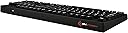
The CM Storm QuickFire XT is a full-size mechanical gaming keyboard featuring CHERRY MX Brown switches, designed for gamers seeking durability and comfort. With a lifespan of up to 50 million keystrokes, a slim profile for ergonomic typing, and N-Key rollover for unlimited key presses, this keyboard is built to enhance your gaming experience. It also includes multimedia shortcut keys and a detachable braided USB cable for convenience.
| Number of USB 2.0 Ports | 1 |
| Brand | Cooler Master |
| Item model number | SGK-4030-GKCM1-US |
| Hardware Platform | PC |
| Operating System | Microsoft Windows, Apple OS X |
| Item Weight | 2.4 pounds |
| Product Dimensions | 17.3 x 5.2 x 1.1 inches |
| Item Dimensions LxWxH | 17.3 x 5.2 x 1.1 inches |
| Color | XT - CherryMX Brown |
| Power Source | Corded Electric |
| Manufacturer | Cooler Master |
| ASIN | B00EQV0W02 |
| Is Discontinued By Manufacturer | No |
| Date First Available | August 23, 2013 |
I**E
This keyboard has some advantages over Das Keyboard for word processing
First a comment about mechanical keyboards in general, they work better for fast typing. You can prove their utility to yourself by merely opening notepad or other word processing program and typing at maximum speed the single word "were" - without the quotation marks. This particular word can be typed in a single coordinated drop of three fingers of the left hand immediately followed by a stroke of the long finger. You just can't consistently do it on a membrane keyboard because the keys don't fire exactly when they're supposed to and there is a process called 'key blanking' in the cheap keyboards where the board deliberately ignores keystrokes made too closely together. If you can't make your left hand work fast enough to jam an OEM membrane keyboard you can probably do so with the word "there", which is started by a nearly simultaneous attack of the two index fingers producing "th" every time on a mechanical keyboard and about half the time on a membrane keyboard. Or if you have a two handed password that you've typed so many times it is burned into your subconscious, this would be the word to use to see how much faster it will go into a mechanical keyboard. Regardless of how good the keyboard, there is still a speed limit if one is using a cloud based word processing program such as the dog of a program I am on for eight hours per day and which sometimes gets as far as 20 or 30 characters behind.This is a review for the CM Storm QuickFire Rapid - Limited Edition Tenkeyless Mechanical Gaming Keyboard with Cherry MX Green switches. For my typing needs I've been using a Das Keyboard S (old style) with Cherry MX blue keys for about a year and find it the best keyboard since the old IBM Selectric typewriter. But I find the CM Storm has some distinct advantages. It has a couple of minor disadvantages.Advantages:* Tenkeyless - for typing (fiction drafts - an endless chore) the ten key pad stuck on the side of a keyboard gets in the way of my coffee cup. This keyboard is shorter than the Das Keyboard and easier to manage on the desktop.* The Cherry MX green keys available on the CM Storm have heavier springs. This allows heavy pounding, heavier than its closest rival the Cherry MX blue keys which are the best available on Das Keyboard as of the time of this writing. According to Wikipedia the Cherry MX blue springs are 60cN and the Cherry MX green springs are 80cN. For anyone who was raised on manual typewriters or who likes to pound keys this heavy feel is the most natural feel. The keys cushion the finger tips better than lighter keys, which bottom out with more of a jolt. Keys feel a bit like the old IBM Selectrics.*This keyboard gives the best tactile and sound feedback for us old farts who grew up pounding a manual Remington or Underwood. Keyboards using Cherry MX blue are definitely good but are second best due to the less heavy springs.* Bigger brighter laser etched letters on the keys than the Das Keyboard. Once you get started typing you ignore them, but it helps a lot if you're on the phone typing one handed or have to stop and look at the ~ or the } key. You can get a Das Keyboard Model S Ultimate Mechanical Keyboard with blank key caps, but I don't consider this a good option, due to my recurring need to type while on the phone. There is also another brand, Keycool, which can be bought with LED backlit keys. Keycool 84 Keys Portable Mechanical Gaming Keyboard Cherry Mx Switches (BLUE/RED/GREEN/YELLOW/WHITE LED Backlight Available) (RED switches + Black body + Green LED backlight) That it a bit much for me, since I normally do my heavy typing in dim light and ignore the key caps. Also I've only found the Keycool keyboard with red, black or brown switches.*The power cord has a woven cover similar to high end guitar power cords, rather than the plastic standard cover. It is detachable and replaceable unlike the fixed Das Keyboard cord.Disadvantages:*Has no USB hub. That same woven-covered power cord I really like lacks the second USB plug that Das Keyboard uses to power two USB hub terminals on the right side of the keyboard.*The Das Keyboard power cord comes out a fixed point in the back center, but the CM Storm cord connects through a Motorola style small USB plug. Then you can route it out from under the keyboard on the left, right or back - but the re-route is only by friction and has no tabs to keep the cord from popping out.*The lack of the ten key pad. I used to do math programming using FORTRAN and found a ten key pad (freestanding, not on the keyboard) helpful. The Das Keyboard has a ten key pad, But you can also get one on another model of the CM Storm - so that really cancels out the disadvantage.What about gaming? I respect gamers and I really appreciate their dedication to supporting the manufacture of excellent keyboards. But this is not just a gamer's keyboard. It is also a serious typist's keyboard, probably the best on the market. There is a rhythm of sound and the cushioning effect of the heavy springs which makes typing for hours much easier than using a membrane keyboard or even a tactile non click version or a version with softer springs.
A**R
Quality, compact, affordable mech keyboard
I have to say that I am very happy with this product! After purchasing the full size version and taking it to work I found myself growing to hate having to come home to type on a lesser rubber dome switch keyboard. Between the two I actually prefer the Rapid for 90% of the tasks I do a home (Writing, gaming, surfing) as it allows my right hand and mouse to be closer to center making casual use and gaming much more comfortable.I have to say I was a bit worried as this would be my first Tenkeyless keyboard. At work I do a lot of number crunching and don't think I could get by w/o a tenkey. I wasn't sure how well I could get by without it at home, but ended up finding I much prefer it. I have taken to using the number keys across the top and find for anything other than long periods of data entry it was preferable.As far as quality goes, I have man handled both of these boards since receiving them (packing them around in backpacks, dropping them, general mistreatment) and they have stood up well. They feel solid and have enough weight to them that they don't move when bumped or while typing excitedly. The switches (MX cherry brown in my case) feel terrific! I tend type a bit heavy handed and they take it like champs. The tactile bump they make is great and always feels crisp and satisfying. I found that my writing tends to have gotten a bit more lengthy as I don't want to stop typing it feels so good!The bezel is coated with a "soft" finish that feels great and holds up well. I honestly expected to end up peeling off at some point but no. The supplied cord is nicely braided nylon, secures well into the board, and is able to be routed out to the left center or right which is nice depending on your desk set up.The one downside I have to mention has to do with the keycaps. My first CM storm Quickfire pro came with back lighting and key caps that had dual injected plastics to form the semi translucent letters. Since this keyboard is not backlit it has been fitted with surface adhered letters/symbols. This adds a slight texture, which in my opinion is unnoticeable, but it also means that eventually they will start to wear on the keys used most. this is not a big deal. It is something to note, but in all honesty no functionality is lost.Overall, I am very happy with this purchase and wouldn't hesitate to recommend this to a friend or coworker.Very good buy!
I**S
Excelente dispositivo. Altamente recomendado para cualquier uso
Tiene una estética muy simple, cómoda y sin adornos visuales (lo más que encontrarás será el sello de la marca en la parte trasera y un led rojo en la tecla F9 que luce mucho a la vista cuando está encendido). Quizá el único 'pero' visual que le pondría sería el apartado de la tipografía de las teclas (no es que lo vayas a ver mientras estás tecleando); nada que no puedas reemplazar con un set de teclas personalizadas.En cuestión de uso, el tecleo es suave, la respuesta es muy buena y no se nota cansancio a pesar de estar horas escribiendo en él (más bien, empiezas a notar ese cansancio que antes omitías al usar otros dispositivos en tu día a día). Sonido: puede ser un tanto molesto para alguien (si es que eliges switches azules), no necesariamente tú sino alguien cercano a tu área de trabajo o algún familiar. Es algo que se puede solucionar comprando anillos de goma que fungen como silenciadores o bien eligiendo desde un inicio cuál switch se adapta a ti, no comprar por comprar.Las teclas multimedia no tienen la mejor ubicación que se puede encontrar en el mercado pero hacen su trabajo de manera correcta, es cuestión de acostumbrarse o bien permitirse buscar la combinación de teclas necesarias al ver el teclado (pierdes algunos segundos pero nada que sea malo). Siguiendo con distribución de teclado, ésta se encuentra en inglés, algo que para un latino puede ser complicado al inicio por el uso de caracteres tales como ñ y acentos. El sistema operativo te permite elegir la distribución que deseas para el teclado, independientemente de cuál tengas físicamente en el dispositivo, para mí basta esa solución (quizá me llego a confundir al teclear si veo la distribución del teclado en lugar de simplemente teclear pero nada grave). Solución alterna: con un set de teclas personalizadas podrías darle al teclado la distribución física que necesitas (si así lo consideras).Tiene un tamaño apropiado, se siente cómodo al uso, no tienes problema por presionar teclas que hagan funciones raras queriendo simplemente poner un número, cubre con casi todas las necesidades, funciona para casi todas las personas.Nota: no es un teclado retroiluminado, quizá eso cambie tu decisión de último momento (por aquello de que en las noches necesitas tener las teclas con cierta iluminación o simplemente te gusta que se vea bonito y cambie de color).Incluye reemplazo para las teclas WASD y teclas Windows o Esc, según lo consideres prudente, y el anillo para hacer el cambio de teclas.A mí me convenció en gran medida este teclado, cubre con todas mis necesidades (lo utilizo para trabajo, chat, escritos y juegos) y las satisface de sobra. No es el mejor en el mercado pero me funciona, aparte de que el precio es bueno. No me arrepiento; buena decisión la que hice al comprar este teclado. Totalmente recomendado.
P**.
A good laptop keyboard and a silent one too (depends on the switch variant, Browns are just fine for workplaces)
Fast, silent, decent, an excellent choice as a laptop keyboard for workplaces. Works exactly as advertised (got the MX Brown one) and it runs nice and smooth. Highly recommended.
S**I
Great keyboard. Glad I went with the brown switches
Great keyboard. Glad I went with the brown switches, because unless one becomes good at touch typing, these switches tend to be noisy. Blue switches would have been too noisy. The kevlar reinforced cable is sturdy. I am an average user of the keyboard, both in terms of gaming and typing word/notepad/programming. I've never typed for more than 30-45 minutes at a stretch but Ive never felt fatigued by typing on this keyboard.
L**E
Best keyboard I have ever used
Pros- The layout is perfect, the keys are well placed and stable. Minimalist form while keeping all the keys. They have replaced the useless (to me) menu key by a function key for media controls.- The build quality is solid. There are no creaks or wobbles and the rubber feet keep the board where I want it.- The full sized USB connection is well placed near the front right end of the board. I tend to place my keyboard against the base of a monitor stand or laptop so this is perfect for me.- The rubberised texture of the bezel was unexpected. The matte black finish is appealing to sight and touch.ConsIf I had to pick out my least favourite things about this keyboard, they would be the font used on the keycaps and the Num/Caps/Scroll lock LEDs. The font on the keycaps is odd looking, large print, and sometimes confusing. I would prefer smaller, more standard printing in the top left corner of the key or no printing at all. The Num/Caps/Scroll LEDs are very close to the number pad so I must lean forward to check, same as Filco, very minor.Other thoughtsI have tried Rosewill RK-9000, Razer BlackWidow, Filco Majestouch 2, Unicomp, and Ducky One keyboards. Compared to a Rosewill, the CM Storm Quick Fire XT is quieter, deeper sounding. Perhaps the sound is dampened by the rubberised bezel. I disliked the Razer because of its cheap feeling/sounding plastic construction. The Filco was just as nice as CM's keyboard but the cable entrance was inconveniently located in the centre of the back and the premium price seems unnecessary. I did not have a chance to use the noisy Unicomp at work because my colleagues threatened to bludgeon me after typing my username and password. Ducky One taught me to avoid backlit keyboards because of the inferior Cherry stabilisers which are sloppy and annoying. Gladly the XT uses Costar. Once the cheap ABS keycaps are replaced by a set of PBT off Aliexpress, the XT is the pinnacle of typing pleasure.
G**R
Fantastic keyboard, but they keycaps are terrible.
I received this keyboard today, and I will give a review based on using it for a few hours. I've used many mechanical keyboards before, so I feel this is adequate time to give a first impression review. I will update this review if anything changes, or if I experience any quality issues.First off, the build of this keyboard is fantastic, with the exception of the keycaps (I'll talk about this later). The backplate is made of metal, and the keyboard's overall quality is top notch. The use of a Full-size USB Type-A connector on the keyboard is wonderful for longevity. Many keyboard makers use Mini USB Type-B, which has a much shorter lifespan.The MX Brown switches are a great buy for anyone wanting this keyboard for typing. If your primary use will be gaming, you would be better served with the MX Red switches. The Brown switches have a slight bump feel immediately at the engagement point of the key-switch. This benefits you in typing accuracy (you will make less errors, and also you will not accidentally backspace a keystroke that you thought you made, but really didn't make). These keyswitches have minimal noise, for a tactile keyswitch. If you don't care about noise, you should get the MX Blue switches, they have more tactile feedback, at the expense of an audible "click-clack" noise.The included braided USB cord is great (seems to be nylon braiding, not fabric. fabric frays alot). The keyboard also comes with a few extra keycaps, and a keycap puller. All great touches.The only negative thing I have observed is that the keycaps are trash. Nothing wrong with the feel, or the actual function of them, just their manufacturing quality. If you are a mechanical keyboard enthusiast, you will probably toss these keycaps instantly. If you are not an enthusiast, you will probably not care at all. To specify my complaint, they are really cheap plastic, and most of them still have a small nub of plastic hanging onto the injection-molding site, on the north-side of the keycap. And worst of all, the keycaps have their lettering painted on. They are not double-shot molded, not even laser-etched. They are painted. The lettering on these keycaps will probably last several months. One of the spare keycaps that came in a sealed bag already has part of the lettering worn off.Aside from the keycap quality, overall I am satisfied with this keyboard, and I don't think I would choose any other 104-key keyboard for the reason I bought this keyboard. I have owned several other mechanical keyboards. My usual go-to recommendation for friends that need a 104-key keyboard is the Rosewill RK-9000v2, but too many people report broken USB-ports on them. I will probably recommend this keyboard to anyone looking for something like this.Final thoughts: This keyboard is overall fantastic, if you don't get why I complain about the keycaps, you can probably safely ignore that complaint. If you understand that kind of complaint, you should be prepared to buy your own keycaps.Update: Another issue with the Keycaps I have observed is that some of the larger keys that have stabilizer bars, make a squeeky noise when you press the key. This keyboard is starting to seem like a bit of a chore.

Trustpilot
1 month ago
1 week ago