


Desertcart purchases this item on your behalf and handles shipping, customs, and support to Indonesia.
🎥 Turn your retro reels into digital gold—before they fade away!
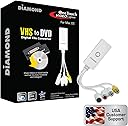
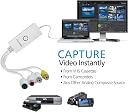
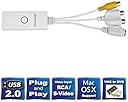
The Diamond Multimedia VC500MAC is a USB 2.0 video capture device designed for Mac users to convert VHS, Hi8, and V8 tapes into digital files. Supporting composite RCA and S-Video inputs, it offers a simple 3-step setup with one-touch recording. Compatible with Mac OS X 12 and Windows 10, it enables saving videos in MP4 or AVI formats, ready for editing in iMovie and sharing on social media. Backed by 30+ years of tech expertise and a one-year warranty, it’s the affordable, DIY solution to preserve your home video memories.




| ASIN | B007QCIBX8 |
| Best Sellers Rank | #689 in Internal TV Tuner & Video Capture Cards |
| Brand | Diamond Multimedia |
| Built-In Media | Vc500mac Usb 2.0 Video Capture Device For Mac |
| Compatible Devices | Camera |
| Connector Type | RCA |
| Customer Reviews | 3.9 out of 5 stars 636 Reviews |
| External Testing Certification | FCC/UL |
| Global Trade Identification Number | 00757448022049 |
| Item Dimensions | 3.7 x 0.4 x 1.1 inches |
| Item Weight | 7.2 ounces |
| Item dimensions L x W x H | 3.7 x 0.4 x 1.1 inches |
| Manufacturer | Diamond Multimedia |
| Mfr Part Number | VC500MAC |
| Model Number | VC500MAC |
| Number of Items | 1 |
| Package Quantity | 1 |
| Power Plug Type | No Plug |
| Specific Uses For Product | personal |
| UPC | 757448022049 001910338634 |
| Unit Count | 1 Count |
| Warranty Description | One year limited warranty |
| Warranty Type | Limited |
K**Y
Simple to use and worked great
Very simple to set up and use. I used my MacBook and downloaded the software from online since I didn’t have anywhere to insert the cd. Once I downloaded the software it was very simple to get started. You connect your camcorder using the yellow and red cables to the diamond media device. Push the record button on your computer and push play on your camcorder. You can record as much or as little as you want (snippets of videos or the entire tape).It’s kinda like a screen record. You’re using your laptop as a monitor to play back your video and screen recording it while it playing. The picture quality was what I expected it. It looked how it would look if I played it on the camcorder or connected it to a tv to watch. When you stop recording you save it. I used a flash drive to save all the videos so I wouldn’t use a ton of space on my computer. One problem I had only a few times was a glitch of when I was recording sometime it wouldn’t save so I would have to playback the entire thing and re-record it, that didn’t happen too many times. Overall it was super simple and I really loved that I was able to digitize our home videos without paying a ton. I’m glad I decided to get this device instead of a $200 one. It worked out great
C**H
Works seamlessly with Sony VHS player and Mac OS High Sierra on an old (2010) MacBook Pro
I used this to convert VHS home videos to my MacBook Pro. To qualify my 5-star ratings: - Given the degraded quality of the tapes, I still managed to rescue a lot of video footage. The device worked straight away once all the software was installed. - I have only used this with a Sony VHS player and a 2010 MacBook Pro running High Sierra - The picture quality was poor, but this was due to the degraded tapes; not the capture device. All in all, and despite not having high expectations to begin with, I’m really happy with the end result. I also Installed the software on OSX Mojave on my 2012 iMac, but I needed my iMac for work and didn’t want to tie it up with video recording, so I did not connect it to the VHS player. My understanding is that the device uses 32-bit software that will not run on later (post Mojave) 64-bit versions of OSX.
S**N
Works for recording old video games to a Mac
I use this for recording (NOT streaming) digital footage of video games to a Mac. There are very few options to do this on Mac (without partitioning your drive) outside of high-end systems from Elgato and Blackmagic that will run you several hundreds of dollars. Obviously you get what you pay for, so I wasn't expecting that this $40 piece work as well as the more expensive hardware, just that it work well enough. And the good news is, it does! I am playing N64, though it could conceivably work for any system with composite or S-video plugs, and recording on a 2015 Macbook Pro running 10.13. The CD that came with the device didn't work, but I downloaded the most recent software from Diamond's website according to the provided instructions, which worked fine. It took me a few tries to get the correct file format and audio input (it defaulted to the computer mic instead of the game audio) but I am now recording videos that I am able to upload to Twitch (make sure you use the appropriate compression and add the extension if it is missing–Twitch provides this info.) That's the good stuff. None of the bad stuff is a dealbreaker for me, just minor inconveniences. There is too much lag in real-time to stream or to use the computer footage instead of a TV, so it only works for recording (not streaming), and you will definitely need to split the signal to a TV or other screen. I have an S-video N64 cable from Childhood (this is optional) and an RCA (composite) 1female-2male splitter from BonaYuanDa, and everything works well enough. The USB end of this device is only about a foot long, so you may need a USB extension cord as well, depending on your setup. The software is very basic, so though it seems to record very well, there doesn't seem to be a way to combine multiple inputs, and there are no processing or editing features (but you have iMovie for that). It also doesn't seem to work with OBS studio either, which is the go-to program for many streamers. (It's possible though that it is compatible and I just haven't figured it out yet.) Bottom line: If you own a PC, you have many other options. If you want to live stream your gameplay, look elsewhere. But if you are interested in a cheap way to record video game footage to your Mac, I would definitely recommend this device.
E**O
Quicktime Software Only Mono; Empia Chipset Not fully Mac Compatible; Mac OS does not see the VC500
VC500 CONCLUSION: Quicktime is a poor video capture software platform. Do not buy any unit that only lists Quicktime as its software support. The Mac OS and iMovie do not "see" the VC500 as a device - connected to AV equipment or not. In addition It is likely I got a bad unit. After about 10 days of roughly 3-4 hours a-day messing around with multiple Macs' hardware and software setups I could not get the VC500 to work consistently. Diamond offered no return, replacement or upgrade discount. So I took advantage of Amazon's free return policy. Thank-you Amazon. SUPPORT CONCLUSION: The Diamond support person did his best. Beyond nice people, Diamond and Apple do not offer any company resources to help. The virus lock down no doubt complicated response quality. THE BORING DETAILS... DIAMOND SUPPORT... The person handling my online trouble reporting was sympathetic, and posted ideas and information almost immediately at every twist. Unfortunately, the Diamond company had little to offer - no list of alternative compatible software, no suggestions of alternative Diamond products that might work, no patches or user forums etc. The virus lock down no doubt made everything harder. APPLE SUPPORT... Because Catalina (OS 10.15) was forced on me with my purchase of a new (2018) iMac I paid for premium support. I spent an extended time with several Apple people (going up the chain of expertise) and, although nice, patient, positive, and articulate - they were no help at all. Like Diamond, they offered no recommended compatible hardware or software alternatives. Quicktime is mono - period. iMovie lists compatible digital cameras but no web cam capture hardware or software. Not a supported feature. It's a third party problem - not theirs. Apple support community forums were no help. There are many related complaints in the archives going back as far as 2006 - but no solutions. I received an acknowledgement of my posting but no further communication. THE PROBLEMS First off the VC500 does not show up as a recognized device by OS 10 (10.15, 10.12, or 10.11). Not in finder or in system preferences. AUDIO analog to digital capture problems... The VC500 (and other USB analog to digital streaming converters for Mac) recommends Mac's bundled Quicktime as its supported capture software. Quicktime ONLY SUPPORTS MONO AUDIO. (There are dated internet posts about using the third party app Soundflower and the Mac Audio Midi Setup utility to create an "aggregate device" to "trick" Quicktime into accepting stereo. But Soundflower's developer, Cycling74 stopped supporting Soundflower in 2014. Also Soundflower is one of many apps that the OS 10.15 "Catalina" upgrade broke.) Audio Hijack recognizes the VC500 as an audio input and does a fine job of capturing audio from my cassette recorder - so stereo audio capture is possible. Just not thru Quicktime. VIDEO analog to digital capture problems... When I play the VHS tape on my VCR thru the composite inputs on my TV everything is fine - excellent video quality and good quality sound. I can rewind and play tapes repeatedly without a glitch. When I run the same equipment thru the DC500 into ANY USB port of ANY of my Mac's: 2018 iMac OS 10.15; 2017 MacAir OS 10.12; 2009 iMac OS 10.11; I get all kinds of AV problems - especially the sound cutting out or the DC500 not showing up as a video device. CAPTURE SOFTWARE I tried included: AudioHijack 3: (audio only) the only software package that worked consistently and produced quality digital output. Quicktime 10.1: mono audio only, and audio and intermittent video capture problems. Out of 2 hours of attempts I got 5 3-minute clips of clean audio and video. iMovie 10.1: like OS 10 in general, iMovie does not "see" the VC500 as a capture device when connected to any AV equipment. VLC 3.0.8 “sees” the VC500. Under the “File” menu is an “Open Capture Device” which produces a pop up screen allowing you to select the VC500 as a video and audio device. Unfortunately when you attempt to run a session with the VC500 selected as an audio device you get an “…unable to open MRL ‘qtsound:// AppleUSBAudioEngine:Unknown Manufacturer: USB 28286” error. MOAVI: suffers from the same problem as iMovie. It does not recognize the VC500’s existence. I can’t find any way to select an audio or video input device. Debut 6.09: sees the VC500 as a “Webcam" audio and video capture device. Debut worked generally well for video capture. Unlike Quicktime it allows you to select your encoding (e.g. .mp4). And you can adjust the audio and video quality settings for each encoding selection under “Encoder options”. Under “Video options” you can select resolution input as high as 1920x1080. However, like Quicktime, the audio capture is inferior. Perhaps there are some audio encoder options I need to set differently. I'd prefer a simple stereo in - stereo out interface (see Audio Hijack). Except Elgato, questions posted to capture software vendors thru "contact us" links so far remain unacknowledged. The virus lock down again I suppose.
H**S
Not plug 'n play but easy to adjust software and results are great
To my surprise this was not plug in and use. The factory settings are off and have to first be adjusted. Instructions don't walk you through this so be prepared to focus on the sound feature and the video capture feather. Software has to be reminded to use its own software to capture the video. Once you figure these two features out, it is extremely easy to use. Saves as an mp4 file which apparently is no longer up to date and to upload to youtube or elsewhere, or for that matter to save to a thumb drive, takes as long or longer than it did to originally convert the video. Be Patient. You will be rewarded with digital videos of your old, out of date VHS-S tapes at a tiny cost.
S**.
Good device - poor support
As a video capture device, the Diamond Multimedia device works quite well. Setup is a snap and it readily captures a standard NTSC video stream from any device, such as an old VCR, camera or DVD player. It is perhaps one of the least expensive devices on the market for doing so. Unfortunately the software is difficult to use and the Diamond Multimedia website is very poorly designed and, for the most part, unhelpful. The software version supplied on the disk that ships with the device will not run under the current Mac OS, Mountain Lion. That in itself wouldn't be a problem if it were easy to locate and download the update. Finding the update on Diamond's site, however, is hands down the worst experience I have had in locating a software update in nearly thirty years of using computers. You have to look under video capture cards, to start with, find the device from a multi-column list and then figure out which file to download - it's not intuitive. For most any printer or scanner I have owned, in contrast, I need only go to the manufacturer's website, type in or select the model number and I will be taken directly to the appropriate download page. Even after downloading the software from Diamond, you still need to enter the serial number from the original software envelope. Why do that? The software is useless without the device itself, so why should they need to make sure you have a legitimately purchased copy? That's just plain silly. Once you have the software installed, you need to select the device before you can use it. Maybe some people have more than one of these hooked up at a time or have a Diamond video card, too, but if not, why not have the software automatically recognize the device? The next step, then, is to select from a dizzying array of audio and video codecs with which to encode and compress the video. Huh??? There may be a legitimate need for some users to use a particular format, but most Mac users want to just hit "record". At the least there should be a simple mode available to allow the user to select a recording mode based on the intended purpose - burn to DVD, send to an iPhone or iPad, upload to YouTube, etc. That is just the way iMovie works, for example. That in particular brings up an even more important point. If you plug just about any camcorder into a Mac, iMovie or the video capture utility will automatically recognize it. So why then isn't the Diamond Multimedia video capture device for Mac plug and play? How nice it would be to be able to record from the device directly into iMovie and to control the device from within iMovie. Most people who spend $40 on a device aren't looking for complex recording modes or unusual video codecs. Mac users in particular expect and demand simplicity. My advice is that if you don't even know what a video codec is, don't buy this device. Although I haven't used it, Roxio makes a very similar, but more expensive device. Having used Roxio Toast software for more than a decade, I have every reason to expect that Roxio's video capture device is just as functional, but much easier to use and well worth the extra money.
D**9
No complaints
No issues, did what I needed it to do
M**4
Finally - one that works with macOS Catalina!
I had some old home video on VHS and I wanted transfer it to digital. This is the third adapter I've tried. The first two simply didn't work with Mac. The best I could get was grainy video and no audio at all. This one works flawlessly with Mac's Quicktime app and does a good job of transferring the VHS tapes over with no loss of quality in the process. I did have some issue getting the Mac software to install but I got good response when I emailed the supplier for help and finally managed to get it working. I think this is more a problem with Mac than it is with the product, so I'm not knocking anything off on the review. Bottom Line: If you want to transfer old VHS to digital on a Mac (and you do), this is the way to go! Definitely recommend.
M**E
Works very well for digitizing analog to digital.
This software was very easy to install following instructions provided onto a mac. Following further with instructions to capture went very smoothly and resulted in completing the task without any issues. A definite purchase!
T**M
How does it work?
Not very intiitive. Instructions are not clear.
S**E
Preis/Leistung ok
Ich besitze das Produkt nun seid über 1 Jahr. Es funktioniert gut und ist benutzerfreundlich. Die Qualität scheint mir auch genügen. Ich kann es nicht mit anderen produkten vergleichen aber das preis/leistungs verhältnis ist für mich in Ordnung.
H**Y
Not working.
Still trying to figure out the problem with the support team but out of the box is not working.
M**Z
En Mac no sirve
Tiene unos drivers muy antiguos que hacen que la capturadora funcione mal y se corte continuamente. Es un producto obsoleto.
Trustpilot
5 days ago
2 weeks ago